All Video Downloader App
- 357.00
- 4.3
- Installs
- 10.00M
- Price
- Free

Screenshots
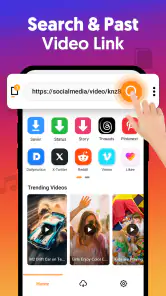
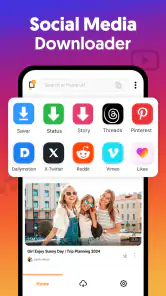
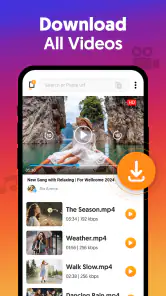
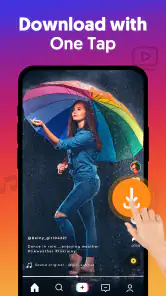
Analysis by Reviewed
I use a video downloader for a practical reason: I want a clip available when a connection is unreliable, or I need to keep a reference close at hand. All Video Downloader is built around that simple job rather than editing footage or publishing finished creative work. That distinction matters: it can fit into a creator’s preparation routine, but it is not a substitute for a video editor or a platform’s own offline tools.
A useful first step for a clip workflow
For collecting material, the appealing idea is a short path from finding a video to saving it for later. Colour Sky Studio makes this free app in the video players and editors category. It has an Everyone age rating, and its version 1.0.53 runs on Android 7.0 or later. The app has a 4.3 average from around 59,000 ratings and over 10 million installs, so it is widely used, though those figures alone cannot tell me whether a particular site or clip will work.
A realistic use is saving a permitted tutorial before a commute, then checking the steps offline while practising. I would treat the download as a personal reference, not as permission to repost someone else’s work. If your goal is to trim clips, add captions, or assemble a polished video, you will still need a separate editing app; downloading is only the intake stage of that process.
Let’s dive into the world of All Video Downloader, an app that promises to simplify your media downloading experience. Whether you're looking to save videos for offline viewing or just want to have your favorite clips at your fingertips, this app claims to do it all. But does it really live up to the hype? Let's find out!
Getting Started with Ease
First off, downloading and installing All Video Downloader was a breeze. The app is available on both Android and iOS, making it accessible to a wide audience. Once installed, the interface welcomes you with a clean and intuitive layout. I was pleasantly surprised by how user-friendly it is. There are no unnecessary bells and whistles, just straightforward options to get your downloads going.
Features That Stand Out
One of the standout features of this app is its ability to download from a variety of platforms. Whether it’s YouTube, Facebook, Instagram, or a less mainstream site, the app handled everything I threw at it. The download speed was impressive, and the quality of videos retained their original crispness. Another feature worth mentioning is the built-in browser, which makes it easier to navigate and find the videos you want to download without switching between apps.
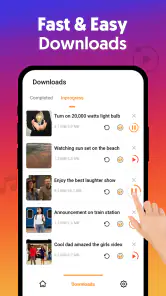
I also appreciated the batch download option. You can line up multiple videos to download simultaneously, which is a huge time saver. For someone like me who loves binge-watching series on long flights, this feature is a game-changer.
More From Our News Desk

Weather by Xiaomi Review: Clear at a Glance, Less Clear Up Close

X Under Pressure: Can It Recover When Posting Goes Wrong?

Clash of Clans Is Won Between the Battles

Android Auto Makes the Case for Quieter Car Software

MobiOffice: Transforming Mobile Productivity with Seamless Integration

EA SPORTS FC™ Mobile Soccer: Redefining Mobile Sports Gaming
Turning a saved clip into a dependable reference
For a busy day, I would first test one video before queuing a collection. If the source allows saving, I can confirm that the clip appears as expected and that its quality is useful on a phone screen; only then would I add other items. This small check avoids waiting for a long batch only to discover that a particular page does not cooperate. I would also leave room on the device before saving several large videos, since offline files compete with photos, apps, and other media for storage.
Batching is most valuable when the clips are genuinely needed together, such as a set of lessons for a trip. It is less useful for a one-off clip, where opening a browser-based downloader may be quicker. And for ongoing access to films or shows, a streaming service’s official offline feature is usually the better fit: it keeps viewing within the service and avoids treating a downloader as a general-purpose media library.
Planning a collection without creating clutter
I find it helpful to decide what the saved videos are for before collecting them. A few short demonstrations for a project can sit together as a temporary reference set; a large, loosely chosen queue is more likely to become a storage problem than a useful library. Saving only the clips I expect to revisit makes it easier to find the important one later and reduces the chance that I keep files simply because they were convenient to download.
There is also a practical difference between gathering inspiration and gathering source material. For inspiration, a clip may only need to be watchable and easy to locate. If I plan to build a creative project around someone else’s footage, I need to establish that I have permission to use it and retain any relevant source details separately. A local copy makes viewing more convenient; it does not make the video mine or automatically make it suitable for a new project.
Usability and Performance
The app’s performance is generally smooth, with minimal lag even when handling large files. However, I did notice that it can be a bit resource-heavy, so it might slow down older devices. On my newer smartphone, everything ran like a charm.
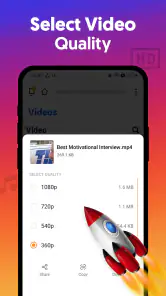
As for usability, navigating through the app is a piece of cake. The developers clearly focused on making the user experience as seamless as possible. The settings menu is straightforward, allowing you to easily change download locations and video quality preferences.
Choosing quality with the destination in mind
When I save a clip, I would match the quality choice to how I will use it rather than automatically aiming for the largest file. A quick reference viewed on a phone does not always need the same detail as footage that I intend to examine closely. This is a useful trade-off when collecting several items: a lighter set can be easier to keep on a device, while a higher-quality copy may be worthwhile when fine visual detail is central to the task.
Before leaving home, I would check that the downloads I actually need are present and playable, rather than assuming that a queued item finished successfully. That quick review is especially useful when the destination has poor reception. It also gives me a chance to remove an accidental duplicate or an item I no longer need, instead of carrying an oversized collection just in case.
Where the workflow can snag
The main trade-off is that downloads depend on the source and on whether saving is permitted; a familiar social site should not be treated as a guarantee that every video will be available. If a page fails, I would check that the video itself plays in the app’s browser and try a single item again rather than repeatedly queueing the same link. Creators should also respect copyright and the terms of the platform hosting a clip, especially before sharing or reusing it.
Compared with a standard web browser, this app is more focused on keeping saved videos together and offers a dedicated download workflow. Compared with a full editor, it does far less: there is no reason to choose it when the task is cutting footage, arranging a timeline, or preparing a final export. Its role is narrower and clearest when I want offline access to allowed videos without turning the process into a larger project.
When a different tool is the better choice
The most sensible alternative depends on what I need to do after finding a video. For a show I plan to watch through a subscription service, that service’s own offline viewing option is generally a cleaner choice. For a clip that needs trimming, captions, colour adjustments, or a sequence of shots, a mobile editor is the right tool. A browser can be enough when I only need to open one page or save something occasionally, while this app makes more sense when collecting several permitted clips is a recurring task.
I would also skip a downloader if my main requirement is guaranteed access to a specific social video for a deadline. Source pages can change, and a download route that works once may not be the dependable workflow I need every time. In that situation I would ask the creator for an approved file or use the platform’s authorized options, rather than building a project plan around a third-party download working at the last minute.
Cost, fit, and creator handoff
The app is free to install, with in-app purchases ranging from $0.99 to $23.99 per item. I would start with the free experience and decide whether any paid option is worth it only after confirming the basic workflow suits my sources and device. For a creator, the handoff is simply the saved file: I would then move to a separate editor if I needed to make changes, and keep the original source and permissions in mind before publishing anything derived from it.
For handoff, I would keep the saved clip distinct from the project’s finished assets. A downloaded video is a reference or source file, not an edited deliverable, and it is easy to blur those roles when everything lives on one phone. Keeping a small, deliberate working set makes the next step clearer: review the reference, create original work in the appropriate editor, and check that every element intended for publication is cleared for that use.
All in all, All Video Downloader delivers on its promises. It’s a versatile app with a range of features that cater to both tech-savvy users and those who just want to download a few videos here and there. While it’s not without its minor flaws, such as being a bit demanding on older devices, the positives far outweigh the negatives.
Who will get the most from it
I would recommend it to someone who regularly saves permitted clips for offline viewing, especially when several videos need to be gathered before travel or a day with patchy reception. Someone who only downloads occasionally may find the phone’s browser or an official in-app offline option simpler. And if you need dependable support for a particular site, try that exact source before relying on it for a trip or work session; the broad idea of downloading does not make every page equally straightforward.
It is a particularly practical fit for students revisiting demonstrations, hobbyists collecting instructions, or creators who want a compact set of visual references while planning a shoot. The common thread is that the saved video is for personal viewing and preparation, not a shortcut around editing or usage rights. People who expect an all-in-one production app, automatic organization for a large archive, or guaranteed downloads from every social page should look elsewhere.
If you’re in the market for a reliable video downloader, give this app a try. It's easy to use, efficient, and most importantly, it gets the job done without any fuss.
So, what are you waiting for? Go ahead, download it, and enjoy the world of offline videos right at your fingertips!
All Video Downloader App Frequently Asked Questions
Does All Video Downloader App work on iPhone and Android devices?
The app is listed for Android, with Android 7.0 or later required. The store summary describes it as a simple and fast downloader for social media videos, but that does not make it an iOS app. Before downloading, check that your device is compatible with the version offered in its app store.
Will downloaded videos be available to watch offline?
Saving videos to a device is the app’s central purpose, so downloads can be useful when you want to watch content later without streaming. The exact saving location and playback options may depend on your device and the app’s current behavior. Also remember that downloading should respect the creator’s rights and the platform’s rules.
Does the app offer video editing tools?
All Video Downloader App is a video-related utility focused on downloading, rather than a full editing suite. Its category is Video Players & Editors, but that category alone does not mean it includes trimming, effects, or other editing features. If editing is your main goal, look for an app specifically designed for video editing.
Who develops All Video Downloader App, and is it intended for beginners?
All Video Downloader App is developed by Colour Sky Studio and is described as a simple video downloader for social media. Its straightforward purpose makes it easy to understand what the app is for before installing it: saving videos for later viewing. It sits in the Video Players & Editors category, so it is aimed at people looking for a video-related utility rather than a full editing suite.
What is the All Video Downloader App?
The All Video Downloader App is a versatile application designed to help users download videos from various platforms directly onto their devices. It supports multiple formats and resolutions, making it easier for users to store and watch their favorite content offline. The app is compatible with both Android and iOS devices, offering a seamless user experience.
Pros
- Supports multiple video formats.
- Fast download speeds.
- User-friendly interface.
- Allows batch downloading.
- Built-in video player.
Cons
- Contains ads.
- Limited free features.
- May not support all websites.
- Occasional crashes.
- Requires internet connection.
- Category
- Video Players & Editors
- Version
- 1.0.53











