All File Manager Clean
- 46.00
- 3.3
- Installs
- 100.00K
- Price
- Free

Screenshots
Analysis by Reviewed
When a phone starts feeling crowded, the problem is rarely just one enormous file. It is usually a mixture of forgotten downloads, duplicate-looking photos, old documents, and folders that no longer make sense. All File Manager Clean, developed by Amo Cidades, approaches that everyday problem as a free file management and phone cleaning tool. I found its most useful idea to be the combination of browsing files and looking for opportunities to remove clutter, rather than treating those jobs as completely separate.
That focus makes it more practical than a cleaner that only presents a large “clean now” button. At the same time, it is not a magic solution for every storage problem. You still need to decide what is safe to delete, especially when personal photos, work documents, or downloads from messaging apps are involved. My experience with the app is best summed up this way: it can make a messy phone easier to understand, but it rewards a careful user more than an impatient one.
Why the file-management focus matters
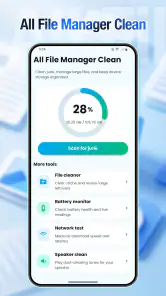
The central capability here is straightforward: the app gives you a place to inspect files while also helping you identify material that may no longer be useful. That sounds simple, but it changes the cleaning process. Instead of guessing which folder is responsible for a full phone, I can approach the task by looking at actual files and their context.
This is particularly helpful when storage pressure comes from several small sources. A phone may contain a few old installation packages, screenshots that are no longer needed, exported videos, and documents saved by different apps. None of those categories alone feels urgent, yet together they can make everyday tasks more frustrating. A file manager with cleaning in mind helps turn that vague feeling of “my phone is full” into a more manageable review.
I also like that the app belongs in the tools category rather than presenting itself as entertainment or a social service. Its purpose is functional: open it when you want to understand your storage, find something, or remove unnecessary material. The store summary describes it as a smart file-management and phone-cleaning tool, while the short description reduces that idea to “All File Manager Clean.” In practice, the value comes from the relationship between those two roles.
The current release is version 3.0.0, and the app runs on Android 9 or later. That makes it relevant for people using older supported phones as well as newer devices. It is rated for Everyone, which fits the basic nature of the task, although an age rating should not be confused with permission to delete carelessly. File cleanup is still a decision-making activity, even when the interface is accessible.
Its public reception is mixed rather than universally enthusiastic: the app has a 3.3 average from around one hundred eighty ratings and has accumulated around forty-six written reviews. I read that as a reason to keep expectations realistic. The app has attracted over one hundred thousand installs, so it is clearly useful to a meaningful group of Android users, but the rating suggests that ease and results may depend on the phone, the amount of clutter, and the user’s preferred level of control.
What I would inspect before deleting anything
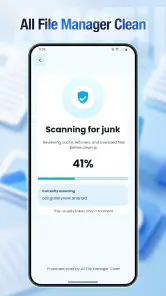
My first rule is to use the cleaning view as an inventory, not as an automatic verdict. A suggested file may be technically old but still important. A document downloaded months ago might be needed for a tax return; a video saved from a chat might be the only copy; an image that looks repetitive may belong to a project. I prefer opening or identifying a file first, then deciding.
A useful workflow is to begin with items that have an obvious purpose for removal. Temporary downloads, failed exports, and files created during a one-time task are safer starting points than personal media. Once those are gone, I move toward larger or less familiar items. This order reduces the chance of making a dramatic mistake simply because a cleaning session feels urgent.
Another practical tip is to clean in short sessions. I would not hand the app a phone full of years of accumulated files and make every decision at once. A ten-minute review of one problem area is easier to verify than a rushed sweep of everything. It also helps you notice whether the phone feels better afterward, instead of confusing a large list of suggestions with actual improvement.
How it works in everyday use
In normal use, I see the app as a bridge between two habits. The first is ordinary file browsing: locating a document, checking a folder, or finding something that another app saved. The second is periodic maintenance: identifying material that has lost its value and removing it. Keeping both activities together is useful because browsing provides context that a purely automated cleaner often lacks.
When I open a file-management tool, I want confidence that I am looking at the real contents of the phone rather than an abstract promise of optimization. The cleaning side is most valuable when it leads me back to recognizable files. If I can understand what an item is, where it came from, and whether I can recreate or replace it, I can make a better choice than I could from a vague category label.
This is also where the app’s limitations become noticeable. A cleaner cannot know the personal meaning of a file. It may help surface candidates, but it cannot decide whether an old scan, a family image, or a downloaded audio file matters to you. Anyone expecting a completely hands-off experience may find the review process slower than expected. I consider that caution a necessary trade-off rather than a defect on its own.
The safest approach is to treat the app as a sorting assistant. I would use it to narrow attention, then confirm important items manually. If a file is unfamiliar, I leave it alone until I know what created it. If a folder belongs to an app I still use, I avoid removing its contents casually. This matters because freeing space is not useful if it breaks an ongoing workflow or removes something that cannot be recovered easily.
A realistic phone-cleaning routine
Imagine a phone used for work, school, and messaging. During a busy month, the owner downloads several PDFs, saves images from conversations, records short videos, and exports a document more than once while correcting it. The phone begins warning about low storage, but there is no single obvious culprit. Opening All File Manager Clean in that situation can provide a more structured starting point than swiping through unrelated gallery items.
I would begin by checking the files created during that busy month, especially items with clear duplicates or obvious temporary purpose. I would keep the final version of an important document, verify that it opens, and only then remove earlier exports. For media, I would review the actual image or video rather than trusting a filename. Finally, I would revisit the phone’s storage after cleaning so I could judge whether the effort solved the problem or merely removed a handful of small items.
The non-obvious benefit of this routine is not just reclaimed space. It creates a repeatable habit. Once I know which kinds of files accumulate on my phone, future cleanups become faster and less stressful. For example, someone who frequently receives documents through messaging apps may benefit from checking that area regularly, while someone who records video may need a different starting point. The app is more useful when it supports that personal pattern instead of pretending every phone has the same clutter.
I would also avoid cleaning immediately before an important trip, presentation, or deadline. That is when an apparently harmless file can turn out to be needed. A calm review gives me time to recognize unfamiliar material and, where appropriate, preserve a copy elsewhere before deleting it. This is a small habit, but it is one of the strongest ways to reduce the risk associated with any cleaning tool.
Where it compares well with usual alternatives
Many Android phones already include a basic file browser, and some manufacturers add storage recommendations to their system settings. Those built-in options can be the better choice if you only need to open a document or remove one known folder. They are already part of the phone’s environment and may feel more familiar.
All File Manager Clean makes more sense when you want the file view and the cleanup task to sit together. A basic browser can show you files without helping you think about accumulated clutter, while a narrow cleaner may focus on freeing space without giving enough context. This app occupies the middle ground. Its advantage is convenience and a cleaning-oriented perspective; its disadvantage is that it still cannot replace the judgment needed for personal data.
I would choose a manufacturer’s own storage utility when I wanted the most integrated experience with that particular phone. I would choose a conventional file browser when my main job was organizing folders manually. I would choose this app when my problem was less “where did I save this?” and more “why has my phone become so difficult to manage?” That distinction is important because no single tool is best for every storage task.
There is also a trade-off between simplicity and control. An automated cleaner can feel faster because it hides decisions, but that speed can make it harder to understand what changed. A file-oriented tool asks more from me, yet it gives me a better chance to preserve something important. For photos, documents, and files tied to other apps, I prefer that extra visibility.
Trade-offs I noticed before recommending it
The biggest limitation is that “clean” does not always mean “safe to remove.” The app can help identify clutter, but the final decision remains personal. Users who want a single tap to solve storage problems may be disappointed by the need to inspect items. In my view, that is the correct friction for a tool handling private files, but it should still be understood before installation.
A second limitation is that a cleaner may not solve the underlying cause of full storage. If the real issue is a large collection of videos, an offline media library, or an app that continually creates new files, deleting a few obvious leftovers will only provide temporary relief. The better response may be changing download habits, moving valuable media, or reviewing the app responsible for the growth.
I would also be careful with files that appear duplicated. Similar names do not always indicate identical content. One copy may have a different resolution, language, edit, or document revision. Before removing one, I compare the files in a way that makes sense for the type of content. This is one area where a human check is more reliable than a broad assumption based on filenames alone.
Privacy is another reason to use a measured workflow. A file manager necessarily deals with the contents of the phone, so I would only install it from a trusted source and pay attention to what the interface asks me to review. I would not use any cleaner as an excuse to ignore the value of backups. If a file is irreplaceable, protecting it separately is more important than the convenience of deleting it from the device.
There is a small psychological trap in storage tools as well: a long list of candidates can look like a successful cleanup even when the phone gains little usable space. I judge the result by practical change. Did a required download complete afterward? Did the low-storage warning disappear? Is it easier to find current documents? Those outcomes matter more than the size of the list shown by the app.
Who gains the most from this approach
I think the strongest audience is Android users who regularly download files, receive media, or move documents between apps and then forget where those items went. Students, freelancers, families sharing images, and people using a phone as a light work device can all benefit from having a clearer maintenance routine. The app’s free price also lowers the barrier for someone who wants to try a dedicated tool before committing to a more elaborate storage system.
It is especially suitable for someone who wants guidance without surrendering control. You can use the cleaning perspective to find likely clutter, then make the final call yourself. That balance is more valuable than aggressive automation when the phone contains personal records or work material.
I would recommend skipping it if your phone is already well organized and you rarely handle local files. In that case, the built-in browser or system storage screen may be enough. I would also look elsewhere if you need advanced synchronization, detailed backup management, or a specialized media library. Those are different jobs, and a cleaning-focused file tool should not be judged as though it were a full cloud-storage platform.
For older supported devices, the Android 9 minimum is worth keeping in mind before trying it. For everyone else, the question is less about whether the app can display files and more about whether you want a regular review process. Its usefulness grows when you return to it with a specific goal: clear old downloads, check a crowded folder, or prepare space before saving a large project.
My recommendation after using it
All File Manager Clean is a sensible option for people who want one practical place to inspect files and work through phone clutter. I appreciate that its main value is not presented as a mysterious performance boost. The real effect is organizational: it helps me see what has accumulated and decide what still deserves space.
I would recommend using it slowly, starting with files whose purpose is obvious and leaving uncertain items untouched. That method makes the app safer and more useful than an impulsive full-device sweep. It also reveals its honest limits: the tool can organize the search, but it cannot understand your memories, deadlines, or personal filing habits.
With a free price, Everyone content rating, support for Android 9 and later, and a developer identified as Amo Cidades, it is easy to consider for a basic cleanup routine. Its 3.3 average shows that it is not a universal favorite, so I would approach it as a practical helper rather than a guaranteed cure for storage trouble. The best reason to use it is controlled cleanup with file context, not blind automation.
In the end, I see it as a good fit for a messy, active phone rather than a perfectly organized one. If your daily use creates a trail of downloads, exports, and forgotten media, the app can turn that trail into a reviewable task. If your needs are limited to advanced backups or deep manual organization, another tool will probably serve you better. For ordinary Android maintenance, though, it gives careful users a useful middle ground between a basic file browser and an overly aggressive cleaner.
Pros
- Simple interface makes browsing files quick and straightforward.
- Supports common file operations such as copying
- moving
- renaming
- and deleting.
- Cleaning tools can help identify unnecessary files and free up storage.
- Useful search function helps locate files without browsing every folder.
- Lightweight design should run smoothly on most Android devices.
Cons
- Some advanced file-management features may require extra permissions.
- Automatic cleaning suggestions should be reviewed to avoid deleting needed files.
- Interface may feel basic for users wanting extensive customization.
- Performance can vary when scanning devices with very large storage.
- Ad-supported elements may interrupt the experience for some users.

- Category
- Tools
- Version
- 3.0.0











