

All Document - File Viewer
- 42.00
- 3.2
- Installs
- 100.00K
- Price
- Free
Screenshots
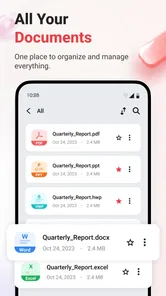
Analysis by Reviewed
I approached All Document - File Viewer as a practical tools app rather than a full document-production suite. Its purpose is straightforward: help you open, read, and manage documents from a mobile device. That sounds simple, but it matters when a file arrives at an inconvenient moment and I need to inspect it without opening a laptop or searching for a separate app for every format.
Created by AinulMardhiyah, the app is available free of charge and is aimed at everyone. It runs on devices using Android 8.0 or later, and the current release is version 1.0. Those details make it easy to understand where it fits: this is an accessible document utility for everyday Android use, not a specialist business platform that expects a recent flagship phone or a paid subscription before I can test it.
What All Document - File Viewer is really useful for
In my experience, the strongest reason to keep a document viewer installed is convenience. A file viewer does not need to replace an office suite to be useful. Sometimes I only need to open an attachment, check a page, confirm a name or date, or read a document while travelling. For those moments, a focused viewer can be less distracting than a large productivity package filled with editing and collaboration tools I do not need.
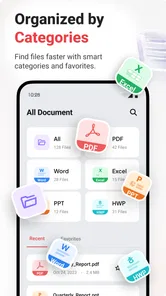
The app’s store summary presents it as a way to open, read, and manage documents with ease at any time. I would interpret that promise sensibly. The practical value is in having a single place to approach documents instead of jumping between unrelated apps. If I receive a file through messaging, download one from a browser, or locate an older document in phone storage, a central viewer can shorten the path between finding the file and understanding what is inside.
That makes it particularly relevant for people who use their phone as a secondary computer. Students checking class material, workers reviewing shared paperwork, and families opening forms or travel documents can all benefit from the basic idea. It is also useful for anyone whose phone has accumulated files in several folders and who wants a document-oriented starting point rather than relying entirely on a general file manager.
A simple workflow is more important than it sounds
My recommended workflow is to treat the app as a reading checkpoint. First, locate the document through the app rather than opening random files from different sources. Then read it on the phone, decide whether it needs action, and only move to a separate editor or sharing tool if necessary. This keeps a quick reading task from turning into an unnecessarily complicated editing session.
There is a less obvious benefit to this approach. A viewer can help separate reading documents from editing documents. That distinction saves time and reduces the chance of changing a file accidentally when all I wanted was to inspect it. If the task is simply “find out what this says,” a dedicated viewing step is often the right first move.
More From Our News Desk

 Gmail
GmailGmail in a Busy Inbox: Who Benefits Most?
From first account to crowded workday, Gmail earns its place through dependable search and flexible sorting—but its best fit depends on how much inbox maintenance you can tolerate.

 Prime Video
Switching to Prime Video: What Changes in Your Viewing Routine
Prime Video can make a compelling second home for streaming, but switching means learning a different catalog, rental layer, and route from browsing to playback.

 Universal TV Remote Control
Universal TV Remote Control Works Best as a Reliable Backup
A phone remote earns its place through quick setup and reliable habits. Here is how to get more from Universal TV Remote Control—and where its limits show.

 Weather - By Xiaomi
Weather by Xiaomi Review: Clear at a Glance, Less Clear Up Close
Xiaomi’s weather app makes everyday forecasts quick to scan, but its calm surface can leave useful details and recovery paths harder to find than they should be.

 X
XX Under Pressure: Can It Recover When Posting Goes Wrong?
A resilience-focused review of X, examining setup, mistaken posts, interruptions, weak connections, and the gaps that matter when recovery needs to be dependable.

 Clash of Clans
Clash of Clans Is Won Between the Battles
Its raids are quick; its community is a long-term project of coordination, teaching, rivalry, and shared responsibility—with all the friction that entails.
Latest News



For a realistic everyday example, imagine receiving a document while standing in a queue. I might open it, check whether it contains the correct information, close it, and return to it later when I have time to respond. I do not need a full office workflow for that situation. I need quick access, readable pages, and a way to keep track of the file. That is the kind of small interruption where this app can earn its place.
Where the free price changes the decision
The clearest value point is that the app costs nothing to download and use. That makes the decision less risky than choosing a paid document utility: I can try it with my own files and see whether its handling suits my phone before spending money. For occasional readers, free access may be enough to justify keeping it available for those moments when a document appears unexpectedly.
Free access also changes how I judge the app. I do not expect it to replace a complete office suite, a cloud collaboration service, or a professional PDF workflow simply because it opens documents. The fair question is whether it provides a convenient reading and management layer without forcing me into a purchase. On that narrower question, it has a sensible starting position.
There is no reason to treat the free price as proof that every advanced function is included. A careful user should still test the exact documents they rely on, especially if their work involves unusual formats, complex layouts, embedded media, forms, or files that need editing rather than viewing. The price removes the financial barrier, but it does not remove the need to check compatibility.
I also would not choose it solely because it is free if I already depend on a familiar office or cloud-storage ecosystem. Switching tools has a cost in attention. If another app already opens the documents I use, remembers my folders, and connects naturally to my work, All Document - File Viewer needs to be more convenient in daily use to become a meaningful improvement.
Managing files on a phone without creating clutter
The word “manage” deserves some practical attention. On a phone, document management is often less about sophisticated administration and more about finding the right file quickly. I would begin by using consistent folder names and avoiding multiple downloaded copies with vague filenames. A viewer can make access easier, but it cannot compensate for completely disorganized storage.
One useful habit is to review a file before sharing it. Mobile file names can be misleading, particularly when several attachments have similar titles. Opening the document first lets me verify that I am sending the intended version. This is a small but important workflow improvement, and it is one of the places where a viewer is more valuable than a simple list of filenames.
Another practical tip is to use the app for triage rather than permanent archiving. I would inspect newly downloaded documents, decide which ones matter, and then place important files in a clearly named folder or another storage system. That keeps the viewer from becoming a dumping ground for every attachment. The app can be the front door to my documents without being the entire filing system.
This approach is especially helpful on smaller screens. Searching through a crowded download folder can be frustrating when filenames are truncated. A document-focused interface may make the content itself the deciding factor, allowing me to open files and confirm what they are instead of guessing from their names.
What I would test before relying on it
Because the app is at version 1.0, I would take a cautious approach before making it central to important work. I would open several ordinary documents, including files with multiple pages and different layouts, and check whether text remains comfortable to read. I would also try documents from different sources, since a file saved from a browser may behave differently from one received through a messaging app.
I would pay attention to how easily I can return to a file after closing it. A good document workflow is not only about opening a file once; it is also about finding it again. If I frequently need the same document, I would see whether the app’s organization fits my habits or whether I still need the phone’s file manager to locate everything.
For people who work with sensitive paperwork, I would also make a deliberate privacy decision before importing documents. The app is suitable for opening files, but the responsibility for storing and sharing those files still belongs to the user. I would avoid casually sending private documents through unfamiliar channels and would keep important material in a controlled folder rather than treating every downloaded copy as disposable.
These checks are not reasons to dismiss the app. They are sensible steps for any new document tool, and they matter more when the app is still early in its version history. A free utility is easiest to evaluate when I use it on low-risk files first, then expand its role only after it behaves reliably with the documents I actually need.
How it compares with the usual alternatives
The closest alternative is often the document support already built into another app. Many phones can open common files through a file manager, browser, email client, or office application. That route is convenient when I only open documents occasionally. All Document - File Viewer becomes more appealing when I want a dedicated place to handle document access instead of depending on whichever app happens to receive the file.
Office suites are a different category. They are better choices when I need to create, edit, format, comment on, or collaborate on documents. If my work involves changing text or building spreadsheets, a viewer alone will not be enough. I would use this app as a reading companion, not as a replacement for a full productivity suite.
Cloud-storage apps also offer a strong alternative for users whose documents live online. They can make synchronization and access across devices easier, while a local viewer may be more direct for files already stored on the phone. The better choice depends on where my files live. If I need shared folders and cross-device continuity, the cloud service is likely more important. If I mainly need to inspect downloaded documents, a lightweight viewer can be the simpler tool.
Dedicated PDF readers may still be preferable for people whose entire workflow revolves around PDFs, annotations, form filling, or detailed navigation. The appeal of All Document - File Viewer is broader access in one tools app, but breadth is not automatically depth. I would choose the dedicated reader when advanced PDF work is the main task, and this app when my needs are more varied and mostly focused on opening and reading.
Who is most likely to get real value
I think the app is a good fit for occasional document readers who want one accessible utility on an Android phone. It is also worth considering for students who receive files from several sources, casual workers who need to check paperwork away from a desk, and households that regularly open forms, instructions, confirmations, or other documents.
The free price is especially helpful for these users because their document needs may be irregular. Paying for a large office package can feel excessive when the main task is reading. Here, the lower commitment makes experimentation reasonable, provided the app handles the file types and layouts that matter to each person.
It may also suit users who prefer a separate document space instead of opening files through whichever application appears first. That separation can make a phone feel less chaotic. Rather than treating every document as an attachment to another task, I can approach documents directly and decide what to do with them.
I would be more hesitant to recommend it as the only document tool for professionals, teams, or anyone who needs dependable editing and collaboration. Those users should prioritize the suite or service that supports their complete workflow. A viewer can be helpful, but it should not be mistaken for a document office.
What the current reception suggests
The app has passed one hundred thousand installs, which shows that it has reached a meaningful audience, but its average rating is 3.1. I read that combination as a reason to stay measured. There is enough interest to make testing worthwhile, yet the rating does not suggest universal satisfaction.
It has also received 231 ratings and 42 written reviews. I would not use those figures as a verdict on every phone or file. Document apps can behave differently depending on storage organization, Android version, document source, and the formats a person opens most often. Still, the middling average reinforces my advice to test the app personally before trusting it with essential work.
The age rating is Everyone, which matches the app’s general-purpose tools positioning. That does not mean every document opened through it is suitable for every reader; the content depends on the files the user chooses. It simply makes the app itself approachable for a broad audience.
My buy-or-skip recommendation
There is no purchase decision to make here because access is free. My recommendation is therefore a try-first, keep-if-useful verdict. I would install it if I wanted a straightforward document viewer, especially for occasional reading and basic file organization. I would start with ordinary, non-sensitive documents and compare the experience with the apps already on my phone.
I would skip it if I expected advanced editing, team collaboration, cloud synchronization, or specialist PDF functions. In those cases, the usual office or storage alternatives are more likely to match the job. I would also skip it if my current file manager already opens everything I need and I have no frustration with that workflow; adding another app would not automatically improve anything.
For everyone else, the free cost makes the experiment reasonable. AinulMardhiyah has positioned this as a tools app for opening, reading, and managing documents, and that focused role can be useful when a phone needs a dedicated document doorway. The main trade-off is expectation: it should be judged as a convenient viewer first, not as a complete replacement for every document application.
My final view is cautiously positive. All Document - File Viewer makes the most sense for people who want a no-cost way to approach documents from one place and who are willing to confirm that it fits their particular files. It is not the right answer for every workflow, but for quick checks, everyday reading, and basic document handling, it is a practical app to test without financial risk.
All Document - File Viewer Frequently Asked Questions
Is All Document - File Viewer free, and what should I expect after installing it?
All Document - File Viewer is a free Tools app for opening, reading, and managing documents from a mobile device. It has an Everyone content rating, so it is intended for a broad audience. The app is currently at version 1.0, and its straightforward purpose makes it worth considering if you want a document viewer rather than a full office suite.
What is All Document - File Viewer used for?
All Document - File Viewer is designed to help you open and read several common document formats from one place. Depending on the version and device, it may support files such as PDF, Word documents, Excel spreadsheets, PowerPoint presentations, text files, and other office-related formats. It is particularly useful when you need a simple mobile viewer without switching between multiple applications.
Which file formats does All Document - File Viewer support?
The application is intended to handle a broad selection of document types, including popular PDF, DOC, DOCX, XLS, XLSX, PPT, PPTX, and TXT files. However, exact compatibility can vary according to the app version, operating system, and the way a file was created. Before relying on it for work or study, test your most important documents to confirm that they open and display correctly.
Can I edit documents with All Document - File Viewer?
All Document - File Viewer is primarily focused on viewing and reading files rather than providing a complete editing suite. You may be able to browse pages, zoom, search for text, and share documents, but advanced editing, spreadsheet formulas, presentation design, or document collaboration may not be available. If you need to modify files, you will probably require a dedicated office or PDF editing application.
Does All Document - File Viewer work offline?
In many cases, documents already saved on your phone can be opened without an internet connection, which makes the app convenient for travel, commuting, or areas with limited connectivity. Internet access may still be required for downloading files, opening cloud-based content, displaying advertisements, or using certain online features. Offline behavior can differ by format and app version, so check permissions and test it before going offline.
Pros
- Opens many common document formats without needing separate apps.
- Simple interface makes finding and viewing files straightforward.
- Useful zoom and page navigation controls for reading on mobile screens.
- Quickly previews files stored locally on the device.
- Convenient for checking documents while traveling or away from a computer.
Cons
- Some advanced editing features may be unavailable or limited.
- Large documents can take longer to load on older devices.
- Free use may include advertisements or upgrade prompts.
- Formatting may not appear perfectly in every supported file type.
- Access to cloud or device files may require broad storage permissions.









