

AlBe Sound Lab - Audio Editor
- 39.00
- 4.6
- Installs
- 500.00K
- Price
- Free
Screenshots
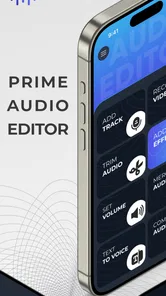
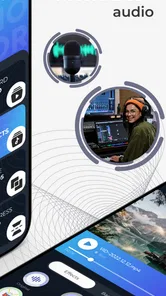
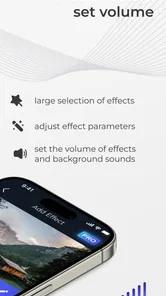
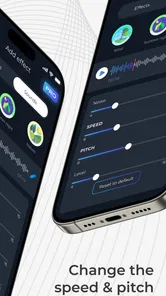
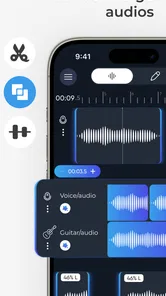
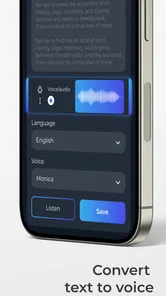
Analysis by Reviewed
I approached AlBe Sound Lab - Audio Editor as a practical music and audio tool rather than a full recording studio. Its main appeal is the short path from an idea to something you can export and share, which makes it interesting for quick creative work on a phone. After spending time with the app, my impression is that it is aimed at people who want to shape a musical idea without opening a complicated desktop-style workstation.
The app comes from Sound Box LLC and is free to install, although it includes optional in-app purchases ranging from $0.49 to $99.99 per item. That combination matters: you can explore the basic experience without paying first, but anyone planning to use it regularly should pay attention to which parts of the workflow may require an extra purchase. It is rated for Teen users, runs on Android 7.0 or later, and its current version is 1.2.
What I like most is the app’s clear sense of purpose. It is not trying to be every possible audio product at once. The useful question is whether it can help you turn a rough musical thought into a shareable result quickly, especially when you are away from a computer. For casual creators, short-form video makers, students, and people who enjoy experimenting with sound, that focus can be more valuable than a long list of advanced controls.
How AlBe Sound Lab feels in everyday use
I find AlBe Sound Lab most useful when I treat a phone session as a place to capture and shape one clear idea, not as a commitment to finish an entire production. In the next section, I’ll focus on how a first-time user can choose a small starting task and judge whether the app’s workflow suits them. A good early test is a short draft you can compare with the original before deciding whether to build on it.
Quick ideas benefit most from the short workflow
The strongest use case is the moment when an idea appears unexpectedly. I can imagine opening the app after humming a melody, sketching a rhythm, or thinking of a sound for a video, then working toward an export before the idea disappears. That kind of speed is different from professional speed. It is not about proving that every operation is instant; it is about reducing the number of decisions between inspiration and a usable audio file.
For that reason, I would use it for a rough demo, a short backing idea, a social clip, or a sound experiment. I would not begin a complex album project here unless I had already confirmed that the particular editing tools, file handling, and purchase requirements matched my workflow. A lightweight mobile editor can be excellent for capturing momentum, but it should not automatically replace a dedicated digital audio workstation.
The interface is easiest to judge by the amount of concentration it demands. On a phone, every extra screen, menu, and confirmation interrupts the creative process. AlBe Sound Lab makes the most sense when you want a direct path and are comfortable making broad creative decisions rather than performing extremely precise engineering. That trade-off is important: convenience can make the first draft faster, while a larger workstation remains better for detailed correction.
More From Our News Desk

 Gmail
GmailGmail in a Busy Inbox: Who Benefits Most?
From first account to crowded workday, Gmail earns its place through dependable search and flexible sorting—but its best fit depends on how much inbox maintenance you can tolerate.

 Prime Video
Switching to Prime Video: What Changes in Your Viewing Routine
Prime Video can make a compelling second home for streaming, but switching means learning a different catalog, rental layer, and route from browsing to playback.

 Universal TV Remote Control
Universal TV Remote Control Works Best as a Reliable Backup
A phone remote earns its place through quick setup and reliable habits. Here is how to get more from Universal TV Remote Control—and where its limits show.

 Weather - By Xiaomi
Weather by Xiaomi Review: Clear at a Glance, Less Clear Up Close
Xiaomi’s weather app makes everyday forecasts quick to scan, but its calm surface can leave useful details and recovery paths harder to find than they should be.

 X
XX Under Pressure: Can It Recover When Posting Goes Wrong?
A resilience-focused review of X, examining setup, mistaken posts, interruptions, weak connections, and the gaps that matter when recovery needs to be dependable.

 Clash of Clans
Clash of Clans Is Won Between the Battles
Its raids are quick; its community is a long-term project of coordination, teaching, rivalry, and shared responsibility—with all the friction that entails.
Latest News



A realistic scenario: making a short audio post
Imagine recording a quick vocal idea at home, adding a musical layer, and preparing a short clip to send to a friend. I would first treat the recording as a draft, listen for the strongest section, make only the edits that improve clarity or timing, and export a version before attempting more ambitious changes. Saving an early version is a useful habit because mobile editing is most frustrating when an experiment becomes the only copy of an idea.
This workflow also highlights a less obvious strength: the app can function as a bridge between thinking and sharing. You do not need to wait until a song feels finished before creating something useful. A rough chorus, a short loop, or a sound reference can be enough to communicate an idea. In that situation, the app’s value comes from lowering the emotional and technical cost of making a first version.
Where the usual alternatives still have an advantage
Compared with a traditional desktop audio editor, this app is naturally better suited to quick sessions and less suited to deep arrangement work. A computer gives you more room for precise editing, clearer visibility across a long timeline, and a more comfortable setup for repeated corrections. If your priority is mixing many layers, automating detailed changes, or maintaining a large library of project versions, I would choose a more established workstation.
Compared with a basic voice recorder, however, AlBe Sound Lab is more appealing for someone who wants to do something with the recording afterward. A recorder is ideal when the only goal is capture. This app becomes more relevant when capture is just the first step toward shaping and sharing. The right choice depends on whether you want a memo or a small piece of finished audio.
It also occupies a different space from streaming music apps. Those services are for listening, while this is for making or editing. Someone looking only for playlists or passive listening should skip it. Someone who wants to turn a personal idea into an audio result is the audience I see benefiting most.
What affects perceived speed
The app’s workflow should feel quickest when the project is short and the number of creative decisions is limited. A brief idea is easier to inspect, revise, and export than a long arrangement with many moving parts. I would therefore judge its speed by the complete task rather than by individual taps: can I get from a thought to a shareable draft without losing focus?
That perspective also prevents a common mistake. A fast editor is not necessarily one that performs every operation instantly. It is one that keeps the process understandable. If I know where to make an edit, how to preview it, and how to export the result, I spend less time searching through controls. For mobile music work, that clarity often matters more than having the largest possible feature set.
Because the app is relatively focused and its current version is 1.2, I would keep expectations practical. I would test a small project first, learn the export path, and only then move to a longer session. That is not a criticism of the app; it is sensible behavior with any mobile creative tool, especially when the project matters.
Heavy-use moments require a different mindset
The pressure on a mobile audio app usually increases when a session becomes longer, more layered, or more experimental. Even if the initial idea feels easy, repeated previews, multiple edits, and large working files can make the phone more important than the app itself. A newer device with plenty of free storage is generally a safer environment for creative work than an older phone that is already close to its limits.
I would also avoid treating a phone as an unlimited studio. A long session can be affected by battery level, background activity, available storage, and the physical heat generated by sustained use. These are ordinary mobile constraints, but they matter more when audio work is involved because interruptions are especially annoying after a good performance or an unexpected creative breakthrough.
My practical approach would be to close unrelated apps, keep enough storage available for exported copies, and work in stages. After reaching a satisfactory draft, I would export it rather than continuing to pile changes onto one session. This gives me a recovery point and makes it easier to compare an earlier version with a newer experiment.
Three habits that make the app more useful
First, I would separate capture from polishing. The first pass should preserve the idea, not chase perfection. Once the core material exists, I would make a second pass focused on the changes that are actually audible. This prevents a phone-based session from becoming a slow search for tiny improvements that do not help the final result.
Second, I would use short test exports before committing to a large project. A small export confirms that the edited result sounds the way I expect and that the sharing step fits my needs. This is particularly useful for people creating audio for messaging or social platforms, where the final destination can influence how much detail is worth preserving.
Third, I would keep original recordings separate from edited versions. This is an easy safeguard that many mobile creators skip. If an experiment makes the sound worse, the original gives me a clean starting point. It also lets me try a more aggressive edit without worrying that I have permanently damaged the source.
Stability and recovery matter more than flashy controls
For me, reliability in an audio editor means more than avoiding obvious crashes. It means the app helps me understand what has been saved, what is still being edited, and what will happen when I export. A creative tool becomes stressful when the user is uncertain whether a change is permanent or whether a share action created the file they intended.
I would therefore build a recovery routine into every serious session. I would save or export at natural milestones, especially after recording a strong take or completing a major edit. I would also listen to the exported file rather than assuming that the preview tells the whole story. That extra check takes little time and catches problems before the file reaches someone else.
The app’s free entry point is helpful for this evaluation. You can start by testing the complete path that matters to you instead of paying before knowing whether the editing style feels comfortable. At the same time, optional purchases mean I would not assume that every useful capability is included automatically. Before building a regular workflow around it, I would identify which tools are available without payment and which purchases are genuinely worthwhile for my needs.
That pricing structure can be either reasonable or frustrating depending on your expectations. For occasional experiments, free access may be enough. For frequent creators, a one-time or repeated purchase can change the value calculation quickly. I would judge the cost against how often I export, how much control I need, and whether another editor already provides the same essentials in a way I prefer.
Device limits are part of the decision
Android 7.0 support gives the app a broad potential device range, which is useful for people who do not own a recent phone. Still, operating-system compatibility does not guarantee that every device will feel equally comfortable for audio work. Screen size, available memory, storage space, speakers, headphones, and overall age can all influence the experience.
I would be especially cautious with older hardware if I planned to work on longer pieces or keep several versions. A small screen can make precise adjustments tiring, while limited storage can turn exporting into a housekeeping task. Headphones are also preferable when judging detail; phone speakers are convenient for a quick check but are not the best reference for deciding whether a mix feels balanced.
There is another practical constraint: mobile audio is often created in imperfect surroundings. A noisy room, inconsistent microphone position, or casual recording distance can affect the result before editing even begins. The app can help shape material, but it cannot fully repair every problem introduced during capture. I would spend a little effort on the recording environment first, because a cleaner source usually saves more time than a complicated edit later.
Who will get the most from it
I would recommend this app to beginners who want to move beyond recording voice notes, creators who need quick audio for short content, and musicians who like sketching away from a computer. It also suits people who value sharing a draft quickly over building a technically elaborate project. The combination of a free starting point and a focused music-and-audio purpose makes it approachable for experimentation.
It may also appeal to a student working on a small audio assignment, provided the required export and editing tools are available within the chosen setup. The app’s Teen content rating makes it a reasonable product to consider for that age group, although any shared-device or purchase decisions should still be handled carefully by the account owner.
I would tell professional producers to approach it as a companion rather than a replacement. It can be useful for capturing a sketch, preparing a quick reference, or making a simple shareable draft. I would not choose it as my only environment for a demanding production unless I had already tested the complete workflow on my own device.
Who should probably skip it
If your main goal is listening to music, this is the wrong category of app. If you need a highly detailed multitrack environment, a large desktop monitor and a more specialized workstation will probably serve you better. If you dislike optional purchases and want every tool included from the beginning, the free-to-start model may also feel limiting.
I would also hesitate to recommend it to someone who rarely saves intermediate versions. Mobile creativity rewards a little discipline. If you tend to make one long session, overwrite the original, and export only at the end, recovery becomes harder no matter how well the app performs. The product is more enjoyable when used in small, deliberate stages.
How the app fits into a broader creative setup
I see AlBe Sound Lab as a front-end idea tool. It can help transform a thought into something audible and portable. From there, you can decide whether the result is already good enough to share or whether it deserves a more powerful editor. That makes it useful even when it is not the final destination for the project.
A sensible setup could involve keeping the original capture, creating a lightly edited draft, and then exporting a version for feedback. If the idea grows, the exported file can guide later work elsewhere. This approach avoids forcing a mobile app to handle every stage of production while still giving it a meaningful role in the process.
The developer, Sound Box LLC, has positioned the product around a simple audio creation path, and the store summary emphasizes exporting and sharing from an idea in only a few taps. I would treat that as the app’s central promise, not as a reason to expect the depth of a full studio. Its success depends on whether those few taps feel natural for the kind of audio you want to make.
My performance verdict
With an average rating of 4.6 from around 3.6 thousand ratings and more than 500 thousand installs, the app has attracted a meaningful audience for a relatively new mobile audio product. It was released on March 22, 2025, so I would still evaluate it with a little patience and pay attention to how well its current version fits my personal workflow rather than assuming that popularity makes it universally suitable.
My overall verdict is positive for short, focused sessions. Its real advantage is reducing the distance between a musical idea and a file you can share. That is valuable when inspiration is brief, when you are working from a phone, or when a rough demo is more useful than waiting for perfect studio conditions.
I would use it with three expectations: keep projects manageable, export at sensible milestones, and check the purchase requirements before relying on a specific tool. Those habits address the main friction points of mobile audio work without taking away its convenience. The app feels most convincing when it is used deliberately, not when it is asked to imitate a complete desktop studio.
For a free Music & Audio app, it is worth trying if you want a straightforward way to explore sound and share early results. I would recommend it to a friend who needs a quick creative starting point, while steering a serious mixing project toward a more spacious and specialized alternative. In short, AlBe Sound Lab - Audio Editor is best understood as a practical sketchpad with an export path: approachable, useful for fast ideas, and strongest when its mobile limits are treated as part of the design rather than ignored.
AlBe Sound Lab - Audio Editor Frequently Asked Questions
Is AlBe Sound Lab available for my device, and what should I check before installing?
AlBe Sound Lab - Audio Editor is a mobile app in the Music & Audio category, and its minimum operating-system requirement is version 7.0. Before installing, check that your device meets the requirement and that you are downloading the version intended for your platform. The app is developed by Sound Box LLC, and its short store description is “AlBe Sound Lab.”
What is AlBe Sound Lab - Audio Editor used for?
AlBe Sound Lab - Audio Editor is designed for recording, editing, and processing audio directly on a mobile device. It can be useful for trimming voice recordings, adjusting clips, creating ringtones, preparing podcast material, or experimenting with sound effects. Its appeal is that it brings several basic audio-editing tools into one app, although users looking for advanced studio production may find it less comprehensive than desktop software.
Which audio editing features does AlBe Sound Lab provide?
The app generally focuses on practical editing tasks such as cutting and joining audio, changing volume, applying effects, and working with recorded or imported sound files. Depending on the version and device, available tools may also include format conversion, playback controls, and other sound-processing options. Before downloading, check the current store listing because features can change through updates or vary between Android and iOS releases.
Can beginners use AlBe Sound Lab without audio-editing experience?
Yes, the app is aimed primarily at users who want to perform straightforward audio edits without learning a complicated professional workstation. The interface may still require a short adjustment period, especially when locating effects, selecting precise sections, or saving an edited file. Beginners should start with a copy of the original recording and test each effect gradually to avoid accidentally overwriting their source audio.
Does AlBe Sound Lab support all audio file formats?
Audio format compatibility can depend on the operating system, app version, and the specific file being imported. Common formats may work as expected, but unusual codecs, protected files, or recordings created by specialized equipment might not open correctly. If format support is important to you, review the latest technical details in the official app listing and test a sample file before relying on it for an important project.
Pros
- Supports precise waveform editing for trimming and cutting audio.
- Offers useful sound effects for creative edits and custom audio projects.
- Audio files can be previewed quickly before exporting changes.
- Suitable for creating ringtones
- clips
- and short voice recordings.
- Simple layout makes basic editing approachable for new users.
Cons
- Advanced mixing and mastering tools may feel limited for professionals.
- Export options may not cover every preferred audio format or quality level.
- Large projects can be less convenient to manage on a phone screen.
- Some features may require in-app purchases or display advertising.
- Processing time can increase noticeably with long
- high-quality recordings.











