

AirMusic - stream your music!
- 183.00
- 4.4
- Installs
- 10.00K
- Price
- $6.99

Screenshots
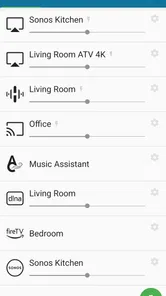
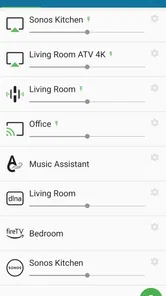
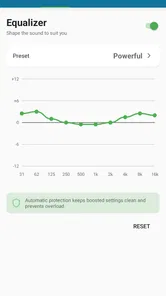
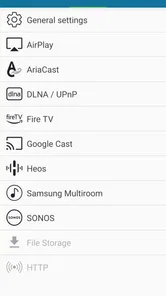
Analysis by Reviewed
I look at AirMusic as a tool for a particular listening problem: your audio is already playing in one app, but you want to hear it through a receiver elsewhere. That is a different job from browsing a music catalogue or building a streaming subscription. AirMusic is a paid Music & Audio app from AirMusic - stream all audio to everywhere, priced at $5.99, and its appeal depends on whether routing sound between devices is something you actually do.
Making the controls easier to follow
For this kind of utility, clear navigation matters more than decorative menus. I would approach the setup as a short sequence: open the audio source, choose the receiver, then check that playback is coming through the intended device. Keeping those steps separate can make the process easier to understand, especially if you are not used to casting. Before settling in, I’d test with a short clip so it is easy to tell whether the phone or the receiver is producing the sound.
There is a useful distinction between sending audio from almost any app and using a service’s own casting controls. A service-native option may be simpler when it is available, because playback and receiver selection sit in the same app. AirMusic is more relevant when you want a route that does not depend on the audio source offering its own casting button. That flexibility is the main reason to consider it, rather than a promise that every setup will feel effortless.
Different ways of using the app
Touch interaction and audio feedback are personal matters, so I would not assume one interface suits everyone. If small controls are difficult to select, take a moment to learn the few actions you use most instead of navigating around while music is playing. If visual attention is limited, prepare the receiver and source before starting playback; that reduces the need to keep checking the phone. These are practical habits, not claims about special accessibility tools.
It can also help to think about the room and the listener. Sending a podcast or spoken audio to a room speaker can be more comfortable than holding a phone close, while music can fill a shared space without requiring a separate playlist inside a receiver’s own app. For a quiet listening session, though, a direct connection to headphones may be the simpler choice. Routing audio is useful when it solves a real placement or sharing problem, not just because it is possible.
Where the trade-offs show
AirMusic does not replace the music service or the controls built into a receiver. You still need an audio source and a compatible destination, and the experience depends on both behaving as expected. If a receiver is not appearing or playback is not reaching it, checking that the phone and receiver are ready to communicate is a sensible first step; restarting playback can also help isolate whether the issue is the source or the route.
The app is rated 4.3 on average from around 1.3 thousand ratings, with over 10 thousand installs, and it is rated for Everyone. Those figures suggest a product with an established audience, but they do not tell me whether it will fit a particular home setup. I would check the receiver I plan to use before paying, and compare that with any built-in casting options I already have. If native casting does the job reliably, the extra app may not be worth the cost.
More From Our News Desk

 Gmail
GmailGmail in a Busy Inbox: Who Benefits Most?
From first account to crowded workday, Gmail earns its place through dependable search and flexible sorting—but its best fit depends on how much inbox maintenance you can tolerate.

 Prime Video
Switching to Prime Video: What Changes in Your Viewing Routine
Prime Video can make a compelling second home for streaming, but switching means learning a different catalog, rental layer, and route from browsing to playback.

 Universal TV Remote Control
Universal TV Remote Control Works Best as a Reliable Backup
A phone remote earns its place through quick setup and reliable habits. Here is how to get more from Universal TV Remote Control—and where its limits show.

 Weather - By Xiaomi
Weather by Xiaomi Review: Clear at a Glance, Less Clear Up Close
Xiaomi’s weather app makes everyday forecasts quick to scan, but its calm surface can leave useful details and recovery paths harder to find than they should be.

 X
XX Under Pressure: Can It Recover When Posting Goes Wrong?
A resilience-focused review of X, examining setup, mistaken posts, interruptions, weak connections, and the gaps that matter when recovery needs to be dependable.

 Clash of Clans
Clash of Clans Is Won Between the Battles
Its raids are quick; its community is a long-term project of coordination, teaching, rivalry, and shared responsibility—with all the friction that entails.
Latest News



A practical choice for the right listening setup
Hey there, music lovers! If you’re anything like me, you’ve probably dreamed of a world where you can stream your music from any device without any hassle. Well, guess what? The folks behind AirMusic have made that dream a reality. Let’s dive into what makes this app a must-have for music enthusiasts.
Seamless Streaming Experience
First things first, AirMusic is all about making your life easier. Imagine being able to stream your favorite tunes from your Android device to practically any other gadget you own. Whether it’s your smart TV, gaming console, or wireless speakers, this app has got you covered. I’ve tried it out with my setup at home, and let me tell you, it’s as smooth as butter. No more fiddling with cables or dealing with connectivity issues. Just pure, uninterrupted music.
Compatibility Galore
One of the standout features of AirMusic is its compatibility. It works with a plethora of devices and platforms like Chromecast, DLNA, Roku, and even the good old Apple TV. It’s like having a universal remote for your music. Setting it up is a breeze, even for someone who isn’t exactly tech-savvy. A few taps here and there, and you’re ready to go. I was genuinely impressed with how intuitive the whole process was.
Sound Quality That Hits the Right Note
Now, let’s talk about the most crucial aspect – the sound quality. After all, what’s the point of streaming if it doesn’t sound right, eh? With AirMusic, you get crisp and clear audio that retains all the nuances of your favorite tracks. I cranked up the volume on my speakers, and the result was nothing short of phenomenal. It’s like having a concert in your living room!
Additionally, the app supports multiple audio formats, which means you won’t have to worry about converting files. Just select your track and hit play. It’s that simple.
Customization and Control
One of the things I love about AirMusic is the level of control it offers. You can tweak the audio settings to your heart’s content, ensuring everything sounds just the way you like it. Whether you’re a bass head or someone who prefers balanced sound, this app has options for everyone. It’s like having a mini mixer right at your fingertips.
Moreover, the app’s interface is sleek and user-friendly. Navigating through your music library is a delight, and creating playlists is a walk in the park. I found myself spending more time enjoying my music rather than fiddling with settings, which is precisely what you want from a music streaming app.
In conclusion, AirMusic is a game-changer for anyone looking to streamline their music streaming experience. It’s packed with features that cater to both casual listeners and audiophiles alike. If you’re on the hunt for an app that brings convenience, quality, and control, look no further. Give it a whirl, and you might just find it’s the best thing to happen to your music collection.
A routine that shows its value
A realistic use is a weekend tidy-up: I start a podcast on my phone while moving between rooms, then send it to a receiver in the kitchen so I can keep listening without carrying the handset. For that workflow, the key benefit is keeping the chosen source rather than hunting for the same episode in another app. I would make the connection before getting busy, then leave the phone somewhere safe and accessible in case I need to pause or change the source.
AirMusic is most useful for people who switch between audio apps and want a common way to send sound to equipment they already own. It is less compelling if nearly all listening happens through one service whose built-in casting works well, or if you mainly use headphones. Compared with a receiver’s own app, it can avoid moving between libraries; compared with a basic Bluetooth connection, it is aimed at sending audio to compatible network receivers rather than simply pairing nearby devices. Those approaches solve related but not identical problems.
Small checks that prevent frustration
Before relying on it for guests or a longer listening session, I would test the exact combination of phone, source app, and receiver I intend to use. Try a spoken clip first: pauses and changes are easier to notice there than in a continuous music track. Then check whether the receiver remains selected when you switch audio sources. This simple rehearsal helps distinguish a routing issue from a problem in the original app.
Sound also depends on the whole path, not just the sending app. If music seems quieter or different after routing, compare the phone’s output level with the receiver’s own volume control before changing equalizer settings. That avoids compensating for a volume mismatch with a permanent sound adjustment. I would be cautious about expecting every audio app or receiver combination to behave identically; the more varied your setup, the more valuable a quick test becomes.
Who should choose another route
If you need a setup that can be operated without looking at a screen, confirm that your phone and receiver controls work comfortably for you before making AirMusic part of a daily routine. Likewise, if a shared household needs several people to control playback, a receiver’s native app may be easier because its controls are already organized around that device. AirMusic’s strongest case is narrower: you want audio from different apps to reach a receiver, and you are willing to make that connection part of your listening routine.
My overall view is positive but conditional. The app addresses a practical gap between phone playback and receiver-based listening, and that can be genuinely helpful for podcasts, casual music, or moving around at home. It is not a substitute for a streaming subscription, a universal guarantee of compatibility, or an accessibility solution in itself. I would choose it when source flexibility matters more than the simplicity of a single service’s native controls—and skip it when the equipment I already use handles the job just as well.
Planning around different listening situations
The best way to judge whether this tool belongs in your routine is to start with a specific moment when phone audio is inconvenient. Perhaps you are cooking and want a spoken program audible across the room, or you are tidying and keep setting the phone down in different places. In those situations, casting can reduce the need to carry the device, but it does not remove every interaction: you may still need the phone nearby to change playback or correct the route. I would treat it as a way to make listening more flexible, not as a fully hands-free system.
For someone with limited dexterity, repeated small taps can be more demanding than a receiver’s physical controls or a familiar service interface. A practical test is to connect once while seated and notice which actions are necessary afterward. If routine listening requires frequent menu changes, that friction may outweigh the benefit. If you only select a destination at the start and then listen, it may fit more comfortably. The difference is not a matter of a feature checklist; it comes down to how often your own listening habits require interaction.
Preparing a dependable handoff
I would also think about transitions between rooms and activities. Before starting a call, leaving home, or handing the phone to someone else, check whether audio is still routed where you expect. This is a small but useful habit because audio sent to a room receiver may be heard by other people, while audio intended for private listening belongs on headphones. A quick pause before changing context helps avoid an awkward surprise and makes the destination choice feel deliberate.
When testing a new receiver, use a short piece of audio and make one change at a time. First establish that the sound reaches the intended device; then try switching from a podcast to music. If something goes wrong, return to the original source before changing several settings at once. This makes troubleshooting less confusing and can show whether the issue follows one audio app or happens across sources. For a household member who is less comfortable with technology, I would demonstrate the exact routine they need rather than asking them to learn every possible control.
What the purchase decision comes down to
Because the app costs $5.99, I would decide based on repeated use, not on the appeal of a one-off experiment. If you regularly want sound from different apps on network equipment, paying once for a more consistent route may make sense. If you are curious but cannot name a receiver and a regular listening situation you want to improve, try the options already built into your phone, audio service, or speaker first. A familiar native route can be quicker and involve fewer steps, while Bluetooth may be a better fit for a nearby personal speaker or headphones.
The developer is AirMusic - stream all audio to everywhere, and the app was released on September 17, 2020. I see it as a focused utility rather than a replacement for the listening apps people already know. That distinction also helps set expectations: you are paying for a way to move audio, not for a catalogue, a new subscription library, or a shared household music account. The purchase is easiest to justify when the routing problem keeps coming back.
An inclusive verdict grounded in the real task
AirMusic can make phone audio more accessible in a practical, everyday sense when a listener benefits from sound coming from a room receiver instead of a handset held close. It may also help someone keep one chosen audio source while moving around. But ease of access depends on the whole setup: the phone, the controls a person can comfortably use, the receiver, and the source app. I would not assume the app alone solves visual, motor, or sensory barriers, and I would test the route with the person who will use it rather than relying on somebody else’s idea of what is easy.
My recommendation is therefore specific. Choose it if you already have a receiver you want to use and you often listen through apps that do not offer a convenient native route. Skip it if one service’s casting button already works for you, if headphones cover nearly all your listening, or if you need a control method you have not yet tested with your equipment. That careful distinction is what makes the app potentially useful: it addresses a real gap for some listeners, while leaving others better served by simpler tools they already have.
AirMusic - stream your music! Frequently Asked Questions
What devices and audio sources can I use with AirMusic?
AirMusic is designed to send audio from almost any app to compatible receivers, so it can be useful beyond playing files from a personal music collection. The receiving device still needs to support a streaming method that AirMusic can connect to. Check that your phone, receiver, and home network work together before downloading, especially if you plan to use a television, speaker, or console.
What is AirMusic and how does it work?
AirMusic is a versatile application that allows users to stream their personal music collection to various devices, such as smart TVs, gaming consoles, and wireless speakers. It works by connecting your Android or iOS device to your home network, and then transmitting music files wirelessly. This enables you to enjoy your favorite tunes on any compatible device without needing physical connections.
Is AirMusic compatible with all music formats?
AirMusic supports a wide range of music formats, including MP3, AAC, FLAC, and WAV. However, it's always a good idea to check the specific device you plan to stream to, as some devices may have limitations on certain formats. For the best experience, ensure your music files are in commonly supported formats.
Do I need an internet connection to use AirMusic?
While AirMusic primarily relies on your local Wi-Fi network to stream music, an internet connection is not strictly necessary for local streaming. However, if you plan to stream music from online services or require updates and additional features, a stable internet connection will be beneficial.
Can I use AirMusic with multiple devices simultaneously?
Yes, AirMusic supports multi-device streaming, allowing you to play music on different devices at the same time. This is particularly useful for creating a synchronized audio experience across multiple rooms or when hosting parties. Just ensure all devices are connected to the same network for seamless streaming.
Pros
- Supports multiple streaming platforms.
- Easy to set up and use interface.
- High-quality audio streaming.
- Seamlessly connects to smart devices.
- Works offline with downloaded music.
Cons
- Limited free version features.
- Occasional connectivity issues.
- No customization for playlists.
- Requires stable internet connection.
- Subscription needed for premium features.











