Airbuds Widget
- 1.59K
- 4.5
- Installs
- 1.00M
- Price
- Free

Screenshots
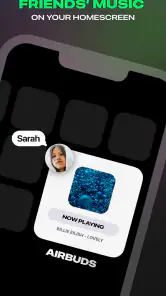







Analysis by Reviewed
Before installing Airbuds Widget, it helps to know what kind of music app it is: its focus is social listening activity, not checking the battery or changing settings on your earbuds. I’d think of it as a way to make listening more visible to friends, rather than as a control panel for headphones. That distinction matters, because it sets up a much more useful first try: get the widget in place, connect the listening experience you want to share, then see whether that small social window adds something to your everyday routine.
What you can expect from a listening widget
Airbuds Widget is a free music and audio app from Capp Inc. The name can make it sound like a tool for tracking earbud hardware, but its emphasis is on friends’ listening activity. If you enjoy seeing what people close to you are playing, or like giving friends a casual glimpse of your own listening, that social angle is the reason to try it. It is not a replacement for a music player: I would keep using the service where I already listen and treat this app as a companion layer around that habit.
The appeal is less about discovering a complicated feature set and more about making music a conversation starter. A friend’s current listening can prompt a message, a recommendation, or a shared moment without anyone having to make a formal playlist first. That can feel natural in a group where people already trade songs. If your friends rarely use music socially, though, the widget may have little to show you, and the experience can feel quiet rather than lively.
It has a 4.5 average from around 45,000 ratings, and it has passed a million installs. Those figures suggest that the idea has found an audience, but they do not guarantee it will suit your circle: the social usefulness depends more on whether the people you care about participate than on how many people use the app overall. It is rated for Everyone, and its current version is 2.1.8.
Make your first setup useful, not just complete
When you install it, take a moment to think about where you want the widget to live and who you actually want to share listening with. A social widget works best when it is easy to glance at, but visibility also changes how often you notice it. I would place it somewhere convenient rather than letting it take over the screen; the aim is a quick check, not another feed that demands attention.
For a first-time user, the most reassuring goal is modest: finish setup, make the widget available on your home screen, and check whether it reflects the listening activity you expect. Avoid judging the app by an empty-looking first glance if friends have not joined or are not listening at that moment. Social tools are different from offline utilities: their value grows as other people take part, so a quiet start is not necessarily a setup failure.
One practical tip is to try it during a time when you and a friend are both likely to listen, rather than testing it at random. That gives you a better chance of seeing what the shared activity is meant to do. Another is to decide early whether you want this to be a casual check-in or a regular way to exchange music. That small choice can help you avoid adding a widget that you never look at.
More From Our News Desk

Clash of Clans Is Won Between the Battles

Android Auto Makes the Case for Quieter Car Software

MobiOffice: Transforming Mobile Productivity with Seamless Integration

EA SPORTS FC™ Mobile Soccer: Redefining Mobile Sports Gaming

How Microsoft OneDrive Became a Mobile Productivity Giant

How Google Translate Breaks Language Barriers Effortlessly
The first moment when it earns its place
A realistic first success might happen on a commute: you open your home screen while waiting for a train, notice a friend’s listening activity, and use it as an easy opener later that day. The point is not that the app must produce a new favorite song every time. Its best moments may be smaller—a familiar artist appears, you realize a friend is in the same mood, or you have a low-effort reason to ask what they think of a track.
This is also where Airbuds Widget differs from a conventional music player or a streaming service’s own library tools. Those are built around choosing, playing, and organizing audio for yourself. This app is more interesting when you want the social context around listening. If your main goal is to find precise playback controls, manage downloads, or inspect device battery levels, use the relevant player or earbud companion instead; the name alone should not lead you to expect those jobs here.
How to read the activity without overthinking it
Listening activity is a snapshot, not a complete explanation of someone’s taste. A track appearing at one moment does not mean it is their favorite, and a quiet widget does not tell you whether a friend is busy, listening elsewhere, or simply not active in the app. I find it more useful as a conversation prompt than as a profile of someone’s personality. That mindset keeps the social feature light and avoids reading too much into what appears.
There is a useful trade-off in putting friends’ activity on a home screen. It reduces the effort of checking in, but it can also turn a spontaneous habit into something you monitor more often than you intended. If you find yourself glancing at it automatically, move it to a less prominent spot or use it only when you want a music prompt. A widget should make the experience easier, not create a new obligation to keep up.
If the activity seems sparse, the first thing I would do is check whether the people you expect to see are using the app and whether they are actively listening. Then give the setup another look rather than repeatedly refreshing or assuming the app is broken. With any friend-based feature, participation is part of the product: inviting the right few people is more likely to make the widget meaningful than adding a large group that rarely shares music.
What's the Buzz About?
The Airbuds Widget is the kind of app that makes you wonder how you lived without it. It's designed to bring your earbud information straight to your home screen. Whether you're checking battery life or adjusting settings, this widget has your back. It's like having a personal assistant for your earbuds. And let's face it, in the hustle and bustle of everyday life, who couldn't use an extra hand?
Easy-Peasy Setup
Setting up the Airbuds Widget is as smooth as butter. Once you download it, the app guides you through a simple setup process. No rocket science degree needed here! Just a few taps, and you're all set to go. It's perfect for those who want functionality without the fuss.
Features That Stand Out
Now, let's dive into the features. One of the coolest things about this app is its real-time battery monitoring. You can say goodbye to unexpected low-battery surprises. Plus, it offers customizable settings, so you can tweak it to match your personal style. Want to change the widget's appearance or set up notifications? You got it!
Another standout feature is its seamless integration with various earbud brands. Whether you're team Apple or team Android, this widget plays nice with both ecosystems. It's like the Switzerland of earbud apps – neutral, effective, and universally friendly.
Everyday Use and Functionality
On a day-to-day basis, the Airbuds Widget proves to be incredibly handy. Imagine being in a meeting and discreetly checking your earbud's battery status without pulling your phone out of your pocket. It's the small conveniences like this that make a big difference.
Moreover, as someone who enjoys a good workout, having quick access to my earbud settings is a game-changer. Adjusting volume or toggling noise cancellation on the fly means I can focus more on my run and less on fiddling with my phone.
Those examples describe earbud hardware controls, so they are not the right reason to choose this app. For a meeting or a run, I would use the controls already available through my phone, player, or earbuds when I need to adjust sound. Airbuds Widget makes more sense before or after that moment, when I want to notice what friends are listening to and perhaps pick up a conversation or recommendation. Keeping those jobs separate makes the app easier to evaluate and avoids expecting it to replace a device’s own tools.
Who is likely to enjoy it
I would recommend giving it a try if music is already part of how you keep in touch with friends. It may suit people who swap recommendations, enjoy comparing listening moods, or want a low-pressure way to discover what their circle has on. It is also a reasonable experiment for someone who prefers a quick home-screen glance over opening several profiles or chats just to ask what is playing.
I would skip it if you mostly listen alone, prefer not to share listening activity, or are looking for a technical earbud utility. It is also a weaker fit if your friends use different habits and do not want another social app in their routine. In those cases, your music player’s recommendations, saved albums, and playlists are likely to be more useful, while your earbuds’ own companion app is the better place for device adjustments.
Compared with opening a group chat to ask for music suggestions, a widget can make the first step feel less deliberate; you may spot something interesting without interrupting anyone. Compared with a streaming service’s recommendation feed, the source is more personal because it comes from people you know, but it is also narrower and depends on their activity. I see that as the central trade-off: less algorithmic breadth, more social context.
Small habits that make the experience better
For a more useful start, choose a small group of friends whose music you genuinely want to follow rather than treating participation as a numbers game. A handful of active listeners can make the widget feel more relevant than a larger circle that rarely checks in. If you are introducing it to friends, explain the simple reason you want to use it—sharing discoveries, for example—so it feels like an invitation rather than another demand for attention.
Use the widget as a doorway, not as a verdict on whether someone is available to chat. Seeing a track can give you a specific, friendly question, but it does not mean the person is ready to respond. Likewise, if you want to recommend a song, a direct message or playlist can still be the better follow-up. The app can surface a moment; the conversation happens wherever you and your friends prefer to talk.
Another helpful habit is to check it at natural transition points, such as when you are choosing what to listen to or taking a break, rather than repeatedly checking throughout the day. That keeps the social layer enjoyable and makes it easier to tell whether it adds value. If the widget becomes visual clutter, removing it does not mean the app failed; it may simply work better as something you open occasionally.
What to keep in mind before settling in
The biggest limitation is built into the idea: a friend-activity tool is only as useful as the activity shared by your friends. If the people you care about do not participate, it can feel empty, and no amount of checking will make a quiet network more engaging. The other limitation is expectation. Despite its name, it should not be treated as a dashboard for earbud battery, noise cancellation, or playback controls. Those needs call for different tools.
It is free, so trying it does not require a purchase, and the Everyone age rating makes it broadly accessible. Capp Inc. released it on December 3, 2023, and it supports a minimum OS version of 8.1. Before installing, I would still make sure the version available for your device is compatible and think about whether you are comfortable making listening activity part of a social experience. The choice is less about audio quality and more about how visible you want this part of your routine to be.
One question a new user may have is whether the app replaces a streaming service. I would not approach it that way: keep your usual player for searching, playback, and managing your music, then use this as a social companion if its friend activity is appealing. Another natural question is whether it will feel worthwhile without a large friend group. My answer is that a small, engaged circle is the better test; if nobody you know joins, the core idea has less room to work.
You may also wonder what to do if the widget does not seem meaningful straight away. First, confirm that setup is complete and give friends a chance to participate; then check it during a time when listening activity is likely. If it still does not fit your routine, there is no need to force it. A home-screen widget earns its space by being useful at a glance, and removing it is a sensible choice if it becomes noise.
The Final Note
To wrap it up, the Airbuds Widget is a must-have for anyone who frequently uses earbuds. It's simple, effective, and just makes life easier. Whether you're a tech aficionado or just someone who loves convenience, this app is worth a download. Give it a try, and you might just find yourself wondering how you ever got by without it.
So, if you're ready to elevate your earbud experience, the Airbuds Widget might just be the perfect little addition to your digital toolkit. Happy listening!
Airbuds Widget Frequently Asked Questions
Who develops Airbuds Widget, and what is it designed for?
Airbuds Widget is developed by Capp Inc. and is a Music & Audio app described as “Friends Listening Activity.” It is intended to help users keep up with friends’ listening activity. If that social music angle is what you are looking for, the app’s focus is different from a general-purpose music player or a tool for managing wireless earbuds.
Is Airbuds Widget free to download, and what devices can run it?
Airbuds Widget is free, and it is available for devices running operating system version 8.1 or later. It is a music and audio app from Capp Inc., intended for people who want to see friends’ listening activity. Before downloading, check that your device meets the minimum operating system requirement and that the app is offered for your device through its app store.
What is Airbuds Widget and how does it work?
Airbuds Widget is a handy application designed to enhance your experience with wireless earbuds. It provides a seamless interface on your device's home screen, allowing you to monitor battery levels, manage connections, and access controls without navigating through multiple settings. Compatible with most Bluetooth earbuds, it simplifies managing your audio accessories.
Do I need any special permissions to use Airbuds Widget?
Yes, Airbuds Widget requires certain permissions to function optimally. This includes Bluetooth access to connect with your earbuds, location permission which aids in improved Bluetooth scanning, and notification access to inform you about battery levels and connection status. Ensure you grant these permissions to fully utilize the app's features.
Is Airbuds Widget compatible with all wireless earbuds?
Airbuds Widget is compatible with a wide range of Bluetooth earbuds, but not all. It supports most popular brands, including Apple AirPods, Samsung Galaxy Buds, and Sony WF series. However, compatibility may vary with lesser-known brands. It's advisable to check the app's compatibility list on the developer's website before downloading.
Pros
- Intuitive interface for seamless experience
- Quick access to audio settings
- Customizable widget design
- Supports multiple audio devices
- Minimal impact on battery life
Cons
- Limited compatibility with older phones
- Occasional widget update lags
- No dark mode available
- Lacks advanced audio settings
- Requires frequent permission updates
- Category
- Music & Audio
- Version
- 2.1.8











