

AI Song & Music Maker-Musicful
- 141.00
- 4.4
- Installs
- 500.00K
- Price
- Free

Screenshots
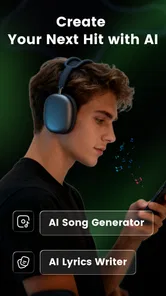
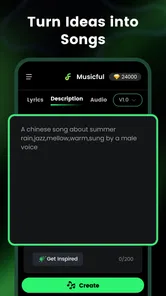
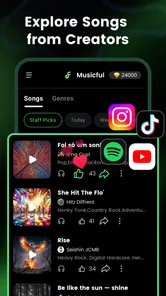
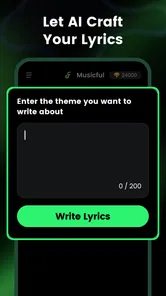
Analysis by Reviewed
I approached AI Song & Music Maker-Musicful as a practical songwriting tool rather than a novelty generator. Its purpose is clear: help me turn a short idea into a song-shaped result without requiring a full studio setup, an instrument, or advanced production knowledge. That makes it interesting for quick demos, background music experiments, and anyone who wants to explore a musical direction before investing time in a more traditional workflow.
Musicful belongs to the Music & Audio category and is made by Wheatfield Guard Technology Co., Ltd. It is free to install, rated for Everyone, and available for devices running Android 8.0 or later. The app has reached over half a million installs and holds a 4.4 average from around four thousand ratings, which suggests that its basic idea connects with a sizeable audience. I would still treat those figures as a starting point rather than proof that it will suit every musician, because AI music tools can feel very different depending on how much control you expect.
Starting with an idea instead of a blank project
The most appealing part of Musicful is the low-pressure beginning. Traditional music software often presents me with tracks, effects, instruments, timelines, and technical choices before I have even decided what I want to make. An AI song maker reverses that order. I can begin with a mood, genre, or rough creative direction and see where the idea leads.
That is especially useful when the problem is not a lack of ideas but a lack of momentum. I might have a phrase for a chorus, a mental image for a video, or a vague feeling that would work as a pop or hip-hop track. Instead of opening a blank project and spending time choosing sounds, I can use that starting point to generate a musical sketch. The result is not necessarily the finished song I imagined, but it gives me something concrete to judge.
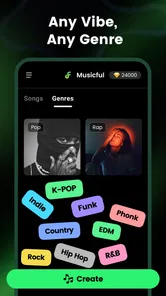
The broad style range is another practical advantage. Musicful is designed around styles such as rap, pop, and hip hop, so it is more approachable than an app that expects me to understand arrangement terminology before producing anything. I found that this kind of prompt-led workflow is best viewed as creative scouting: it helps me compare directions quickly, rather than replacing every decision a songwriter or producer would normally make.
For a beginner, that distinction matters. If I am making music for the first time, an automatically generated draft can teach me what different moods and genre choices sound like in practice. If I already write songs, the app can act as a source of rough references. I can listen for pacing, atmosphere, vocal character, or the way a hook might sit inside a broader arrangement.
There is also a useful everyday scenario here. Imagine I am preparing a short travel video and want an original musical bed that feels energetic but not aggressive. I may not need a fully edited commercial release; I need a starting track that helps me understand the tone of the video. Musicful is more useful in that moment than opening a complex desktop workstation, because the creative question comes first and the technical setup stays in the background.
More From Our News Desk

 Gmail
GmailGmail in a Busy Inbox: Who Benefits Most?
From first account to crowded workday, Gmail earns its place through dependable search and flexible sorting—but its best fit depends on how much inbox maintenance you can tolerate.

 Prime Video
Switching to Prime Video: What Changes in Your Viewing Routine
Prime Video can make a compelling second home for streaming, but switching means learning a different catalog, rental layer, and route from browsing to playback.

 Universal TV Remote Control
Universal TV Remote Control Works Best as a Reliable Backup
A phone remote earns its place through quick setup and reliable habits. Here is how to get more from Universal TV Remote Control—and where its limits show.

 Weather - By Xiaomi
Weather by Xiaomi Review: Clear at a Glance, Less Clear Up Close
Xiaomi’s weather app makes everyday forecasts quick to scan, but its calm surface can leave useful details and recovery paths harder to find than they should be.

 X
XX Under Pressure: Can It Recover When Posting Goes Wrong?
A resilience-focused review of X, examining setup, mistaken posts, interruptions, weak connections, and the gaps that matter when recovery needs to be dependable.

 Clash of Clans
Clash of Clans Is Won Between the Battles
Its raids are quick; its community is a long-term project of coordination, teaching, rivalry, and shared responsibility—with all the friction that entails.
Latest News



How I would write a better prompt
The quality of the starting idea depends on how specific I am. A single word such as “happy” leaves too much open. I would describe the intended setting, emotional movement, and role of the track: something bright for a morning vlog, a restrained beat for spoken narration, or a dramatic electronic atmosphere for a short montage. I would also decide whether I want the music to feel intimate, spacious, playful, tense, or polished.
This is one of the less obvious lessons with AI music tools: the prompt is not just an instruction; it is a creative brief. If I use it as a vague mood button, I am likely to get a result that sounds broadly acceptable but not particularly personal. If I treat it like a note to a session musician, I have a better chance of receiving something I can actually evaluate and refine.
I would also avoid trying to describe an entire album in one request. A focused brief makes comparison easier. For example, I might create separate versions for a relaxed pop direction and a more rhythmic hip-hop direction, then decide which one supports the project. That approach turns generation into a decision-making tool instead of a lottery.
From generated idea to usable song draft
Once the initial direction is chosen, the main value of Musicful is speed. It can move me from an abstract concept to an audible draft without the usual chain of selecting instruments, programming a rhythm, arranging sections, and balancing a mix. That makes it particularly attractive for people who care more about capturing an idea than learning a complete production environment.
I would not expect the first output to be the final answer. In my experience with this type of workflow, the first generation is most useful as a reference. It tells me whether the chosen style is close to the mood I wanted, whether the energy is too high or too low, and whether the song feels suitable for the intended use. Those answers are often more valuable than a technically perfect blank project.
The app’s simplicity can also make it suitable for non-musicians. A person creating a podcast intro, a social video, a personal slideshow, or a private demo may not know how to build a track manually. Musicful lowers the entry barrier by letting the user think in ordinary creative language. That is a meaningful strength, because many music applications are powerful but intimidating long before the first note is played.
At the same time, simplicity creates a trade-off. The less I control manually, the more I have to accept the app’s interpretation of my idea. If I need exact chord changes, a carefully written bass line, a particular drum fill, or precise vocal phrasing, I may quickly reach the limits of an AI-first workflow. A conventional digital audio workstation or a dedicated recording app is the better choice when detailed editing is the center of the job.
This is where I would place Musicful in a realistic production chain: early ideation, rough composition, mood testing, and fast content creation. I would not automatically place it at the end of a professional release process. It can help me decide what to make, but the final standard depends on how much control, originality, and editing the project demands.
Using generations as references, not disposable attempts
A useful workflow is to listen to each draft with one question at a time. First, I would ask whether the overall genre and mood are right. Then I would consider the structure and energy. Only after that would I judge details such as the vocal feel or instrumental texture. This prevents me from rejecting a promising idea because of one imperfect element.
I would also take notes while comparing versions. A draft might have the right chorus energy but the wrong opening. Another might create a better atmosphere but feel too busy under narration. Writing down those differences helps me form a more precise next brief. The process becomes iterative: generate, listen, identify the useful part, and adjust the direction.
That method is more productive than repeatedly pressing generate without a plan. The app can provide possibilities quickly, but I still need to act as the editor. My role is to decide what belongs in the project and what does not. The strongest results come from treating AI output as material to curate, not as an automatic substitute for taste.
Iteration is where the tool earns its place
The first result is rarely the most important one. What matters is whether Musicful helps me move through alternatives without making every experiment expensive in time or technical effort. For a songwriter, that can mean testing several genre identities for the same lyrical idea. For a video creator, it can mean checking whether a scene works better with a calm background or a more forceful rhythm.
I would approach revisions in stages. If the track is too energetic, I would change the brief toward a softer or more restrained mood rather than trying to fix every detail at once. If the style is close but the atmosphere is wrong, I would keep the genre direction and revise the emotional language. This isolates the creative variable I am testing and makes each new result easier to understand.
One non-obvious benefit is that this process can reveal what I actually want. Sometimes I begin by asking for a generic pop song and discover that the most useful result has a darker tone or a more spacious arrangement. The generated draft becomes a mirror for my preferences. I can react to something audible instead of guessing from words alone.
There is a downside to rapid iteration: choice overload. When an app makes it easy to produce many possibilities, I can spend more time comparing drafts than finishing the project. I would set a simple limit for myself, such as choosing the best direction after a small batch of experiments. Without that discipline, the convenience of generation can become another form of procrastination.
I would also keep the intended delivery context in mind during revisions. A track that sounds exciting through headphones may compete with a voice-over. A dense arrangement may work for a standalone listen but distract from a short social clip. The right version is not always the most impressive one in isolation; it is the one that serves the project around it.
Where traditional alternatives still win
Compared with a conventional digital audio workstation, Musicful is faster to enter and easier for idea generation, but it does not offer the same sense of hands-on authorship. A workstation is preferable when I want to record my own performance, edit individual notes, automate effects, build a detailed arrangement, or mix every element with precision.
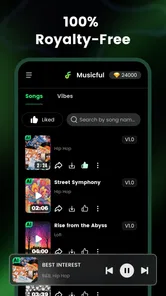
Compared with royalty-free music libraries, Musicful offers a more active creative process. A library is quicker when I need a predictable track immediately and do not want to generate or refine anything. It may also be easier for someone who wants to browse finished pieces by length or mood. Musicful is more appealing when the act of shaping a custom idea matters more than selecting from a fixed catalog.
Compared with a human collaborator, the app is available whenever I need a fast sketch, but it cannot replace the communication and shared taste that come from working with another musician. If the project depends on a distinctive personal performance or a very specific artistic identity, I would use Musicful for exploration and bring in human input for the decisions that define the final work.
Preparing a draft for handoff
The handoff stage deserves more attention than it usually receives in an AI music workflow. A generated song may sound finished inside the app, but my project still needs a clear purpose. Before using a result elsewhere, I would listen to it in the context where it will appear: under dialogue, alongside visuals, in a playlist, or as a private demo. That check often reveals whether the track is genuinely usable.
I would also keep a simple record of which version I selected and why. If I am working on several video edits, naming drafts by mood and intended use is more helpful than relying on memory. For example, a restrained background version should be kept separate from a more prominent standalone version. This small habit prevents confusion when I return to the project later.
Musicful is most convenient when I need to move a concept onward quickly, but I would not assume that generation alone completes the publishing process. The final handoff may still require trimming, level adjustment, synchronization with video, or additional editing in another tool. If my goal is a polished release with exact control over every element, I would plan for that second stage rather than expecting the mobile generator to do everything.
Cost is another practical consideration. The app is free to use at the entry level, while in-app purchases range from about five dollars to around two hundred dollars per item. I would check the purchase choices carefully before committing to a longer workflow, especially if I am experimenting casually. Someone making occasional personal drafts may find the free starting point sufficient, while a frequent creator should decide whether the paid options fit the value of the output they actually need.
The age rating of Everyone makes the app approachable for a broad audience, including beginners who may feel uncomfortable with more technical production software. Still, an accessible interface does not remove the need for judgment. I would review every generated result before sharing it, particularly when it is being used publicly or attached to a client project. The app can accelerate creation, but responsibility for the finished choice remains with me.
Who should use it, and who should skip it
I would recommend Musicful to a curious beginner who wants to make a song without first learning a full production system. It also makes sense for a content creator who needs quick musical concepts, a songwriter looking for arrangement inspiration, or anyone who enjoys testing styles that they could not easily perform themselves.
It is a good fit when speed and experimentation matter more than microscopic control. If I need a rough track for a personal video tonight, or I want to hear whether an idea works as rap rather than pop, the app gives me a direct route from intention to sound. That is a more useful benefit than simply calling it easy: it shortens the distance between a thought and an editable creative decision.
I would skip it as my main tool if I require detailed multitrack production, exact notation, live recording, or a highly individual performance. I would also choose a library or a conventional editor when the priority is a predictable, ready-to-license asset or a carefully controlled final mix. Musicful is strongest as a generator and creative companion, not as a complete replacement for every part of music production.
My verdict after using the workflow
Musicful succeeds because it makes the first step feel manageable. Instead of asking me to become a producer before I can hear an idea, it lets me begin with a direction and then decide what deserves further work. Its support for familiar styles, approachable format, and fast experimentation make it especially useful for sketches, personal projects, and visual content that needs a custom musical identity.
I appreciate that it can serve several roles: an idea starter when I am stuck, a comparison tool when I am choosing between moods, and a rough-draft machine when a project needs music quickly. The most effective use is not passive. I need to write focused briefs, compare results deliberately, and carry the selected material into whatever editing or delivery step the project requires.
The limitations are just as important. AI generation can reduce technical friction, but it also reduces direct control. The free entry point is inviting, while the range of in-app purchase prices means I would review the upgrade path before building a large workflow around it. And although a generated track can be useful immediately, a demanding release may still need traditional editing, mixing, or human performance.
The current version is 2.7.3, and the app was released on February 6, 2025, so it is a relatively recent option in a fast-moving category. My recommendation is straightforward: try it if you want to turn a musical idea into a quick, listenable draft and you are comfortable acting as the editor. If you want every note, recording, and mix decision in your hands, start with a more traditional music tool instead. For everyone between those extremes, Musicful is a practical way to get unstuck and make the next creative decision with something real to hear.
AI Song & Music Maker-Musicful Frequently Asked Questions
Can I make music in different genres with Musicful?
Musicful is presented as an AI music generator and song maker for creating songs in styles such as rap, pop, and hip-hop. You can use a genre as part of your creative direction, alongside details such as a topic, lyrics, or mood. If the first result does not suit what you had in mind, trying a different style or adjusting your prompt can help you explore another sound.
Will Musicful be suitable if I have no music-making experience?
The app is aimed at beginners and casual creators, so you do not need advanced knowledge of instruments, recording, or music production to try making a song. You can guide the AI with a prompt, lyrics, mood, or genre rather than building a track from scratch. It is still worth experimenting with your instructions, since results can vary and may take some refinement.
What is AI Song & Music Maker-Musicful?
AI Song & Music Maker-Musicful is a mobile music creation app designed to help users generate songs with artificial intelligence. You can typically start with a text prompt, lyrics, mood, genre, or other creative direction, then let the app produce a musical result. It is aimed at beginners and casual creators who want to experiment without needing advanced knowledge of instruments, recording, or music production.
How do I create a song with Musicful?
After opening Musicful, you generally choose a creation mode and provide details such as a song topic, lyrics, musical style, mood, or preferred vocal approach. The AI then processes your instructions and generates a track. Results can vary, so refining the prompt or changing the genre may produce a better version. The app’s interface is designed to make experimentation quick, even for first-time music creators.
Is AI Song & Music Maker-Musicful free to use?
Musicful is free to download, and it may offer access to selected creation tools, previews, or a limited number of generations. The app also includes in-app purchases, with listed items ranging from $4.99 to $199.99. Available options and pricing can differ by country, operating system, promotional offer, and account status. Before starting a purchase or trial, check the current terms carefully, including renewal conditions and any usage limits.
Pros
- Quickly creates song ideas from simple text prompts.
- Offers multiple genres and moods for creative experimentation.
- Useful for making background music for videos and social posts.
- Simple interface makes music generation accessible to beginners.
- Can help overcome writer’s block with instant musical inspiration.
Cons
- Generated vocals may sound artificial or lack emotional expression.
- Results can vary greatly between prompts and repeated attempts.
- Advanced editing options may feel limited for experienced musicians.
- Some features or exports may require a paid subscription.
- Generated tracks may need additional mixing before professional use.











