

AI Song & Cover Music・InsMelo
- 121.00
- 4.3
- Installs
- 100.00K
- Price
- Free

Screenshots
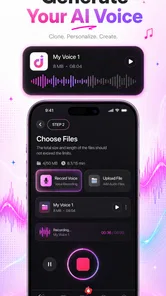
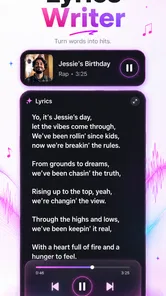
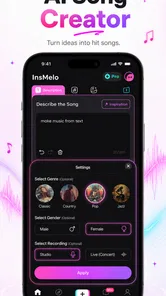
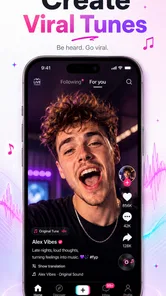
Analysis by Reviewed
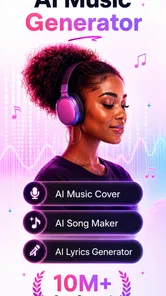
I spent time with AI Song & Cover Music・InsMelo as a music and audio app, and my first impression was that it is aimed at people who want to turn a quick idea into something shareable without learning a full digital audio workstation. The focus is not on painstaking studio production. It is on experimenting with AI-generated songs, covers, and music-video-style creations from a phone.
That distinction matters. If you want detailed control over every instrument, vocal take, effect, and edit point, a traditional recording or production app remains the better tool. If you want to test a chorus idea, make a playful cover concept, or create a short piece for social sharing, this app feels much more approachable. Its real appeal is speed: reducing the distance between an idea and a listenable result.
How the AI music workflow feels on a phone
The app comes from AI Mystic Labs and sits in the Music & Audio category. It is free to start, with optional purchases ranging from $3.99 to $199.99 per item. That makes the initial decision easy: you can explore the basic experience before deciding whether the paid side fits your habits. I would still treat the purchase options carefully, especially if you are only curious and do not yet know how often you will create.
The most useful way to approach it is as an idea laboratory. Rather than opening the app expecting a finished professional track, I would begin with a simple goal: a short mood piece, a humorous vocal concept, or a cover experiment for a private group chat. This keeps expectations realistic and makes the fast generation process feel like a strength instead of a compromise.
On a mobile device, the workflow is naturally more immediate than working in a desktop editor. You can think of a theme while travelling, shape an idea during a break, and listen back without setting up microphones or instruments. That convenience is especially valuable for beginners who may be intimidated by tracks, buses, plug-ins, and complicated timelines.
At the same time, AI output is not a substitute for musical judgement. The first result may have the right atmosphere but the wrong emphasis, or a vocal treatment that does not suit the words. I found it more productive to treat each generation as a draft. The strongest results come from choosing a clear concept, listening critically, and refining the idea instead of accepting the first output automatically.
Where a connection becomes part of the experience
AI creation usually involves sending a request to a service and waiting for a result, so connectivity shapes the experience more than it would in a simple local audio player. When the network is stable, the process feels pleasantly direct: define what you want, start the creation, and move on to evaluating the result. When the connection is weak, the waiting becomes much more noticeable because the creative flow depends on the response arriving.
More From Our News Desk

 Gmail
GmailGmail in a Busy Inbox: Who Benefits Most?
From first account to crowded workday, Gmail earns its place through dependable search and flexible sorting—but its best fit depends on how much inbox maintenance you can tolerate.

 Prime Video
Switching to Prime Video: What Changes in Your Viewing Routine
Prime Video can make a compelling second home for streaming, but switching means learning a different catalog, rental layer, and route from browsing to playback.

 Universal TV Remote Control
Universal TV Remote Control Works Best as a Reliable Backup
A phone remote earns its place through quick setup and reliable habits. Here is how to get more from Universal TV Remote Control—and where its limits show.

 Weather - By Xiaomi
Weather by Xiaomi Review: Clear at a Glance, Less Clear Up Close
Xiaomi’s weather app makes everyday forecasts quick to scan, but its calm surface can leave useful details and recovery paths harder to find than they should be.

 X
XX Under Pressure: Can It Recover When Posting Goes Wrong?
A resilience-focused review of X, examining setup, mistaken posts, interruptions, weak connections, and the gaps that matter when recovery needs to be dependable.

 Clash of Clans
Clash of Clans Is Won Between the Battles
Its raids are quick; its community is a long-term project of coordination, teaching, rivalry, and shared responsibility—with all the friction that entails.
Latest News



This changes how I would use it in everyday life. At home on a reliable connection, I would explore several ideas in one sitting. On public transport or in a crowded venue, I would avoid planning a serious creative session around it. A dropped connection at the wrong moment can turn a quick experiment into repeated tapping and uncertainty about whether the request actually went through.
That network dependence also affects patience. AI creation is not the same as pressing play on a song already stored on a phone. A user may need to wait for processing, and the result may still need another attempt. I recommend deciding on a small creative target before starting rather than opening the app with no idea at all. A clear prompt or concept makes waiting feel purposeful.
For people with limited mobile data, the sensible habit is to create when connected to a trusted Wi-Fi network and save listening or sharing for later. I would not repeatedly regenerate large or complex ideas over cellular data unless the result is genuinely worth the cost of that connection. This is one of the less obvious trade-offs: the app may be free to install, but frequent AI experimentation can still have practical costs through data use, battery use, and optional purchases.
Useful mobile situations, and the ones I would avoid
One realistic scenario is a friend’s birthday. I could write a few personal lines, shape them into a playful song concept, and send the result to the group rather than spending an evening learning production software. The value is not that the output replaces a professional song; it is that the app helps turn a personal joke or memory into an audio gift quickly.
Another good use is songwriting preparation. If I have a chorus idea but no arrangement, I can use an AI-generated direction to test whether the mood feels closer to pop, a dramatic ballad, or something more energetic. I would not use the result as the final recording, but it can help me decide which idea deserves more work in a proper music app.
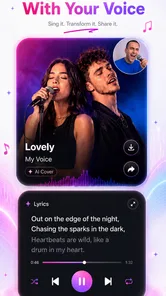
The cover angle is also best understood as experimentation. A familiar song can be a useful reference point for trying a different feel, but users should think carefully before publicly sharing material involving music they do not own. For private amusement, the creative exercise is straightforward. For public uploads, I would check the relevant rights and platform rules rather than assuming that an AI-generated version is automatically safe to publish.
I would skip this app if my main need were serious vocal recording, exact timing correction, multitrack editing, or a dependable live-performance setup. A conventional audio workstation gives much finer control. I would also skip it if I dislike generated results that can vary from attempt to attempt. The app is built around fast creative discovery, not guaranteed precision.
What happens when a request fails
Failure is an important part of any connected AI tool. A request can be interrupted by a poor signal, a temporary service problem, or an input that does not produce the result I imagined. The key is not to interpret one failed attempt as proof that the whole app is unusable. I would first check the connection, wait briefly, and then retry once rather than repeatedly pressing the creation control.
A more careful recovery habit is to keep the original idea outside the app before submitting it. I might write the lyrics or concept in a notes app, including the style and emotional direction I want. That way, if the session resets or a result is disappointing, I have not lost the creative starting point. It also makes it easier to compare attempts instead of relying on memory.
When an output is technically acceptable but creatively weak, changing everything at once is not the best approach. I would alter one element at a time: simplify the theme, clarify the mood, shorten the wording, or choose a different vocal direction. This makes the process more understandable and helps reveal whether the problem is the concept or the generated interpretation.
Another practical limitation is that speed can encourage careless repetition. It is easy to request many variations simply because each attempt feels low effort. That can create clutter and make it harder to identify the version worth keeping. I recommend naming or noting the purpose of a promising idea immediately, especially when using the app for several projects in one session.
Using it without wasting data or money
The free entry point is helpful for testing the app, but the in-app purchase range means I would not treat every visible creation option as automatically necessary. Before paying, I would use the free experience to answer a few basic questions: do I like the type of output, does the workflow suit my phone, and will I realistically use it more than once or twice?
My data-conscious routine would be simple. I would prepare text and creative instructions before opening the generation workflow, connect to Wi-Fi when possible, and avoid making multiple near-identical attempts. I would also listen to promising results with headphones only when needed; casual replay can consume battery and data if the app relies on connected delivery rather than locally stored audio.
It is worth separating creation from sharing. I would finish the idea first, then decide whether it is good enough to send or post. Sharing every draft can multiply uploads and encourage rushed decisions. A short review of the lyrics, vocal tone, and intended audience is especially important for cover-style work, where a private experiment and a public upload have very different consequences.
The age rating is Everyone, which makes the app broadly approachable from a content-rating perspective. That does not remove the need for adult guidance in family situations, particularly when children are encouraged to share creations publicly or make purchases. I would keep purchase decisions deliberate rather than treating the app like an unlimited toy.
Version, compatibility, and who gets the most from it
At version 1.4.003, the app is a relatively focused choice for casual AI music creation rather than a replacement for a complete studio. It supports devices running Android 7.0 or later, which covers a wide range of phones, although the actual comfort of use will still depend on the device, its available storage, battery condition, and the quality of its connection.
The app has reached over 100 thousand installs and holds a 4.3 average from around 5.3 thousand ratings. Those figures suggest that it has found an audience, but they do not tell me whether every user will enjoy the same workflow. I would read the experience through the lens of my own needs: quick generation and playful sharing are strong reasons to try it, while detailed production control is a reason to look elsewhere.
Compared with a standard music player, this is an active creation tool rather than a listening library. Compared with a conventional mobile studio, it removes much of the technical setup but also gives me less direct control over the musical result. Compared with a social video editor, its starting point is the song or cover idea, not simply arranging existing clips around a soundtrack.
That comparison helps define its best audience. Beginners can use it to discover whether they enjoy shaping musical ideas. Casual creators can make something personal without carrying instruments or opening a desktop. More experienced musicians may find it useful for brainstorming, but they will probably want to export or rebuild the strongest concept elsewhere if they need precise editing.
My connectivity verdict
I see AI Song & Cover Music・InsMelo as a convenient creative companion for connected moments, not as a tool I would depend on when the network is unreliable. Its strongest quality is the way it encourages experimentation from a phone: a theme, a few ideas, and a willingness to judge the result can be enough to begin.
The trade-off is equally clear. Network interruptions can break the rhythm, repeated generations can consume data and attention, and the free installation does not mean every advanced path is cost-free. Users also need to think responsibly about sharing covers and personal creations. Those are not reasons to avoid the app, but they are reasons to use it intentionally.
I would recommend it to anyone who wants quick AI-assisted song and cover experiments, especially for jokes, gifts, mood sketches, and early songwriting ideas. I would point a serious producer toward a full audio workstation instead. For me, the best approach is to use this app as a spark: create while connected, keep important ideas backed up elsewhere, review each result critically, and move the worthwhile ones into a more controlled tool when the project grows.
My final recommendation is positive for curious mobile creators, with one condition: treat the app as an idea generator rather than a complete recording studio. Used that way, its speed is genuinely useful, and its limitations become manageable instead of disappointing.
AI Song & Cover Music・InsMelo Frequently Asked Questions
What devices and operating systems can run AI Song & Cover Music・InsMelo?
InsMelo is a mobile music and audio app for Android, and it requires Android 7.0 or later. Check your device’s Android version before downloading, especially if you use an older phone or tablet. The app is free to install, though some features may involve in-app purchases. Its age rating is Everyone.
Who makes InsMelo, and is it a popular app?
AI Mystic Labs develops InsMelo, an app focused on creating AI songs and covers. It has more than 100,000 installs and an average rating of 4.3 from around 5,300 ratings, giving prospective users a useful snapshot of its reach and reception. Those figures can help set expectations, but your experience will depend on how well its creation tools suit your needs.
What is AI Song & Cover Music・InsMelo?
AI Song & Cover Music・InsMelo is an AI-powered music creation app designed for generating songs, vocal covers, and music ideas from user prompts or selected settings. It is aimed at both casual users and creators who want to experiment with melodies, lyrics, arrangements, and different vocal styles without needing advanced production skills. Results can vary depending on the selected options and the quality of the instructions provided.
How do I create a song or AI cover with InsMelo?
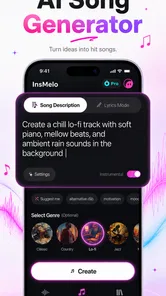
After opening InsMelo, users can generally choose a creation mode, enter a musical idea or lyrics, and select available genres, moods, voices, or other customization settings. The app then processes the request and produces an audio result. Creating more polished tracks may require several attempts, because genre selection, wording, song structure, and vocal preferences can significantly affect the final output.
Is AI Song & Cover Music・InsMelo free to use?
InsMelo is free to download, but it also offers in-app purchases priced from $3.99 to $199.99 per item. Some features may be available without payment, while access to additional tools or content can involve a purchase. Review the purchase details shown in the app before paying, and check any trial or renewal terms carefully so you understand what you are agreeing to.
Pros
- Quickly creates original songs from simple text prompts.
- Offers cover-style transformations for experimenting with vocals and genres.
- Large variety of musical styles for different creative ideas.
- Useful for short videos
- social posts
- and personal demos.
- Simple interface makes music generation accessible to beginners.
Cons
- Generated vocals may sound artificial or uneven in some songs.
- Results can vary significantly between similar prompts.
- Advanced customization may require a paid subscription.
- Export options and audio quality may be limited on the free plan.
- Commercial usage rights should be checked before publishing generated tracks.











