Active File Cleaner
- 48.00
- 3.4
- Installs
- 100.00K
- Price
- Free

Screenshots
Analysis by Reviewed
I spend a surprising amount of time managing files that no longer matter: duplicate downloads, old screenshots, forgotten documents, and media copied from one device to another. Active File Cleaner is aimed at that everyday problem. It is a free tools app from Glorich Limited, built around practical file cleanup rather than entertainment or social features. After using it as a focused maintenance tool, I see its appeal clearly: it can give a cluttered phone a more manageable starting point without asking users to pay for access.
That said, a cleaner app is only useful when it helps me make safe decisions. Deleting files is not the same as deleting harmless clutter, and I would never treat a cleanup suggestion as automatic permission to remove everything. My overall impression is that Active File Cleaner is most useful for people who want a dedicated place to review unwanted files, while users who already keep their storage organized through the phone’s built-in tools may find another app unnecessary.
How Active File Cleaner fits into everyday storage maintenance
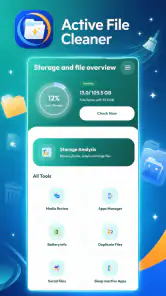
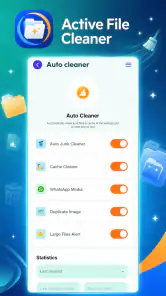
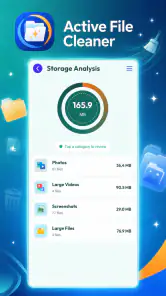
The app belongs to the file cleanup side of the tools category. Its purpose is straightforward: help me look at the material occupying space on a device and decide what can go. That makes it different from a general file browser, a cloud backup service, or a full device-management suite. I would open it when storage starts feeling crowded, not when I need to edit a document or transfer a file.
Its current version is 4.0, and it runs on Android 8.0 or later. That broad compatibility matters for people using older phones that may not offer the newest storage-management screens. The app is also rated for Everyone, which makes the presentation approachable for a wide range of users. Still, an age rating should not be confused with permission to delete casually: adults and younger users alike need to check the selected items before confirming a cleanup.
Active File Cleaner has reached over one hundred thousand installs and holds a 3.4 average from around three hundred ratings, with dozens of written reviews. I read that combination as moderate interest rather than proof that the app is perfect. It has enough use to be worth considering, but the rating also suggests that expectations should stay realistic. I would test it on a small, nonessential cleanup first instead of handing it responsibility for my entire storage library immediately.
The developer behind it is Glorich Limited. In practical terms, that means I judge the app by what it does on my own phone: whether the file list is understandable, whether the cleanup process feels controlled, and whether it saves me time compared with opening folders one by one. Those details matter more to me than a polished promise to make a device “clean.”
What the free price really means
Active File Cleaner is free to use. That gives it a clear advantage for someone who wants to try a dedicated cleanup workflow without committing money first. I can install it, see whether its approach suits my habits, and decide whether it earns a place in my routine. For occasional storage maintenance, free access makes experimentation easy.
The important distinction is that free access is not the same as guaranteed value for every phone. If my device already includes a capable storage manager, the app may not save enough time to justify another tool. In that situation, its value comes from convenience and presentation, not from a new source of storage. I would compare the results with the phone’s own file manager before making it part of a regular routine.
I also avoid assuming that a free utility can safely remove more than I can verify myself. The sensible approach is to review filenames, locations, and previews where available, then clean in small batches. That habit is especially important for photos, downloads, messaging attachments, and work files, because a file that looks old may still be needed later.
A realistic cleanup session
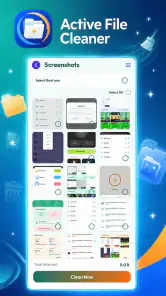
Imagine I am preparing for a weekend trip. My phone has accumulated screenshots of booking pages, several downloaded maps, restaurant menus, short videos shared in group chats, and duplicate copies of travel documents. Instead of scrolling through every folder manually, I would use Active File Cleaner as a first-pass inspection tool. I would separate disposable screenshots and repeated media from anything containing reservations or identification, then remove only the obvious clutter.
The useful part of that workflow is not pressing a single cleanup button. It is creating a pause between finding clutter and deleting it. I can use the app to surface candidates, then treat the review stage as a checklist: keep travel documents, preserve the newest copy of anything important, and remove only files I recognize. This is a better use of a cleaner than trying to reclaim space in a panic just before leaving home.
Another practical scenario is a family phone shared by someone who is not comfortable navigating storage folders. The app’s focused purpose may make the task easier to explain: open the cleaner, inspect the groups, and ask before removing anything uncertain. I would still supervise the process, particularly when the device contains schoolwork, medical records, or family photos.
Where the app can save time
The strongest potential benefit is concentration. A dedicated cleaner gives me one place to begin instead of making me jump between the camera folder, downloads, messaging folders, and miscellaneous directories. Even when I ultimately use the phone’s own file manager for final confirmation, a focused first pass can reduce the mental effort involved in locating obvious clutter.
It can also encourage a repeatable habit. Rather than waiting until storage is nearly full, I could review files after a major event such as a holiday, a software migration, or a large batch of downloaded media. The key insight is to use the app after clutter-producing activities, when I still remember what the files are. That is safer than cleaning months later, when filenames have become mysterious.
I would not measure success only by the amount removed. A smaller cleanup that leaves my important folders intact is more valuable than an aggressive deletion that creates regret. Active File Cleaner makes the most sense when I use it as a decision aid, not as a substitute for backups or careful file ownership.
Tradeoffs compared with built-in tools
Android’s built-in storage controls are usually the first alternative I would check. They are already part of the phone, so there is no extra app to maintain, and they may be closely integrated with the device’s storage categories. For a user who only needs to clear temporary clutter or inspect large files occasionally, the built-in option may be enough.
Active File Cleaner becomes more attractive when I prefer a separate, task-focused interface. Some people find system settings scattered or difficult to revisit, while a dedicated tool can make cleanup feel like a distinct job. The tradeoff is that I am adding another layer between myself and the files. I need to understand what it presents, confirm the selections, and avoid assuming that a cleaner has perfect knowledge of my intentions.
A traditional file manager is another strong alternative. It gives me direct control over folders, filenames, and locations, which is better when I know exactly what I want to remove. The disadvantage is time: manual browsing becomes tedious when clutter is spread across many places. I see Active File Cleaner as more convenient for discovery, while a file manager remains better for precise, deliberate maintenance.
Cloud storage tools solve a different problem. They may help preserve important files or move them away from local storage, but they are not automatically a replacement for cleanup. Uploading a file does not mean I should delete the local copy before checking that the backup is usable. Active File Cleaner is therefore best considered a local organization aid, not a complete backup strategy.
Limits I would keep in mind
The main friction is the risk of overconfidence. A file-cleaning interface can make deletion feel routine, but the consequences are personal: lost photos, missing attachments, or an important document removed with a group of harmless downloads. I would slow down whenever the app shows mixed categories or files with unclear names.
Another limitation is that no cleaner can understand the emotional or practical value of every file. A blurry image may be disposable to one person and irreplaceable to another. A large video may be an unwanted duplicate or the only copy of a family memory. This is why I would use the app to narrow the search, then apply my own judgment to the final selection.
I would also avoid installing it solely because storage feels low without first checking what is consuming space. If the problem is a large game, an offline video library, or an app with oversized data, deleting random documents may have little effect. In that case, the phone’s storage overview or the relevant app’s settings may point to a more effective solution than a general file cleanup session.
Who is likely to get the most value
Active File Cleaner suits people who regularly download files, save screenshots, receive media through messaging apps, or move content between phones. It is particularly reasonable for users who want a guided cleanup starting point and do not want to pay before deciding whether the workflow is useful. The free price lowers the risk of trying it, provided the user remains careful with deletion.
It may also help someone who has inherited a cluttered device and needs a manageable way to begin. I would start with clearly disposable items, such as redundant screenshots or files I recognize as temporary, then stop and review the result before continuing. That staged method is more reliable than attempting a complete digital clear-out in one session.
I would skip it if my storage needs are highly specialized. Photographers who need detailed media cataloging, professionals who require dependable archival controls, and users who already maintain a disciplined folder system may prefer tools designed for those exact jobs. Likewise, anyone uncomfortable reviewing files manually should not rely on a cleaner simply because it promises convenience.
My final recommendation
Active File Cleaner delivers a sensible proposition: a free, focused way to begin dealing with unwanted files on compatible Android devices. I like it most as a practical inspection tool that turns an intimidating storage problem into smaller decisions. Its value is strongest when clutter is spread across everyday folders and I need help identifying where to start.
My recommendation comes with one firm condition: review before removing. Use it after a clutter-heavy event, clean in small groups, and protect documents, photos, and backups from impulsive selection. If the built-in storage manager already gives you the same clarity, staying with that option may be simpler. If you want a dedicated cleanup workspace and are willing to remain involved in the decisions, Active File Cleaner is worth trying because the entry cost is free.
In the end, I would not describe it as a magic fix for every storage problem. I would describe it as a useful first step for ordinary file clutter, with enough reach to help many Android users but not enough judgment to replace their own. That balance is the reason I can recommend it to a friend who needs organization, while still telling them to slow down before tapping delete.
Pros
- Quickly identifies unnecessary files and frees up storage space.
- Simple interface makes cleanup accessible for less experienced users.
- Helps locate large files that may be consuming valuable device storage.
- Useful for removing temporary and leftover files from supported locations.
- Can make file management more organized by highlighting cluttered folders.
Cons
- Some detected files may require careful review before deletion.
- Cleaning results can vary depending on device permissions and file access.
- Advanced cleanup features may be limited compared with full file managers.
- Scanning large storage areas can take time on older or nearly full devices.
- Frequent cleanup is still needed because new temporary files accumulate.

- Category
- Tools
- Version
- 4.0











