

Acorn TV: Brilliant Mysteries
- 2.50K
- 4.1
- Installs
- 1.00M
- Price
- Free

Screenshots


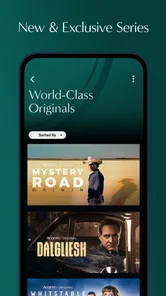
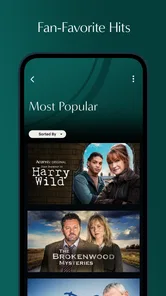
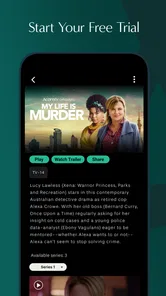


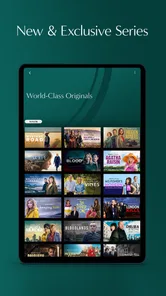
Analysis by Reviewed
I spent time with Acorn TV: Brilliant Mysteries as an entertainment app built around streaming crime, drama, and comedy series. My first impression was that it is aimed at viewers who want a more focused alternative to endlessly browsing a huge general-purpose service. The catalog concept feels especially appealing when I am in the mood for mysteries or character-led television rather than whatever happens to dominate a broad streaming home screen.
The app comes from RLJ Entertainment and is free to install, although access to its viewing experience can involve in-app purchases ranging from $5.99 to $99.99 per item. That distinction matters: downloading the app costs nothing, but I would not treat “free” as meaning that every program is available at no cost. The content rating is Teen, so it is better suited to older children and adults than to a family audience looking for universally appropriate viewing.
What makes this service interesting is not simply the promise of another video library. It is the way the experience depends on a reliable connection, a suitable screen, and enough patience for streaming to behave properly. When the network is strong, the app is a convenient way to settle into a series. When the connection becomes unstable, the smoothness of that experience depends much more on circumstances outside the app itself.
How Acorn TV feels when the connection is doing the work
When the connection is steady, I can focus on choosing a mystery instead of troubleshooting playback, and that makes this specialist library easiest to enjoy at home or in another dependable Wi-Fi spot. I also find it useful to decide what I want to watch before settling in, so a short break stays about viewing rather than browsing. The next question is what changes when the network has to keep up on the move.
A focused catalog is useful when I already know my mood
With a general streaming service, I often spend longer choosing something than watching it. This app has a clearer identity. Its emphasis on crime, drama, comedy, and mysteries gives me a more manageable starting point, particularly on an evening when I want a puzzle, an investigation, or a story with a distinctly television-oriented rhythm.
I found that focus more useful than a giant selection when I was choosing from a phone. A broad service can be excellent when I want the latest blockbuster or a familiar mainstream title, but its range can also create decision fatigue. Here, the narrower editorial direction makes browsing feel less random. I can open the app with a reasonable idea of the kind of mood it is designed to serve.
That focus also creates a trade-off. If I want live content, a wide variety of genres, children’s programming, or a single place for every household member, this is unlikely to replace a larger general-purpose platform. It works best as a specialist entertainment destination, not as an all-in-one television replacement.
More From Our News Desk

 Gmail
GmailGmail in a Busy Inbox: Who Benefits Most?
From first account to crowded workday, Gmail earns its place through dependable search and flexible sorting—but its best fit depends on how much inbox maintenance you can tolerate.

 Prime Video
Switching to Prime Video: What Changes in Your Viewing Routine
Prime Video can make a compelling second home for streaming, but switching means learning a different catalog, rental layer, and route from browsing to playback.

 Universal TV Remote Control
Universal TV Remote Control Works Best as a Reliable Backup
A phone remote earns its place through quick setup and reliable habits. Here is how to get more from Universal TV Remote Control—and where its limits show.

 Weather - By Xiaomi
Weather by Xiaomi Review: Clear at a Glance, Less Clear Up Close
Xiaomi’s weather app makes everyday forecasts quick to scan, but its calm surface can leave useful details and recovery paths harder to find than they should be.

 X
XX Under Pressure: Can It Recover When Posting Goes Wrong?
A resilience-focused review of X, examining setup, mistaken posts, interruptions, weak connections, and the gaps that matter when recovery needs to be dependable.

 Clash of Clans
Clash of Clans Is Won Between the Battles
Its raids are quick; its community is a long-term project of coordination, teaching, rivalry, and shared responsibility—with all the friction that entails.
Latest News



Streaming quality is tied to the moment
The most important practical point is simple: this is a streaming experience, so the quality of my connection shapes nearly everything. On a dependable home network, starting an episode and staying with it feels straightforward. On a crowded public network or a weak mobile signal, interruptions become part of the viewing experience, regardless of how appealing the program itself may be.
I would be careful about beginning a long episode just before leaving a stable connection. A show that starts comfortably on home Wi-Fi may become frustrating during a commute, in a waiting room, or in a building with inconsistent reception. The app is therefore better for planned viewing when I can control the network than for assuming that every spare minute away from home will become reliable television time.
This is also why I would test the app in the places where I actually watch. A service can feel excellent in a living room and much less dependable in a bedroom at the edge of the router’s range. The difference is not necessarily the catalog or the interface; it is the path between the device and the streaming service.
Watching on a phone requires more planning than watching at home
Mobile viewing is convenient, but the smaller screen changes how I use the service. A mystery with visual clues, subtitles, or a large cast is easier to follow when I am sitting still with headphones than when I am walking around or splitting attention between the episode and other tasks. I prefer using the phone for intentional viewing rather than treating it as background noise.
A realistic use case is a lunch break with a stable workplace connection. I can browse before the break, choose an episode, and watch without committing to a full evening. Another is a quiet hotel room after a day out, where the app gives me a familiar entertainment option without requiring a television. In both cases, the experience depends on checking the connection first rather than assuming that a mobile signal will behave consistently.
I would also keep the phone charged before a longer session. Streaming can be demanding during extended viewing, and a low battery turns a relaxing episode into a race against the power indicator. This is not a special flaw of the app, but it is an important part of using a video service on mobile. A compact stand or headphones can make the phone experience much more comfortable than holding it for an entire episode.
What happens when playback does not go smoothly
Connection failures are the point where I become more cautious. If playback pauses, I first check whether other apps are also struggling. Switching from a congested public network to a more dependable connection can solve the problem faster than repeatedly restarting the episode. I also find it sensible to close unnecessary streaming or download activity on the same network before blaming the app.
When a session breaks, I would reopen the app and return to the program rather than repeatedly tapping play while the connection is still unstable. That small change prevents a temporary network issue from becoming a confusing sequence of duplicate loading attempts. If the problem continues, testing another title can help separate a general connectivity problem from an issue limited to one piece of content.
The recovery experience matters because streaming apps are judged during interruptions as much as during successful playback. I want to know that I can get back to what I was watching without losing my place or spending several minutes navigating. In my use, I treated the app more confidently when I gave it a moment to reconnect instead of forcing rapid retries.
There is an important limitation for travelers and commuters: I would not plan a viewing session around an assumption of offline access. The safest approach is to consider this a connection-dependent service and arrange a reliable network before starting. If guaranteed playback away from the internet is essential to you, a service whose offline behavior is clearly part of your normal workflow may be a better fit.
Managing mobile data without ruining the experience
Watching over cellular data can be convenient, but it deserves deliberate use. I would reserve longer sessions for Wi-Fi whenever possible and use mobile data for shorter, planned viewing rather than letting episodes run in the background. This is especially important if several people share a limited plan or if the phone is already handling other data-heavy tasks.
A practical routine is to browse and decide what to watch while connected to Wi-Fi, then avoid leaving the app open while choosing. Browsing may feel harmless, but repeated artwork loading and previews can still make a mobile session less efficient than simply selecting a title and watching it. I also avoid switching between several programs while away from home, because exploratory browsing is easier to control on a fixed connection.
For a family sharing one connection, I would schedule viewing rather than starting several streams at once. The app’s value can drop quickly if the network is asked to serve multiple viewers and the home connection is not prepared for that demand. In that situation, a larger household-oriented service may offer a more familiar shared setup, while this app makes more sense for one viewer or a clearly defined viewing slot.
Another useful habit is to watch for the difference between a connection problem and a device problem. If the phone is nearly full, running hot, or busy with many background tasks, playback may feel less dependable. Restarting the device, closing unused apps, and trying again on a stable network are basic steps, but they are often more productive than immediately deciding that the service is unusable.
The app’s audience and the cost question
The store rating sits at a 4.1 average from around 7.2 thousand ratings, with roughly 2.5 thousand written reviews. It has passed 1 million installs, which suggests that the service has found a substantial audience beyond a niche experiment. I still would not use popularity as a substitute for checking whether its programming matches my habits, because a focused catalog can be highly appealing to one viewer and too narrow for another.
The app is currently version 5.0.28.1 and requires Android 5.0 or later. That makes it accessible on many older Android devices, although compatibility alone does not guarantee a pleasant streaming session. An older phone may technically run the app while offering a smaller display, weaker battery life, or less comfortable multitasking than a newer model.
The purchase range is wide enough that I would examine the available option carefully before committing. Someone who watches mysteries and dramas regularly may find value in paying for access, while a casual viewer who opens the app only once in a while may prefer to decide title by title. The right choice depends less on the installation cost and more on how often I would genuinely use the catalog.
I would also keep the Teen rating in mind when sharing a device. It signals that this is not an app I would hand to a young child without checking what is being watched. Crime and drama can involve themes that are perfectly acceptable for the intended audience but unsuitable for every member of a household.
Where it beats ordinary alternatives, and where it does not
Compared with a general streaming service, this app’s main advantage is concentration. I can approach it with a clearer expectation of crime, mystery, drama, and comedy rather than searching through unrelated categories. That is valuable for viewers who already know their preferred genres and want less browsing friction.
Compared with free ad-supported video platforms, the appeal is the possibility of a more deliberate viewing experience rather than accepting whatever interruptions and recommendations come with a no-cost service. The trade-off is that in-app purchases may be part of the experience, so it is not automatically the cheapest choice for someone who watches only occasionally.
Compared with a television app that combines live channels, this service is better suited to on-demand viewing around my own schedule. It is less useful if I want live news, sports, channel surfing, or the feeling of turning on a traditional broadcast lineup. I would choose it for a planned series, not for discovering what happens to be on.
Compared with a service selected mainly for children or family variety, the Teen classification and genre focus make it a more specialized option. That specialization is a strength for the right household and a limitation for anyone hoping to cover every age group with one installation.
Small habits that make the experience better
My first recommendation is to choose the episode before the moment I intend to watch. Doing that while connected to a dependable network reduces the chance that a weak signal will turn a short break into a browsing session. It also helps me notice whether I am selecting a full-length episode when I only have a few minutes available.
My second is to treat the phone as a viewing screen, not just a remote control. Headphones improve dialogue in noisy places, while a stand prevents hand fatigue and makes subtitles easier to follow. For a mystery, paying attention matters, so I would rather watch fewer minutes with concentration than let an episode play while I am distracted.
My third is to separate catalog frustration from connectivity frustration. If a title takes time to start, I check the network before judging the app’s selection or interface. If playback is fine but I cannot find anything appealing, that tells me something more useful: the service may simply not match my current mood. This distinction helps me decide whether to troubleshoot, change the viewing plan, or use a broader alternative.
I would also avoid treating a mobile connection as a guaranteed substitute for home internet. A strong signal icon does not always mean a stable streaming route, and a busy network can behave differently from one minute to the next. For important viewing, especially a finale or a program I do not want interrupted, I choose the most predictable connection available.
My verdict on a connection-dependent specialist
Acorn TV: Brilliant Mysteries is a good recommendation for viewers who enjoy crime, mysteries, drama, and comedy and prefer a service with a recognizable editorial focus. I like the way that focus can shorten the distance between opening the app and finding a suitable series. RLJ Entertainment has positioned it as a specialist entertainment option rather than a replacement for every kind of television.
Its biggest strength is also the reason to be selective. If those genres are central to your viewing, the focused catalog can feel more useful than a huge general library. If your household needs live channels, broad family programming, major variety, or dependable viewing away from any network, another service may fit better.
The connectivity angle is impossible to ignore. At home on a stable network, the app makes sense as a straightforward way to watch a planned program. On mobile, I would use it deliberately, monitor data habits, keep the device ready, and avoid assuming that every trip or commute will support uninterrupted playback. Those are not deal-breakers, but they are part of the real ownership experience.
My final recommendation is to install it if the genre focus genuinely matches what you watch, then judge it by a real session in your usual viewing location. Give yourself enough time to test browsing, playback, and recovery from a brief connection change. For the right viewer, the focused selection is more valuable than endless choice; for everyone else, the purchase options and network dependence may make a broader or more flexible alternative the smarter decision.
Acorn TV: Brilliant Mysteries Frequently Asked Questions
Is Acorn TV: Brilliant Mysteries free to download, and what might I pay to watch?
The app is free to download, but watching most of its programming requires an Acorn TV subscription. In-app purchases range from $5.99 to $99.99 per item, so check the purchase details shown in the app before confirming a plan. The service focuses on streaming crime, drama, and comedy series without commercial breaks, making the subscription the key cost to consider.
What devices and operating systems can I use with Acorn TV: Brilliant Mysteries?
Acorn TV: Brilliant Mysteries is an entertainment app for Android, and it requires Android 5.0 or later. If you are considering another device, such as a tablet, smart TV, or streaming player, check that device’s app store for availability before subscribing. Compatibility can affect installation and playback, so confirm that your device meets the requirements and that the app is available in your region.
What is Acorn TV: Brilliant Mysteries?
Acorn TV: Brilliant Mysteries is a streaming app focused on mystery, crime, detective, and drama programming, particularly productions from the United Kingdom, Australia, New Zealand, Canada, and other international markets. Its catalog typically includes complete series, selected films, and exclusive or hard-to-find titles. It is designed for viewers who prefer character-driven investigations and thoughtful storytelling over mainstream blockbuster content.
Do I need a subscription to watch Acorn TV: Brilliant Mysteries?
Yes, most of the content requires an active Acorn TV subscription. Depending on your location and the current offer, the app may provide a free trial or promotional access for new users, although eligibility and trial length can change. After the trial ends, the subscription normally renews automatically unless it is canceled through the platform where it was purchased.
Can I download shows for offline viewing?
Offline viewing may be available for supported titles and devices, but it is not necessarily offered for every program or on every platform. When the feature is supported, you can usually download an episode while connected to Wi-Fi and watch it later without an internet connection. Download availability, storage requirements, and expiration rules may vary by operating system and subscription plan.
Pros
- Focused catalog of acclaimed mystery and crime series.
- New episodes and premieres are easy to find in the app.
- Supports offline downloads for watching without an internet connection.
- Multiple profiles help separate viewing preferences within a household.
- Clean interface makes browsing by genre and title straightforward.
Cons
- The catalog is smaller than major mainstream streaming services.
- Some titles may rotate out because of licensing agreements.
- Video quality and availability can vary by region and subscription plan.
- Offline downloads may expire or become unavailable after licensing changes.
- Limited blockbuster and non-mystery content may reduce its broader appeal.













