

Acorn TV: Brilliant Hit Series
- 21.00
- 3.0
- Installs
- 100.00K
- Price
- Free

Screenshots

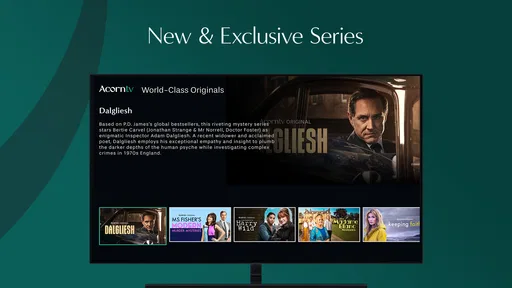
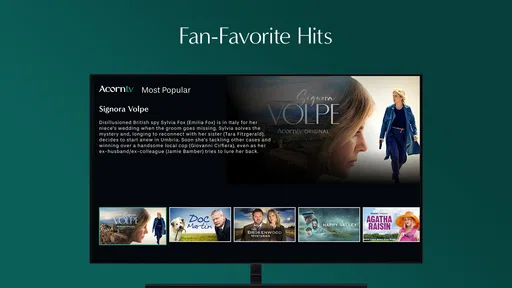
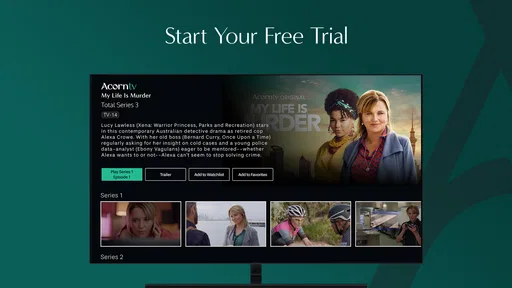
Analysis by Reviewed
I approached Acorn TV: Brilliant Hit Series as an entertainment app for viewers who want a more focused way to watch crime, drama, and comedy series. It is free to install, but the viewing experience is tied to the service’s own catalog and any access choices presented inside the app. That distinction matters: this is not a general-purpose video player for your personal files, and it is not designed to replace every streaming service on your phone.
My first impression was that its appeal depends less on having endless content and more on whether Acorn TV’s particular style of programming matches your taste. If you enjoy character-led mysteries, British and international dramas, and comedy with a different rhythm from mainstream US streaming, the app has a clear identity. If you mainly want the biggest blockbuster releases or a single place for every show you already follow, I would look elsewhere.
How I settled into the everyday viewing workflow
The most practical way to use the app is to treat it as a dedicated destination rather than something I open casually while deciding what to watch. I browse with a specific mood in mind: a mystery for a quiet evening, a drama for a longer session, or a lighter series when I do not want something too intense. That simple habit makes the catalog feel more manageable than scrolling without a plan.
Because the app is categorized around entertainment rather than live communication, work, or utility tasks, the main workflow is straightforward. I open it, look through the available programming, choose a series, and return to it when I have time for another episode. The experience works best when I give a show a fair chance instead of judging the service only by the first title visible on screen.
A realistic use case is a weeknight when I have about an hour and want something more substantial than short clips. I can choose a crime or drama series, watch an episode, and leave the app rather than falling into an endless mix of unrelated recommendations. That narrower purpose is one of its strengths. It creates a more intentional viewing routine, especially for people who are tired of jumping between large services and never starting anything.
I also found it useful to separate discovery from commitment. The first browsing session is for identifying a few promising titles. Later sessions are for continuing the one I actually chose. This avoids a common streaming problem: spending longer selecting a show than watching it. Acorn TV works better when I use it as a curated shelf, not as a replacement for every other source of video entertainment.
The app comes from RLJ Entertainment, and its positioning is clear from the kind of programming it presents. I would recommend it most readily to viewers who already know they enjoy the service’s focus. Someone searching for broad family entertainment, major sports, or a huge general catalog may find the narrower identity limiting rather than helpful.
More From Our News Desk

 Gmail
GmailGmail in a Busy Inbox: Who Benefits Most?
From first account to crowded workday, Gmail earns its place through dependable search and flexible sorting—but its best fit depends on how much inbox maintenance you can tolerate.

 Prime Video
Switching to Prime Video: What Changes in Your Viewing Routine
Prime Video can make a compelling second home for streaming, but switching means learning a different catalog, rental layer, and route from browsing to playback.

 Universal TV Remote Control
Universal TV Remote Control Works Best as a Reliable Backup
A phone remote earns its place through quick setup and reliable habits. Here is how to get more from Universal TV Remote Control—and where its limits show.

 Weather - By Xiaomi
Weather by Xiaomi Review: Clear at a Glance, Less Clear Up Close
Xiaomi’s weather app makes everyday forecasts quick to scan, but its calm surface can leave useful details and recovery paths harder to find than they should be.

 X
XX Under Pressure: Can It Recover When Posting Goes Wrong?
A resilience-focused review of X, examining setup, mistaken posts, interruptions, weak connections, and the gaps that matter when recovery needs to be dependable.

 Clash of Clans
Clash of Clans Is Won Between the Battles
Its raids are quick; its community is a long-term project of coordination, teaching, rivalry, and shared responsibility—with all the friction that entails.
Latest News



What to check before making it part of your routine
One important practical question is whether your phone can run it comfortably. The app supports Android devices using version 5.0 or later, which covers a wide range of hardware, but compatibility on paper does not guarantee an equally pleasant experience on every older handset. Screen quality, battery condition, available storage, and connection stability can all affect how enjoyable long viewing sessions feel.
I would also check the age guidance before handing the phone to a younger viewer. The app carries a Teen content rating, so it should be treated as a service aimed at older children and adults rather than as a general kids’ video app. That does not tell me whether every individual series will suit every viewer, so I still consider the tone of a show before starting it with someone else.
The app is free to download, but in-app purchases range from $0.99 to $99.99 per item. I would not assume that installing it means every viewing option is automatically included. Before settling into a long-term habit, I would read the screens shown during sign-up or playback carefully, check what an offered purchase covers, and make sure the selected account option matches how often I expect to watch.
That is especially important for occasional viewers. If I only want to sample one series, a smaller commitment may make more sense than choosing the broadest available option. A frequent viewer may judge the value differently, particularly if the catalog regularly supplies several shows they genuinely want to finish. The right decision depends on actual use, not simply on the fact that the download itself costs nothing.
Settings and small habits that make viewing easier
I recommend spending a few minutes reviewing the app’s visible playback and account controls before beginning a series. I would look for options related to notifications, account access, playback behavior, and any controls that influence how the app behaves when I return to it. Even when the default setup is acceptable, removing unnecessary interruptions can make the service feel calmer.
Notifications deserve particular attention. An entertainment app can become annoying if it repeatedly pulls me back toward content when I am not ready to watch. I prefer to keep only alerts that are genuinely useful to me and silence the rest. This is a small adjustment, but it changes the app from something that competes for attention into something I open on my own terms.
Another useful habit is to check how the app resumes a series after I leave. I do not rely blindly on a home screen recommendation to remember where I was. Instead, I make a mental note of the last episode or scene, especially if I switch between a phone and another viewing device. That prevents the frustrating situation of starting an episode again or accidentally skipping ahead.
For people watching on a mobile connection, I would be deliberate about when and where I stream. A stable home network is the obvious choice for longer sessions, while mobile viewing is better reserved for situations where the connection is reliable and the plan allows it. I would not begin an important episode in a place where interruptions are likely, because the app’s value depends on uninterrupted attention to its stories.
It is also worth keeping the current version in mind. The listed version is 5.0.29.1, and I would install updates through the normal app store process when they become available for my device. Updates can affect stability and interface behavior, so if something feels different after an update, I would revisit the settings rather than assuming the old arrangement still applies.
Faster patterns for choosing and finishing a series
My fastest approach is to narrow the decision before opening the catalog. I ask myself whether I want suspense, emotional drama, or comedy, then I examine only titles that fit that mood. This is more effective than browsing every row. It also helps me avoid choosing a serious crime story when I only have the energy for something lighter.
I use a two-session rule when trying an unfamiliar title. The first session tells me whether the tone and characters interest me; the second tells me whether I want to continue beyond the initial premise. I do not force myself to finish a show simply because I started it. A focused catalog is valuable only when it helps me find the right program, not when it makes me feel obligated to watch everything presented.
For a busy household, I would keep viewing decisions separate from account decisions. If several people use the same device, agree on what is being watched before pressing play, and avoid changing settings in the middle of someone else’s session. This is not an advanced technical feature; it is a repeatable routine that prevents confusion when different viewers have different tastes and different tolerance for mature themes.
I also recommend using a simple schedule. For example, I might reserve two evenings for a continuing mystery and leave the weekend open for sampling a comedy. That approach makes the app feel more like a personal television shelf than an endless feed. It is particularly helpful for viewers who enjoy series but do not want entertainment to consume every spare minute.
Another trade-off is episode length and attention. A crime drama may reward watching with fewer interruptions because details and relationships can matter later. A comedy may be easier to enjoy in shorter bursts. I choose the session length according to the type of series rather than treating every program the same. That sounds obvious, but it improves the experience more than repeatedly searching for a new title.
Where the service is strong, and where its limits become clear
The strongest aspect is its defined personality. Acorn TV is not trying to be indistinguishable from a broad entertainment bundle. Its emphasis on crime, drama, and comedy gives me a reason to open it when I want those genres specifically. Viewers who like discovering series outside the most familiar mainstream choices may appreciate that sense of direction.
The weakness is the same thing viewed from another angle: a focused catalog can feel restrictive. If I expect a service to cover every genre, include the newest mainstream releases, and satisfy several people with unrelated tastes, this app is unlikely to be enough on its own. A larger general streaming platform may be a better primary subscription, with Acorn TV considered only as a specialist addition.
The average rating is 3.0 from around 118 ratings, with 21 written reviews. I read that as a sign to keep expectations practical rather than assuming the app will be perfect on every device. Ratings can reflect interface preferences, account experiences, catalog expectations, or playback problems, so I would judge it against my own reason for installing it. The service may suit a mystery fan even if it does not satisfy someone looking for a broad all-purpose video library.
There is also a difference between the app and the programming. A viewer may enjoy the series but dislike a particular navigation choice, or find the interface acceptable while deciding that the available shows do not match their taste. I try to separate those questions. The app’s usefulness comes from the combination of access, discovery, and viewing convenience; a strong title alone does not make every part of the experience ideal.
People who need a completely free viewing service should approach carefully because the app includes paid items. People who want children’s programming should also look at the Teen rating and consider whether the available shows are appropriate. And anyone who watches mainly on an older phone should test the experience before building a routine around it, paying attention to heat, battery drain, and how comfortably the screen handles longer episodes.
Who should install it and who should choose another option
I would suggest trying it if you enjoy detective stories, serious character drama, and comedy that sits outside the most obvious mainstream choices. It is also a good fit for someone who prefers a smaller, more recognizable entertainment identity over a giant catalog that requires constant filtering. The free installation makes it easy to explore, provided you pay attention to the purchase choices inside the app.
I would skip it as a primary service if your viewing habits revolve around major new releases, live events, children’s shows, or a large shared household with very different preferences. In those cases, a broader platform is likely to provide more variety in one place. Acorn TV makes more sense as a targeted choice for its particular genres than as a universal answer to every streaming need.
For travelers or commuters, I would make the decision based on connection reliability and viewing habits rather than assuming a mobile app automatically solves offline entertainment. I would check the controls offered on my device and account, then test a normal session before depending on it during a trip. That cautious approach avoids discovering a limitation when I am already away from a dependable network.
For a new user, my recommended sequence is simple: install the app, review the account and notification choices, browse by mood, sample one suitable series, and only then decide whether the available purchase option fits your routine. This prevents the common mistake of paying first and evaluating the catalog afterward. It also gives you a clearer sense of whether the service’s specialized focus is genuinely useful to you.
My final view after using it as a focused entertainment app
The best way to use Acorn TV is as a deliberate genre destination, not as an all-purpose replacement for every streaming service. I like the clarity of its identity, and I can see why viewers who enjoy crime, drama, and comedy series would return to it regularly. The experience becomes more satisfying when I choose a viewing mood in advance, keep notifications under control, and treat paid access as a decision to evaluate rather than an automatic consequence of downloading.
At the same time, the app is not a universal recommendation. The Teen age rating, the in-app purchase range, the middling average rating, and the narrower programming focus all deserve consideration before it becomes part of your everyday setup. Those points do not make it a poor choice; they define the audience it serves best.
My verdict is positive for the right viewer. If you want a focused home for distinctive crime, drama, and comedy programming, Acorn TV: Brilliant Hit Series is worth exploring on Android 5.0 or later. If you want maximum variety, the newest broad-release content, or a completely uncomplicated free catalog, I would choose a different option. For me, its value comes from knowing exactly when to open it: when I want a carefully chosen series, not when I want the entire world of video at once.
Acorn TV: Brilliant Hit Series Frequently Asked Questions
What kind of programs can I watch on Acorn TV?
Acorn TV focuses on international television, with an emphasis on crime, drama, and comedy series. Its selection is aimed at viewers who enjoy stories from markets such as the United Kingdom, Ireland, Australia, New Zealand, and Canada. The service describes its programming as award-winning and commercial-free, making it a specialized option for people looking beyond general-purpose entertainment libraries.
What is Acorn TV: Brilliant Hit Series?
Acorn TV is a streaming service focused on television from the United Kingdom, Ireland, Australia, New Zealand, Canada, and other international markets. Its catalog includes mystery dramas, crime series, comedies, period productions, documentaries, and Acorn TV originals. The app is designed for viewers who want alternatives to mainstream platforms, especially British and international programming with complete seasons and regularly added titles.
Does Acorn TV require a subscription, and is there a free trial?
Acorn TV generally requires a paid subscription to watch its full catalog. Depending on your country, the app may offer a free trial or promotional introductory period, although the length and availability can change. Before confirming a subscription, check the current price, billing terms, renewal date, and cancellation policy shown in the app store or on the official Acorn TV website. The app itself is free to download, but in-app purchases range from $0.99 to $99.99 per item, so review the offer and terms before purchasing.
Which devices are compatible with the Acorn TV app?
Acorn TV is available on supported Android and iOS mobile devices, and it may also be accessible through selected smart televisions, streaming media players, web browsers, and television platforms. Compatibility can vary by region, operating-system version, and device model. If you plan to watch on a television, verify that your specific device is supported before subscribing or downloading the application. For Android, the app requires version 5.0 or later.
Can I download Acorn TV shows for offline viewing?
Offline viewing may be available for selected Acorn TV programs on supported mobile devices, but not every title or platform necessarily includes this option. When downloading an episode, make sure you have enough storage space and a reliable Wi-Fi connection. Downloads can also be subject to licensing limits, expiration dates, and account restrictions, so they should not be treated as permanent copies.
Pros
- Strong selection of British
- Canadian
- and Australian TV dramas
- New episodes and premieres are added regularly
- Clean interface makes browsing by genre and series simple
- Offline downloads support viewing during travel or without Wi-Fi
- Multiple profiles help separate recommendations within one account
Cons
- The catalog varies significantly depending on your country
- Some shows have limited seasons or expire from the service
- Live TV and major mainstream blockbusters are generally unavailable
- Video quality can depend heavily on your internet connection
- A subscription is required after the trial period ends













