7shifts: Employee Scheduling
- 2.14K
- 4.6
- Installs
- 1.00M
- Price
- Free

Screenshots

Analysis by Reviewed
I judge a restaurant tool by whether it still earns a place on my phone after the first week, when the novelty has worn off and the next roster is due. 7shifts: Employee Scheduling is aimed squarely at that recurring job: keeping shifts, people and day-to-day coordination in view. It is a free business app from 7shifts, Inc., and its restaurant focus matters. If you manage a small team, replacing scattered messages and a shared spreadsheet with one working schedule can feel useful quickly; if your workplace has no real scheduling complexity, the extra system may not be worth adopting.
Why the first week feels useful
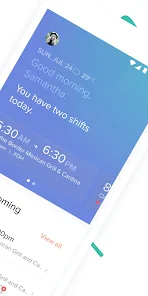
The early appeal is practical rather than flashy. A manager can build a schedule, assign people to shifts and make edits when plans change, while staff can use the same place to check what they are expected to work. That shared reference helps prevent the familiar problem of one person acting on an outdated message. The app is rated for Everyone, and its 4.6 average from around 8,300 ratings, alongside more than a million installs, suggests it has reached a broad audience; those figures are context, not a guarantee that every restaurant’s workflow will fit.
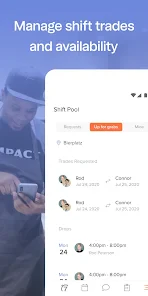
A realistic test is a busy week in which someone calls out before a shift. Instead of updating a spreadsheet, sending several individual texts and hoping everyone sees the change, a manager can revise the schedule and notify the team through the app. I would still make sure the affected employees have actually seen the change; sending a notice is not the same as confirming coverage. That small habit is what turns a digital schedule into a dependable one.
The app is most compelling when the team has enough moving parts for missed messages to create real work: rotating shifts, changing availability, or several people who need the same current roster. A manager can use the first scheduling cycle to establish a simple rule: publish shifts in one place, make revisions there, and ask employees to check the change before assuming they are covered. This is more useful than trying to transfer every workplace conversation into an app. The goal is a reliable schedule, not a new source of notifications.
What keeps it useful beyond the novelty
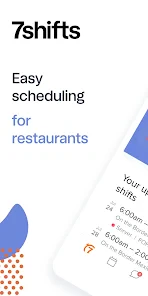
Getting started with 7shifts is a breeze. I was pleasantly surprised at how intuitive the setup process was. Within minutes, I had the app up and running, ready to dive into the scheduling world. The interface is clean and straightforward, making it easy for anyone, tech-savvy or not, to navigate through its features. No need to be a tech wizard here!
Scheduling Made Simple
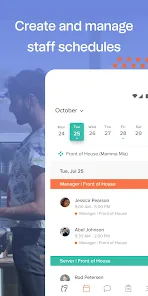
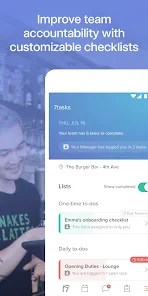
The core feature, of course, is scheduling, and 7shifts does it brilliantly. You can create and modify schedules with just a few taps. Want to add shifts, assign roles, or make last-minute changes? No problem! The app allows for easy adjustments, ensuring that you’re always in control. Plus, it’s cloud-based, so you can manage schedules from anywhere. How cool is that?
The longer-term benefit is consistency: staff learn where to look, and managers have a single schedule to maintain instead of recreating the same information across several channels. My tip is to settle on a regular routine for publishing and revising shifts, then use the app as the reference point. That makes it easier to spot a change that has not been communicated clearly. It also exposes a trade-off: a shared schedule only stays trustworthy when someone takes responsibility for keeping it current.
More From Our News Desk

Clash of Clans Is Won Between the Battles

Android Auto Makes the Case for Quieter Car Software

MobiOffice: Transforming Mobile Productivity with Seamless Integration

EA SPORTS FC™ Mobile Soccer: Redefining Mobile Sports Gaming

How Microsoft OneDrive Became a Mobile Productivity Giant

How Google Translate Breaks Language Barriers Effortlessly
Compared with a paper rota or a basic calendar, a restaurant scheduling app can keep team communication closer to the shifts themselves. A spreadsheet may be enough for a very small team with stable hours, and it can be easier if nobody wants another app. 7shifts makes more sense when schedules change often and more than one person needs to stay informed. Before relying on any connected workflow, I would check that the systems and plan available to my restaurant support the way I intend to use them rather than assume every setup works identically.
There is also a practical distinction between making a schedule and getting a team to follow it. The app can centralize the roster, but it cannot decide whether a shift change is fair, resolve conflicting availability, or make someone volunteer for an uncovered shift. I would use it to keep the facts visible, then handle sensitive conversations directly. That division keeps the tool useful without expecting it to replace a manager’s responsibility.
For an owner or manager comparing options, the best alternative depends on the problem. A shared calendar can be less demanding when only a few people work predictable hours. A spreadsheet offers flexibility, but someone has to distribute updates and guard against multiple versions. A general-purpose chat can be convenient for quick questions, yet schedule details may become hard to find later. 7shifts is worth considering when scheduling is a recurring coordination task rather than a simple list of dates; otherwise, a lighter tool may be easier to maintain.
Communication is Key
One of the things I love about 7shifts is its emphasis on communication. The built-in messaging feature lets you communicate with your team instantly. Need to notify staff about a schedule change? You can do it directly through the app, ensuring everyone is on the same page. It’s like having a group chat dedicated solely to your work schedules.
For day-to-day use, I would keep messages focused on actionable work details: which shift changed, who needs to respond and by when. That is a useful way to reduce the chance of important scheduling notes getting buried in a general chat. It is not a substitute for a manager’s judgment, though. A message cannot resolve a disagreement about availability or guarantee that a last-minute opening will be filled.
A small workflow choice can make those messages more effective: distinguish between an FYI and a request that needs a reply. If a shift is simply moved, staff need to know what changed; if coverage is needed, the manager should make the request explicit and follow up until it is resolved. Otherwise, a quiet notification can be mistaken for confirmation. I would also agree on what to do if someone cannot access the app or misses a message, so urgent coverage does not depend on one communication channel alone.
That is particularly relevant for teams with varied phone habits. Some employees may check a work app regularly, while others may rely on a manager to tell them about a change. The app can create a shared place to look, but the transition works best when the manager explains the expectation and gives the team time to adopt it. If staff are not willing or able to use it, keeping a backup communication route is more realistic than assuming that installing an app solves the problem.
Tracking and Reporting
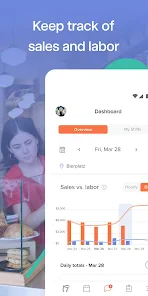
Another standout feature is the reporting tool. Keeping track of labor costs and employee performance is crucial, and 7shifts offers detailed reports that help you stay on top of things. Whether you’re analyzing hours worked or spotting trends in labor costs, the insights provided are invaluable for making informed decisions.
Reports become more helpful when a manager checks them as part of a regular review rather than opening them only when something looks wrong. A recurring look at hours and labor costs can prompt a useful question about how a roster is working, but a report should inform a decision, not make it on its own. If your business uses connected point-of-sale tools, confirm that the particular setup is compatible and decide who will check the resulting information; integration is valuable only when someone acts on it.
For example, if a manager notices that planned staffing and labor patterns do not seem to line up, the useful next step is to investigate the roster and the circumstances behind it, not to treat a report as a verdict on an employee. Numbers can point to a question; they do not explain every busy service, absence, or operational choice. I would keep a short review habit and use the findings to guide the next schedule, rather than letting reports become another screen that nobody opens.
Owners should also decide who is responsible for checking connected information and what decision it is meant to support. A connection to a point-of-sale system sounds attractive, but it only earns its place if the restaurant’s specific setup works as expected and someone has time to interpret what appears. If your team does not need that view, scheduling and communication may be the more relevant reasons to use the app. Avoid adding a reporting routine simply because it exists; a small, repeated check is better than a complicated process that quickly gets abandoned.
The upkeep and the points that can wear thin
There is maintenance behind the convenience. Managers still need to keep staff details, roles and schedules accurate, and employees need to build the habit of checking the app rather than relying on old screenshots or side conversations. If only some of the team uses it, the business can end up maintaining both the app and a parallel text thread. I would introduce it with a clear expectation about where schedule changes appear and how staff should acknowledge urgent updates.
That routine can feel like friction in a tiny restaurant where shifts rarely change, or for workers who prefer not to use a phone app for work. In those cases, a printed rota or a simple shared calendar may be the calmer choice. The same is true if the manager wants only a basic timetable and does not need restaurant-oriented coordination or reporting. The point is not to move every workplace task into one tool, but to avoid adding another place people must check without a clear benefit.
One maintenance trap is treating the initial setup as the finished job. When roles, availability, or team membership change, the schedule needs to reflect the current reality. I would assign one person to own those updates and make it clear who can publish changes. That keeps edits from becoming a vague shared responsibility where everyone assumes someone else has corrected the roster. It is a modest bit of process, but it is what protects the schedule’s credibility over time.
There is a corresponding burden for employees: they must remember to check the app, understand which version of the schedule is current, and pay attention when something changes. For some teams that becomes routine; for others, especially those already juggling several work channels, it can feel like one more obligation. A restaurant should be honest about that before switching. If adoption is uneven, the manager may need a gradual handover rather than abruptly stopping the existing method.
The app’s current version is 2025.48.0, and it supports Android 7.0 or later. It has been available since August 23, 2013, so this is an established product rather than a new scheduling experiment. Still, I would check the device requirements before asking a team to adopt it, especially if staff use older phones. For a restaurant considering it, a sensible trial is to run one complete scheduling cycle, note where people still miss information, and decide whether the reduced back-and-forth justifies the ongoing upkeep.
A trial should include the awkward parts, not just a calm week when everything goes to plan. See what happens when availability changes, a shift needs coverage, or someone does not notice an update. Keep track of where the team still falls back on texts or paper, then ask whether that backup is a sensible safety net or evidence that the new routine is not sticking. This gives a manager a better basis for deciding than judging the app by how quickly the first roster was entered.
How it fits into a working restaurant
The strongest fit is a restaurant where schedules need regular attention and more than one person benefits from seeing the same information. A working manager who handles shift assignments, communicates changes, and checks labor patterns may get recurring value from keeping those tasks close together. A team with a stable rota and very little need for coordination is less likely to notice enough benefit to justify teaching everyone another habit.
It can also be a useful option for a manager who is tired of answering the same practical questions about when people work. A clear shared schedule gives staff a place to check before asking, while the manager can spend less time retransmitting routine information. That does not mean questions disappear: exceptions, swaps, and coverage still need human attention. The benefit is a better starting point for those conversations, not a promise that the conversations go away.
Imagine a manager preparing the next week’s rota while also dealing with a change in staff availability. The schedule can be adjusted in the shared system, and the team can be told where the current version lives. If a shift remains uncovered, the manager still needs to follow up with the people involved rather than assuming that a notification has solved it. At the end of the cycle, checking hours and labor patterns can help shape the following roster. That repeatable loop—prepare, communicate, verify, review—is where the app’s ongoing value can emerge.
Before choosing it, I would ask the team two straightforward questions: will everyone use a shared schedule, and who will keep it accurate? If the answers are clear, the app has a better chance of becoming part of the workday instead of an extra icon. If not, a paper rota or existing calendar may be more dependable for now. A tool should fit the team’s habits, and sometimes the right decision is to simplify rather than add another system.
7shifts also integrates smoothly with various POS systems, which is a big plus. This integration means you can pull sales data directly into the app, allowing for a comprehensive view of your business operations. It’s like having a mini HR department right in your pocket!
In a nutshell, 7shifts: Employee Scheduling isn’t just an app; it’s a lifesaver for anyone in the restaurant industry. Its ease of use, robust features, and ability to improve team communication make it a must-have tool. So, if you’re looking to transform your scheduling process, give 7shifts a try. You’ll wonder how you ever managed without it!
7shifts: Employee Scheduling Frequently Asked Questions
Is 7shifts: Employee Scheduling free to download?
Yes, 7shifts is free to download, so you can install the app and explore its role in handling workplace scheduling and communication. It is a business app from 7shifts, Inc., aimed especially at restaurant teams. Before making it part of your daily routine, consider whether its scheduling tools fit the way your workplace manages shifts, time, and staff requests.
What devices and operating systems can run 7shifts?
7shifts is available for Android, with support beginning at Android 7.0. That makes it suitable for many devices still in everyday use, though it is worth checking your phone’s software version before downloading. The app is intended for use by both managers and employees, so teams can use mobile access to stay connected with their schedules and workplace activity.
What is 7shifts: Employee Scheduling?
7shifts: Employee Scheduling is a comprehensive app designed to help businesses manage their staff scheduling needs efficiently. It is particularly popular in the restaurant industry, allowing managers to create, edit, and share work schedules seamlessly. The app also offers features like time-off requests, shift feedback, and labor compliance, making it an essential tool for streamlining operations and improving communication.
How does 7shifts help in reducing labor costs?
7shifts helps in reducing labor costs by providing managers with tools to optimize scheduling and ensure that labor hours align with forecasted sales. The app offers labor budgeting features, allowing businesses to track and control labor costs in real time. Additionally, it provides insights and analytics to help managers make informed decisions, ultimately minimizing unnecessary labor expenses.
Is 7shifts suitable for businesses outside the restaurant industry?
While 7shifts is primarily designed for the restaurant industry, its robust scheduling and communication features make it adaptable for various types of businesses. Any organization that requires employee shift scheduling, such as retail stores or service providers, can benefit from its capabilities. However, it's important to evaluate if the specific features meet your industry's needs before implementing it.
Pros
- User-friendly interface for easy navigation.
- Efficient scheduling saves managers time.
- Employees can access schedules anytime.
- Reduces scheduling conflicts and errors.
- Integrates with payroll and POS systems.
Cons
- Limited offline functionality.
- Occasional sync issues with devices.
- Some features behind a paywall.
- Requires stable internet connection.
- Learning curve for new users.

- Category
- Business
- Version
- 2025.48.0











