

7 Brew Coffee
- 399.00
- 3.9
- Installs
- 100.00K
- Price
- Free

Screenshots
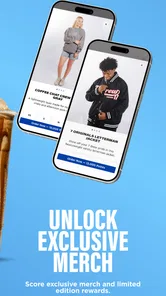
Analysis by Reviewed
I approached 7 Brew Coffee as a practical companion for ordering drinks, keeping track of rewards, and making a drive-thru visit less of a last-minute decision. It is a free Food & Drink app from Seven Brew Drive Thru Coffee, and its purpose is refreshingly focused: prepare an order ahead, earn rewards through use, and redeem them when you are ready. I found that focus more useful than a crowded restaurant app trying to cover every possible dining situation.
The app has a 3.9 average from around 500 ratings and has passed 100K installs, so it has attracted a meaningful group of users without feeling like a general-purpose platform. It is rated for Everyone, costs nothing to download, and runs on Android 8.0 or later. That combination makes it accessible to older phones, although the experience still depends on how smoothly your device and connection handle any app that needs to load menus, locations, account information, and order details.
How the app feels during a real coffee run
I look at a coffee run as a sequence of small decisions, and this section focuses on where ordering ahead can genuinely help: choosing before the queue, checking the pickup location, and leaving time to review the order. I also want to distinguish a smoother ordering routine from a promise of faster drink preparation, since those are not the same thing.
Speed expectations before you leave
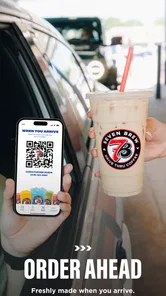
The main appeal is not that it turns coffee into a complicated digital experience. It is that it can move the planning step away from the counter. When I am leaving home or finishing a short errand, ordering ahead is most valuable because it lets me make the drink decision before I reach the drive-thru. That small change can make the visit feel more organized, especially when I already know what I want.
I would not judge the app solely by how quickly its first screen appears. A useful order-ahead tool has several moments where information needs to be current: choosing a location, selecting a drink, checking the order, and confirming the reward activity. If any of those steps takes longer than expected, the benefit of preparing in advance becomes smaller. My practical advice is to place the order before you are pulling into the parking area rather than waiting until the last few seconds.
That workflow also gives you a chance to review the order calmly. In a drive-thru setting, people often make choices while dealing with traffic, passengers, weather, or a line of cars behind them. Using the app earlier reduces that pressure. The real speed advantage is preparation, not frantic tapping at the store entrance.
For a regular customer, the rewards side can make the app feel quicker over time because your routine becomes familiar. You are not necessarily exploring the entire menu on every visit; you are returning to the choices you already understand and using the app as a repeat-order aid. I found that more convincing than treating it as a replacement for every in-person interaction.
More From Our News Desk

 Instagram
Instagram’s Power Comes From Its Place in Your Phone
A close look at how Instagram turns Meta’s reach, recommendation systems and everyday camera habits into durable platform power—and what that costs users.

 Gmail
GmailGmail in a Busy Inbox: Who Benefits Most?
From first account to crowded workday, Gmail earns its place through dependable search and flexible sorting—but its best fit depends on how much inbox maintenance you can tolerate.

 Prime Video
Switching to Prime Video: What Changes in Your Viewing Routine
Prime Video can make a compelling second home for streaming, but switching means learning a different catalog, rental layer, and route from browsing to playback.

 Universal TV Remote Control
Universal TV Remote Control Works Best as a Reliable Backup
A phone remote earns its place through quick setup and reliable habits. Here is how to get more from Universal TV Remote Control—and where its limits show.

 Weather - By Xiaomi
Weather by Xiaomi Review: Clear at a Glance, Less Clear Up Close
Xiaomi’s weather app makes everyday forecasts quick to scan, but its calm surface can leave useful details and recovery paths harder to find than they should be.

 X
XX Under Pressure: Can It Recover When Posting Goes Wrong?
A resilience-focused review of X, examining setup, mistaken posts, interruptions, weak connections, and the gaps that matter when recovery needs to be dependable.
Latest News



What happens during heavier-use moments
The most demanding situations are likely to be the ones in which many customers are trying to order around the same time. Morning commutes, school drop-offs, weekend errands, and sudden weather changes can all create moments when an order-ahead app matters most. These are also the moments when a user has the least patience for a slow screen or an unclear confirmation.
I recommend opening the app before the busiest part of your trip begins. If you are already driving, hand the phone to a passenger or wait until you are safely stopped. This is not just a convenience tip: an order that has not been reviewed carefully can create more friction than ordering directly at the window. Check the selected location and the drink details before confirming, then keep the confirmation available until the pickup is complete.
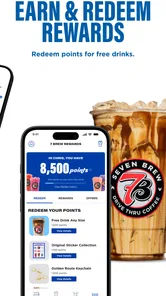
A second useful habit is to avoid treating rewards as an afterthought. Since earning and redeeming are central parts of the app, I would look at the reward balance before starting an order rather than discovering at the end that I wanted to use it differently. This makes the app part of the purchase decision instead of merely a digital receipt afterward.
There is also a trade-off in using order ahead during a rush. It may save you from making the order verbally, but it does not make the physical preparation of the drink disappear. If the drive-thru is busy, the app cannot by itself guarantee that your drink will be ready the instant you arrive. I see it as a way to reduce ordering friction, not as a promise of a completely wait-free visit.
Reliability and recovering from interruptions
Reliability matters more here than flashy presentation. A coffee-ordering app has to leave me confident about three things: what I selected, where I selected it, and whether the order was actually submitted. If the connection drops during browsing, I would rather wait and verify than repeatedly tap a confirmation control and risk creating confusion.
The safest recovery habit is simple: after an interruption, reopen the app and inspect the current order state before trying again. Do not assume that a frozen screen means nothing happened, and do not assume that a completed-looking screen means the order was accepted unless the app clearly shows the result. This is sensible with any order-ahead service, but it is especially important when the app is being used during a busy commute.
I also prefer using a stable connection before leaving. A short delay at home is easier to handle than discovering a loading problem while sitting in a line of cars. If the app is temporarily inconvenient, the ordinary alternative remains available: order directly at the drive-thru. That option is slower from a planning perspective, but it is easier when you need to ask a question, change your mind, or explain a special request.
Because the app is focused on Seven Brew rather than being a broad delivery marketplace, its reliability should be judged by how well it supports that particular visit. I would not install it expecting restaurant discovery, multi-brand ordering, or delivery coordination. Its narrower scope is a strength when you already buy from Seven Brew, but it is a reason to skip it if your coffee habits are spread across several unrelated businesses.
Device limits, operating system support, and everyday demands
The minimum Android requirement is 8.0, which keeps the app within reach of many older devices. That is helpful for someone who does not replace a phone frequently. Still, minimum compatibility is not the same as an equally smooth experience on every supported phone. Older hardware, limited free storage, aggressive battery controls, or an overloaded background process can make any ordering app feel less responsive.
I would keep the app updated to its current version, 1.0.2557, and make sure the phone has enough room for normal app operation. I would also avoid opening it for the first time while rushing into a drive-thru. Give it a test run at home: see how quickly it opens, find the ordering flow, inspect the rewards area, and make sure you understand where the final confirmation appears. That preparation is more useful than assuming the app will behave identically on every device.
Resource demands should be modest in the context of its job, but a modest app can still become inconvenient if the phone is already struggling. If your device regularly closes apps in the background or has an unreliable connection, the order-ahead benefit may be inconsistent. In that situation, direct ordering may actually be the less stressful choice. The app is best for people whose phones can handle a short, focused session without constant interruption.
On a newer phone, the experience should be easier to manage simply because screens respond more promptly and switching between the app and other tasks is less troublesome. On an older supported phone, I would prioritize a simple workflow: open it, choose the location, make the order, check the reward decision, and finish. Avoid leaving the app open for long periods while multitasking if your device tends to reclaim memory aggressively.
Where it fits among the usual alternatives
The closest alternative is ordering in person at the drive-thru. That method wins when you need help deciding, want to ask about an unfamiliar drink, or need to explain a change that is difficult to express through a fixed ordering flow. It also avoids depending on the app at the exact moment you need coffee. The downside is that every choice happens under time pressure, and you cannot prepare the order while still at home or finishing another task.
Another alternative is using a general restaurant or delivery service. Those platforms can be better when you want to compare several places, coordinate food and drinks, or arrange delivery. They are less naturally suited to a quick Seven Brew drive-thru routine, where the useful combination is order ahead plus rewards. A broad platform may add discovery, but it can also add another account, another interface, and another layer between you and the store.
The app makes the most sense for a person who visits Seven Brew often enough to value rewards and already prefers drive-thru pickup. It is less compelling for someone who visits only once, rotates between many coffee brands, or usually wants to speak with staff before choosing. In those cases, the download is unlikely to solve a recurring problem.
Three practical habits that improve the experience
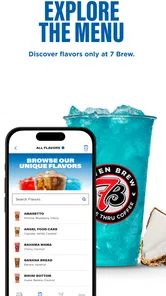
First, separate menu browsing from the final ordering moment. If you are curious about a new drink, explore when you have time, but do not wait until you are at the entrance to make every decision. This keeps a slow connection or an unexpected distraction from affecting the pickup routine.
Second, treat the selected location as a detail worth checking every time you order. People often build habits around a usual store, then place an order while traveling or running a different route. A quick location check can prevent the most frustrating kind of mistake: a correctly prepared order waiting somewhere you are not going.
Third, use rewards deliberately rather than automatically. If you are saving toward a particular visit, do not redeem simply because the option is visible. If you are making a small routine purchase, redemption may be worthwhile. The app becomes more useful when the rewards decision matches your own pattern instead of being left to the last tap.
These habits are not glamorous features, but they are where the app can earn its place on a phone. The store summary is brief, yet the practical value comes from combining advance preparation with a conscious rewards routine. That is also why I would test the complete flow before relying on it during a time-sensitive trip.
Who should use it, and who should skip it
I would recommend it to frequent Seven Brew customers who want a repeatable way to prepare a drive-thru order. It is especially suitable for commuters, parents managing a busy morning, and anyone who dislikes making a detailed drink choice while waiting at the window. The free price removes the main barrier to trying it, and the Everyone rating makes it a reasonable option for a wide range of users.
I would be more cautious if you rarely visit Seven Brew or do not care about rewards. In that case, the app may offer too little benefit to justify another icon, account, and ordering routine. I would also skip relying on it when your phone is unreliable, your connection is poor, or you need a conversation with staff before ordering. The direct drive-thru remains the better tool for those situations.
My overall performance verdict is favorable but specific. This is not an app I would praise for trying to do everything; I like it because it concentrates on the Seven Brew visit. Its perceived speed comes from moving decisions earlier, its strongest heavy-use benefit is reducing verbal ordering pressure, and its main reliability risk is the need to verify the order after interruptions. On supported Android devices, it should be a sensible lightweight addition for regular customers, provided they plan ahead rather than treating it as an emergency tool.
After using it, I see 7 Brew Coffee as a practical loyalty and order-ahead companion rather than an essential app for every coffee drinker. The rating of 3.9 suggests a mixed but workable experience, and that feels like a fair expectation: the app can make repeat visits smoother, but it cannot remove busy-store delays or replace personal assistance. If Seven Brew is already part of your routine, I think the combination of advance ordering and rewards is worth trying. If it is not, ordering directly or using a broader food app will probably suit you better.
7 Brew Coffee Frequently Asked Questions
What is the 7 Brew Coffee app’s rating, and is it popular?
The 7 Brew Coffee app is a Food & Drink app from Seven Brew Drive Thru Coffee. It has a 3.9 average rating, based on around 500 ratings, and more than 100,000 installs. Those figures offer a quick sense of its reach, but your experience will depend on whether the app’s ordering and rewards features are useful at your local stand.
What is 7 Brew Coffee, and what can I order through the app?
7 Brew Coffee is a drive-thru beverage brand known for coffee, energy drinks, teas, smoothies, shakes, and other customizable drinks. Depending on the app and your location, you may be able to browse the menu, review drink options, find nearby stands, check opening hours, and access brand information. Availability of ordering, rewards, or payment features can vary by region and app version.
Does the 7 Brew Coffee app support mobile ordering or drive-thru pickup?
Mobile ordering availability may depend on your location, the specific 7 Brew app version, and whether nearby stands support digital orders. In some areas, the app may primarily provide menus, locations, promotions, or rewards rather than full ordering. Before downloading, check the app listing and confirm that your local stand appears with the features you need, since services can differ between locations.
Can I customize drinks and view allergy or nutritional information in 7 Brew Coffee?
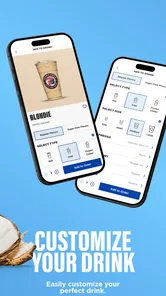
7 Brew is popular for drink customization, including flavor combinations, sweetness preferences, milk choices, and caffeine options. However, recipes and nutritional details may not be displayed in the same depth for every item. People with allergies or dietary restrictions should review the available information carefully and speak directly with staff before ordering, because cross-contact and ingredient changes may not be fully represented in the app.
Does 7 Brew Coffee offer rewards, promotions, or a loyalty program?
The 7 Brew experience may include loyalty benefits, promotional offers, or rewards depending on the app, your market, and current company programs. If these features are available, you may need to create an account and allow the app to store purchase or reward information. Program rules, expiration dates, eligible products, and redemption limits can change, so read the terms shown in the app before relying on a particular offer.
Pros
- Large selection of customizable coffee
- energy drinks
- teas
- and smoothies
- Friendly drive-thru service designed for quick ordering
- Seasonal flavors add variety beyond the standard menu
- Rewards features can make frequent purchases more worthwhile
- App helps locate nearby stands and check available menu options
Cons
- Prices can become high when adding flavors
- milk
- or extra toppings
- Menu choices may feel overwhelming for first-time customers
- Availability and service quality can vary between individual locations
- Mostly drive-thru focused
- with limited seating at many stands
- Some drinks may be very sweet or high in calories











