10-21 Police Phone
- 362.00
- 2.8
- Installs
- 100.00K
- Price
- Free

Screenshots
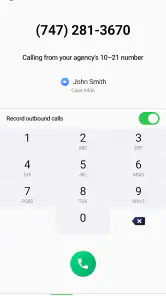
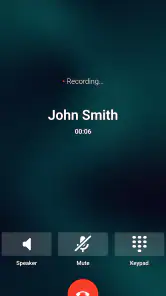
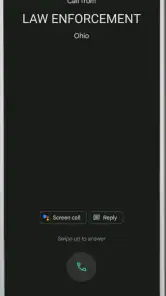
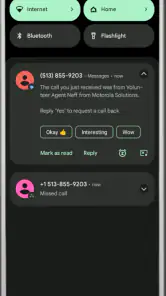
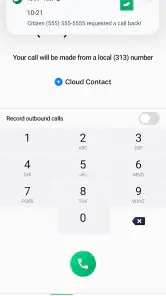
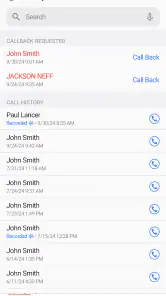
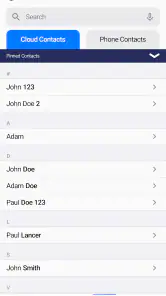
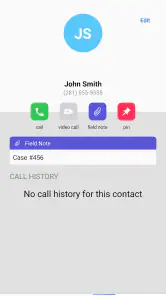
Analysis by Reviewed
10-21 Police Phone is a communication app built around a very specific need: making contact with law-enforcement phone services through a mobile device. I approached it less like a general phone replacement and more like a focused tool for people who already understand the police-contact workflow they need. That distinction matters, because its value depends heavily on your role, your location, and whether a dedicated police calling service is relevant to your everyday routine.
Developed by Motorola Solutions, the app sits in the communication category and is free to install. Its store summary presents it as a calling tool for law enforcement, while the short description identifies it as “10-21 Police Phone.” In practical terms, I would not treat it as a substitute for emergency services, a normal dialer, or a general messaging platform. It is better understood as a specialized front end for a particular police-phone use case.
The app has been available since October 20, 2015, and the current version is 7.8.0. It is marked for Everyone, although the intended audience is clearly narrower than that age label suggests. The listing shows over 100 thousand installs, with an average score of 2.8 from more than 600 ratings and over 300 written reviews. Those figures tell me to approach it with realistic expectations: there is a recognizable use case, but the overall experience has not convinced every user.
How the everyday workflow feels
My recommended starting point is simple: install it, open it before you actually need it, and identify what the main calling action expects from you. A communication tool like this is most useful when the first real call is not also your first attempt to understand the interface. I would spend a few minutes checking the available screens, reading the wording around the call action, and confirming that the app fits the type of police contact I have in mind.
That preparation is especially important because “calling law enforcement” covers very different situations. A non-emergency request, a routine contact, a follow-up conversation, and an urgent threat should not be treated as interchangeable. I would never rely on this app as my only option during an emergency. If someone is in immediate danger, the appropriate emergency channel for the local area should take priority over experimenting with a specialized application.
For a routine scenario, the workflow is easier to understand. Imagine that I need to contact a local police service about a minor incident that does not require an emergency response. Instead of searching through old notes, browsing a website, or trying to remember a phone number, I can use the app as the starting point for that call. Its usefulness comes from reducing the number of steps between recognizing the need to call and reaching the relevant phone function.
I would still verify the destination before speaking. A dedicated police-phone app is not automatically a guarantee that every call is routed to the agency I intended. Location, service coverage, and the way the app is configured can all affect whether the result is appropriate. The safest habit is to confirm the agency name or call context shown on screen, especially after installing the app on a new device or moving to a different area.
You May Like

Clash of Clans Is Won Between the Battles

Android Auto Makes the Case for Quieter Car Software

MobiOffice: Transforming Mobile Productivity with Seamless Integration

EA SPORTS FC™ Mobile Soccer: Redefining Mobile Sports Gaming

How Microsoft OneDrive Became a Mobile Productivity Giant

How Google Translate Breaks Language Barriers Effortlessly
Another practical question is whether it replaces the phone app already on the device. In my view, it should not. The standard dialer remains the better fallback for ordinary calls, saved contacts, and situations where I already know the correct number. This app earns its place when its specialized police-contact path is more convenient than managing that information manually.
Who gets the most value from it
The strongest audience is likely to be someone who regularly handles non-emergency police communication or needs a consistent way to begin that process. That could include people who work around public-safety operations, community organizations that frequently direct residents toward police services, or users who prefer a dedicated shortcut rather than relying on memory.
It may also help a household that wants a clearly recognizable police-contact tool on a shared phone. In that case, I would explain the difference between routine police communication and emergency calling before anyone needs it. A large, familiar entry point can be useful, but only if every user understands that the app is not a replacement for emergency instructions.
On the other hand, I would skip it if I only need a normal phone dialer, if my local police service is already easy to reach through a saved contact, or if I expect a full incident-reporting system with chat, live status, location sharing, or case tracking. The app’s core promise is narrower. Installing it will not automatically turn a phone into a complete public-safety portal.
Settings and habits worth checking
Experienced use starts with the phone settings around the app, not with repeatedly tapping the call button. I would check whether the app is allowed to send notifications, whether the system can place calls normally, and whether battery-saving rules are likely to restrict it in the background. I am not assuming that every device exposes the same controls; Android and iOS handle these areas differently. The useful habit is to inspect the app’s entry in the operating-system settings and make sure it is not being quietly restricted.
I would also review the phone’s default calling behavior. If the device asks which application should handle a call, choosing incorrectly can create friction at the exact moment the app is supposed to save time. If the phone offers a choice between the specialized tool and the ordinary dialer, I prefer keeping the standard dialer as the default unless I have a strong reason to change it. That preserves a reliable fallback for every other contact.
Notifications deserve a practical check rather than automatic approval. If the app uses alerts for a call-related workflow, I want those alerts to be visible without allowing unrelated notifications to overwhelm the phone. I would look at the notification category, sound, lock-screen visibility, and interruption behavior. A quiet, predictable setup is better than a dramatic alert that makes the app feel like an emergency system when it is not being used that way.
Privacy is another reason to review settings carefully. A police-contact application can feel sensitive even when I am using it for an ordinary call. I would pay attention to what appears on the lock screen, whether recent actions are visible in the app or phone history, and who can access the device. I would not assume that deleting an icon erases the phone’s normal call history. If the device is shared, that distinction is worth understanding before relying on the app.
There is also a useful maintenance habit: after a major operating-system update, open the app once and test the beginning of the workflow without completing an unnecessary call. System updates can change default-app prompts, notification behavior, or permission presentation. A quick check is less disruptive than discovering a changed setting during a stressful situation.
Making the first setup repeatable
I recommend creating a small personal checklist rather than depending on memory. First, confirm that the app opens normally. Next, identify the correct call path. Then, check that the phone can place a call and that the audio route is what I expect. Finally, keep a separate emergency plan visible somewhere familiar. This takes little time, but it separates preparation from crisis decision-making.
I would not add unnecessary in-app purchases simply because they appear in the listing. The app is free to install, while its store information shows optional purchases ranging from $4.99 to $49.99 per item. That price range is enough reason to pause and understand what an offered purchase does before approving it. For a specialized communication tool, I would only consider paying if the feature clearly solves a problem I actually have; otherwise, the free starting point is the sensible choice.
The Everyone content rating should not be confused with universal suitability. A young person may be able to install it, but an adult should explain when to use a police phone service and when to use emergency help. The app’s audience is defined more by the communication situation than by age.
Faster patterns for regular users
The first speed improvement is to place the app where it can be found without searching. I would keep it on a home screen used for practical tools, not buried in a folder full of unrelated downloads. If the device supports a home-screen shortcut or a system-level app shortcut, I would inspect what is available and use it only if the resulting action is clear. I would not assume that every phone exposes the same shortcut options, and I would avoid creating a shortcut whose label could be misunderstood.
A second improvement is to pair the app with a written local reference. I might keep the relevant police service name and the distinction between routine and emergency contact in a secure note or household information sheet. The app can provide a convenient route, but a separate reference helps if the app is unavailable, the phone is offline, or I am assisting someone who is using a different device.
For people who make repeat calls, consistency matters more than speed alone. I would use the same sequence every time: open the app, verify the destination, start the call, and state the reason clearly. Repeating that order reduces the chance of calling the wrong service or beginning a conversation without the information needed by the person answering.
Before calling, I would prepare the few details that are likely to matter: where the issue occurred, what happened, when it happened, and whether anyone is currently at risk. I am not presenting that as a special feature of the app; it is a better calling habit. The app helps initiate communication, while preparation helps make the communication useful.
A particularly helpful trade-off is deciding when not to use the app. If I already have a verified local number and the standard dialer can reach it immediately, the ordinary phone app may be faster. If I am uncertain which service is appropriate, opening a specialized tool without checking the context may add confusion rather than remove it. The best workflow is not always the one with the most dedicated software; it is the one that reaches the right help safely.
Where it differs from familiar alternatives
Compared with the standard phone app, 10-21 Police Phone is more focused but less flexible. The ordinary dialer handles every kind of contact and works naturally with personal address books. This app is more appealing when the user wants a police-specific starting point and does not want that purpose mixed with everyday calls.
Compared with a web search, the app can reduce the temptation to click through several pages while trying to find a contact route. That said, a search engine may be better when I need broader information, such as office hours, a station address, reporting instructions, or a service outside the app’s intended scope. The app is a calling tool, not a replacement for all local police information.
Compared with messaging and community-safety platforms, its advantage is directness. I would choose a messaging service when a documented text conversation, file exchange, or group discussion is the actual need. I would choose this app when the priority is beginning a police phone conversation. Mixing those expectations is one of the easiest ways to become disappointed with it.
Advanced limits and points of friction
The average score of 2.8 suggests that the app deserves a careful trial rather than blind confidence. I found the narrow purpose both helpful and restrictive: it keeps attention on calling, but it also means the app may feel underdeveloped to anyone expecting a modern all-in-one communication platform. The more features a user expects beyond calling, the less likely this will feel like the right fit.
Version 7.8.0 is the version I would evaluate on the current device, but I would still keep the operating system updated and watch for changes after updates. A communication app can be technically present while still being inconvenient if a phone’s permissions, default handlers, or notification rules have changed. The practical test is whether the complete path remains understandable from launch to call.
Another limitation is context. Police services are organized locally, and a tool designed around one calling pattern may not match every region or agency. I would not travel with the assumption that the same workflow is equally useful everywhere. When crossing jurisdictions, I would verify the local contact method separately and treat the app as one option rather than a universal directory.
I would also be cautious about confusing convenience with identity verification. The app may help begin a call, but I would not treat its presence on a phone as proof that a caller has reached the correct department, nor would I share sensitive information until the receiving service is clearly identified. That is a general safety principle, but it is especially relevant when an app’s purpose makes the conversation feel official.
In-app purchases are another possible source of friction. The listed range, from $4.99 to $49.99 per item, is wide enough that I would read each purchase screen carefully and avoid approving anything under pressure. A free installation does not mean every part of the experience is free. I would also make sure that a child or another person using a shared device cannot accidentally authorize a purchase.
Finally, I would not judge the app solely by how quickly it opens. The important question is whether it helps me make the correct call with the correct expectations. An interface can be fast and still be unsuitable if I do not know whether the situation is routine or urgent. In that sense, the app works best as part of a prepared communication plan, not as the entire plan.
My verdict after building a reliable routine
I see 10-21 Police Phone as a niche communication utility with a clear audience. Its best quality is focus: users who need a police-phone workflow may appreciate having a dedicated place to begin. Motorola Solutions gives the app a recognizable public-safety identity, and the free entry point makes it easy to test without committing money immediately.
My recommendation is conditional. Install it if you have a genuine recurring need for this kind of police contact, if the workflow matches your area, and if you are willing to keep a normal dialer and emergency plan alongside it. Set it up before you need it, check the phone’s calling and notification behavior, and practice verifying the destination rather than tapping through automatically.
I would skip it if I am looking for emergency response, two-way messaging, incident tracking, a broad local-services directory, or a replacement for the phone app. Those needs call for different tools or established local procedures. The app’s narrow design is not automatically a flaw, but it becomes one when I expect it to solve problems outside calling.
After considering its modest average rating, focused purpose, optional purchases, and limited role in a larger safety plan, my final view is straightforward: this is most useful as a prepared shortcut, not as a complete law-enforcement solution. For the right user, that shortcut can be worthwhile. For everyone else, the standard dialer plus verified local information will often be simpler, clearer, and more dependable.
10-21 Police Phone Frequently Asked Questions
Who develops 10-21 Police Phone, and is it suitable for everyone?
10-21 Police Phone is a communication app developed by Motorola Solutions. It is rated for Everyone, so its intended audience is broad. Its focus is police-related communication rather than entertainment, and the services available can depend on whether a local agency supports the platform. Before installing, consider whether the app’s purpose and the services offered in your area match what you need.
What does the app cost, and are there purchases inside it?
The app is free to download, but it also offers in-app purchases priced from $4.99 to $49.99 per item. Those purchases may matter if you plan to use optional features, so check the purchase details shown in the app before completing a transaction. The basic download price alone does not tell you whether every feature or service is available without an additional charge.
What is 10-21 Police Phone, and what can I use it for?
10-21 Police Phone is designed to provide convenient access to police-related information and services from a mobile device. Depending on the supported location and agency, it may help users find contact details, submit non-emergency requests, receive public safety updates, or access local resources. It should be viewed as a convenience and information tool, not as a replacement for emergency services or direct assistance from law enforcement.
Can I use 10-21 Police Phone to report an emergency?
No. 10-21 Police Phone should not be used for situations involving immediate danger, active crimes, serious injuries, fires, or any circumstance requiring urgent assistance. In an emergency, contact your local emergency number directly, such as 911 in the United States. The app is better suited to non-emergency communication and general police services, where available, and response times may vary depending on the department and request type.
Is 10-21 Police Phone available in every city or police department?
Availability and functionality can depend heavily on whether your local police department or public safety agency supports the platform. Some users may see a full selection of services, while others may only find basic contact information or limited features. Before downloading, check the app listing and confirm that your city, county, or participating agency is included. Features may also differ by region.
Pros
- Includes a broad selection of police-themed emergency phone numbers.
- Simple interface makes the app easy for children to explore independently.
- Interactive sounds and visuals can make pretend play more engaging.
- Useful for role-playing games
- costumes
- and police-themed activities.
- Lightweight design should run smoothly on many older Android devices.
Cons
- It is a pretend-play app
- not a real emergency communication tool.
- Some features may feel repetitive after extended use.
- Audio effects can be loud or unsuitable in quiet environments.
- Limited educational value beyond basic role-playing and number recognition.
- May contain ads or in-app prompts depending on the installed version.

- Category
- Communication
- Version
- 7.8.0











