Spider Solitaire Deluxe® 2
- 2.39K
- 3.7
- Installs
- 1.00M
- Price
- Free

Screenshots



Analysis by Reviewed
Spider solitaire makes a good shared-device pastime because it asks for attention without asking everyone nearby to join in. I like being able to play a few moves while waiting, then leave the phone or tablet free when someone else needs it. Spider Solitaire Deluxe® 2 is at its best in those small, quiet gaps: it gives me a puzzle to focus on, but it does not require a long session or a partner.
A familiar game for shared downtime
Spider Solitaire works well on a shared household device because each round is essentially a solo puzzle. One person can finish a game and pass the phone or tablet along without having to coordinate turns or explain a multiplayer match. In a realistic day-to-day moment, I might play while waiting for someone else to finish getting ready, then leave the device available when they need it. That casual handoff is a better fit here than games built around a live session.
There is still a small practical catch: a shared device can mean a shared game environment. If several people take turns, it is worth agreeing on whose progress or settings are being used before changing themes or starting a challenge. I would not treat a quick card game as a family account system; it is simply easier to enjoy when everyone knows they are using the same device and game space.
Choosing a difficulty that fits the moment
The one-suit option is a sensible place to begin if you are new to Spider Solitaire or want a gentler break. More suits add planning demands, so I would save the tougher layouts for a stretch when I can concentrate instead of playing in tiny fragments. One useful habit is to pause before moving a card that uncovers a hidden one: the immediate move may look tidy, but opening a column can give you more choices later. That kind of small decision is where the game’s brain-teaser appeal comes from.
Compared with simpler solitaire variations, Spider asks you to think about sequences across several columns rather than just move cards into final piles. That makes it more involved than a quick Klondike round, though it can also feel less forgiving when a layout gets tangled. If I want a very short, low-effort distraction, another solitaire style may suit me better; if I want a puzzle I can revisit thoughtfully, Spider is the stronger choice.
What the app offers, and what to weigh
The game is free to download, with optional in-app purchases priced from $4.99 to $49.99 per item. I would decide whether to spend only after trying the free experience and considering whether any paid option adds something I personally value. Purchases are not necessary to understand the basic appeal of arranging cards, but the presence of paid items is worth keeping in mind if a child or another household member uses the device.
Developed by Murka Games Limited, this card game has an average rating of 3.5 from around 11,000 ratings, with about 2,100 written reviews and over 1 million installs. It is free, rated Everyone, and was released on July 20, 2021. Version 4.65.2 supports Android 5.0 and later. Those details make it straightforward to judge whether it fits an older Android device, while the modest average rating is a reminder that experiences vary; I would try it myself before assuming it will suit every solitaire fan.
More From Our News Desk

Weather by Xiaomi Review: Clear at a Glance, Less Clear Up Close

X Under Pressure: Can It Recover When Posting Goes Wrong?

Clash of Clans Is Won Between the Battles

Android Auto Makes the Case for Quieter Car Software

MobiOffice: Transforming Mobile Productivity with Seamless Integration

EA SPORTS FC™ Mobile Soccer: Redefining Mobile Sports Gaming
Game Design and Features
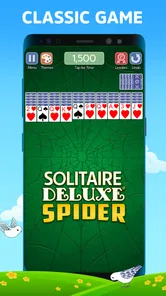
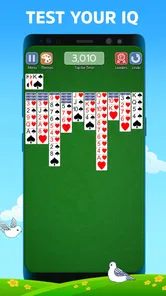
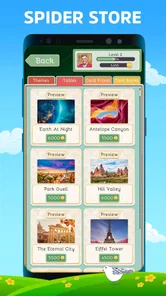
The first thing you’ll notice when you open up Spider Solitaire Deluxe® 2 is how sleek and modern the design is. The developers really put in the effort to make sure the game is visually appealing without being overwhelming. You’ve got several themes to choose from, so whether you’re in the mood for a classic green felt look or something more vibrant, they’ve got you covered.
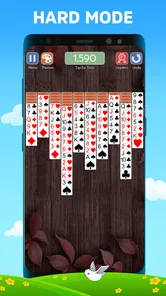
Gameplay is where this app truly shines. For those who might not be familiar, Spider Solitaire involves arranging cards in descending order. Sounds simple? Well, with this app, you can choose the level of difficulty, ranging from one suit to the full four suits. It’s perfect for beginners and seasoned players alike. Plus, with its intuitive controls, you’ll find it’s easy to pick up and play, yet challenging enough to keep you engaged.
Why You’ll Love It
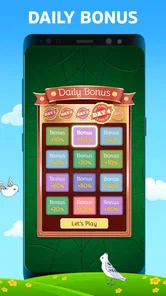
One of the standout features of this app is the Daily Challenge. It’s like a little nudge to get you to play every day, and who doesn’t love a good challenge with rewards? Completing these challenges not only gives you a sense of accomplishment but also unlocks some pretty neat rewards that enhance the game experience.
Let’s not forget about the customization options. You can personalize your game board, which is a fun way to make the game truly yours. And if you’re someone who’s competitive, the global leaderboard is a fantastic addition. It’s always fun to see how you stack up against players from around the world.
Accessibility and User Experience
In terms of accessibility, the developers have done a great job ensuring that everyone can enjoy the game. The app supports both landscape and portrait modes, making it flexible for different devices and personal preferences. The tutorial is also quite helpful, especially for newcomers who might need a bit of guidance at the start.
The app is free to download with optional in-app purchases, which is fairly standard for mobile games these days. However, what’s great is that you don’t feel forced to spend money to enjoy the full experience. The ads are minimal and not intrusive, which is always a plus in my book.
Final Thoughts
At the end of the day, Spider Solitaire Deluxe® 2 is a fantastic option for anyone who loves card games. It’s got a great balance of challenge and relaxation, with enough features to keep things interesting. Whether you’re a solitaire veteran or just looking for a fun new game to pass the time, I’d say give it a shot. You might just find yourself hooked!
Keeping play comfortable for different ages
Its Everyone age rating makes it suitable to consider for a broad audience, and the tutorial gives a newcomer a way into the rules without needing an experienced player beside them. Still, I would introduce the game as a quiet pastime, not as a learning app or a promise of measurable brain-training results. The challenge comes from planning moves and managing columns; how much a player enjoys that depends on their patience with card puzzles.
For a household with children, I would keep the conversation about optional purchases simple and practical: the game costs nothing to download, but purchases are available, so the person responsible for the device should make spending decisions. That matters more than trying to turn a solitaire session into a competition. The leaderboard can add a comparison angle for players who like it, but anyone who would rather play privately can simply focus on the cards and their own decisions.
A routine that makes the most of a short session
I find that Spider Solitaire is easier to enjoy when I choose the difficulty to match the time I have. For a brief wait, a familiar, lower-suit game keeps the decisions manageable; for a longer quiet stretch, the full four-suit challenge gives me more to think through. I also try not to make a move just because it is available. Checking whether it opens a useful card or leaves a column blocked is a more helpful way to approach a difficult layout than clearing cards impulsively.
The daily challenge and leaderboard give the game reasons to return, but they also make it less ideal for someone who wants a completely unstructured, one-and-done distraction. I would treat the challenge as an optional prompt, not a daily obligation. If you prefer a game with a clear narrative, direct competition, or frequent new mechanics, this familiar solitaire format may feel too repetitive. Its appeal is the steady puzzle, not a stream of surprises.
Who is likely to enjoy it
I would recommend trying it if you already like card puzzles, want a solo game that can fit around household routines, or are introducing someone to Spider Solitaire at an easier level. The choice between one and four suits gives room to adjust the mental load, and the portrait and landscape options make it more convenient to hold or prop up a device in different situations.
I would skip it if you dislike replaying a recognizable card format, need a social game that actively brings people together, or do not want optional purchases in a game used on a shared device. A simpler solitaire app may be preferable for quick, familiar rounds, while a multiplayer card game is a better pick when conversation and shared turns matter more than a solo puzzle.
My household verdict
Overall, I see this as an easygoing choice for a personal or shared device, provided everyone understands that the game is built around individual play and that purchases are optional but present. Murka Games Limited’s take has enough difficulty range and presentation choices to make repeated rounds more comfortable, while the challenge and leaderboard suit players who enjoy a reason to return. I would start with the tutorial, pick a difficulty that matches the moment, and see whether the card-by-card planning feels relaxing or frustrating. For the right person, it is a pleasant way to fill a spare few minutes; for someone seeking a social, story-led, or radically varied game, I would look elsewhere.
Making a shared device easier to hand over
When more than one person uses the same phone or tablet, I would keep the handoff simple: finish or pause a round before passing it on, and let the next player choose whether to continue or begin fresh. That small routine avoids the awkward moment of someone moving cards in a layout another person was trying to solve. Since the game is built around solo decisions, taking turns informally works better than trying to play one puzzle collaboratively.
The themes and board customization also make a practical difference in a shared setting, beyond appearance. A player who finds one presentation easier to read can choose it for their own session, while another person can adjust the look later. I would just make a point of saying when I have changed a setting, rather than assuming the next person wants the same setup. It is a minor courtesy, but it keeps a shared game from feeling as though someone else has taken over.
Deciding whether to return each day
The Daily Challenge can give a regular player a defined starting point when they do not want to choose a layout themselves. I would use it as an occasional prompt, especially on a day when I have enough time to concentrate, rather than letting a daily streak or reward dictate when I play. A challenge is most enjoyable when it adds a bit of focus; it becomes less relaxing if I start treating it like an obligation.
For a new player, the tutorial is the natural first stop, followed by a lower-suit game to learn how sequences behave. Once the basic rhythm feels comfortable, I would increase the suit count gradually instead of jumping straight to the hardest option. That progression helps separate two questions: whether you enjoy Spider Solitaire itself, and whether you enjoy the extra planning its more demanding layouts require.
What to expect from the free version
A common question is whether spending is needed just to enjoy a normal round. The free download gives you a way to try the core card puzzle, and I would begin there before considering optional purchases. Because the available items range from $4.99 to $49.99, I would check the purchase screen carefully and avoid treating the biggest option as a default. On a shared device, it is sensible for the household member responsible for purchases to handle that decision rather than leaving it to whoever happens to be playing.
Another practical consideration is whether the game suits short sessions. It can, but the number of decisions in a Spider layout means that a difficult round may not feel satisfying if you are constantly interrupted. I would choose one suit for brief waits and reserve more complex play for a quieter moment. If you need a game that reliably wraps up quickly, a simpler solitaire variation is the safer choice.
A card puzzle, not a group activity
People looking for something to play together may wonder whether the leaderboard makes this a social game. I see it as a personal puzzle with an optional competitive reference, not a substitute for a card game where everyone takes turns and talks through each move. The leaderboard may appeal to someone motivated by comparison, but the central pleasure remains arranging cards on your own.
That distinction matters when choosing an app for a household. A child and an adult can both enjoy the same basic rules at different suit settings, but they do not need to share a goal or compete. If the point is to spend time together, I would choose a multiplayer card game instead; if the point is to keep a shared device useful during separate pockets of downtime, this is a more natural fit.
My recommendation for the right player
I would give it a try if you want a familiar card game with more planning than a quick Klondike round, appreciate being able to adjust the challenge, and like having optional goals such as a daily puzzle. It is also a reasonable fit for a household that passes one device around, as long as each person is comfortable with a shared game environment and the person managing purchases keeps those decisions in hand.
I would choose something else if you need a lively group experience, a story that unfolds across sessions, or a guaranteed short round every time. Spider Solitaire can be absorbing, but a tangled layout may ask for patience, and its familiar rules are the point rather than a drawback to be overcome. For players who enjoy that steady card-by-card problem solving, it offers a relaxed way to make a few spare minutes feel occupied without needing the whole household to play at once.
Spider Solitaire Deluxe® 2 Frequently Asked Questions
Is Spider Solitaire Deluxe® 2 suitable for beginners, or is it mainly for experienced players?
Spider Solitaire Deluxe® 2 is a card game built around the familiar Spider Solitaire format, so it can suit both newcomers and players who already know the game. Multiple difficulty levels let you choose a more approachable starting point or take on a tougher layout. Hints and an undo function can also help when you are learning or reconsidering a move.
What features does Spider Solitaire Deluxe® 2 offer?
Spider Solitaire Deluxe® 2 offers a range of features to enhance your gaming experience, including multiple difficulty levels, daily challenges, and customizable themes. Players can enjoy a smooth user interface, helpful hints, and an undo function to correct mistakes. The app also provides detailed statistics to track your progress and achievements over time.
Is Spider Solitaire Deluxe® 2 free to download and play?
Yes, Spider Solitaire Deluxe® 2 is free to download and play. However, the app offers in-app purchases for those who wish to enhance their experience with additional features or to remove ads. While the core gameplay remains accessible for free, these purchases can provide a more seamless and enjoyable experience. In-app purchases range from $4.99 to $49.99 per item, so check the available options before buying.
Does Spider Solitaire Deluxe® 2 require an internet connection?
Spider Solitaire Deluxe® 2 can be played offline, making it perfect for gaming on the go without worrying about internet connectivity. However, to access certain features like daily challenges or to sync your progress across devices, an internet connection is required. This flexibility allows you to enjoy the game anywhere, anytime.
Which devices can run Spider Solitaire Deluxe® 2?
Spider Solitaire Deluxe® 2 is available for Android devices running version 5.0 or later. Before downloading, it is worth checking your device’s operating system version and available storage in the app store. The game is rated Everyone, making its content broadly suitable, though parents can still review the game themselves to decide whether it is right for their household.
Pros
- Intuitive user interface for easy navigation.
- Multiple card designs for personalized play.
- Daily challenges to enhance engagement.
- Offline mode available for uninterrupted play.
- Customizable backgrounds to suit player mood.
Cons
- Contains in-app purchases.
- Limited hints for beginners.
- Ads can be intrusive at times.
- Requires frequent updates for stability.
- No multiplayer feature for competitive play.