Skyline Bowling
- 1.24K
- 4.3
- Installs
- 1.00M
- Price
- Free

Screenshots

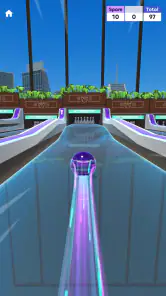
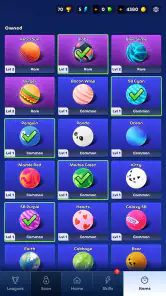
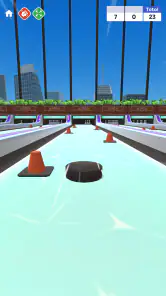

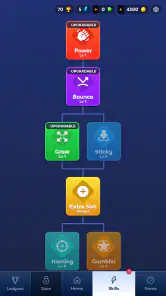
Analysis by Reviewed
I’d treat Skyline Bowling as a casual sports game for short sessions rather than a substitute for playing a full bowling match. Its appeal is the familiar aim of sending a ball toward the pins, paired with special abilities and unusual maps. That combination gives the game a more playful angle than a straightforward bowling simulator, though it also means players looking for a close recreation of real-world bowling may prefer a more traditional option.
What the free entry does—and doesn’t—tell you
The game is free to download, which makes trying it a low-commitment choice. It also offers in-app purchases priced from $0.49 to $99.99 per item, so free access and the cost of optional purchases are separate considerations. I’d start without spending and decide whether the available play is satisfying before considering any purchase; a listed price range alone doesn’t tell you which items are useful or necessary.
Skyline Bowling is a sports game from VOODOO, with a Teen content rating. It has an average rating of 4.3 from around 7,900 ratings, and more than 1 million installs. Those figures suggest a sizeable audience, but they can’t predict whether its particular blend of bowling and special abilities will suit you. The current version is 3.12.5.
Where the value comes from
The most useful way to judge the free experience is by how often you actually want to return to it. A quick bowling round can fit into a break without requiring the planning of a longer sports game, while the special abilities and changing map concepts give you reasons to approach shots differently. I’d pay attention to whether those twists make each session feel fresh for you, rather than assuming that more content automatically means more value.
One practical tip is to give yourself a few rounds to learn how the game responds before judging a missed shot as bad luck. When a game adds abilities to a familiar sport, it can be tempting to focus on the novelty and overlook the basic aim-and-release rhythm. Learning that rhythm first makes it easier to tell whether a different result came from your choice or from the game’s added twists. That distinction matters if you’re deciding whether to keep playing, or whether an optional purchase would genuinely improve your enjoyment.
Getting the Ball Rolling
From the moment you open Skyline Bowling, you’re greeted with a user-friendly interface that’s both intuitive and easy to navigate. The game doesn’t waste any time in getting you right into the action. After a brief tutorial that even a novice can breeze through, you’re ready to start knocking down pins like a pro.
Gameplay and Features
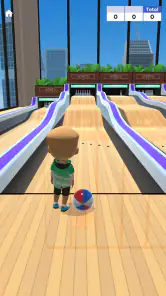
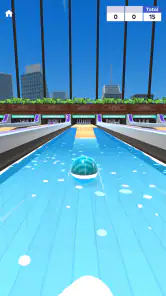
One of the standout features of this app is its realistic physics engine. It might sound technical, but it simply means that the pins fall in a way that feels just like real life — no easy feat for a mobile game. The game offers several modes, including a classic single-player mode and a thrilling multiplayer mode, perfect for challenging your pals or random opponents from around the globe.
More From Our News Desk

Weather by Xiaomi Review: Clear at a Glance, Less Clear Up Close

X Under Pressure: Can It Recover When Posting Goes Wrong?

Clash of Clans Is Won Between the Battles

Android Auto Makes the Case for Quieter Car Software

MobiOffice: Transforming Mobile Productivity with Seamless Integration

EA SPORTS FC™ Mobile Soccer: Redefining Mobile Sports Gaming
Customization is another area where this game shines. You can choose from a variety of bowling balls, each with their own unique designs and stats. Whether you prefer a ball that curves just right or one that’s all about power, there’s something here for every type of player.
Making a short session count
A useful way to approach the game is to treat each round as a small experiment rather than a test of pure accuracy. Try changing one element of your approach at a time: first aim for a consistent line, then pay attention to how a special ability or a different map changes the result. This makes it easier to learn what is actually affecting a shot, and stops the game’s extra twists from turning every outcome into guesswork.
That method is especially handy if you only have a few minutes. Rather than opening the game and drifting through rounds without noticing what you enjoy, pick a simple goal for the session: improve consistency, try a new ability, or see whether a particular map makes you rethink your usual approach. If none of those gives you a reason to play another round, that is useful information too. A free game is still asking for your attention, and your time is part of its value.
A good everyday use case is a spare few minutes while waiting for a ride or a friend. In that setting, the uncomplicated bowling premise is easier to dip into than a sports game built around long matches or detailed team management. If you want a more authentic bowling routine, though, the special abilities and distinct maps may feel like distractions rather than benefits. I’d choose a more conventional bowling game when realistic scoring and a simulation-first feel matter more than variety.
How it compares with other bowling games
Compared with a traditional bowling simulator, the defining trade-off here is clear: Skyline Bowling puts more emphasis on playful variation than on recreating the measured pace of a real alley. That can make it a better fit when you want an uncomplicated mobile distraction, but a weaker fit if you care most about practicing familiar bowling decisions. The special abilities and unusual maps are the reason to try it, not a guarantee that it will satisfy someone seeking a strict simulation.
It also occupies a different space from larger sports games that ask you to manage teams, follow longer competitions, or learn extensive control systems. I’d choose this one when I want a bowling-themed activity without that kind of commitment. If I wanted deeper progression, a more realistic match structure, or a different sport entirely, I’d look elsewhere rather than expect this game to become something it isn’t.
Graphics and Sound
The developers of Skyline Bowling have done an excellent job in the graphics department. The game boasts high-quality 3D graphics that are both colorful and detailed, making every game a visual delight. The various bowling alleys are beautifully designed, each with its own theme that adds an extra layer of fun to your games.
The sound effects are equally impressive. From the satisfying crash of the pins to the ambient sounds in the bowling alley, every audio cue is crafted to enhance your gaming experience. It’s these small details that make Skyline Bowling a standout in the crowded field of mobile bowling games.
Things to weigh before spending
The free download gives you a sensible way to test whether the central loop holds your interest before making any purchase. I would not treat the existence of optional items as proof that spending is required, nor assume that buying something will fix a play style that does not appeal to me. First decide whether you enjoy the bowling itself; then, only if you keep returning, consider whether a particular purchase seems worthwhile to you.
The range from $0.49 to $99.99 per item is broad enough that I’d be deliberate rather than browsing casually when I’m already caught up in a session. A practical safeguard is to decide on a personal limit before opening purchase options and to check the exact item and cost before confirming anything. The game’s free starting point is valuable, but it does not make every optional purchase automatically good value.
Another useful question is whether you want a game that stays enjoyable in brief bursts or one that gives you a long-term project. Skyline Bowling’s most obvious appeal is its quick, recognizable activity with added variation. If your idea of value depends on substantial career-style progression, carefully simulated rules, or a large competitive structure, you may be happier with a different sports game. I’d judge it by the pleasure of its individual sessions, not by expectations borrowed from those alternatives.
Who is likely to get the most from it?
I’d recommend trying it if you enjoy quick sports games, like experimenting with a familiar activity, or want something that doesn’t demand the commitment of a full simulation. It may also suit friends who enjoy comparing how they approach a playful challenge. If you mainly want to practice real bowling technique, dislike ability-based twists, or are looking for a game with no optional spending at all, I’d skip it and choose an alternative that better matches those priorities.
It is also a reasonable pick for someone new to mobile bowling who wants to see whether the genre is fun before paying to access a game. The low-commitment start makes that trial straightforward, while the Teen content rating gives families a basic age-guidance point to consider. I’d still make the choice based on the player’s own preferences: the game’s playful direction will suit some people more than others, regardless of how familiar they are with bowling.
As you play, notice which maps and abilities make you change your approach instead of using the same shot every time. That’s a more useful test of variety than simply counting what’s available. I’d also set a personal spending limit before browsing purchase options: the game can be tried for free, but the wide range of item prices makes it sensible to decide what, if anything, you’re comfortable paying before an impulse buy.
Final Thoughts
All in all, Skyline Bowling is a must-have for any mobile gaming enthusiast. Its combination of realistic gameplay, impressive graphics, and engaging multiplayer modes make it a game that’s hard to put down. Whether you’re a bowling aficionado or just someone looking for a fun way to pass the time, this game is sure to strike the right chord. So why not give it a roll? You might just find yourself hooked!
My more measured verdict is that the free download makes it easy to see whether its style clicks, while purchases are a separate choice rather than a reason to install. I’d try it for a short session, see whether the special abilities and maps add enough variety, and keep playing only if that mix feels fun. For casual bowling with a playful slant, it’s worth a look; for strict realism or a firm no-purchases preference, another game is likely the better fit.
Skyline Bowling Frequently Asked Questions
Is Skyline Bowling free to download, and what should I know about its purchases?
Skyline Bowling is free to download, so you can try its bowling gameplay without paying upfront. It also offers optional in-app purchases, with items ranging from $0.49 to $99.99. Consider these costs if you are planning a download, especially if you prefer not to make purchases while playing. The game is rated Teen.
Who makes Skyline Bowling, and what kind of game is it?
Skyline Bowling is a sports game developed by VOODOO. Its central idea is a bowling experience built around special abilities and unique maps, giving the game a more stylized setting than a plain, traditional bowling lane. It is available for Android and iOS, making it worth considering if you want a casual sports game with a distinctive bowling theme.
What is Skyline Bowling and how does it differ from other bowling games?
Skyline Bowling is an immersive and interactive bowling game available on Android and iOS platforms. Unlike traditional bowling apps, it features stunning skyline backdrops and a variety of themed alleys, enhancing your gaming experience. The game also offers multiple gameplay modes, enabling both solo and competitive multiplayer sessions with friends or online players.
What kind of gameplay modes does Skyline Bowling offer?
Skyline Bowling provides multiple gameplay modes to cater to different player preferences. You can play solo to hone your skills or join multiplayer matches to compete against friends or other players online. Additionally, the game features various challenges and tournaments, allowing players to earn rewards and unlock new levels and features.
Are there in-app purchases in Skyline Bowling?
Yes, Skyline Bowling offers in-app purchases that allow players to enhance their gaming experience. These purchases can include buying new bowling balls, unlocking exclusive alleys, or obtaining special power-ups. While the game is free to download, these optional purchases can help players progress faster or customize their gaming experience.
Pros
- Easy to navigate interface
- Wide variety of bowling challenges
- Realistic gameplay physics
- Engaging multiplayer mode
- Frequent updates with new features
Cons
- Ads can be intrusive
- Limited free features
- Occasional bugs reported
- Requires internet connection
- In-app purchases can be costly
- Category
- Sports
- Version
- 3.12.5