Shooting Archery
- 12.47K
- 4.6
- Installs
- 100.00M
- Price
- Free

Screenshots






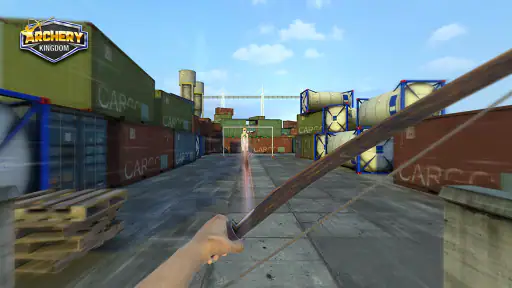
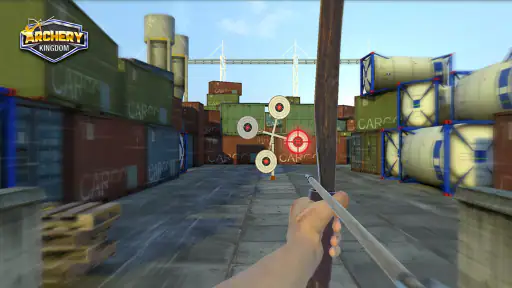
Analysis by Reviewed
I like having a simple game on a shared phone for the small gaps in a busy day: a quiet moment before dinner, a short wait, or a turn while someone else is choosing what to play. Shooting Archery fits that kind of use because its central action is easy to understand. It is a free sports game from 7788`s, and its bow-and-target theme gives it a clearer focus than a general collection of quick mini-games.
Taking turns on one device
In a household, the uncomplicated aiming gesture makes it easy to pass the phone around without explaining a long control scheme. I’d treat it as a casual shared activity rather than a game that needs a formal schedule: one person can take a few shots, hand the device over, and let the next person try to beat their own result. That works especially well when attention is divided and nobody wants to commit to a long session.
There is a useful trade-off here. A shared screen makes the game convenient, but it also means everyone is using the same device and whatever game state is active there. I would agree on whose turn it is and avoid assuming that separate household members have separate progress or settings. If keeping play completely individual matters, using a personal device is the cleaner arrangement.
Reads About Shooting Archery
A practical handover can be as simple as deciding that everyone gets the same number of attempts, then passing the phone without changing how it is held or where the player sits. That keeps a casual contest friendly and gives younger or less experienced players a fair chance to learn the controls. If the group is not interested in comparing results, there is no need to keep score at all; taking turns for the fun of aiming avoids turning a short break into an argument over who did better.
Gameplay and Features
When I first downloaded Shooting Archery, I was immediately captivated by its simplicity and addictive gameplay. The game doesn’t bombard you with complicated tutorials; instead, it gently eases you into the world of archery with intuitive controls. You simply drag your finger across the screen to aim and release to shoot. It’s as easy as pie!
For a better shared-device routine, I’d keep turns short and let each person settle the phone in their hands before aiming. Touch-based aiming can feel different depending on grip and screen position, so comparing attempts is fairest when players use a similar hold. That small adjustment makes the result feel more about patience and precision than about who happened to be holding the phone in the most comfortable way.
What really sets this game apart is its variety of modes and challenges. Whether you’re in the mood for a leisurely session in the classic mode or you’re itching for some competition in the battle mode, Shooting Archery has got you covered. The game also offers daily challenges that keep things fresh and exciting. Trust me, you’ll never get bored.
More From Our News Desk

X Under Pressure: Can It Recover When Posting Goes Wrong?

Clash of Clans Is Won Between the Battles

Android Auto Makes the Case for Quieter Car Software

MobiOffice: Transforming Mobile Productivity with Seamless Integration

EA SPORTS FC™ Mobile Soccer: Redefining Mobile Sports Gaming

How Microsoft OneDrive Became a Mobile Productivity Giant
Those options suit different moods, but I wouldn’t assume every mode is equally relaxed. If the goal is a low-pressure break, classic play is the natural place to start; if people in the room enjoy comparing performance, a competitive mode may be more engaging. Daily challenges can also give a returning player a reason to open the game, though they make it less purely spontaneous than a round with no ongoing objective.
Making short sessions work
The game makes most sense to me as something to open for a few minutes, not as an activity that needs a large block of free time. For example, if I’m waiting for someone to finish getting ready, I can take a short turn and put the phone down when they’re ready. The focused target-shooting loop is a better fit for that pause than a sports game that expects me to finish a full match before I can stop.
One small tip is to treat the first few shots as a feel-out rather than a score attempt. I’d check how the aiming movement responds on that device and then make slower adjustments, especially if I’m switching from a larger phone to a smaller screen. That helps distinguish a rushed swipe from a genuinely difficult shot, and it keeps a new player from deciding too quickly that the controls are not for them.
Daily challenges are useful when I want a clear reason to return, but they are not essential to the basic appeal. Someone who only wants an occasional archery-themed distraction can stick with a casual session; a regular player may appreciate having a recurring objective. The trade-off is that a challenge can make the game feel more like a task if I open it when I only wanted to pass a minute or two.
Graphics and Sound
The graphics in Shooting Archery are surprisingly good for a mobile game. The developers have done a great job of creating a realistic and immersive environment. The attention to detail in the archery equipment and the different backgrounds is commendable. You can almost feel the tension of the bowstring as you pull back the arrow.
As for the sound, it’s subtle yet effective. The twang of the bowstring and the thud of the arrow hitting the target add to the realism of the game. You might even find yourself getting lost in the rhythmic sounds of archery – it’s kind of therapeutic!
That audio character is a plus when playing alone, but it is worth thinking about in a shared room: a quiet game is easier to fit around conversation, while repeated shot effects may still be noticeable if someone nearby is reading or resting. I’d check the sound level before handing over the device rather than making the game’s atmosphere the default for everyone around it.
On a shared phone, I’d also think about what happens when the next person wants to do something else. Agreeing that the game is only using the device for a short turn avoids a common household snag: one player getting absorbed while somebody else needs the phone. This is not a special game feature, just a sensible way to make a quick activity work on a device that serves several people.
Age, spending, and expectations
The game is rated Everyone, which makes it broadly suitable for a mixed-age household, but that label is not a substitute for deciding how a child uses a shared device. I’d set the expectation that it is a target-shooting game, agree on turns, and have an adult handle purchases if a child is playing. The game is free to install, with in-app purchases priced from $0.99 to $4.99 per item, so it is sensible to check purchase settings on the device before passing it around.
It has a 4.6 average from around 819,000 ratings and more than 100 million installs, which suggests a large audience has tried it; those figures don’t tell me whether it will suit a particular player. The game was released on March 29, 2018, and version 3.61 requires Android 7.0 or later. The developer is 7788`s. Those practical details matter if you are choosing it for an older device or deciding whether it belongs on a family phone.
For families, I would separate the question “is this appropriate for the age group?” from “is this the right thing to install on this device?” The Everyone rating is reassuring for broad age suitability, while a shared phone still calls for ordinary adult supervision around purchases and turn-taking. If the device is used for school, work, or other personal tasks, it may be better to choose a dedicated play window rather than leave the game open for anyone to pick up at any time.
Another practical point is that a shared device blurs the boundary between a game session and the device owner’s own activity. Before handing it over, I’d close anything private and make sure the person using the phone knows not to switch into other apps. That advice applies to any shared phone, but it matters particularly when a game is being passed around among people with different ages and levels of comfort using the device.
Choosing it over other sports games
The appeal of Shooting Archery lies in its accessibility and the sense of achievement it offers. Whether you’re a seasoned gamer or a newbie picking up a mobile game for the first time, you’ll find yourself improving with each round. The game has a way of making you feel like an archery pro, even if you’ve never picked up a bow in real life.
Compared with sports games built around full matches, teams, or detailed career progression, this is a much narrower, more immediate activity: the focus is aiming at targets with a bow and arrow. I’d choose it for a brief precision challenge, not as a replacement for a deep sports simulation or a game that depends on long-term team play. Players who want elaborate controls, a realistic training tool, or a story-led adventure may find the format too focused.
That narrow focus is a genuine advantage when I want to start playing immediately, but it is also the main reason some people will lose interest. A football or racing game may offer a broader sense of match drama, while a puzzle game might be a better choice for someone who prefers thinking through a sequence rather than testing aim. This one is for the player who enjoys the small tension of lining up a shot and seeing how it lands.
A useful way to play is to slow down rather than swipe quickly. Make a small aiming adjustment, pause long enough to judge the target, then release; that gives you a clearer sense of whether a shot missed because of your aim or because you rushed. On a shared device, it also gives the next player a simple approach to try instead of turning each handover into guesswork.
And let’s not forget the thrill of hitting a bullseye! There’s something incredibly satisfying about watching your arrow soar through the air and land perfectly on target. It’s a game that rewards patience and precision, and the more you play, the better you get.
Who should pass, and what to expect
I’d point a newcomer toward this game if they want a direct, touch-based archery activity and are happy to focus on targets rather than a larger sports world. It is also a reasonable choice for a household looking for something that can be explained in a sentence and played in turns. By contrast, I’d steer someone toward a deeper sports simulation if they care most about managing a team, playing structured matches, or working through a substantial career.
It is also not the best pick for someone who wants a hands-on guide to real archery. A mobile game can make aiming feel satisfying, but that should not be confused with instruction in safe equipment handling or real-world technique. If the goal is to learn the sport itself, I’d look for proper coaching and a suitable real-world setting instead of treating a phone game as practice.
When choosing whether to install it, the most useful question is how often the player will actually want a focused target game. If the answer is “only during short waits,” that is exactly the kind of use the compact format suits. If the player needs a long narrative, extensive variety, or a separate personal account for each household member, I would set expectations carefully or choose another type of game.
The game is free to install, but the listed in-app purchases mean I would not hand a child a shared device without first considering purchase safeguards. A free starting point can make it easy to try, while optional spending can complicate an otherwise simple family routine. I’d make the household rule clear before the first session: ask an adult before any purchase, and do not treat paid items as necessary to enjoy a few casual turns.
A practical household verdict
I’d recommend it to someone who wants a free, easy-to-start archery game that can be played in short sessions and passed between willing players. It is especially handy when a household wants a simple shared activity without a complicated setup. I’d skip it if the main priority is separate personal profiles, a substantial competitive sports experience, or a game with a broader range of activities than bow-and-target shooting.
For a shared phone, I’d make the first session a low-stakes test: let each person try the aiming controls, keep the volume considerate, and decide whether turns or informal score comparisons make the experience more enjoyable. If the device owner’s privacy, purchase boundaries, or uninterrupted access matter, keep the game on a personal device or limit when it is shared. Those small decisions make the difference between a handy household diversion and a source of avoidable friction.
In conclusion, Shooting Archery is a must-have for anyone looking to unwind and have a bit of fun. It’s a game that’s easy to pick up but hard to put down. So why not give it a shot? You might just find yourself becoming the virtual Robin Hood you never knew you wanted to be!
Shooting Archery Frequently Asked Questions
What is Shooting Archery, and what kind of game is it?
Shooting Archery is a sports game centered on aiming a bow and shooting arrows at targets. Its short description is simply “Shooting Archery,” while its store summary highlights a variety of bows, arrows, and targets. If you enjoy target-shooting games and want a straightforward archery theme, this gives you a clear idea of what to expect before downloading.
Who developed Shooting Archery, and how popular is it?
Shooting Archery is developed by 7788`s. It has reached over 100 million installs and has an average rating of 4.6 from around 819,000 ratings, making it a widely played mobile game. Those figures can help you gauge its audience, although your own enjoyment will depend on whether you like sports games built around aiming and shooting at targets.
What devices are compatible with Shooting Archery?
Shooting Archery is compatible with most Android and iOS devices. To ensure the best performance, it is recommended to have a device running Android 5.0 or higher, or iOS 10.0 or later. The game is optimized for both smartphones and tablets, offering a seamless experience across various screen sizes. On Android, it requires version 7.0 or higher.
Is Shooting Archery free to play?
Yes, Shooting Archery is free to download and play. However, it offers in-app purchases for players who wish to enhance their gaming experience. These purchases can include additional game modes, power-ups, or cosmetic items. Players can enjoy the core gameplay without spending money, making it accessible to everyone. In-app purchases are priced from $0.99 to $4.99 per item.
Does Shooting Archery require an internet connection?
Shooting Archery can be played offline, allowing users to enjoy the game without an internet connection. However, certain features, such as leaderboards and in-app purchases, require an internet connection to function. This flexibility ensures that players can enjoy the game anytime and anywhere, regardless of connectivity.
Pros
- Intuitive controls for easy gameplay
- Variety of challenging levels
- Realistic graphics and sound effects
- Multiple game modes for diverse experiences
- Regular updates with new content
Cons
- Advertisements can be intrusive
- In-app purchases may be expensive
- Requires internet connection for some features
- May consume significant battery life
- Limited customization options for players
- Category
- Sports
- Version
- 3.61