Woodturning
- 17.65K
- 4.0
- Installs
- 100.00M
- Price
- Free

Screenshots
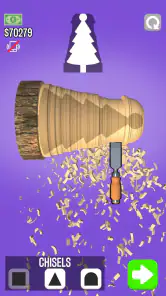
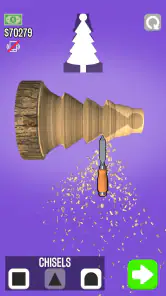
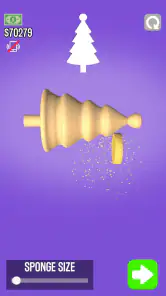

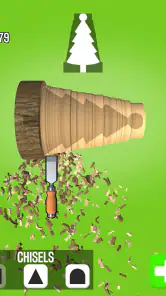
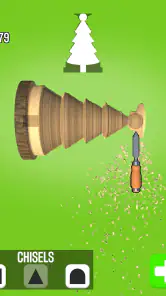
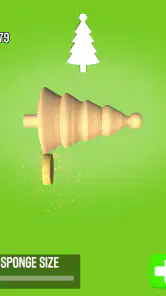

Analysis by Reviewed
I tend to enjoy mobile simulations most when they turn a simple action into a small, satisfying routine, and carving a block of virtual wood has that appeal. Woodturning gives you a chance to shape, smooth, and decorate a piece without needing a workshop or any woodworking experience. I found it best approached as a casual creative game rather than a serious training tool: the pleasure comes from seeing a rough form take shape, not from learning all the demands of working with real timber.
A low-pressure way to try the craft
The basic loop is easy to understand: carve the wood, sand it, then add color or a finish. That makes this a good fit for a short break when I want something more hands-on than tapping through menus but less demanding than a strategy game. I would also recommend it to someone curious about woodturning who wants a playful first look before deciding whether the real craft appeals. It gives you a visual sense of how gradual shaping changes an object, even though a screen cannot teach the feel of a tool against wood.
For a realistic everyday use, imagine waiting for a ride or winding down after dinner. You can pick up the game, focus on shaping one object, and stop when you have had enough. The process has a clear beginning and end, which makes it easier to dip into than a simulation built around managing a large workshop or keeping track of many ongoing tasks. If you are looking for a deep progression system, detailed woodworking lessons, or a close substitute for using a lathe, this is probably not the right choice.
Reads About Woodturning
Where the free access fits
The game is free to download, so you can try its central carving-and-finishing loop without paying upfront. It is a simulation game from VOODOO, and its straightforward focus is a useful part of that value: there is little to learn before you can start experimenting. In-app purchases are listed at $2.99 to $84.99 per item, so I would treat optional spending cautiously and decide whether the free experience is enjoyable before considering a purchase. Those prices alone do not tell me what a particular purchase includes, so I would check the in-game details rather than assume it unlocks a specific tool or benefit.
Its value depends less on how many options you expect and more on whether you enjoy repeating a tactile-looking process. Compared with the usual alternatives in mobile simulation games, which often center on building, managing, or collecting, this one keeps attention on the changing shape in front of you. That narrow focus is a strength when you want a calm creative task, but a limitation if you need varied objectives or a convincing lesson in actual woodworking. I found that slowing down and making small adjustments is more rewarding than trying to carve quickly; it also makes the finished shape easier to judge before moving on to sanding and paint.
Getting Started with Woodturning
The first thing you notice when you open the Woodturning app is its simple and intuitive interface. No clutter, no unnecessary options – just a virtual piece of wood waiting for you to transform it into a masterpiece. The app greets you with a short, yet comprehensive tutorial that guides you through the basics of carving, sanding, and painting. If you’re a complete newbie, don’t worry! The tutorial is your best friend here, ensuring you don’t feel overwhelmed.
Carving Your Way
The carving section is where the magic truly begins. Using your finger, you can rotate and carve the wood, just as you would on a real lathe. It’s surprisingly satisfying to watch the shavings peel away, revealing the shape beneath. The app offers a variety of chisels and tools, each designed for different cuts and finishes. While it’s not the same as feeling the grain of the wood under your hands, it’s a pretty close digital approximation!
More From Our News Desk

Weather by Xiaomi Review: Clear at a Glance, Less Clear Up Close

X Under Pressure: Can It Recover When Posting Goes Wrong?

Clash of Clans Is Won Between the Battles

Android Auto Makes the Case for Quieter Car Software

MobiOffice: Transforming Mobile Productivity with Seamless Integration

EA SPORTS FC™ Mobile Soccer: Redefining Mobile Sports Gaming
Adding the Finishing Touches
Once you’ve carved out your masterpiece, it’s time to sand and paint. The Woodturning app provides a range of sandpaper grits and colors to choose from. The sanding process is quite realistic; you can see and feel (through haptic feedback) the texture smoothing out. Painting is equally fun, allowing you to add vibrant colors or subtle stains according to your preference. The app gives you the freedom to unleash your creativity without making a mess.
Why Woodturning is Worth a Spin
One of the standout features of the app is its simplicity. It focuses solely on the core aspects of woodturning, without any unnecessary bells and whistles. The graphics are crisp and the controls are responsive, making it a joy to use. Plus, it’s a great stress reliever! Who knew virtual wood carving could be so therapeutic?
However, it’s important to note that while the app simulates the carving experience well, it doesn’t replace the tactile sensation and skill involved in real woodturning. But for those who appreciate the craft or are curious about it, this app serves as a delightful introduction.
Device fit and expectations
It runs on iOS 7.0 or later, and the current version is 3.10.15. The age rating is Everyone, which makes it an approachable option for families looking for a calm, creative game to share. Still, I would set expectations clearly for younger players: the virtual tools make shaping feel intuitive, but the game is not a safety lesson or a guide to operating real workshop equipment. A child who likes drawing, clay, or craft activities may enjoy the freedom to experiment, while someone who wants fast competition may find the measured pace too quiet.
Its popularity is substantial, with more than 100 million installs and an average rating of 4.0 from around 551,000 ratings, alongside roughly 18,000 written reviews. Those figures suggest a broad audience, but they do not guarantee that every player will connect with its deliberately focused loop. I would use the tutorial as a quick orientation, then treat the first few pieces as experiments rather than trying to make a perfect design immediately. That removes some pressure and helps reveal whether the carving itself is satisfying enough to keep returning to.
Making each session feel more deliberate
I get more out of the carving when I decide on a rough silhouette before moving the tool. A simple outline—a narrow middle, a fuller base, or a gradual taper—gives each pass a purpose and makes it easier to notice when the form is becoming uneven. This is not about planning an elaborate design; even a quick mental sketch can stop me from removing material impulsively and regretting it later.
It also helps to treat sanding as a separate decision rather than a chore to rush through. I use the shaping stage to establish the main profile, then look at the result before smoothing it. That pause makes the finishing steps feel more intentional: a clean, simple shape can suit a subtle finish, while a more unusual outline may call for color that emphasizes its contours. The practical trade-off is that careful shaping takes more attention than casual swiping, but it tends to make the final piece feel more like a choice than an accident.
On a small phone screen, I would keep gestures controlled and avoid trying to make several corrections at once. Shorter movements are easier to evaluate than one long sweep, especially when the object is close to the shape I want. If a design starts to drift, I find it more useful to stop and reassess the overall outline than to keep making tiny changes without a clear goal. That approach is helpful for anyone who enjoys the making process more than simply reaching the end of a level.
Who will get the most from the routine
This is a good match for people who like low-stakes creative play: players who enjoy shaping, decorating, and seeing a visible result without needing a long session. It can also work as a shared activity for a family, provided everyone understands that it is a game about a craft rather than practical instruction. Taking turns suggesting a shape or choosing a finish gives the activity a social angle without requiring anyone to compete or keep score.
I would be less likely to recommend it to someone who wants a sandbox with unrestricted design tools, a detailed career mode, or realistic lessons about timber and lathe technique. It is also not the strongest pick for players who need frequent surprises or a fast reward cycle; the central pleasure is repetition with small creative variations. If that loop feels soothing, its focus is an advantage. If repeating a similar sequence quickly becomes dull for you, a broader building or management simulation will probably offer more variety.
Compared with drawing apps or digital sculpting tools, the game gives the process a more guided, physical-looking sequence: carve, smooth, finish. That structure can be easier to approach than a blank canvas, particularly if you prefer reacting to a form as it changes instead of inventing everything from scratch. The reverse is true for people who want precise control over every design detail or a completely open creative workspace; a drawing or sculpting app is likely to suit them better.
What the experience can and cannot teach
The game can make the broad idea of shaping a turning object easier to picture, because you see material being removed and then refine the surface. That visual sequence is a useful point of curiosity, not a technical lesson. Real wood behaves differently, and actual tool handling involves judgment and safety that finger gestures cannot reproduce. I would use the game to decide whether the visual craft interests me, then turn to proper hands-on teaching before attempting real work.
There is a similar distinction between the game’s calming feel and guaranteed relaxation. The steady actions can be a welcome change from timers, complex menus, or competitive matches, but a player who dislikes repeated fine adjustments may find the pace more tedious than soothing. I would try a short session first and pay attention to whether I enjoy shaping itself, not just the novelty of seeing a virtual object appear. That is the clearest way to tell whether its core loop has lasting appeal for you.
When another option is better
If your main goal is to learn real woodworking, I would choose instruction that explains materials, tool handling, and workshop safety; a phone simulation cannot provide that practical knowledge. If you want a broader mobile simulation with several systems to manage, this game may feel limited because its appeal rests on shaping and finishing individual pieces. On the other hand, players who want a calm, tactile-feeling activity without a messy setup are exactly the people I would point toward it. The distinction matters: it is a playful digital approximation of a craft, not a replacement for the craft itself.
There is also a useful way to decide whether to spend anything: start with the free version and notice what, if anything, interrupts your enjoyment or makes you curious about a paid option. Since individual in-app items have a wide listed price range, I would only consider a purchase after checking its exact contents and deciding that it addresses something I personally want. You do not need to treat spending as part of the entry ticket; the core appeal is whether you like the repeated sequence of cutting, smoothing, and decorating.
A sensible way to decide
For me, the buy-or-skip decision is straightforward: download it at no upfront cost if you are curious about a focused carving game, then judge the experience before spending. The free entry makes experimentation easy, while the range of in-app purchase prices is a reason to be deliberate rather than assume every paid option is good value. I would only pay after reading the details of the specific item and deciding it would improve the way I actually play.
That advice is especially useful if you are trying it for a child or sharing a device. The Everyone age rating makes it broadly approachable, but an adult should still review any purchase prompt and agree on spending expectations. The game’s creative theme does not change the value question: a purchase makes sense only if its stated contents are wanted, and a player who is already satisfied with the free loop has no reason to buy something just because it is offered.
As a simulation, it sits in a quieter corner than games built around managing a business or expanding a world. I would choose those alternatives when I want long-term goals and several systems to balance. I would choose this one when I want to concentrate on a single object and enjoy the change from rough shape to finished surface. That difference is more important than whether one game is objectively better: they serve different moods and expectations.
In conclusion, if you’re looking for a relaxing and creative outlet, or simply want to try your hand at woodturning without the sawdust, give the Woodturning app a spin. It’s a fun, engaging, and surprisingly addictive way to explore the art of wood crafting right on your phone. So, what are you waiting for? Time to get carving!
Woodturning Frequently Asked Questions
Can I play Woodturning in short sessions, or does it require a long time commitment?
Woodturning is a simulation game centered on shaping and decorating wood, so it may appeal if you want a creative activity you can pick up when convenient. Its straightforward premise is easy to understand without a complicated setup. Whether you prefer a brief session or a longer stretch of play, the main appeal is transforming a wooden object through the crafting process.
Is Woodturning a good choice for players who enjoy creative games?
Woodturning is built around a creative crafting theme: you shape, polish, and paint wooden objects to match designs. That makes it worth considering if you enjoy hands-on simulations and visual customization. The experience focuses on a clear activity rather than a complex setup, so it is approachable for players who want to experiment with creating finished pieces in a relaxed game.
Does Woodturning require a powerful phone or a recent operating system?
On Android, Woodturning requires Android 7.0 or later, which is a useful compatibility check before installing. If your device meets that requirement, you can consider trying the game’s wood-shaping simulation. It is also available on iOS. Checking that your device’s operating system is supported is a sensible first step before downloading any mobile game.
Is Woodturning free to download, and are there optional costs?
Woodturning is free to download, so you can try its crafting simulation without paying upfront. Optional in-app purchases are available, with prices ranging from around $3 to $85 per item. These purchases are not required to enjoy the central wood-carving activity, but keep them in mind if you prefer to avoid additional spending. You can also use your device’s purchase controls to manage transactions.
What kind of game is Woodturning, and who develops it?
Woodturning is a simulation game from VOODOO, built around the hands-on feel of shaping and decorating wood. Its store tagline is “One to rule them all,” while the short description simply names the game. The experience focuses on a straightforward creative activity rather than a complicated setup, making it an easy title to understand before you decide whether its crafting theme appeals to you.
Pros
- Realistic wood carving simulation
- User-friendly interface
- Variety of tools and designs
- Relaxing and satisfying gameplay
- Offline play available
Cons
- Limited design templates
- Repetitive gameplay
- Ads can be intrusive
- No multiplayer mode
- In-app purchases needed for upgrades
- Category
- Simulation
- Version
- 3.10.15