3D Bowling
- 86.99K
- 4.7
- Installs
- 100.00M
- Price
- Free

Screenshots




Analysis by Reviewed
I like bowling games best when they give me something simple to work toward without turning every spare moment into a commitment. 3D Bowling is built around that quick, familiar loop: line up a throw, swipe, and see how the pins fall. It suits a short break, a quiet evening, or a bit of friendly turn-taking, especially if getting to a real bowling alley is not on the cards.
Small goals make each frame count
The immediate aim is clear: use each throw well and try to improve your result. That makes it easy to pick up without a tutorial-heavy learning curve. I find the appeal is less about a long campaign and more about the small decisions within a turn: whether to aim for a reliable hit or try a more controlled throw with spin. When I have only a few minutes, that is enough of a goal to make another frame feel worthwhile.
For a casual session, I would treat the game as a chance to practise consistency rather than chase a perfect score every time. A useful habit is to change one thing at a time—your starting angle, swipe direction, or spin—so you can tell what affected the result. That makes the bowling feel less random and gives each attempt a bit more purpose. If you prefer games with explicit missions, a map of stages, or a steady stream of unlocked tasks, this simpler frame-by-frame structure may feel sparse.
What progress feels like
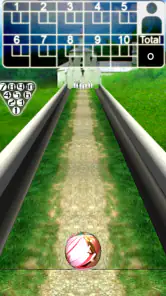
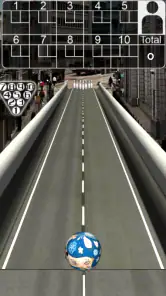
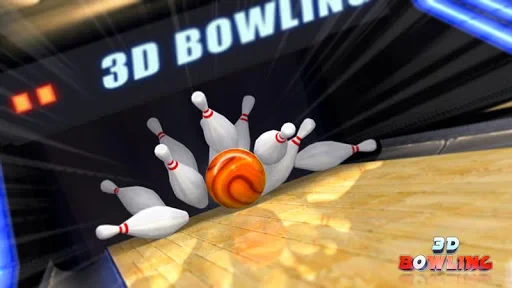
The satisfying signals are immediate: the ball’s path, the pin action, and the score after a throw. The leaderboard adds a broader comparison if you enjoy seeing how your results stack up, while the different alleys and ball designs give you visual variety. I would not confuse those touches with a deep progression system, though. Their value is in making repeat sessions feel a little different, not in promising a complex route through the game.
That distinction matters when choosing between this and other sports games. A full bowling simulation may offer more rules, league structure, or detailed player management; a fast arcade sports game may deliver more modes and constant rewards. This one sits closer to a straightforward digital lane. I would choose it when I want to focus on the throw itself, and choose another game when I need a strong sense of chapter-by-chapter advancement.
Challenge, pacing, and staying power
The pace is easy to control because a bowling turn naturally breaks play into short decisions. You can stop after a quick session without losing the thread, or keep playing when you are trying to improve your accuracy. The challenge comes from repeating a physical gesture and learning how its direction and spin affect the ball, rather than from a steadily escalating story or a complicated skill tree. That keeps the entry barrier low, but players who need new objectives constantly may run out of reasons to return.
There is also a practical trade-off in the swipe controls: they are approachable, but a small change in how you drag can alter a shot. If a throw goes wide, I would avoid making several adjustments at once. Try a straighter swipe first, then add spin only when you have a feel for the aim. This simple routine makes practice more informative and helps separate an unlucky result from a repeatable technique.
Strike a Pose: The Gameplay Experience
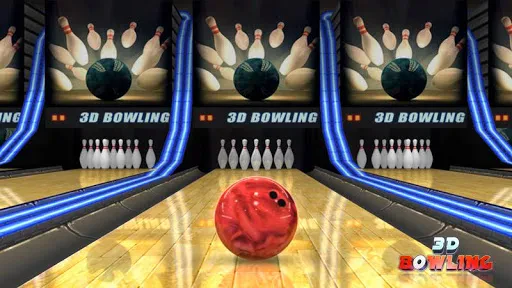
Now, when I first downloaded 3D Bowling, I was curious about how realistic a mobile game could make the bowling experience feel. To my pleasant surprise, it didn’t disappoint. The game offers a variety of bowling alleys, each with its own unique vibe and atmosphere. Whether you’re in the mood for a classic wooden lane or something more futuristic, you’ve got options.
The controls are pretty intuitive. You simply swipe your finger to roll the ball, and you can even add a little spin to your throw with a flick of your wrist. It’s almost like being at the lanes, minus the rental shoes and cheesy nachos. Plus, the physics engine is quite impressive. You can actually see the ball curving and knocking down pins in a very realistic fashion. Kudos to the developers for nailing that aspect!
Graphics and Sound
One of the first things you’ll notice about 3D Bowling is its vibrant graphics. The game does a fantastic job of bringing each bowling alley to life with detailed textures and bright colors. It’s visually appealing and makes the whole experience more immersive. And let’s not forget the sound effects. The satisfying crash of the pins when you score a strike is music to a bowler’s ears!
Customization Galore
If you’re the kind of player who loves to personalize your gaming experience, 3D Bowling has you covered. You can choose from a variety of balls, each with different designs and attributes. Want a ball that looks like a pizza? You got it. How about one with flames? Absolutely. It’s a nice touch that adds a layer of fun to the game.
Additionally, the game offers a leaderboard feature, so you can compete with friends or players worldwide. Nothing like a little friendly competition to spice things up!
Final Thoughts
All in all, 3D Bowling is a delightful way to pass the time, whether you’re a casual gamer or a bowling aficionado. Its realistic gameplay, coupled with stunning graphics and sound, makes for an enjoyable experience. And with the customization options and online leaderboard, there’s plenty to keep you coming back for more.
So, if you’re looking to strike up some fun without leaving the comfort of your home, give 3D Bowling a try. Who knows, you might just find your new favorite mobile game. Happy bowling!
A handy fit for everyday breaks
In practical terms, I can see this working well during a commute while seated, waiting for an appointment, or sharing a phone with someone who wants to take turns. A round gives each player a clear moment to act, so it is easy to pass the device back and forth without explaining a complicated control scheme. For a family choosing a simple sports game, its Everyone age rating is reassuring, though younger players may still need help with the swipe-and-aim rhythm.
The basic appeal is also why I would not pick it for every situation. If you are looking for online team play, a realistic league calendar, or a social space built around conversation, this is not the same kind of experience as a dedicated multiplayer sports title. The leaderboard gives results a competitive angle, but the core remains personal practice and score chasing. I would also skip it if repeated attempts at similar throws quickly bore you; the bowling action is the point, not a stream of unrelated activities.
How to get more from a session
When playing one-handed, I recommend keeping the phone steady and using a deliberate swipe rather than a rushed flick. That makes it easier to judge whether a miss came from the aim or from adding too much spin. If you are playing with a friend, agree to compare scores over the same session instead of relying only on a leaderboard; it turns a simple turn-based game into a low-pressure contest without needing elaborate rules.
The ball choices are worth exploring for their look and feel, but I would not assume that a different design automatically fixes an inconsistent shot. The more useful experiment is to settle on one ball and practise a repeatable release before switching styles. That keeps cosmetic variety enjoyable without making it harder to understand your own technique. In a real bowling alley, lane conditions and equipment add complications; here, the cleaner setup is convenient, although it cannot reproduce the full physical feel of a real ball.
Who should give it a try
Italic Games’ sports game is free, and its long-running presence is reflected in an average rating of 4.7 from around 1.2 million ratings, with over 100 million installs. It first arrived on June 7, 2011, and version 3.9 supports Android 4.1 or later. Those details make it an accessible option for many Android users, while the free price means you can try its style before deciding whether the simple loop suits you. The game has also drawn around 87,000 written reviews, and its Everyone rating makes it broadly suitable for general audiences.
Choosing it for the right kind of play
A useful way to decide is to ask what you want from a sports game when you open it. If you want to practise timing and aim in a focused setting, this bowling game gets to the point quickly. If you want a roster to build, opponents to manage, or a season that gives every session a larger purpose, a sports-management game or a more structured bowling title will likely hold your attention better. The difference is not simply realism: it is whether the main reward for you is improving a throw or advancing through a broader set of goals.
It also works well as a shared-phone game when nobody wants to learn a complicated set of rules. I would use it while waiting for food with a friend, taking turns and setting a simple target score for that sitting. Because the controls are direct, the other person can understand what to do by watching a throw. The trade-off is that the contest depends on agreeing to play together; the leaderboard is not a substitute for a richer live multiplayer experience.
Reading a bad throw without getting stuck
One small practice tip is to give yourself a few throws with no spin before judging the controls. That creates a clearer baseline: if the ball repeatedly misses in the same direction, adjust your starting aim; if the result changes sharply from one swipe to the next, make the gesture slower and more consistent. Only after that would I experiment with spin. It is a modest routine, but it avoids the common frustration of changing aim, speed, and curve all at once and learning nothing from the result.
There is a related choice around visual variety. Switching alleys can freshen up a session, while staying in one setting makes it easier to concentrate on whether your release is improving. I would pick the latter when trying to beat my own result and the former when I am simply passing time. The game’s different looks are a welcome change of scenery, but they do not turn each setting into a new mode or a separate challenge path.
How its simple loop affects replay value
For me, the strongest reason to return is a personal one: I can try to make my throws more consistent without needing to remember a story or manage a long session. That is satisfying in small doses. The weaker side is that the same simplicity can make progress feel self-directed. The score, shot outcome, and leaderboard offer feedback, but players who need frequent unlocks or clearly signposted milestones may not feel a strong pull to continue once the basic mechanics are familiar.
That makes the game a better fit for brief, relaxed play than for someone looking for a demanding sports simulation. Its quick turns are convenient on an older Android device too, since the minimum requirement is Android 4.1, but compatibility alone does not make it the right choice if you expect elaborate modes. I would treat it as an uncomplicated digital bowling lane: enjoyable when that is exactly what I want, and easy to set aside when I am craving more depth.
A simple recommendation, with a clear limit
In short, I would recommend it to casual players, bowling fans who want a lightweight way to work on aim, and families looking for an easy sports game to share. It is free to try, has a broad audience rating, and gets its central action across without demanding a large time commitment. I would steer away from it if you need a campaign, frequent new objectives, or the social and physical detail of an in-person game. Those expectations are where its pared-back approach becomes a limitation rather than a strength.
My advice is to begin with a few steady, straight swipes, then vary one part of your technique at a time and use the score as a personal benchmark. That gives the game a small, satisfying purpose even without a long progression track. If that kind of self-set challenge sounds relaxing rather than repetitive, Italic Games’ 3D bowling game is an easy one to keep around for the moments when a quick frame is all you need.
3D Bowling Frequently Asked Questions
Can I play 3D Bowling without an internet connection?
3D Bowling is a bowling game designed for quick play, which can make it appealing when you want a casual game on your phone. Whether every mode works offline can depend on the version and device, so check the game’s behavior after installing it if offline access matters to you. You can also review the permissions and settings before starting.
Is 3D Bowling easy to learn for someone who has never played a bowling game?
The game is built around a familiar sport, and its straightforward controls make it approachable even if you have not played a bowling game on a phone before. Getting comfortable with aiming and adjusting a throw may take a little practice. If your first attempts do not go as planned, try a few rounds and make small changes to your technique.
Does 3D Bowling offer different ways to play?
3D Bowling includes different modes, with single-player and multiplayer options described among its features. This gives you a choice between practicing or playing against another opponent, rather than relying on just one style of session. The exact options available can depend on the version you install, so explore the game’s menus to see what fits the way you want to play.
Is 3D Bowling suitable for children?
3D Bowling is listed as suitable for Everyone, so it is presented as a game for a broad audience. Its bowling theme and straightforward play make it easy to understand, though younger players may still appreciate some help getting used to the controls. Parents can review the game’s store page and device settings before downloading it for a child.
How much space does 3D Bowling need, and will it run on an older Android device?
The game supports Android devices running version 4.1 or later, which makes it compatible with a range of older phones and tablets as well as newer ones. Before downloading, check that your device has enough free storage for the installation and any updates. Keeping the operating system and game current can also help provide a smoother experience.
Pros
- Realistic 3D graphics enhance gaming experience.
- Smooth and responsive controls.
- Free to play with optional in-app purchases.
- Variety of bowling alleys and balls.
- Engaging multiplayer mode available.
Cons
- Contains ads that can be intrusive.
- Limited customization options for avatars.
- In-app purchases can be pricey.
- Occasional lag on older devices.
- No offline multiplayer mode.

- Category
- Sports
- Version
- 3.9