Carrom Pool: Disc Game
- 8.13K
- 4.5
- Installs
- 500.00M
- Price
- Free

Screenshots
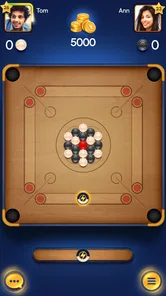
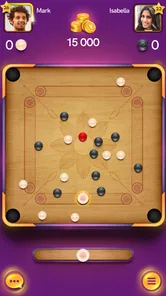

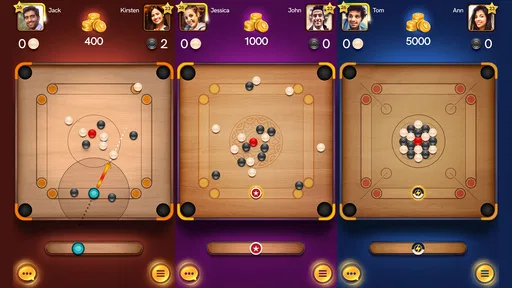
Analysis by Reviewed
I often turn to Carrom Pool: Disc Game when I want a quick game that asks for more than a lucky tap. The basic appeal is easy to grasp: line up a striker, send discs toward the pockets, and try to clear your pieces before the other player. A round gives me a compact goal, while the online opponent makes each shot feel like a small contest of nerve and judgment. It is best approached as a focused board game rather than a full sports simulation.
Picking a shot, then reading the result
At the first turn, the controls make the familiar carrom idea accessible on a phone: aim, choose the force, and release. The challenge arrives when a direct shot is not available. I get more from considering where the striker and discs will finish than from simply trying to pocket something immediately. A modest shot that leaves a useful angle can be worth more than a hard strike that scatters the board and gives the next player an opening.
That makes the feedback rhythm satisfying. The collision and pocketing sounds help each action feel clear, and the changing positions show whether a planned angle worked. When a shot misses, I can usually see the consequence on the board and adjust rather than feeling as if the game has hidden the reason. The same loop—aim, strike, judge the result, and plan again—keeps a match lively without requiring a long tutorial or a large time commitment.
Reads About Carrom Pool: Disc Game
Gameplay and Features
At its core, Carrom Pool: Disc Game stays true to the traditional game of Carrom. The rules are simple – pot all your pieces before your opponent does. But don’t be fooled by its simplicity; it’s a game that requires strategy, precision, and a bit of luck.
The app offers a few different modes to keep things fresh. You have the classic mode, which adheres closely to the standard Carrom rules. Then there’s the disc pool mode, which mixes things up a bit for those looking for a slight twist on tradition. Playing these modes, you quickly realize that the developers have put in a lot of effort to ensure that the physics and controls feel as natural as possible, making the experience quite immersive.
Choosing a mode for the moment
The mode choice is useful when I want to change the pace without learning a completely different game. Classic carrom is the better fit when I want the familiar board-game feel and room to think through a sequence. Disc pool offers a variation on that routine, so it can freshen up a session when the standard approach starts to feel repetitive. Neither mode changes the central pleasure of judging angles and managing the board.
For a short everyday break, I would start a match when I have enough time to finish it rather than treating every spare minute as a good moment to play. A quick round can fit between errands or during a quiet part of the day, but online competition still asks for attention: an interruption can make it harder to judge a shot or respond thoughtfully. If I am playing with a friend, a planned match is more enjoyable than trying to squeeze one in while distracted.
More From Our News Desk

X Under Pressure: Can It Recover When Posting Goes Wrong?

Clash of Clans Is Won Between the Battles

Android Auto Makes the Case for Quieter Car Software

MobiOffice: Transforming Mobile Productivity with Seamless Integration

EA SPORTS FC™ Mobile Soccer: Redefining Mobile Sports Gaming

How Microsoft OneDrive Became a Mobile Productivity Giant
Graphics and User Interface
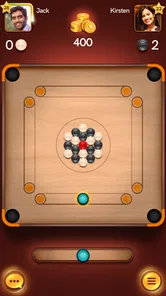
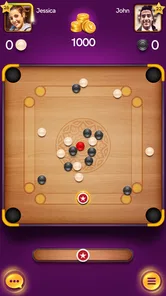
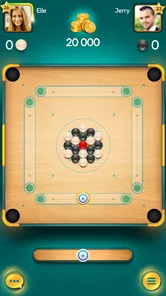
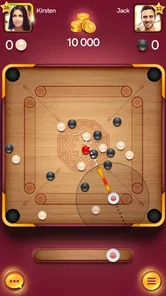
Visually, the game is a treat. The graphics are clean, vibrant, and really bring the board to life on your screen. The user interface is intuitive, making it easy for both seasoned players and newcomers to navigate through the game. The smooth animations and transitions are definitely a plus, enhancing the overall gameplay experience.
One aspect I particularly enjoyed was the attention to detail. From the way the striker moves to the sound of the discs hitting each other, it’s clear that a lot of thought went into recreating the authentic feel of Carrom. It’s little things like these that keep you hooked for hours.
A small skill-building habit
My practical tip is to slow down before committing to a shot. I look for a safe route to a pocket, but also check whether the striker will end up in a position that makes the next turn awkward. This is especially useful when several discs are crowded together: a powerful hit may create movement without creating a good scoring chance. Treating each turn as both a scoring attempt and a setup makes the game feel more strategic.
There is also a trade-off between experimenting and protecting a lead. Trying a narrow angle can be rewarding when the board is open, but a cautious shot may be smarter when a miss would leave the opponent an easy finish. That is where the game’s simple controls work in its favor: the important decision is usually the plan, not learning a complicated input system.
In-App Purchases and Ads
Like many free-to-play games, Carrom Pool: Disc Game includes in-app purchases and ads. While the ads can be a bit intrusive at times, they’re generally manageable. If you’re someone who prefers an ad-free experience, there’s always the option to make a purchase and remove them.
The in-app purchases mainly revolve around buying coins and gems, which can be used to unlock new strikers and pucks, or to enter higher-stakes matches. While not necessary to enjoy the game, they do offer a way to enhance your gameplay if you’re willing to spend a little.
What the rewards are really for
Progression and customization can give a player another reason to return, but I would keep the distinction between appearance and skill in mind. A new striker or puck may make a match feel more personal, while better shot selection is what makes the actual play more consistent. Higher-stakes matches may appeal to someone who enjoys risk, but they are not the best place to learn; I would first get comfortable with aiming and judging rebounds in lower-pressure play.
The game is free to download, with optional in-app purchases priced from ten cents to nearly one hundred dollars per item. That wide range makes it sensible to decide on a personal spending limit before buying anything, especially if the main goal is simply to enjoy casual rounds. Purchases are optional for the basic appeal, but ads and the temptation to spend can be friction for anyone who wants a completely uninterrupted, no-cost experience.
Social and Multiplayer Experience
One of the highlights of Carrom Pool: Disc Game is its multiplayer feature. Whether you’re playing against random opponents from around the world or inviting friends for a match, the competitive edge is always present. The leaderboard system adds an extra layer of motivation, as you can see how you stack up against other players globally.
Connecting with friends is seamless, and it’s a great way to enjoy the game while catching up with people you may not have seen in a while. It’s also worth mentioning that the game runs smoothly online, with minimal lag, which is crucial for maintaining a fair and fun competition.
Who will enjoy the loop, and who may not
I would recommend it to someone who likes turn-based head-to-head games, familiar tabletop rules, and the satisfaction of improving through small decisions. It can also work well for friends who want a simple shared activity without coordinating a long session. By contrast, players looking for a solo campaign, a realistic full-court sports game, or a purely offline distraction may be happier with another kind of game. This one is built around taking turns against another player, so that competitive rhythm is central to its appeal.
Compared with other mobile sports games, it is less about managing a team or reacting continuously and more about patience, angles, and anticipating the opponent’s next opportunity. Compared with a physical carrom board, it is easier to start a match remotely, but a touchscreen cannot reproduce the feel of flicking a real striker across wood. That difference matters most if tactile play is the part of carrom you value above all.
A practical way to make early matches count
When I am learning, I treat the opening turns as observation as much as scoring. I pay attention to how much force is needed for a short nudge and how a crowded group reacts when hit from the side. That gives me a better feel for the board before I attempt a difficult pocket. It is a useful habit for anyone who knows the tabletop game but is still adjusting to aiming on glass: the familiar rules transfer more readily than the physical feel of a flick.
It also helps to avoid chasing every possible pocket. If a disc is awkwardly placed, shifting it into a more workable position can be a better use of the turn than forcing a low-percentage attempt. That choice may look less rewarding in the moment, but it can leave a cleaner route later. The satisfying part is that the board records the consequence immediately, so I can learn from a decision instead of relying on a long explanation of the rules.
What a typical short session feels like
Imagine opening the game during a quiet lunch break. I would choose a match only if I could give it attention, take a few seconds to read the layout, and then let the opponent’s reply shape my next plan. A close match is a better fit for that moment than a game that demands constant rapid input: I can think between turns, but I still need to stay present. If work or travel is likely to interrupt me, a solo puzzle or another pause-friendly option is a safer choice.
That distinction answers a practical question: is it suitable for very brief play? It can be, provided the time is genuinely free and I am comfortable finishing the contest rather than abandoning it midway. The action is easy to understand quickly, but the online, turn-based exchange is not the same as a disposable one-tap distraction. I enjoy it most when I can settle into a match and give each shot a little thought.
How it sits beside other sports games
For someone choosing among mobile sports games, this is a quieter alternative to titles built around continuous movement, timing windows, or team management. The competition is still direct, but the pressure comes from choosing a line and anticipating how the board will change. That makes it a good fit for players who like billiards-style thinking and tabletop turns more than reflex-heavy action. If the appeal of sports games is fast motion or controlling a full team, this will feel deliberately small in scope.
It also differs from playing carrom face to face. A phone makes it straightforward to challenge someone at a distance, and the interface handles the board’s movement, but you lose the tactile judgment of a real striker and the shared table-side atmosphere. I would choose the app for convenient remote competition and the physical board for a relaxed gathering where the feel of the pieces is part of the fun. Neither replaces the other particularly well.
Who makes it, and what to expect on a phone
Miniclip.com developed this sports game, which has a 4.7 average from around seven million ratings and over 500 million installs. It is free and rated for Everyone, so it is broadly accessible, though the competitive play and purchase options are worth discussing with younger players. The game first appeared on March 26, 2019, and version 18.1.3 requires Android 7.0 or later. Those details make it easier to judge whether it suits your device and household before getting started.
The large player base is a reassuring sign for anyone interested in online matches, but popularity alone does not make every session equally enjoyable. Match quality still depends on the opponent and on whether I am in the mood to focus. If I only want a quiet, predictable pastime, a solo puzzle is a better choice; if I want a quick contest where one careful shot can change the board, this format makes more sense.
Resetting for one more match
What brings me back is not a long story or a complicated checklist. It is the clean reset after a match: the board starts fresh, the next opponent presents a new arrangement, and I can try to use what I learned about shot strength and positioning. A frustrating loss can make me want another attempt, while a win gives the same short loop a satisfying finish. I would still set a stopping point if I were playing casually, because quick rounds can make time pass faster than expected.
In conclusion, Carrom Pool: Disc Game does a fantastic job of bringing the beloved board game to the digital realm. It’s easy to pick up, hard to put down, and perfect for both casual gamers and those looking for a more competitive experience. Whether you’re a Carrom enthusiast or just someone looking for a fun, strategic game to pass the time, this app is definitely worth checking out. So grab your virtual striker, aim carefully, and let the games begin!
Carrom Pool: Disc Game Frequently Asked Questions
Can I download Carrom Pool: Disc Game on both Android and iOS?
Carrom Pool: Disc Game is available as a mobile game for Android and iOS, so you can look for it in the app store on either platform. Before downloading, check that your device meets the operating-system requirements for its platform. The game is free to download, though optional in-app purchases are available, so it is worth reviewing your purchase settings if you share your device.
How much storage should I have free before installing Carrom Pool: Disc Game?
It is sensible to make sure your phone or tablet has enough available storage before installing the game. Free space can also help avoid problems when installing updates later. The amount of space available varies by device, so check your device’s storage settings before starting the download, particularly if you already have many apps, photos, or other files saved.
Does Carrom Pool: Disc Game need an account to get started?
The game’s central activity is playing Carrom-style board matches, with multiplayer competition as an important part of the experience. If you plan to play against other people, you should be ready to use the game’s online features and follow any sign-in prompts it presents. For a first look, the familiar aim-and-flick mechanic is easy to understand, while multiplayer is there for players seeking competition.
Can I play Carrom Pool: Disc Game with friends?
Carrom Pool: Disc Game is designed around multiplayer competition, so it can suit players who want to play against other people rather than only practise. Playing with friends can make the familiar board-game format more social, while each match still depends on aiming and planning shots. Multiplayer requires an internet connection, so make sure you are online when you want to challenge someone.
Does Carrom Pool: Disc Game include ads?
Carrom Pool: Disc Game is free to download and offers optional in-app purchases. If you are deciding whether it suits your preferences, it is useful to check the app’s store page and the game itself for its current presentation and purchase options. You can also review your device’s settings for managing purchases, especially if a child will be using the device.
Pros
- Easy to learn and play.
- Multiplayer mode available.
- Smooth graphics and animation.
- Offline mode supported.
- Frequent updates with new features.
Cons
- Contains in-app purchases.
- Ads can be intrusive.
- Requires internet for multiplayer.
- Limited board designs.
- Occasional lag in gameplay.