Piano Pop
- 16.00
- 4.3
- Installs
- 50.00K
- Price
- Free
Screenshots

Analysis by Reviewed
I approached Piano Pop as a quick music game rather than as a serious piano-learning tool, and that distinction matters from the first tap. Its appeal is immediate: you interact with a piano-themed rhythm experience, react to what appears on screen, and try to keep the session feeling smooth and musical. The game comes from MWM - AI Music and Creative Apps, is free to download, and is aimed at Everyone, so it is easy to imagine it being used by children, casual players, or adults looking for a short distraction.
My overall impression is that Piano Pop works best when I treat it as a compact arcade-style music break. It is not trying to replace a keyboard, a structured lesson app, or a full music-production workstation. Instead, it offers a more approachable way to spend a few minutes with rhythm and timing. The store summary says “Make it pop!”, while the short description presents it simply as “Piano Pop”; in practice, that simplicity is both its strength and its limitation.
How Piano Pop feels during ordinary play
The first thing I noticed was how little commitment the concept demands. I do not need to prepare a practice space, connect an instrument, or understand music theory before starting. That makes it suitable for the moments when I want entertainment without a long tutorial or a complicated menu structure. A short session can fit naturally between errands, during a break, or while waiting for an appointment.
That quick-entry quality also shapes my expectations about speed. A music game depends heavily on the connection between touch input and what I see and hear. If the response feels late, even a simple sequence becomes frustrating. Piano Pop is therefore at its best on a device that can keep its screen response consistent. I would not judge it like a large open-world game, but I would still expect the basic interaction to feel immediate because timing is the central part of the experience.
In everyday use, I would begin with short sessions rather than leaving it open for an entire afternoon. That approach suits the game’s casual identity and makes it easier to notice whether the phone remains responsive after switching between apps. It also avoids turning a light music diversion into a repetitive routine. The fun comes from concentration and rhythm, not from treating the game as a complete musical curriculum.
One useful way to play is to focus on accuracy before speed. It is tempting to chase a faster sequence or react to the most visually noticeable element, but a steadier rhythm usually produces a more satisfying session. I found that lowering my urge to rush helped me recognize where my mistakes came from: sometimes I was reacting too early, and sometimes I was watching the animation instead of listening to the beat.
Who will enjoy the format most
Piano Pop is a natural fit for someone who likes casual music games and wants something less demanding than a full rhythm-game package. It can also work for families looking for an accessible title with an Everyone content rating. A younger player may enjoy the immediate piano theme, while an adult can use it as a small mental reset during the day.
More From Our News Desk

Weather by Xiaomi Review: Clear at a Glance, Less Clear Up Close

X Under Pressure: Can It Recover When Posting Goes Wrong?

Clash of Clans Is Won Between the Battles

Android Auto Makes the Case for Quieter Car Software

MobiOffice: Transforming Mobile Productivity with Seamless Integration

EA SPORTS FC™ Mobile Soccer: Redefining Mobile Sports Gaming
It is less suitable for a user who expects detailed piano instruction. The presence of piano imagery and musical interaction does not automatically make a game a lesson platform. If your goal is to learn scales, read notation, build finger technique, or follow a progressive course, a dedicated piano-learning app or a real keyboard will be a better choice. Piano Pop is about play and timing, not disciplined instrumental training.
I would also hesitate to recommend it as the only option for someone who wants deep musical variety or a long-term competitive system. Casual games can be enjoyable precisely because they are uncomplicated, but that same simplicity may feel limited to players who want extensive customization, advanced practice tools, or a large social layer.
What happens when a session becomes longer
The most demanding moments are not necessarily about graphics. In a rhythm-focused game, sustained attention is the heavier workload for the player. As a session continues, small timing errors become more noticeable, and repeated visual reactions can make the experience feel more intense than its gentle piano presentation suggests. I recommend taking short pauses if the game starts to feel like a test of reflexes rather than a relaxing break.
From the device side, I would pay attention to heat, battery use, and background activity during longer play, especially on an older phone. I cannot responsibly attach a precise performance measurement to those areas, because the result depends on the handset, operating system, screen settings, and what else is running. The sensible expectation is that a lightweight music game should be easier on a phone than a large three-dimensional title, but “easier” does not mean identical on every device.
Sound is another practical consideration during heavier use. Playing with audio makes timing more intuitive, but a loud environment can make the game harder to read musically. Headphones may help in a quiet setting, while a speaker is more convenient when I am playing casually at home. I would keep the volume comfortable, particularly if a child is using the game, because repeated sessions can make it easy to lose track of how loud the device has become.
A small but effective workflow is to close demanding apps before starting a focused session. This is not unique to Piano Pop, but it matters more in a timing game than in a turn-based title. If another app is consuming resources in the background, any interruption or uneven response can break concentration. I also prefer disabling unnecessary notifications temporarily, since a banner arriving during a sequence is more disruptive here than it would be in a slower game.
Another practical tip is to test the game in the exact conditions in which you expect to use it. A phone may feel perfect on a quiet home network and less convenient when used during travel, in a crowded room, or while battery-saving settings are active. Rather than assuming that a good first session answers every question, I would try a few brief sessions at different times and see whether the interaction remains comfortable.
Stability and recovering from interruptions
Reliability in a casual music game is partly about whether it opens consistently and partly about how well it handles ordinary interruptions. Calls, notifications, screen locking, and switching to another app are all normal phone behavior. A good recovery experience should let me return without feeling that a brief interruption has ruined the entire session.
I treat this as an important part of the review because rhythm games are less forgiving than many other categories. Losing a turn or breaking concentration after a notification can be more annoying when the game depends on continuous timing. My recommendation is to play with interruptions minimized whenever possible, particularly if I am trying to improve a run rather than simply exploring the game.
For recovery, I would use a simple routine: pause when the phone allows it, leave the game normally when possible, and reopen it if the session has been interrupted. I would not rely on an unfinished sequence surviving every operating-system decision, especially on a device that aggressively closes background apps. That is a general mobile limitation, but it is worth remembering before starting a serious attempt.
Keeping the operating system reasonably current can also help with general app compatibility, although the game’s listed minimum requirement is Android seven point zero. That makes the entry barrier fairly broad for Android users with older supported devices. Even so, meeting the minimum requirement only means the phone qualifies to run the app; it does not guarantee the same smoothness as a newer handset with more available memory.
The current version is 2.00.00, and that gives the app a clear, modern version identity, but I would still avoid assuming that every future update will feel identical. Updates can change presentation, responsiveness, or the balance between free access and paid content. I prefer to reassess an app after a major update rather than relying entirely on an earlier impression.
Device limits, storage habits, and purchase awareness
Because Piano Pop is free, it is easy to try without making an immediate financial commitment. That is useful for families and casual players who want to decide whether the musical interaction is enjoyable before spending anything. The game includes in-app purchases ranging from $3.99 to $44.99 per item, so I would review the purchase flow carefully and use device-level purchase controls if children share the phone.
The free starting point is a benefit, but it also means I would pay attention to how much of the experience feels comfortable without buying anything. A player who only wants occasional entertainment may find the free access sufficient. Someone who plays frequently should decide whether the paid options add meaningful value to their personal routine rather than purchasing simply because the game is enjoyable in the first few minutes.
For storage and resource management, I would keep some free space available and avoid running the game while the phone is already struggling with several large apps. I am not assigning a storage figure or a battery estimate because those can vary across versions and devices. The practical takeaway is simpler: older or crowded phones deserve a short trial before a user commits to regular play.
Screen size can influence comfort too. On a compact phone, the interaction may feel precise but visually tight, especially for someone with larger fingers or reduced eyesight. On a larger display, the interface may be easier to follow, though the phone can also be less convenient to hold during a quick session. I would choose portrait orientation and hand position based on comfort rather than forcing a particular grip.
Accessibility needs deserve an honest caveat. A game built around visual timing and musical feedback may not suit every player equally. If someone has difficulty distinguishing moving elements, hearing the audio clearly, or making rapid touch responses, Piano Pop may be less comfortable than a slower puzzle game with adjustable presentation. I would test it personally rather than assuming that an Everyone rating means every person will find the interaction equally accessible.
How it compares with other music-game choices
Compared with a piano-learning app, Piano Pop is more approachable and less intimidating. I can start playing without committing to lessons or practice goals. The trade-off is that it gives me entertainment value rather than a clear path toward real keyboard ability. If I want measurable musical progress, a teaching app wins; if I want a quick reaction-based diversion, Piano Pop is the more relaxed option.
Compared with a traditional rhythm game, its piano identity gives it a more focused personality. Large rhythm titles often emphasize elaborate presentation, extensive song libraries, or competitive progression. Piano Pop feels better suited to someone who wants the musical idea without taking on a large game ecosystem. The downside for an experienced rhythm player is that the experience may not offer enough depth or complexity to become a long-term main game.
Compared with simply listening to music, the game adds active participation. I am not just consuming a track; I am paying attention and responding. That makes it a better choice when I want a small challenge, but it is not the right substitute when I am trying to relax completely. Sometimes a playlist is more appropriate, especially after a tiring day when even quick reactions feel like work.
Compared with a real piano or digital keyboard, the difference is obvious but not negative. Piano Pop removes the cost, space, and setup involved in owning an instrument, making it much easier to access. It cannot provide the tactile feedback, expressive control, or physical technique of keys. I see it as a playful introduction to musical timing, not as an instrument simulator that should be judged by professional standards.
My practical verdict after weighing speed and stability
My performance verdict is positive within a specific boundary: Piano Pop is a good casual music game when I want fast access, simple interaction, and a short session that does not require prior knowledge. Its strongest quality is the low commitment. I can approach it as a small rhythm exercise, enjoy the piano theme, and stop before it becomes a major time investment.
I would be more cautious with an older Android phone, a device that frequently closes background apps, or a user who expects uninterrupted long sessions. In those cases, I would test the game before relying on it as a regular pastime. The Android requirement begins at seven point zero, which makes it available to a wide range of devices, but age alone does not tell me how much spare performance a particular phone has.
The game has attracted a 4.3 average from around 345 ratings and has passed 50 thousand installs, which suggests a modest but real audience rather than a completely unknown experiment. I would read that as useful context, not as a guarantee that it will match everyone’s taste. Music games are especially personal: the same short, reactive structure that feels refreshing to one player may feel repetitive to another.
MWM - AI Music and Creative Apps has positioned this release in the music-game space rather than presenting it as a formal education product. That positioning feels accurate to me. The free price makes trying it straightforward, while the paid items mean parents and frequent players should stay aware of the purchase path. The Everyone rating also makes it broadly approachable, though individual comfort with fast visual and audio feedback still matters.
I recommend Piano Pop for quick musical play, not for serious piano study. Try it when you want a lightweight challenge, use headphones or a speaker according to your surroundings, reduce notifications before a focused run, and give an older phone a short trial before expecting perfect responsiveness. Skip it if you need structured lessons, advanced musical control, or a deep competitive system. For the right player, it is a pleasant little rhythm break; for everyone else, a dedicated piano teacher app, a fuller rhythm title, or a simple playlist may be the better fit.
Piano Pop Frequently Asked Questions
What devices and operating systems can run Piano Pop?
Piano Pop is a music game for mobile devices, with the minimum operating system listed as version 7.0. Before downloading, check that your device meets this requirement and has enough available storage for the app. A compatible operating system helps with installation, but performance can still vary depending on the device and its condition.
Who developed Piano Pop, and what kind of game is it?
Piano Pop is a music game developed by MWM - AI Music and Creative Apps. Its store summary, “Make it pop!”, reflects its focus on rhythm and musical play. The game has an average rating of 4.3 from 345 ratings, with 16 written reviews, and has reached over 50,000 installs. These figures offer a snapshot of its store presence, while the gameplay itself is best judged by whether you enjoy tapping along to music.
What is Piano Pop, and how does the gameplay work?
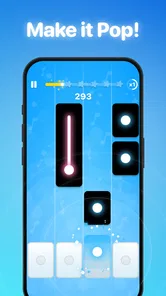
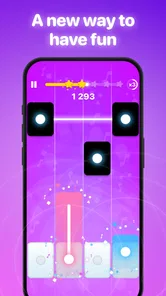
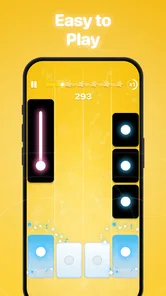
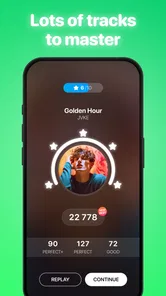
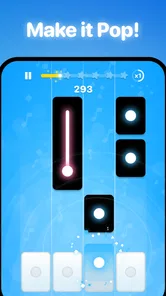
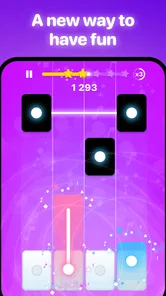
Piano Pop is a rhythm-based music game in which you tap piano-style tiles or notes in time with the music. The goal is to maintain accurate timing, complete songs, and achieve high scores without missing too many notes. As you progress, tracks generally become faster and more challenging, making the game suitable for short casual sessions as well as players who enjoy improving their reflexes.
Can I play Piano Pop without an internet connection?
Some parts of Piano Pop may be available offline, particularly previously loaded songs or basic gameplay modes, but the exact experience can depend on the version installed and the device being used. Internet access may still be required for downloading new tracks, viewing advertisements, synchronizing progress, accessing online rankings, or using other connected features. It is best to open the game online at least once before relying on offline play.
Is Piano Pop free to download and play?
Piano Pop can generally be downloaded without an upfront purchase, but free access may include advertising, optional in-app purchases, or limitations on certain songs and features. Purchases may provide virtual items, remove advertisements, unlock content, or help players continue after mistakes. In-app purchases range from $3.99 to $44.99 per item, so review the purchase options before downloading, especially if children will be using the device.
Pros
- Simple tap controls make it easy for beginners to start playing.
- Fast-paced songs provide an engaging challenge for rhythm game fans.
- Short rounds are convenient for quick gaming sessions.
- Bright visuals and lively effects make gameplay feel energetic.
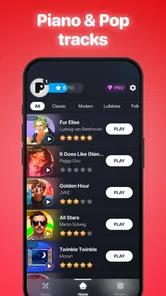
- A broad song selection can keep the experience fresh over time.
Cons
- Increasing speed can make later levels frustrating for casual players.
- Some songs or features may require in-app purchases to unlock.
- Gameplay can become repetitive if you play for long sessions.
- Accidental taps may end a run when the screen feels crowded.
- Requires steady concentration
- which may not suit relaxed gaming.













