Miner GO!
- 89.00
- 4.4
- Installs
- 50.00K
- Price
- Free

Screenshots


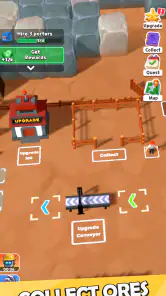
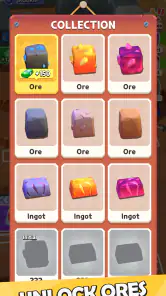
Analysis by Reviewed
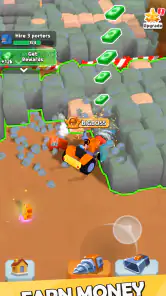
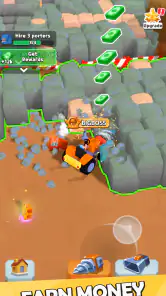
I approached Miner GO! as the sort of arcade game that can sit on a shared phone and offer a quick activity without demanding a long session. Its basic appeal is easy to understand: you dig for resources, sell what you collect, and use the proceeds to improve your mining operation. In practice, that loop makes it approachable for a household device because one person can play for a few minutes, hand the phone over, and leave the next player with an understandable objective.
That simplicity is also the game’s main test. A mining game needs to make each improvement feel worthwhile, and it needs to give the player a reason to return after the first few upgrades. My impression is that Miner GO! is best viewed as a compact, early-stage arcade experience rather than a deep management simulator. It is free to start, rated for Everyone, and comes from Seikami. The current release is version 0.1.4, so I would approach it with interest in the core loop rather than expectations of a huge, fully developed empire-building system.
How Miner GO! works on a shared device
The most useful household scenario is a phone or tablet that several people use casually. One player can take a short turn digging, sell the gathered resources, and spend the return on an upgrade. Another player can continue from that point without needing a long explanation of complicated rules. This makes the game more suitable for shared downtime than an arcade title built around precise timing, competitive rankings, or a story that must be followed in order.
I would still set a simple household rule before passing the device around: decide whether everyone is contributing to one save or whether the device belongs to one primary player. The reason is practical rather than technical. A mining operation built through upgrades can feel personal, and a younger player may spend resources differently from an older one. If the game is treated as a common project, that difference becomes part of the fun. If one person wants careful progress, unplanned spending can quickly become frustrating.
For a shared session, I find a turn-based rhythm works better than leaving the game open indefinitely. One person can focus on collecting, another can handle selling and improvements, and the group can agree on the next purchase before anyone taps through it. That turns a basic arcade loop into a small coordination exercise. It also helps children understand that virtual resources are limited within the current run, even though the game itself is designed to be easy to pick up.
A realistic example would be a family waiting for an appointment or relaxing after dinner. A child might dig for a while, ask what should be upgraded, and then let an adult decide whether the immediate reward is more useful than saving for a larger improvement. The game does not need to become a formal family activity to work this way. Its short, repeatable actions make it easy to include without taking over the entire evening.
What to agree on before the first turn
On a shared device, I would clarify three things: who is allowed to spend the accumulated currency, whether progress is communal, and whether purchases inside the game are off limits. These conversations matter more than they might with a simple one-touch arcade game because Miner GO! connects play directly to selling and upgrading. The decisions are straightforward, but they can affect the direction of the operation.
My preferred approach is to let each player complete a small mining cycle, then pause for a joint decision. That prevents the fastest tapper from controlling every upgrade and gives younger players a chance to understand the relationship between effort and improvement. It also exposes one of the game’s quieter strengths: the loop can support cooperation even though it is not presented as a cooperative game.
The trade-off is that this arrangement may feel too slow for someone who wants uninterrupted personal progress. A dedicated player will probably prefer having the device and making every decision alone. For that person, sharing a save can create friction instead of adding enjoyment. The game is flexible enough for both styles, but the household should choose one rather than assuming everyone has the same expectations.
Keeping accounts and progress boundaries clear
I would not treat Miner GO! as a place for separate household profiles unless the device and the game clearly provide that option in actual use. The safer assumption is that the visible progress belongs to the current installation and the person using it. That means a family should avoid promising a child a private mining operation on a shared phone, especially if other people regularly play arcade games on it.
This boundary is particularly important when the device is passed between adults and children. A child may see an upgrade as an obvious next step, while an adult may be saving for a different improvement. Neither choice is automatically wrong, but they should not be confused with separate accounts. If individual ownership matters, a personal device is a better arrangement than relying on informal memory about who earned which resources.
I also recommend taking a moment to identify the game before switching users. That sounds obvious, but on a busy household device, several games may be installed and notifications or recent-app screens can make it easy to open the wrong one. A quick verbal check—whose turn it is and what the current goal is—prevents accidental changes and keeps the shared session friendly.
Coordination around digging, selling, and upgrading
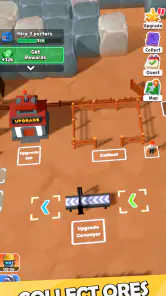
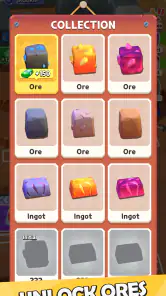
The three-part loop creates a natural decision sequence. Digging produces the material to work with, selling converts it into spending power, and upgrading determines how the next round feels. I would encourage new players not to rush through the selling stage. Before confirming a transaction, look at the current resources and discuss whether the money should be used immediately or held for a more meaningful improvement.
This is one of the most useful ways to make the game last longer on a shared device. If every player sells and spends without discussion, the operation can become a chain of isolated taps. If the group pauses between stages, each action has a purpose. The experience remains simple enough for a child to follow, but it also gives older players a reason to think about timing rather than merely repeating the same motion.
Another practical tip is to name the current objective in plain language. Instead of saying “play until it gets better,” agree on a target such as completing another dig-and-sell cycle or reaching the next planned upgrade. This keeps short sessions satisfying. It also helps when someone has to stop unexpectedly: the next player knows whether the group was collecting, selling, or deciding what to improve.
There is a trade-off here. Players who enjoy optimization may want clearer long-term planning and more detailed management choices than the compact loop provides. Players who want a relaxed arcade activity may appreciate not having to study complicated systems. Miner GO! sits closer to the second group, while still offering enough resource handling to make progress feel more deliberate than a purely reflex-based game.
Age context and trust on a family device
The Everyone content rating makes Miner GO! an approachable choice for a broad household audience. That does not mean every child will enjoy it equally. Younger players may like the immediate connection between digging and collecting, while older children may quickly ask for more variety, more strategic depth, or a stronger sense of discovery. I would introduce it as a simple resource arcade game, not as a detailed simulation of running a real mining business.
Trust is more important than the age label when the device is shared. The game includes in-app purchases priced at $4.99 per item, so adults should decide in advance how purchases are handled. For a child’s session, I would make the rule explicit: no purchase is made without asking first. Even when the game is free to download and play, a household should separate the cost of optional items from the normal play loop.
This is also a good opportunity to explain the difference between progress earned by playing and progress obtained through spending. A child can enjoy digging, selling, and upgrading without assuming that every improvement should be bought. An adult can allow optional spending if it fits the household’s rules, but I would not make it part of the game’s basic introduction. The free starting point is enough to judge whether the loop is enjoyable.
For adults, the age rating may make the game feel low-risk as a casual family option, but it should not replace supervision of the device itself. Shared phones contain personal information, payment methods, and other apps. Miner GO! can be a suitable game for a child to use, yet the broader device still needs normal household boundaries. That distinction is easy to overlook when a game appears simple.
Where the game fits among arcade alternatives
Compared with a reflex arcade game, Miner GO! asks for less constant precision and more patience with a repeatable progression loop. You are not relying only on a high score achieved in one intense attempt. The appeal comes from seeing a small operation improve through repeated work. That makes it a better fit for players who enjoy incremental progress than for someone looking for rapid action.
Compared with a full idle or management game, it appears more immediately understandable. There is a clear relationship between the activity and the reward: dig, sell, and improve. The downside is that players who expect layers of staffing, market decisions, equipment trees, or complex automation may find the experience too narrow. I would choose a deeper management game for long sessions built around planning, and Miner GO! for a lighter activity that can be explained in a minute.
It also differs from competitive arcade games because its household value does not depend on comparing scores. Two people can discuss the next upgrade without one of them needing to beat the other. That makes it less exciting for a group that wants direct competition, but more comfortable for mixed ages or players with different skill levels. A child who is not quick with reflexes can still participate in the mining decisions.
The game’s early version matters when making this comparison. At version 0.1.4, I would judge it by whether the central loop is pleasant and understandable, not by expecting the breadth of a long-established arcade or simulation title. Seikami has a foundation that is easy to grasp, but players who need extensive content should keep their expectations measured.
Everyday strengths and points of friction
The strongest everyday quality is accessibility. A player can understand the purpose without reading a long explanation, and the shared-device format gives the household an easy way to take turns. The resource cycle also creates a small amount of decision-making, which keeps the game from feeling like a completely passive tap routine.
The main friction is repetition. Digging, selling, and upgrading are satisfying only while the next improvement feels meaningful. If the available decisions do not continue to change the experience, a player may lose interest after the initial curiosity fades. This is why I would recommend short sessions at first rather than presenting it as a game that must occupy an entire afternoon.
Another limitation is the possibility of disagreement over spending. That is not a flaw unique to the game, but Miner GO!’s structure makes it especially visible on a shared device. A household that cannot agree on one common progression path should use separate devices or reserve the game for individual play. The simple controls do not remove the need for clear ownership of the save.
Players should also consider the purchase model before recommending it to children. The game costs nothing to start, which lowers the barrier to trying it, but optional items can change how adults want the device configured. I would treat the free experience as the evaluation period: play normally, see whether the loop holds attention, and only then decide whether any optional purchase belongs in the household budget.
Who will enjoy Miner GO! most?
I would recommend it to someone who likes visible, gradual improvement and wants an arcade game that can be played in short bursts. It is a good candidate for a shared family device when everyone understands that the progress is communal. It may also suit a player who finds traditional reflex games tiring but still wants a simple interaction with a clear reward.
It is less suitable for someone searching for a large simulation, a story-driven adventure, or intense competitive play. It is also not my first choice for a household where each person expects a separate progression path on one phone. In that situation, the social arrangement becomes more complicated than the game itself, and a title with explicit profiles or a naturally score-based format would be more convenient.
For a child, I would recommend playing alongside an adult at least initially—not because the game is difficult, but because the selling, upgrading, and purchase decisions are useful moments to explain. For an adult playing alone, the appeal depends on tolerance for repetition. If the satisfaction of a steadily improving mining operation sounds appealing, the loop has a fair chance of working. If you need constant novelty, it may feel limited.
My household verdict
Miner GO! works best as a modest, approachable arcade game with a resource-management twist. I like that its central actions are easy to share and easy to explain, and I can see it fitting naturally into short household sessions. The game’s 4.4 average from over 700 ratings suggests that many players have responded positively, while its 50K-plus installs show that it has found an audience without needing to be treated as a major mainstream release.
My recommendation comes with clear boundaries. Keep shared progress communal, agree on spending before children play, and use short objectives to make each turn feel complete. Do not choose it expecting a deep business simulator or an endless supply of complex systems. The free entry point makes trying it straightforward, and the Everyone rating broadens its household appeal, but the game still depends on whether its repeating mining loop matches your taste.
For me, the best reason to try Miner GO! is not the promise of a huge virtual empire. It is the small satisfaction of turning a few minutes of digging into a visible improvement, then deciding together what should happen next. That is enough for a relaxed shared-device game. If your household values simple cooperation, clear turns, and low-pressure progress, Seikami’s mining arcade title is worth a look. If separate accounts, deep strategy, or constant action are essential, I would choose a different kind of game.
Pros
- Simple controls make mining easy to learn.
- Short runs suit quick gaming sessions.
- Collecting resources gives each run a clear goal.
- Bright visuals make underground areas easy to follow.
- Progress feels rewarding as equipment improves.
Cons
- Limited variety can make repeated runs feel predictable.
- Some upgrades may require considerable grinding.
- Small screens can make certain details hard to see.
- The pace may feel slow for players seeking constant action.
- Performance can vary on older mobile devices.

- Category
- Arcade
- Version
- 0.1.4