Guess The Song - Music Quiz
- 49.22K
- 4.0
- Installs
- 10.00M
- Price
- Free
Screenshots

Analysis by Reviewed
I tend to enjoy music quizzes most when they fit into a spare moment rather than demand a whole evening. Guess The Song - Music Quiz is a trivia game built around recognizing music, so it can suit a short break, a commute, or a casual get-together. The key question is whether its quick-guessing format matches the way you like to listen: it rewards fast recognition more than careful music discovery.
Getting past the first few snags
Music quizzes can be less straightforward than they look. A clip may be familiar without bringing the title or artist to mind, and background noise can make listening harder. I’d start somewhere quiet, turn the volume to a comfortable level, and give each excerpt your attention before answering. If you’re playing with someone else, agree to take turns rather than call out answers over one another; it makes the result feel fairer.
Simple checks before you play
If the game does not seem to respond as expected, I’d first check the basics: make sure the device’s sound is on, confirm that the app is open and responsive, and try again after closing and reopening it. A weak connection can also affect apps that need to load online content, so checking your connection is a sensible general step. These checks won’t solve every issue, but they’re a better first move than assuming the quiz itself is broken.
For a smoother round, I’d use headphones when I’m alone and keep the device nearby if I’m playing with friends. Music recognition depends on hearing the clip clearly, and a noisy room can turn a good guess into a coin toss. I also wouldn’t treat a wrong answer as proof that I don’t know the song: sometimes the snippet simply catches an unfamiliar part.
A good fit for short, social sessions
The game works best for people who enjoy naming songs from memory and don’t mind being put on the spot. A realistic use is a few rounds while waiting for a friend or relaxing at home, with everyone guessing before the answer is revealed. That gives the quiz a light party-game feel without needing a long setup. It may be less satisfying if you want to browse full tracks, build playlists, or learn music in a structured way; a streaming or music-learning app is a better match for those goals.
Compared with trivia games based on written questions, a song quiz asks you to recognize sound rather than recall facts from a prompt. That makes it more immediate and can bring out different strengths: one person may know song titles, while another recognizes performers quickly. To keep a group round friendly, let people say whether they’re guessing the title or artist before answers are settled. It avoids arguments over what counts as a correct response.
Unleashing the Music Buff Within
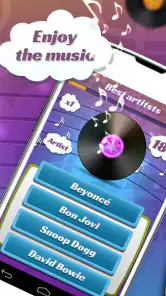
Guess The Song - Music Quiz is one of those apps that makes you feel like you’re on a game show. Once you fire it up, you’re greeted with a user-friendly interface that gets you right into the groove. The app plays a short clip of a song, and your mission, should you choose to accept it, is to guess the song title or the artist as fast as you can. Sounds simple, right? But trust me, it’s ridiculously addictive!
More From Our News Desk

Weather by Xiaomi Review: Clear at a Glance, Less Clear Up Close

X Under Pressure: Can It Recover When Posting Goes Wrong?

Clash of Clans Is Won Between the Battles

Android Auto Makes the Case for Quieter Car Software

MobiOffice: Transforming Mobile Productivity with Seamless Integration

EA SPORTS FC™ Mobile Soccer: Redefining Mobile Sports Gaming
Features That Hit the Right Note
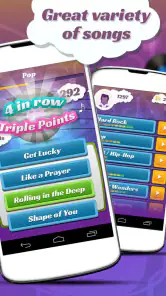
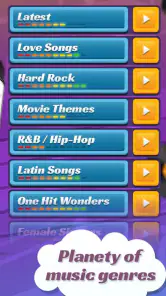
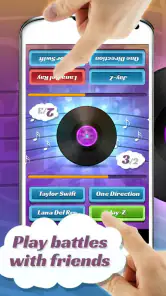
What I absolutely love about this app is the variety. Whether you’re into pop, rock, indie, or even those classic golden oldies, there’s a playlist for you. You can either play solo or challenge your friends to see who’s the real walking jukebox. Oh, and did I mention the app updates its song library regularly? So, you’re always up for a new challenge.
The app also comes with power-ups that you can use when you’re stuck. For instance, you can eliminate two wrong answers or extend the time limit. It’s like having a lifeline that keeps the game exciting and keeps you coming back for more.
The Social Element
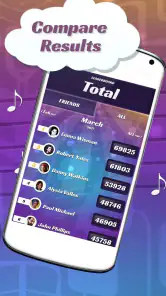
In the era of social media, this music quiz doesn’t disappoint. You can connect the app to your social media accounts and share your scores or challenge friends directly. The leaderboard feature is a nice touch, as it lets you see where you stand among your friends or even globally. There’s nothing like a bit of friendly competition to get the adrenaline pumping!
It is free to play, with optional in-app purchases priced from around a dollar to just under five dollars per item. I’d try the free experience first and only consider spending if I know I’ll keep playing; a purchase is not necessary simply to see whether the format suits me. The game is rated for everyone, though younger players may still benefit from an adult helping with device settings or purchase decisions.
Practical details and who should skip it
Made by S Quiz It!, the game has a four-out-of-five average from around four hundred thousand ratings and has been installed over ten million times. It first appeared in 2012, and version 4.7.0 runs on Android 5.0 or later. Those details make it easy to judge whether your device meets the stated minimum, but they don’t guarantee that every individual phone will behave identically.
If a round stalls, I’d leave the screen and reopen the game, then check the connection and sound again before trying another session. If other audio apps also have trouble, the cause may be the device, headphones, or network rather than this quiz. And if the issue happens only during a particular round, moving to a fresh session is a practical way to see whether it was temporary. I wouldn’t keep repeating a purchase or changing settings in a rush.
The main trade-off is that fast recognition is the whole appeal, and also the reason some players may tire of it. If you prefer explanations, music recommendations, or untimed questions, a conventional trivia app or listening service will serve you better. I’d also skip this one when I want uninterrupted full songs rather than brief guessing rounds. For casual music fans who enjoy testing one another, though, it offers a lively change from ordinary question-and-answer trivia.
Choosing the right way to play
I find the format most rewarding when I treat each round as a quick memory test rather than a measure of musical knowledge. A title can be on the tip of your tongue while the singer’s name escapes you, and that gap is part of the fun. Before starting with friends, decide whether a correct title, performer, or either one earns the point. That small agreement keeps the pace moving and makes it less likely that a close answer turns into a debate.
For a low-pressure visit, I’d play solo first and see whether the snippets and pace feel enjoyable. If the guessing becomes frustrating, it is easy to stop without having committed to a long session. With a group, one person can hold the phone while everyone else listens; rotating that role gives each player a fair chance and avoids crowding around the screen. This works especially well during a relaxed evening when people want something more interactive than simply putting on a playlist.
What the quick format gives up
The short-clip approach creates an energetic rhythm, but it naturally leaves little room for context. You are trying to identify what you hear, not explore an artist’s background or understand why a track matters. Someone who enjoys collecting music trivia facts may prefer a question-and-answer game, while someone who wants to hear complete songs will be happier with a music service. I see this quiz as a companion to listening, not a replacement for it.
There is also a difference between recognizing a song and knowing it well. A familiar chorus may make a round easy, while an instrumental passage or less familiar section can slow even a confident listener down. I’d avoid judging the game solely by whether every clip feels immediately recognizable; the challenge comes from those moments when memory needs a second. If you want a calm, carefully paced quiz with detailed explanations after each answer, this quick format may feel too abrupt.
Making a session feel fair
In a group, sound quality and turn-taking matter more than elaborate rules. Keep the device close enough for everyone to hear, but avoid having several people shout guesses at once. If you are keeping score informally, write it down or use a simple agreed rotation rather than assuming the app will manage every part of a homemade party game. That lets the quiz provide the musical prompt while the group supplies its own social rules.
For a commute or other shared space, I’d choose headphones and keep the volume considerate. If the environment is loud, postponing a round is often better than repeatedly replaying or guessing at a clip you barely heard. At home, a quiet moment can make the game feel more satisfying because you can focus on the musical details rather than fighting background noise. These are small adjustments, but they make a recognition game noticeably less dependent on luck.
For younger players, the everyone rating makes the game broadly approachable, but I would still keep an eye on purchase decisions and device use. The optional purchases are a separate consideration from trying the free game, so a parent can decide whether spending is appropriate before handing over the phone. Adults who want a casual shared activity may also find that letting children guess without pressure is more enjoyable than turning each answer into a strict competition.
Practical verdict
There is enough here for a quick music break if you enjoy the simple pleasure of recognizing a tune. The game’s appeal depends less on elaborate progression and more on the moment of hearing a clip and seeing what comes to mind. I’d recommend it to casual listeners, music-loving families, and friends who like an easy activity that needs little preparation. It is not the choice I’d make for learning music theory, finding new artists in depth, or listening to full tracks.
With a four-out-of-five average and about forty-nine thousand written reviews, it has attracted a substantial audience, though popularity alone cannot tell you whether its style will suit you. I’d use the free option to decide that for myself rather than buying anything before I know I enjoy the pace. The best test is simple: play a few rounds in a setting where you can hear clearly, then notice whether you want another turn or would rather return to your usual music app.
Final Thoughts
If you’re looking for a fun, engaging way to pass the time and love music, this app is definitely worth checking out. It’s free to download, although there are in-app purchases if you want to enhance your gameplay. But honestly, the free version is more than enough to keep you entertained. So, grab your headphones, download the app, and let the music quiz begin!
Happy guessing, my fellow music aficionados!
Guess The Song - Music Quiz Frequently Asked Questions
Does Guess The Song - Music Quiz need much storage space?
It is sensible to check the available storage on your device before installing any game, especially if you have limited room for apps and media. Guess The Song - Music Quiz is a music-trivia game, so its main appeal is listening to song clips and answering questions. You can review the download requirements shown for your device before proceeding.
Can I play Guess The Song - Music Quiz with friends?
The quiz format is easy to share with friends or family: take turns listening to the clips and guessing the song or artist, then compare how well everyone does. The published gameplay description also mentions competing with friends. It can make a casual music challenge, whether players recognize current hits or favor older songs.
Is Guess The Song - Music Quiz suitable for children and families?
The game is rated Everyone, making it suitable for a broad audience. Its music-trivia format is easy to understand, so family members with different levels of musical knowledge can take turns guessing. As with any game that offers in-app purchases, it is sensible for parents to review purchase settings on the device before letting children play.
What is Guess The Song - Music Quiz?
Guess The Song - Music Quiz is an engaging and interactive game that challenges players to identify songs based on short audio clips. With a wide range of genres and decades to choose from, it offers a fun way to test your musical knowledge and discover new tunes. This game is perfect for music enthusiasts looking for a fun and competitive way to enjoy their favorite songs. It is a trivia game from S Quiz It! and is free to play.
How does the gameplay work in Guess The Song - Music Quiz?
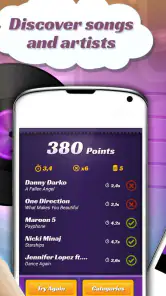
In Guess The Song - Music Quiz, players listen to short snippets of songs and must quickly identify the song or artist from multiple choices. The faster you answer, the more points you earn. The game features various levels with increasing difficulty and offers hints and power-ups to help players progress. It's a great way to challenge yourself and compete with friends.
Pros
- Engaging gameplay keeps users entertained.
- Wide variety of songs across genres.
- Enhances music recognition skills.
- User-friendly interface for easy navigation.
- Multiplayer mode for competitive fun.
Cons
- Requires internet connection for song updates.
- Ads can be intrusive during gameplay.
- Limited offline mode functionality.
- Some songs may be too obscure.
- Occasional app crashes reported.
- Category
- Trivia
- Version
- 4.7.0