Charades & Headbands Game
- 545.00
- 4.2
- Installs
- 10.00M
- Price
- Free

Screenshots


Analysis by Reviewed
The first few rounds of a charades game can rescue a quiet get-together surprisingly quickly. I like having a simple guessing game ready for a family visit, a casual evening with friends, or a stretch of waiting when people are already gathered and looking for something to do. Charades App - Guess the Word is a word game from artGS, and its appeal is less about learning a complicated system than getting people to take turns, give clues, and laugh at the guesses.
Why the First Few Rounds Work
What makes this kind of game useful in the first few minutes is that the group can understand the basic idea by watching one turn. Nobody needs to study a strategy or remember a long sequence of rules before joining in. I’d still explain the clue boundaries before starting, but after that, the first correct guess usually gives everyone a feel for the rhythm. That immediate shared focus is valuable when a gathering has reached the familiar pause where people are present but not yet talking to one another.
A practical first session does not need to be an event in itself. At a family dinner, for example, I might use it while the table is being cleared: one person holds the phone, a few others offer clues, and we stop after a handful of turns if people are ready to move on. Keeping the first go short makes it easier for reluctant guests to try without feeling trapped in a long competition. It also lets the host find out whether this particular group enjoys performing before planning a bigger game night around it.
From First Rounds to a Repeatable Game
We've all been there, right? Stuck at a party or gathering where the energy is low, and we need something to spice things up. Enter Charades App - Guess the Word, a delightful way to get everyone laughing and competing in no time. If you haven't tried it yet, let me take you through my experience with this app and why it's a must-have for your next shindig.
Instant Fun with Friends and Family
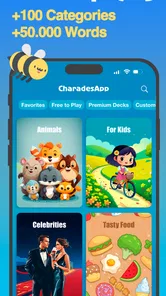
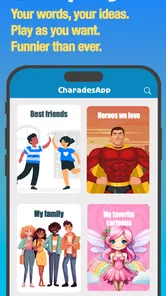
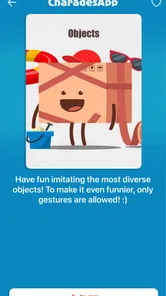
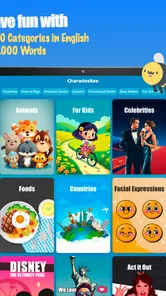
First off, the beauty of the Charades App - Guess the Word is its simplicity. You don't need any complicated setup. Just whip out your phone, and you're ready to go. The app provides a wide range of categories, from movies to animals, and even some pop culture references. This variety means there's something for everyone, no matter their age or interests. I found myself switching between categories, keeping the game fresh and exciting with each round.
The format works best when one person is willing to be the guesser while everyone else joins in with clues. In a real evening at home, I’d start with a broad category so younger players and guests who do not follow the same films or celebrities can participate, then narrow the theme only if the group wants a challenge. That small choice matters: a category that feels obvious to one friend can leave another person standing awkwardly with no clue to offer.
Compared with a boxed word game, this is easier to start because there is no board or pile of cards to set up, and the phone keeps the prompts together. Compared with asking someone to invent words on the spot, it gives the group a ready-made structure. The trade-off is that a phone becomes the center of attention, and the fun still depends on people being comfortable performing or giving clues. If your group prefers quiet puzzles or a game everyone can play independently, this is probably not the best fit.
More From Our News Desk

Weather by Xiaomi Review: Clear at a Glance, Less Clear Up Close

X Under Pressure: Can It Recover When Posting Goes Wrong?

Clash of Clans Is Won Between the Battles

Android Auto Makes the Case for Quieter Car Software

MobiOffice: Transforming Mobile Productivity with Seamless Integration

EA SPORTS FC™ Mobile Soccer: Redefining Mobile Sports Gaming
How Does It Work?
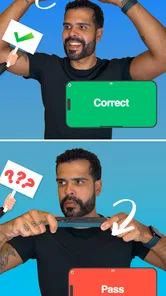
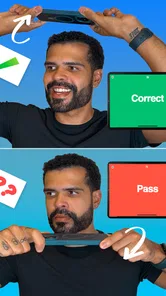
Here's how it goes down: one person holds the phone to their forehead, and the word or phrase appears on the screen. The others in the room have to act it out or give clues without saying the word. It's a race against time, so there's a lot of frantic gesturing and hilarious misinterpretations. The app does a fantastic job of keeping track of your score, so you can even make it a competitive event if that's your thing.
A useful way to keep rounds moving is to agree on the clue rules before the phone goes up: decide whether players will act, describe, or use a mix, and keep the same rule for everyone. I also find it helps to rotate the phone-holder promptly rather than letting the most confident performer take every turn. That gives quieter guests a low-pressure chance to guess, and it prevents the game from becoming a show put on by just two people.
Making a Mixed Group Feel Included
The best category is not necessarily the one that sounds most exciting; it is the one that gives most people a way into the game. With a mix of ages, languages, or interests, I’d choose a familiar theme first and avoid turning the opening round into a test of niche knowledge. If someone gets stuck, the clue-givers can shift from references to simple descriptions or gestures, as long as the group has agreed that this is allowed. That small hosting choice can make the difference between a shared laugh and a few people watching from the edge.
It also helps to make passing feel normal. A player may be happy to guess but not to perform, or may simply not recognize a particular prompt. Rather than letting that moment stall the room, I’d invite a quick role change or move to the next turn. The game is at its most welcoming when nobody has to prove they are funny, quick, or knowledgeable to belong.
Features That Stand Out
One feature I really appreciated is the voice recognition. If you're the one guessing and you shout the correct answer, the app registers it and moves on to the next word. It's surprisingly accurate, which adds to the seamless experience. There's also a timer feature that ticks down, adding that extra layer of excitement and urgency. And for those who love a good laugh, there’s the option to record the antics, so you can replay the funniest moments later.
For a first-time group, I would treat the timer as a way to create pace, not as a test of who is cleverest. A fast countdown can be funny, but it can also make a nervous player freeze; taking turns with an easier-feeling category before increasing the pressure makes the opening less intimidating. Recording can preserve a memorable moment, though I’d ask everyone first. Some people enjoy being filmed, while others would rather play without a camera pointed at them.
Those features also shape how I’d use the game in different settings. Voice recognition suits a lively room where guesses are spoken clearly, but overlapping shouts can make a turn feel less orderly. If the room is noisy, I’d keep one person responsible for giving clues at a time and let the guesser repeat an answer when needed. Recording is better treated as an optional extra than part of the game: the group can have a good round without saving anything, and skipping it avoids turning a spontaneous moment into a performance for the camera.
The game is free to download, but in-app purchases range from $0.99 to $89.99 per item, so I would check the purchase details before confirming anything. It is rated for Everyone, which makes it a natural option for mixed-age gatherings, while the actual choice of category and clues still needs a little common sense from whoever is hosting. The game has a 4.5 average from around 134,000 ratings and has been installed over 10 million times, suggesting that this kind of quick group play has broad appeal.
What Keeps It Useful After the Novelty
For repeat use, I would change the social setup rather than expecting the same prompts to feel new forever. One week, let a child or guest pick the category; another time, split into teams or agree to use only gestures. These are simple house rules, not a reason to make the game complicated. They give familiar material a different feel and let the group adjust the pace to its mood, whether people want a relaxed warm-up or a louder contest.
A small hosting routine can also prevent the app from becoming a last-minute distraction. I’d choose a stopping point before starting, make sure everyone knows where the phone will be passed, and keep another activity ready in case the group loses interest. That way, the game works as a useful bridge between arrival and dinner, or between a meal and another activity, rather than something that has to carry the entire evening. Its recurring value comes from convenience and the people playing, not from needing to open it every day.
Easy to Use, Even for Technophobes
Not everyone is tech-savvy, and that's perfectly okay. The user interface is incredibly intuitive. From my experience, even my tech-challenged friends had no trouble navigating through the app. The design is clean, and the instructions are straightforward, making it accessible for anyone to jump in and start playing.
That low setup burden is also why it can work in ordinary situations rather than only at planned parties. If relatives are waiting for dinner to finish or friends arrive early, one person can bring out the phone and start a short round without asking everyone to learn a separate rulebook. The app is on version 6.3.2 and requires Android 5.0 or later; for someone deciding whether to install it, those details are useful to check against the device they plan to use.
Keeping the Game Fresh Without Making It a Chore
The maintenance burden is light in the sense that I would not need to prepare cards, track a campaign, or remember a complicated set of rules before a visit. But there is still a little social upkeep: someone has to choose a suitable category, explain the turn, and keep the phone moving. If the same person always organizes the game, it can start to feel like hosting work rather than shared fun. Rotating who starts or letting another player pick the next theme spreads that responsibility naturally.
For a casual group, I’d also resist trying to turn every session into a scored tournament. A score can add a reason to focus, but it can make a mixed-ability group self-conscious if winning becomes the main point. A good compromise is to keep score only when people ask for competition, and otherwise use the rounds as a short icebreaker. That makes it easier to fit into a visit without asking everyone to commit to a full evening.
Its staying power depends on the people around you more than on a daily habit. I would keep it available for visits, holidays, or game nights, not expect it to become a solo pastime. Repeated sessions can feel familiar if the same group uses the same categories every time, and the performance element will not suit everyone. Rotating who chooses the category, keeping rounds short, and stopping while the group is still enjoying itself are practical ways to avoid turning a lively idea into a forced activity.
In conclusion, if you're looking for an app that guarantees laughter and fun, give the Charades App - Guess the Word a try. It's perfect for breaking the ice at gatherings or simply enjoying a good time with friends and family. Trust me, once you start playing, you'll find it hard to stop. So go ahead, download it, and let the games begin!
Does It Earn a Place on Your Phone?
For me, it earns a place as a handy group-game option rather than an app I would open every day. Its strongest use is clear: when several people are together, willing to be a little silly, and need a shared activity that starts quickly. If your usual alternative is a deck of prompt cards, this saves the preparation; if your group already loves a more strategic board game, that deeper structure may be more satisfying for a full evening. The game was released on June 14, 2016, and its broad, familiar format remains useful precisely because it does not demand much from players before the first turn.
So who should skip it? I would look elsewhere if you mostly play alone, dislike acting or shouting clues, or want a quiet game with a clear individual challenge. For everyone else, the best approach is to treat it as a flexible icebreaker: choose a category the whole room can understand, agree on how clues work, and let people pass or swap roles if they feel put on the spot. That makes the app more welcoming and gives its simple premise a better chance of staying fun beyond the novelty of the first round.
My Long-Term Take
After the first burst of excitement, I judge this game by whether it is easy to bring back at the right moment, not by whether it becomes a permanent daily routine. On that measure, it has a sensible role: it can fill an awkward pause, help guests mingle, or add a playful change of pace to a family visit. I would not build an entire game collection around it, but I can see why a free, familiar word game is worth keeping available for the occasions when a group wants to do something together without much setup.
The main source of fatigue is predictable rather than technical: the same players, themes, and style of clues can start to feel repetitive, and a room full of people who would rather watch than perform will not be transformed by an app. I’d use it selectively, keep the first round short, and switch to conversation or another game when the energy dips. If that sounds like how you host, Charades App - Guess the Word is a practical option. If you want solo depth, strategic decisions, or a calm activity, another kind of word game will suit you better.
Charades & Headbands Game Frequently Asked Questions
Is Charades & Headbands Game suitable for a party or family gathering?
Yes. Charades & Headbands Game is designed as a social guessing game, so it can be a lively choice for a party, family evening, or casual get-together. One person guesses while the others offer clues, giving everyone a way to participate. Players can take turns holding the phone, which helps keep the game moving and lets different people have a chance to guess.
Do I need to create an account to play Charades & Headbands Game?
The central appeal of Charades & Headbands Game is its straightforward group play: one person holds the phone and tries to guess a word from clues provided by everyone else. That makes it easy to introduce at a gathering without lengthy explanations. Check the app’s setup screens when you first open it, then follow the on-screen instructions to begin playing.
Can I play Charades & Headbands Game with a small group?
Yes. The game is built around one person guessing while others give clues, so a small group can take turns and still enjoy the central gameplay. It also works for a larger gathering, where more people can join in giving clues. The format is flexible, making it easy to fit into a family evening or a casual get-together.
Do players need to act out clues, or can they describe the word?
The key idea is to help the person holding the phone guess the displayed word without saying that word itself. Players can give clues through descriptions, and the familiar charades style also lends itself to acting things out. Agreeing on how to give clues before a round can help everyone follow the same rules and keep the guessing lively.
What is Charades App - Guess the Word?
Charades App - Guess the Word is a fun and interactive game designed to entertain players by having them guess words based on clues given by teammates. It is a digital version of the classic charades game, available for both Android and iOS platforms. The app provides a variety of categories, ensuring endless fun for parties, family gatherings, or casual hangouts.
Pros
- Fun for all ages
- Easy to set up and play
- Encourages team play
- No internet needed
- Customizable word lists
Cons
- Limited free content
- May become repetitive
- Ads can be intrusive
- Requires at least 2 players
- Some glitches reported