Blockman Go
- 54.41K
- 4.2
- Installs
- 100.00M
- Price
- Free

Screenshots



Analysis by Reviewed
What makes Blockman Go interesting to me is the chance to move between different block-style mini-games without installing a separate app for each one. It is an arcade game with a social hub, so a spare moment can become a quick match, a team activity, or a bit of avatar tinkering. That choice is also its main compromise: the game is less immediate than a standalone title when I just want one familiar activity and nothing else.
A quick way into the action
Blockman Go is an arcade game from Blockman GO studio, and its appeal is easy to understand: there is more than one kind of match to try. The game has been around since November 29, 2017, and its current version is 3.16.3. It is free to download, rated Teen, and requires Android 6.0 or later. The audience is substantial, with over 100 million installs and an average rating of 4.2 from around 2.9 million ratings.
That scale does not guarantee that every mini-game will suit me, but it does suggest there are plenty of players encountering the same platform. I find it useful to treat the app as a collection of short destinations rather than a single, carefully paced adventure. If one mode is not clicking, I can move on; the trade-off is that choosing what to play can take longer than jumping straight into a standalone game.
What is Blockman Go?
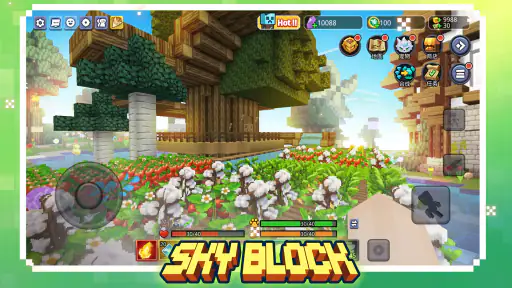
If you’re into sandbox games that let your creativity run wild, Blockman Go is your new best friend. Imagine a universe where you can build, explore, and compete in a variety of mini-games all under one roof. It’s like having a whole gaming arcade right in your pocket! The app is available for both Android and iOS, so no one’s left out of the fun.
The World of Mini-Games
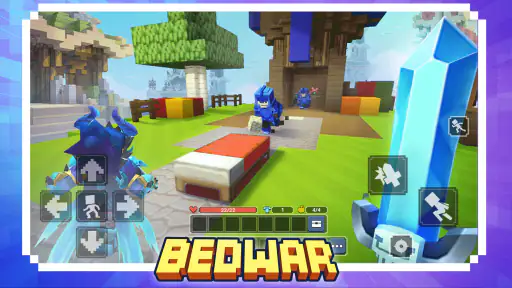
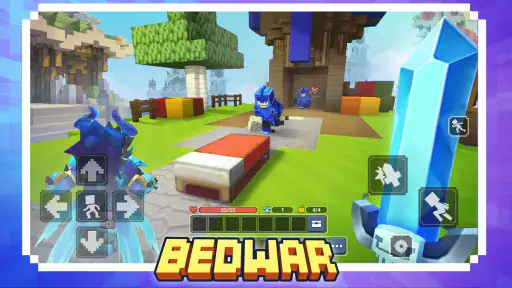
One of the coolest things about Blockman Go is its extensive array of mini-games. Whether you’re into action, adventure, or puzzle games, there’s something here for you. I particularly loved "Bed Wars," where you team up with friends to protect your bed from opponents. It’s a crazy mix of strategy and chaos that keeps you on your toes.
Another favorite of mine is "Sky Royale." It’s a battle royale-style game but with a twist. You start on a floating island and have to gather resources to stay alive while fending off other players. Talk about an adrenaline rush!
Finding a session that fits
These modes give the game different rhythms. A Bed Wars match asks me to pay attention to teammates and defense, while Sky Royale’s resource gathering and survival give each session a more immediate contest. I would not assume that every visit needs to turn into a long play session: the practical move is to pick a mode before opening the game, then give it enough attention to finish a round rather than bouncing between options mid-match.
More From Our News Desk

Weather by Xiaomi Review: Clear at a Glance, Less Clear Up Close

X Under Pressure: Can It Recover When Posting Goes Wrong?

Clash of Clans Is Won Between the Battles

Android Auto Makes the Case for Quieter Car Software

MobiOffice: Transforming Mobile Productivity with Seamless Integration

EA SPORTS FC™ Mobile Soccer: Redefining Mobile Sports Gaming
That makes it a better fit for a break when I can focus for a little while than for moments when I may need to stop at any second. Competitive rounds can be hard to abandon without letting teammates down or losing progress. If my day is unpredictable, I would choose a less team-dependent activity when one is available, and avoid starting a match just before I need to leave.
Making a short visit feel worthwhile
For example, if I have a little time before an appointment, I would avoid launching a team round when I know I may be called away. I would use that moment to browse the available activities, settle on a mode I already understand, or adjust my avatar instead. Then, when I have a more dependable stretch of free time, I can start a match without watching the clock. This simple distinction makes the game easier to fit around real life, even though it cannot make every competitive session safely pausable.
That is the key question for someone deciding whether to install it: can you give a round your attention until it ends? A shared platform may look like a good answer to “I only have a minute,” but the hub and mode selection still take time, and a match may ask for more commitment than the initial launch suggests. If I need something I can put down instantly with no consequence, I would choose a solo puzzle or a self-contained arcade game instead.
Customization Galore
Let’s talk customization because who doesn’t love a game where you can express your personal style? Blockman Go has a wicked character customization feature. You can choose from a huge variety of outfits and accessories to make your avatar stand out. Whether you want to be a suave spy or a funky pirate, the possibilities are endless.
They’ve got this neat currency system too. By playing games, you earn coins which you can then use to buy more outfits and accessories. It’s a great incentive to keep playing and exploring new games within the app.
Make the most of short breaks
For an ordinary evening, I can see the appeal of opening the app while waiting for a friend, choosing one familiar mode, and playing a round together once they arrive. That is a more satisfying use than spending the whole break browsing menus in search of a perfect match. A small practical tip is to decide whether I want competition, teamwork, or avatar styling before I start; doing so gives the session a purpose and reduces the feeling of endlessly sampling games.
The coin loop also creates a choice: I can focus on playing for the fun of a mode, or treat each session as a step toward an outfit. The second approach can keep me coming back, but it risks making a casual game feel like a chore if I care more about the reward than the match. I would use customization as a bonus, not as a reason to grind through modes I do not enjoy.
Social Features
Now, what’s a good game without a social aspect, right? Blockman Go nails this by allowing you to connect with friends easily. You can chat, join games together, or even make new friends. The in-game chat feature is pretty slick and makes coordinating with your team a breeze.
There’s also a community vibe in the app where players can share their game experiences. It’s super interactive and adds a layer of fun you won’t find in most other games.
Friends, strangers, and comfort
Playing with friends is the use case I would recommend first: familiar teammates make a cooperative mode easier to coordinate and can turn a quick match into a shared activity. If I am playing with strangers, I would keep the social side at the level that feels comfortable and remember that public chat is not the same as talking to people I already know. The Teen rating is a useful signal for families considering the game, but it is still sensible for younger players to have clear expectations around online interaction and purchases.
For a parent or guardian, I would make the first session a shared one: look over the hub together, agree on what kinds of chat feel appropriate, and decide whether purchases are allowed before the child explores the customization options. The game is free to start, but its in-app purchases range from $0.29 to $199.99 per item, which is a wide enough span to make device-level purchase controls worth checking. This does not mean spending is required to try the game; it means setting expectations early can prevent an unexpected bill or an argument over an outfit.
Compared with a typical single-mode arcade game, Blockman Go offers more variety and a persistent social layer, but it can be less direct. A focused alternative is better if I want to launch one familiar mechanic immediately, while this game suits me when I want a choice of different mini-games and the possibility of playing alongside friends. It is not the best pick for someone who dislikes online competition, chat, or a hub full of options.
How the variety compares in practice
The comparison is not simply “more modes are better.” A dedicated arcade game usually has a clearer loop: open it, understand the objective, and start playing. Here I get the benefit of switching from a team defense match to a survival contest without changing apps, but I also take on the effort of choosing among activities and adapting to different rules. I would recommend this platform to someone whose boredom comes from repeating one mechanic; someone who values instant access and a predictable control scheme may be happier with a single-purpose game.
It also works differently from a conventional sandbox where the main pleasure is shaping one world at my own pace. Blockman Go’s appeal, as I experience it, is more about moving between social play, competition, and customization than settling into one uninterrupted building project. If I want quiet creative time with no opponents or coordination, I would look for a sandbox designed around solo creation instead. If I want a lively change of pace and do not mind a busier menu, the collection approach makes more sense.
Easy to Start, Hard to Put Down
One of the things I appreciate about Blockman Go is how user-friendly it is. Even if you’re not a seasoned gamer, you’ll find it easy to navigate. The tutorials are helpful and get you up to speed quickly. But here’s the kicker: once you start playing, it’s nearly impossible to stop. The variety and excitement of the games make it incredibly addictive.
Plus, the developers keep things fresh with regular updates and new games. So, there’s always something new to try, which keeps boredom at bay.
Choosing what to replay
Replay value here comes from having several activities to rotate through, not from every visit transforming the experience. Once I know the basic aim of a mode, the next decision is whether its familiar routine still feels enjoyable with the people I am playing alongside. I would keep a short mental shortlist of modes that work for different moods: one for friendly teamwork, another for a more direct contest, and perhaps time to explore when I am not in a hurry. That is more useful than expecting the platform to choose the right activity for me.
A practical way to avoid menu drift is to give a session a simple stopping point before starting: one round, one attempt, or a brief look at a new mode. It keeps the game from swallowing a break merely because there is always another option to inspect. If I find myself opening it out of habit but not enjoying the matches, I would take that as a reason to rotate to another game rather than chase coins or keep browsing for a better fit.
What to expect over time
The variety helps replay value, but it does not remove repetition. Returning to the same mode means seeing familiar objectives and routines, and the social experience depends on who is online and how well a group works together. I would keep a couple of favorite modes in rotation rather than expecting every visit to feel new. When I want a single, deep progression path or a quiet offline experience, a conventional standalone arcade game is likely a better match.
Purchases are another consideration. The game is free, with in-app purchases ranging from $0.29 to $199.99 per item, so I would check purchase settings before handing a device to a child and avoid treating paid items as necessary for enjoyment. Players who simply want to try the mini-games can start without paying, while anyone prone to impulse spending should set boundaries before browsing cosmetic options.
Who will get the most from it
I think it suits players who enjoy trying different short competitive formats, have friends to invite, or like giving an avatar a recognizable look. It can also work for a family that is comfortable supervising online interaction and discussing purchases, because the variety gives players different ways to spend time in the same app. The best fit is not necessarily someone who plays for hours; it is someone who likes having a few distinct options ready and can choose one with a little intention.
I would steer away from it if I wanted a fully offline experience, a long story with steady character progression, or a game that is reliably safe to interrupt during every round. It is also a poor match for someone who dislikes social hubs or feels pressured by cosmetic rewards. In those situations, a smaller, focused game may be less distracting and easier to enjoy in brief gaps.
Wrapping It Up
In conclusion, if you’re looking for a game that offers endless fun and creativity, download Blockman Go right now. It’s a game that brings people together and lets you unleash your imagination in a vibrant virtual world. Whether you’re in it for the strategy, the social interaction, or just plain fun, this app has got you covered.
So, what are you waiting for? Grab your phone, hit that download link, and dive into the world of Blockman Go. Trust me, you’ll be glad you did!
My recommendation is more specific: try it if you like sampling different competitive mini-games, enjoy customizing an avatar, and have friends who might join you. Give it a pass if you need a reliably interruptible game, prefer solo play, or find social hubs and repeated match formats tiring. For me, its best casual rhythm is a planned short visit with one mode in mind—not an expectation that every option will be equally engaging.
Blockman Go Frequently Asked Questions
What kind of game is Blockman Go?
Blockman Go is an arcade game built around a sandbox and multiplayer mini-games platform. It brings different play experiences together in one app, making it a fit for players who like switching between varied activities rather than sticking to a single style. Its Teen content rating is also worth considering when deciding whether it is suitable for you or your family.
How much does Blockman Go cost to download?
Blockman Go is free to download and play, so you can try the game without paying an upfront price. It also offers optional in-app purchases, with items ranging from $0.29 to $199.99 each. Those purchases are not necessary simply to download the game, but it is sensible to review purchase options and use appropriate spending controls before handing a device to a younger player.
Does Blockman Go need an internet connection?
Yes, Blockman Go is primarily an online game, so an internet connection is needed for its multiplayer play and connected features. That online focus is central to the experience, since players use the platform to access mini-games and interact with others. If you are looking for a game to play during a journey or somewhere without reliable service, plan around the need to be connected.
What devices can run Blockman Go?
Blockman Go is a game in the Arcade category, developed by Blockman GO studio. It requires Android 6.0 or later, so check your device’s operating system before downloading. The game is available for Android and iOS, and its Teen content rating is worth considering when deciding whether it is appropriate for younger players.
What is Blockman Go and how does it work?
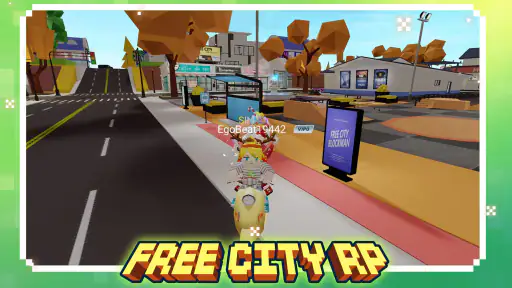
Blockman Go is a unique multiplayer gaming platform that combines various mini-games with social networking features. Players can explore different game modes, ranging from action-packed battles to creative sandbox worlds, all within a single app. Users can also personalize their avatars, chat with friends, and join communities, creating an immersive experience.
Pros
- Diverse mini-games enhance replayability.
- Customizable avatars offer personalization.
- Social features for connecting with friends.
- Regular updates with new content.
- Cross-platform play available.
Cons
- In-app purchases can be costly.
- Some games have frequent ads.
- Requires stable internet connection.
- Graphics might seem basic to some.
- Occasional lag in crowded games.
- Category
- Arcade
- Version
- 3.16.3