Blackjack
- 29.89K
- 4.5
- Installs
- 5.00M
- Price
- Free
Screenshots





Analysis by Reviewed
I’m drawn to Blackjack when I want a familiar card game that I can pick up without arranging a table or finding other players. Its focus is easy to understand: make decisions around 21, then see how the hand plays out. That makes it a natural fit for a quick break, though the gift-card angle means I’d also check the rules and pace for myself rather than assume every session is a way to earn something.
Who may enjoy this card game
I’d recommend it most to casual players who already enjoy blackjack or want a low-pressure way to get acquainted with the basic rhythm of the game. It is less suitable for someone looking for a broad collection of card games, a social game night, or a serious training tool for casino play. A digital opponent and a real dealer are different experiences, and I wouldn’t treat app results as a reliable guide to what will happen at a casino table.
For a realistic everyday use, imagine waiting for a takeaway order: a hand or two can fill a short gap without the commitment of a long match. If you have more time, you can pay attention to how each choice changes the outcome instead of tapping quickly. That small change in pace is useful: playing deliberately makes the game more engaging and can help a beginner understand the decisions, while rapid play is better only when the goal is passing a few minutes.
Making a session work for you
One practical habit is to decide before opening the game how long you want to play and whether you’re willing to spend. In-app purchases range from $0.99 to $199.99 per item, so I’d keep purchases separate from the fun of a hand and avoid treating them as a shortcut to skill or rewards. The game is free to download, but “free” does not mean every optional purchase is small. If the gift-card element is your main reason to play, check the terms shown in the app and consider whether the play itself is enjoyable without a reward.
Compared with solitaire, blackjack is more about reacting to a changing hand than planning a long sequence of moves. Compared with a live multiplayer card room, a solo digital game is easier to fit around interruptions, but it cannot reproduce the atmosphere or conversation of people sitting together. I’d choose this app for a compact blackjack session, and a physical deck or a social table when the company matters more than convenience.
Getting Started with Blackjack
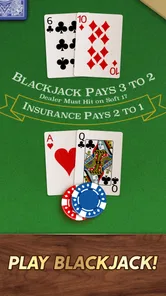
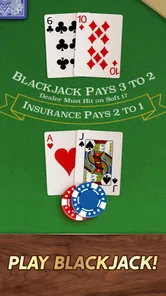
Diving into Blackjack is as straightforward as it gets. Once you download and open the app, you're greeted with a sleek and intuitive interface that screams "let's play!" You don't need a PhD in card games to navigate this app, trust me. The setup is user-friendly, and I was able to jump into a game within seconds. The visuals are crisp, and the cards are designed to resemble the real deal, making the experience quite immersive.
Readability and navigation
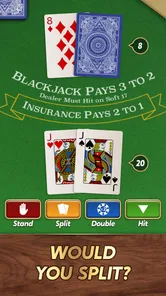
In a card game, clarity matters because the important information is concentrated around the cards and the available decisions. I found the table presentation easy to grasp, and the familiar layout reduces the effort needed to work out what is happening. If you are new to blackjack, take a moment to read the on-screen choices before tapping; acting quickly is not the same as understanding the hand. I would also try a short session first, since a layout that feels comfortable on one phone may feel crowded on another.
More From Our News Desk

Weather by Xiaomi Review: Clear at a Glance, Less Clear Up Close

X Under Pressure: Can It Recover When Posting Goes Wrong?

Clash of Clans Is Won Between the Battles

Android Auto Makes the Case for Quieter Car Software

MobiOffice: Transforming Mobile Productivity with Seamless Integration

EA SPORTS FC™ Mobile Soccer: Redefining Mobile Sports Gaming
Tripledot Studios Limited makes this free card game, which has a 4.5 average from around 116,000 ratings and over 5 million installs. It is rated Everyone 10+, and version 2.18.02 requires Android 6.0 or later. Those details make it easy to judge whether it suits your device and household, but they do not replace checking how the game feels in your own hands. The large audience suggests it has found plenty of casual players; it does not mean every player will enjoy its pace or presentation.
Motor and sensory considerations
Blackjack is a relatively simple format to operate: most of the attention goes to reading a hand and choosing what to do next. That can be less demanding than games built around rapid movement, but it still asks for repeated taps and steady visual attention. I’d avoid playing while walking, handling something hot, or doing another task that needs your eyes. If small cards or busy table details are hard for you to follow, pause and see whether the display is comfortable before settling into a longer session; I wouldn’t assume a card-focused design automatically works for every level of vision or dexterity.
Situational access and remaining barriers
A quiet, short session can suit a commute break or a few minutes at home, provided you can safely look at the screen and hear or notice the game’s feedback. Sound can add atmosphere, but the card decisions themselves are visual, so I’d keep the screen easy to see rather than relying on audio alone. Interruptions are another consideration: blackjack hands are brief, yet stopping mid-decision can still be frustrating. If you need a game that can be ignored instantly, a turn-based puzzle may be a better fit. Likewise, anyone who finds casino-style themes uncomfortable may prefer a more neutral card game.
The release date was November 18, 2019, and the current version is 2.18.02. I would treat those as useful context, not a promise that the app will suit every device or preference. Its straightforward card format is appealing, but the strongest reason to try it is that you specifically want blackjack in a convenient digital form. If you want extensive accessibility controls, a quiet interface, or a different kind of card challenge, compare alternatives before committing time or money.
A measured recommendation
Overall, I see this as a convenient option for casual blackjack, especially for players who value quick access over the social feel of a real table. It is free to start, and the in-app purchases mean spending is optional, though I’d keep a clear personal limit. The Everyone 10+ rating may help families make an initial decision, but I would still consider whether the casino presentation and purchase prompts feel appropriate for the person playing.
My advice is to try a brief session, check that the cards and controls are comfortable for you, and decide whether the core decisions hold your interest without relying on gift cards or paid extras. If they do, it can be a handy way to enjoy a familiar game in spare moments. If you need stronger social play, broader accessibility options, or a completely different pace, another card game will likely be a better match.
Gameplay and Features
Now, onto the heart of the matter - the gameplay. The app offers several modes, including a single-player mode where you can practice your skills against the AI, and a multiplayer mode to test your luck against players worldwide. I spent a good amount of time honing my skills in single-player mode before feeling brave enough to take on the global competition. Spoiler alert: it's super addictive!
One of the standout features of this app is its tutorial mode. For those new to Blackjack, this is a lifesaver. The tutorial is detailed yet easy to follow, guiding you through the basic rules and strategies. It even throws in a few tips on when to hit, stand, or double down, which I found incredibly helpful. The app also integrates a leaderboard, so if you're competitive like me, you'll love seeing your name climb up the ranks.
Graphics and Sounds
Let’s talk about the aesthetics for a moment. The graphics are top-notch, presenting a clean and realistic table view. The animations are smooth, and the transition between deals is seamless. On the audio front, the sound effects add to the realism without being intrusive. You get the shuffle of cards, the soft tap of chips, and even a bit of background casino ambiance, which really sets the mood.
In-App Purchases and Ads
Like many free apps, Blackjack does come with ads, but they’re not overwhelming. They pop up occasionally between games, but it’s a small price to pay for a free app that offers such a rich gaming experience. There are also in-app purchases available for those looking to enhance their gameplay with extra chips or to unlock special features. However, you can still enjoy the game fully without spending a dime, which is always a plus in my book.
Overall, Blackjack delivers a fantastic virtual card-playing experience. Whether you're killing time or aiming to become a blackjack pro, this app has something for everyone. So, shuffle up and deal, because you're in for a fun ride!
Keeping the gift-card goal in perspective
The promise of a possible reward changes how I would judge the game, even if the basic card decisions remain the main attraction. I’d separate two questions: do I enjoy playing a hand, and do I understand the requirements attached to any reward? Those are not the same. A player who likes blackjack can enjoy the app on its own terms, while someone playing only to accumulate a benefit may find the routine tedious if progress takes longer than expected. I would read the in-app conditions before investing a lot of time, and I would never count a potential reward as guaranteed value.
This is also where patience helps. If I were learning, I’d use the tutorial and slower solo play to think through choices, then treat any competitive element as entertainment rather than proof that I have mastered the game. Blackjack outcomes involve chance, so a run of wins or losses does not establish that a particular approach will keep working. I find that mindset makes the experience more enjoyable and reduces the temptation to chase a result with extra spending.
Choosing the right way to play
For someone deciding between this and a standard blackjack app, the main distinction here is the gift-card framing alongside the familiar card format. A stripped-down practice app may be preferable if all you want is a quiet place to rehearse decisions without reward-related expectations. A casino-style social game is a better choice if you want conversation, table etiquette, and the feeling of playing with other people. This one sits between those needs: it offers accessible digital play, but it cannot stand in for either focused study or a shared evening around a table.
I’d also think about what happens when a session is interrupted. A short hand can fit neatly into a queue, but it is not necessarily a good choice during a task that demands frequent attention. Before starting, I would finish anything time-sensitive and put the phone away when I need to be alert to my surroundings. For a break at a desk or at home, the game’s compact format makes more sense; for a crowded platform or while moving, keeping attention on the real world matters more than finishing a deal.
Practical checks before settling in
If you are trying it for the first time, I’d make the first visit a simple comfort check rather than a long session. Notice whether the cards remain readable at your usual screen brightness, whether the buttons are easy to distinguish, and whether the pace gives you enough time to make a choice. These are small checks, but they can reveal whether the presentation works for you without spending money or getting invested in a long run. If the visual style feels tiring, taking a break is more sensible than forcing yourself through it.
For families, the age rating is a starting point rather than a complete answer. I would look at the game together, explain that optional purchases are not necessary to enjoy a hand, and agree on a spending rule before a younger player explores the menus. The purchase range makes that conversation worthwhile even when the intended play is free. A parent who wants a purely educational card activity, with no reward framing or casino atmosphere, may be happier choosing a different kind of game.
Where it fits in a card-game routine
I see the strongest everyday use as a deliberate little pause: open the app when you have a few unclaimed minutes, play at a pace that lets you follow the decisions, then stop when the break is over. That routine is more satisfying than leaving it open as background entertainment, because blackjack depends on paying attention to the hand. If you are keeping track of your own choices, a simple mental note after each round—what you chose and why—can make practice more thoughtful without turning casual play into homework.
For a longer evening, I would not make it my only card-game option unless blackjack is exactly what everyone wants. Solitaire gives one person a different kind of planning challenge, while a physical deck makes it easy to adapt rules and share the table. A live card room adds human interaction but can be less convenient and more demanding. The useful trade-off here is immediacy: this app puts a recognizable blackjack session close at hand, while giving up some of the variety and company available elsewhere.
Inclusive verdict
My overall view is positive but specific: this is a convenient pick for people who want blackjack on a phone, can comfortably follow a visual card table, and are happy to keep the reward and purchase aspects in perspective. The simple turn-by-turn format is less physically demanding than many action games, yet it still relies on seeing the cards and making taps. That means it may suit some players who prefer calm, contained interaction, but it is not automatically accessible to everyone with visual, motor, or sensory needs.
I would start with a short, no-pressure session, check the controls and presentation for yourself, and decide whether the game is enjoyable even without a gift card or paid extras. If the answer is yes, its quick access and familiar decisions can make it a pleasant way to fill a quiet pause. If your priority is extensive accessibility settings, a truly social table, a broader selection of card games, or a learning tool for real casino play, I’d choose an alternative built around that need instead.
Blackjack Frequently Asked Questions
Does Blackjack offer gift cards as rewards?
Blackjack’s store summary says you can play the game and earn gift cards, which may appeal if you enjoy having a reward goal alongside card play. The main experience is still centered on Blackjack hands and decisions, so consider whether that combination suits you before downloading. As with any reward feature, read the in-game terms and eligibility details before relying on a particular reward.
Is Blackjack suitable for younger players?
Blackjack has an Everyone 10+ content rating, offering a useful age guide for families considering the game. It is a card game built around familiar Blackjack decisions, including whether to take another card or keep a hand. Parents and guardians should still review the game themselves and consider their household’s approach to in-app purchases before allowing a younger player to install it.
Who developed Blackjack, and what kind of game is it?
Blackjack is a card game developed by Tripledot Studios Limited. It is designed around the familiar goal of playing hands against a dealer, making it approachable for newcomers while still giving experienced players strategic decisions to consider. The game is free to download, and its content rating is Everyone 10+, so it may be suitable for a broad audience, subject to the age guidance shown by the store.
What is Blackjack’s average rating, and how popular is it?
Blackjack has an average rating of 4.5 from around 116,000 ratings, with about 28,000 written reviews and over 5 million installs. Those figures suggest that many players have tried the game and shared feedback about it. Ratings are only one way to judge whether a game suits you, though, so it is worth considering its card-game format and purchase options before deciding to install.
What is the objective of Blackjack?
The primary objective of Blackjack is to beat the dealer's hand without exceeding 21 points. Players are dealt two cards and can choose to 'hit' to receive additional cards or 'stand' to keep their current hand. The aim is to get as close to 21 as possible without going over, which would result in a 'bust' and loss of the round.
Pros
- Engaging gameplay for casino enthusiasts.
- Simple rules
- easy to learn for beginners.
- Supports offline play without internet.
- Free to download and play on mobile.
- Visually appealing with smooth graphics.
Cons
- Can be addictive for some players.
- In-app purchases may be pricey.
- Limited rewards without spending.
- Ads can be frequent and intrusive.
- May require updates for new features.