

Zum - Student Transportation
- 466.00
- 4.5
- Installs
- 100.00K
- Price
- Free

Screenshots
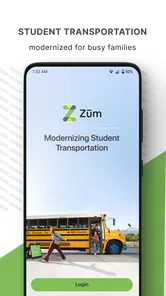
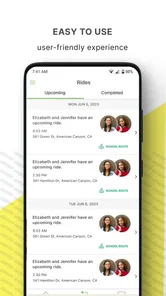
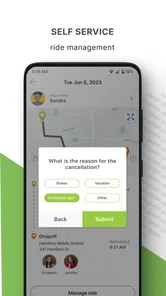
Analysis by Reviewed
Getting a child to school is usually a routine, but the routine becomes complicated when several adults share responsibility for it. That is where Zum - Student Transportation makes its case. It is a free Maps & Navigation app from Zum, built around tracking and managing a child’s rides rather than helping me find a restaurant or plan a holiday route. I see its value most clearly when transportation is a repeated family task that needs visibility, not when I simply need turn-by-turn directions.
My first impression is that the app has a focused purpose. It is not trying to replace a general map service, and that narrow focus is useful. The central question is simple: where is the child’s ride, and how can the responsible adults keep track of it? That makes the experience easier to understand during a busy morning, especially for families who need a dedicated place for school transportation instead of a mixture of messages, phone calls and separate map tools.
From first-week convenience to lasting routine
During the first week, the appeal is easy to understand. A parent can approach school travel as an organized process instead of a series of last-minute updates. The app’s store summary points directly to its purpose: tracking and managing a child’s rides. I appreciate that clarity because it sets the right expectation. This is a companion for student transportation, not a broad navigation suite with a school-related feature hidden among unrelated tools.
The first useful habit is checking the app at the moment when uncertainty normally appears. A child may be preparing to leave, waiting for pickup or returning home while a parent is still at work. Rather than asking another adult to repeat the latest information, I can use the transportation app as the place to begin checking. That small change matters because it reduces the number of conversations needed to coordinate an ordinary school day.
A realistic example is a household where one parent handles the morning and another handles the afternoon. The morning parent can stay focused on getting the child ready, while the afternoon parent has a dedicated way to follow the ride. If a grandparent or another trusted caregiver is involved, the same arrangement can be easier to maintain than forwarding separate messages every day. The benefit is not excitement; it is fewer points where a routine can break down.
That said, the first-week experience depends heavily on whether the child’s transportation arrangement is already supported by the service behind the app. Zum is the developer, and the application is designed around student transportation rather than independent trip planning. I would not install it expecting to create a complete school bus network from scratch or use it as a universal tracker for every family journey. Its usefulness begins when it fits the transportation setup a family already relies on.
The app is also approachable from an access standpoint. It is free, carries an Everyone age rating, and requires a minimum operating system of version 9. That combination makes it reasonable for families using older compatible devices, although I would still check the device’s current software and practical performance before making it the only source of ride information. A transportation tool is most valuable when it opens quickly and remains dependable at the exact time I need it.
More From Our News Desk

 Weather - By Xiaomi
Weather by Xiaomi Review: Clear at a Glance, Less Clear Up Close
Xiaomi’s weather app makes everyday forecasts quick to scan, but its calm surface can leave useful details and recovery paths harder to find than they should be.

 X
XX Under Pressure: Can It Recover When Posting Goes Wrong?
A resilience-focused review of X, examining setup, mistaken posts, interruptions, weak connections, and the gaps that matter when recovery needs to be dependable.

 Clash of Clans
Clash of Clans Is Won Between the Battles
Its raids are quick; its community is a long-term project of coordination, teaching, rivalry, and shared responsibility—with all the friction that entails.

 Android Auto
Android Auto Makes the Case for Quieter Car Software
The car interface is no longer judged by how much it can do, but by how quietly it helps. Android Auto shows what drivers now expect—and what still gets in the way.

 MobiOffice: Word, Sheets, PDF
MobiOffice: Transforming Mobile Productivity with Seamless Integration
MobiOffice: Word, Sheets, PDF is redefining mobile productivity with a surprising blend of functionality and innovation.

 EA SPORTS FC Soccer Mobile 26
EA SPORTS FC™ Mobile Soccer: Redefining Mobile Sports Gaming
Dive into EA SPORTS FC™ Mobile Soccer, where immersive gameplay and strategic depth transform mobile sports gaming.
Latest News



One tip I found important is to treat the app as part of a routine rather than something to open only when worried. Checking it at the same points each school day can make the information easier to interpret. For example, I might look before the child leaves, again around the expected pickup period, and once more when the return trip is underway. The point is not to stare at a map continuously. It is to create a few predictable check-ins that replace anxious, unstructured checking.
What makes the novelty useful
Many transportation apps feel helpful during the first few days because live information is new. The stronger test is whether the app changes a recurring task enough to justify keeping it on the phone. In my view, Zum - Student Transportation passes that test when several people need the same ride information and the family regularly deals with school pickup or drop-off coordination.
The app’s average rating of 4.6 from roughly 1,200 ratings suggests that many users find the basic idea worthwhile. I would not treat that number as proof that every household will have the same experience, but it does indicate that the focused transportation model resonates with a substantial group of users. Its install count is also above 100,000, which makes it feel like an established tool rather than a novelty that only a handful of families have tried.
What I like most is the potential to move ride information out of personal memory. Parents often remember the usual schedule, but unusual days are where mistakes happen: a different caregiver, a changed work shift or a child returning to a different location. A dedicated ride-tracking app can give those exceptions a clearer place to live. The practical gain is strongest when the household has enough moving parts that verbal reminders no longer feel reliable.
There is a subtle trade-off here. Centralizing information can reduce confusion, but it can also make people overly dependent on one screen. I would use the app to support a transportation plan, not to replace sensible preparation. A child should still know what to do if a pickup changes, and caregivers should still have a backup way to contact one another. The app helps with visibility; it does not remove the need for family communication.
Month-to-month value for busy households
After the first month, the question changes from “Is this interesting?” to “Does this save enough effort to keep using?” For me, the answer depends on repetition. If a child has a regular ride and multiple adults need updates, the app can earn a permanent place in the daily workflow. If transportation is handled by one parent who already knows every departure and arrival detail, the added value may be modest.
The strongest long-term use case is shared responsibility. Imagine a parent who leaves for work before the child’s afternoon ride, while a caregiver handles the handoff at home. Without a central reference point, the parent may send several messages asking whether the ride has arrived or whether the child is still on the way. With a dedicated transportation app, the caregiver can focus on receiving the child, while the parent can check the ride status when appropriate. That is a small improvement repeated many times, which is exactly the kind of value that survives the initial novelty.
Another useful scenario involves a family with more than one child whose schedules are not identical. The app’s purpose makes it more relevant than a general map application because the concern is not simply distance or route direction. It is the relationship between a child and a school ride. I would still keep my own simple calendar note for special events, because a ride-tracking tool should not be expected to replace every scheduling system in the household.
Compared with ordinary alternatives, Zum has a narrower but potentially better fit. A general maps app is excellent for finding a route, estimating travel time or navigating an unfamiliar address. A group chat is good for quick human updates, but information can disappear beneath unrelated messages. A phone call provides immediate reassurance, yet it requires both people to be available. Zum sits between these options by giving student transportation its own place in the routine.
That comparison also shows when another option is better. If I only need directions to a school, a standard map app is simpler. If a child is traveling with a parent in the same car, direct communication may be enough. If a family’s transport provider does not connect meaningfully with the app, the dedicated interface loses much of its advantage. The product earns recurring value through coordination, not through being a more sophisticated map for ordinary driving.
I also think the app is more useful for reducing repeated questions than for delivering a dramatic new capability. That sounds modest, but it is a good sign for long-term software. The best family tools often become invisible: they are checked quickly, then closed. If Zum can make the ride status part of a predictable morning and afternoon rhythm, it does not need to entertain me to remain worthwhile.
The maintenance burden behind a simple idea
Any app connected to a daily routine creates a small maintenance obligation. I need to keep the app available, remember to use it, and make sure the people who depend on the information understand their part in the process. That burden is not necessarily a flaw, but it is easy to overlook during the first enthusiastic week.
The current version is 3.0.10, and the app was released on February 12, 2016. Those details tell me that this is a mature product rather than a brand-new experiment, but they do not guarantee that every device will feel equally smooth. I would pay attention to how quickly the app opens on the phone I intend to use and whether the household can check it without friction. A transportation app that is technically installed but rarely opened is not doing much work.
My practical recommendation is to decide who is actually responsible for checking the app. If everyone assumes someone else is watching, the tool can create false confidence. A simple household rule works better: one adult checks during the morning window, another checks during the afternoon window, and the child knows which adult to contact if the expected arrangement changes. The app then supports a clear process instead of becoming another notification source that nobody owns.
There is also a maintenance cost in handling exceptions. School holidays, altered schedules, appointments and occasional caregiver changes can make a normal ride pattern less reliable. I would not assume that the app alone communicates every special circumstance. Before an unusual day, I would confirm the plan directly with the relevant adults and use the app as an additional reference. This is one of the most important trade-offs: convenience is highest when the routine is stable, while unusual days still require human attention.
Privacy and attention deserve a practical mention without turning the review into speculation. A child transportation tool naturally concerns information that families should handle thoughtfully. I would limit access to people who genuinely need the ride details, avoid treating a visible status as a substitute for supervision, and teach older children that tracking is meant to support safe coordination rather than encourage constant monitoring. The app is most sensible when it improves communication without making every trip feel like an emergency.
One non-obvious workflow is to use the app as a confirmation layer rather than a live babysitter. I would check the expected ride stage, compare it with the family’s normal timing, and then stop checking unless something looks unusual. This approach protects attention and battery habits while preserving the main benefit. Repeatedly refreshing any tracking tool can become its own source of stress, especially when a normal delay is interpreted as a problem.
Where daily fatigue can appear
The same focus that makes Zum useful can also make it feel limited. Because it is centered on student transportation, it may not become the one app a family uses for every trip. I would still need a general navigation app for driving directions, a calendar for appointments and perhaps messaging for last-minute coordination. Users expecting one application to manage the entire family schedule may find the narrower purpose frustrating.
There is also the risk of checking fatigue. At first, seeing ride information can feel reassuring. After several weeks, opening an app for a routine that usually unfolds normally may feel like an extra chore. The answer is not to abandon it immediately, but to establish sensible check-in points. If the ride is predictable, I would avoid turning tracking into a minute-by-minute ritual. The lasting value comes from knowing where to look when needed, not from constantly watching.
Another source of friction is shared adoption. A transportation app cannot fully simplify a family routine if one caregiver uses it, another ignores it and a third continues to rely on old messages. I would introduce it with a short agreement about who checks what and when. That is more effective than simply installing the app and assuming the household will naturally adapt. The technology is only as organized as the routine around it.
I would also be cautious about recommending it to someone who wants independent control over a child’s entire journey. The product is designed for tracking and managing rides, but that should not be confused with guaranteeing that every transport event will match a parent’s preferred schedule or that all uncertainty disappears. Families dealing with frequent changes may still need direct confirmation from the transportation provider or school. The app can make information easier to follow, but it cannot solve an operational problem by itself.
In comparison with a group chat, the app may feel less flexible because a chat can handle any unexpected question immediately. In comparison with a general map, it may feel less useful outside the school commute. Those are fair limitations, not reasons to dismiss it. I would choose Zum when the repeated student-ride problem is the main issue. I would skip it when my real need is route planning, broad family scheduling or informal communication rather than dedicated ride visibility.
Does it deserve permanent space?
My long-term verdict is positive, with a clear condition: Zum - Student Transportation deserves lasting space when a family regularly shares responsibility for school rides. Its free price removes an obvious barrier to trying it, and its Everyone rating makes it broadly approachable. The combination of a focused purpose, a 4.6 average and more than 100,000 installs gives me confidence that it is not merely a clever concept with no established audience.
What keeps it useful after the novelty fades is not a flashy feature. It is the repeated reduction of uncertainty around a task that happens again and again. When a parent is working, a caregiver is waiting and a child is traveling between school and home, having a dedicated reference point can prevent unnecessary calls and messages. That is a practical benefit, and practical benefits are the ones most likely to survive month after month.
I would recommend starting with a defined trial in the family’s real routine. Decide which adults need access, choose reasonable times to check, and keep a backup communication plan for unusual days. After a few weeks, ask whether the app has reduced questions or made handoffs clearer. If it has, the habit is earning its place. If everyone still relies on calls and messages because the app does not fit the transportation arrangement, keeping it installed will only add clutter.
For a household looking for a universal navigation tool, this is not my first choice. For a family trying to make recurring student rides easier to follow, it is much more relevant than a normal map. My recommendation is therefore specific rather than universal: use Zum when shared school transportation is a daily coordination problem, keep expectations realistic, and let the app support—not replace—the adults responsible for the child’s journey.
Zum - Student Transportation Frequently Asked Questions
Is Zum – Student Transportation available to every family, or does my school need to participate?
Zum is designed to help families track and manage a child’s rides, but access depends on the school or district’s transportation program. Before downloading, check whether your child’s school uses Zum and whether your family is eligible for an account. The app is free, but downloading it by itself does not arrange transportation or guarantee that school routes and ride tools will be available.
What is Zum – Student Transportation, and who is it designed for?
Zum – Student Transportation is a school transportation service that helps families arrange and manage rides for students. Depending on the school district and local availability, it may support bus transportation, school-route information, ride notifications, and communication with caregivers or school staff. Access is generally limited to participating schools and approved families, so downloading the app alone may not provide full functionality without an eligible account.
How do I sign up and connect my child to the app?
To use Zum, you typically need an invitation, activation link, or account information provided by your child’s school or district. During setup, you may be asked to verify your identity and enter details related to your student. The available routes, pickup information, and notifications depend on what the school has configured. If your child does not appear after registration, contact the school transportation office rather than creating multiple accounts.
Can I track my child’s school bus or receive arrival notifications?
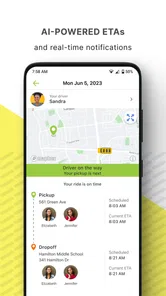
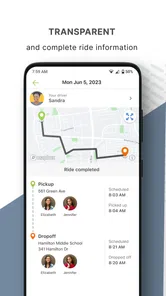
In supported areas, Zum can provide transportation updates such as route status, estimated arrival information, pickup or drop-off notifications, and alerts when a student boards or leaves a vehicle. The exact tracking features vary by school, vehicle, location permissions, and the transportation program’s setup. GPS information may occasionally be delayed or unavailable because of connectivity, traffic, weather, or operational changes.
What should I do if the bus is late, the route changes, or my child misses a ride?
The app may display service alerts and updated transportation details, but it should not be treated as the only source of information during an urgent situation. Check the latest notification, confirm that your phone has internet access, and contact the school or transportation provider if the information appears incorrect. Route changes, cancellations, and missed rides are usually handled according to district policies rather than directly through the app.
Pros
- Real-time bus tracking helps families monitor pickup and drop-off progress.
- Parents can receive alerts about delays
- route changes
- and schedule updates.
- Digital attendance records improve visibility into student boarding activity.
- School-specific access keeps transportation information relevant to each family.
- The interface is generally simple for checking routes and daily ride details.
Cons
- Availability depends on the school or district supporting Zum services.
- Tracking accuracy may vary with GPS coverage and the vehicle’s connection.
- Notifications can be delayed during network outages or technical issues.
- Some features may require location permissions and access to personal data.
- Transportation details may be incomplete if school staff do not update records.











