

zTrip
- 1.25K
- 3.6
- Installs
- 500.00K
- Price
- Free

Screenshots

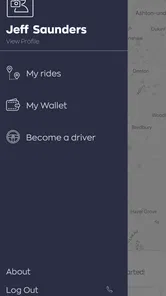
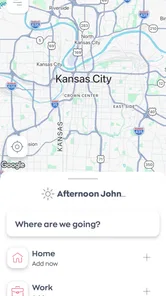
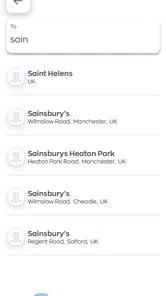
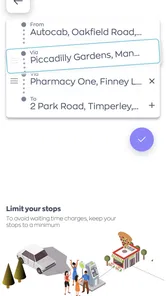
Analysis by Reviewed
I think the most useful way to judge zTrip is to picture the moment you actually need a car: you have a destination in mind, want to arrange a ride without a phone call, and need the booking process to feel straightforward. That is the kind of everyday problem this Maps & Navigation app is meant to address. It is free to download, and I would consider it when I want a ride rather than directions for driving my own car.
Before you open the app
A ride-booking app is only helpful if it fits the trip you are planning. I would start by checking whether zTrip serves the area and journey I have in mind, then make sure I have enough time to complete the booking and confirm the details. That small bit of preparation matters most when a trip has a fixed start time, such as getting to an appointment or leaving for the airport.
For a spontaneous errand, the appeal is different: I want to get from my current location to a clear destination without having to negotiate the whole arrangement from scratch. For a journey where timing is critical, I would avoid treating any ride app as a guarantee and leave a sensible buffer. That is a practical habit, not a knock on this particular service.
The zTrip Experience
From the moment I opened zTrip, I was greeted with a clean and intuitive user interface. It’s like your favorite ride-sharing app, but with a twist that makes it uniquely charming. One thing that really caught my attention was how easy it was to navigate the app. Everything is laid out in a way that makes sense, and I didn’t have to spend ages trying to figure out how to book a ride.
Booking a Ride
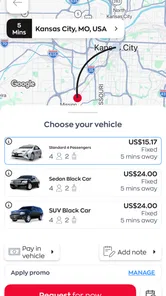
Booking a ride was as simple as pie. Just a few taps, and I was all set. What I loved most was the transparency in pricing. There were no hidden fees lurking around the corner, which is something I always appreciate. Plus, the ability to book rides in advance is a game-changer for those of us who like to plan ahead.
For a more reliable handoff, I would check the pickup point and destination before confirming, especially at a large building or a busy curb where a vague meeting spot can cause confusion. If I were arranging a ride for someone else, I would make sure they know where to wait and how to recognize the pickup. This is one of the easy-to-miss parts of booking: a clear destination in the app does not automatically make a crowded pickup location clear to the driver.
Safety Features
Now, let’s talk about safety because it’s super important. zTrip offers a feature that allows you to share your ride details with friends or family, giving you peace of mind. Knowing that someone else could keep an eye on my journey made me feel a whole lot safer.
More From Our News Desk

 Weather - By Xiaomi
Weather by Xiaomi Review: Clear at a Glance, Less Clear Up Close
Xiaomi’s weather app makes everyday forecasts quick to scan, but its calm surface can leave useful details and recovery paths harder to find than they should be.

 X
XX Under Pressure: Can It Recover When Posting Goes Wrong?
A resilience-focused review of X, examining setup, mistaken posts, interruptions, weak connections, and the gaps that matter when recovery needs to be dependable.

 Clash of Clans
Clash of Clans Is Won Between the Battles
Its raids are quick; its community is a long-term project of coordination, teaching, rivalry, and shared responsibility—with all the friction that entails.

 Android Auto
Android Auto Makes the Case for Quieter Car Software
The car interface is no longer judged by how much it can do, but by how quietly it helps. Android Auto shows what drivers now expect—and what still gets in the way.

 MobiOffice: Word, Sheets, PDF
MobiOffice: Transforming Mobile Productivity with Seamless Integration
MobiOffice: Word, Sheets, PDF is redefining mobile productivity with a surprising blend of functionality and innovation.

 EA SPORTS FC Soccer Mobile 26
EA SPORTS FC™ Mobile Soccer: Redefining Mobile Sports Gaming
Dive into EA SPORTS FC™ Mobile Soccer, where immersive gameplay and strategic depth transform mobile sports gaming.
Latest News



On top of that, all drivers go through a comprehensive background check, ensuring that you’re in good hands. I found the drivers to be professional and courteous, which really enhanced the overall experience.
Sharing trip details is most useful when it has a real recipient: I would send them before setting off, then tell that person if my plans change. It is a helpful extra layer of reassurance, but I would still confirm that the vehicle and pickup match what I expect rather than relying on a shared trip alone. For someone riding late or travelling alone, that small routine can make the journey feel more considered.
Payment Options
Another aspect where zTrip shines is its flexible payment options. Whether you prefer paying by cash, card, or even through the app itself, zTrip has got you covered. This flexibility makes it convenient for everyone, no matter your payment preference.
That choice can be handy when a family member is paying in a different way from the person taking the ride, or when I do not want to rely on a single payment method. I would still decide how I plan to pay before the pickup, rather than sorting it out in a rush at the end. For a work trip, a ride paid in the way I normally track expenses may be easier to manage later; for a quick local errand, convenience might matter more.
Planning around the pickup
A useful habit is to think about the pickup as a separate part of the journey, not just the first pin on a screen. At a hotel, hospital, shopping centre, or office complex, I would choose a place where a car can safely stop and where I can wait without blocking a doorway. If there are several entrances, I would use the one I can describe plainly, then keep my phone available for a quick clarification. This reduces the chance that a simple booking turns into a back-and-forth while I am already watching the clock.
If I were booking for another person, I would send them the practical details in ordinary language: which entrance, what landmark to look for, and whether they should be ready outside. The app can help arrange the ride, but the person taking it still needs a workable meeting point. This is especially helpful for someone unfamiliar with the neighbourhood, or for a relative who is not comfortable making last-minute decisions on a phone.
Choosing it for the right trip
Compared with map apps, which mainly help me plan a route or navigate in my own vehicle, zTrip is aimed at arranging a ride. Compared with the ride-booking services people may already use, the right choice depends on which service is available where they are and which booking and payment experience suits them. I would not assume that one app is automatically best for every trip: keeping a familiar alternative available is sensible if timing or location is important.
This makes zTrip a better fit for people who want a direct way to request or plan a ride than for someone looking for public-transit directions, cycling routes, or turn-by-turn navigation. If I only need to compare routes before driving, I would use a navigation-focused alternative instead. If I need a car and already know where I am going, a ride app is the more relevant tool.
There is also a practical difference between using a ride-booking app and relying on a taxi stand or calling a local cab company. An app can make it easier to set up the trip and pass along details, while a stand may be simpler when cars are already waiting nearby and you want to leave immediately. A phone call can be preferable when the pickup situation is unusual and needs explaining. I would choose the method that solves the actual handoff problem, rather than insisting on doing everything through one app.
Putting the booking into a real day
Imagine I have a morning appointment across town and need to arrive with enough time to check in. The night before, I would confirm the destination and decide where I can wait comfortably. In the morning, I would check the booking details, keep the phone accessible, and share the trip with the person expecting me if that would be reassuring. Once the ride begins, I can focus on the appointment rather than figuring out directions while travelling. The value is not just getting a car; it is making the small decisions before the pressure of a deadline sets in.
For a less structured trip, such as meeting a friend for dinner, I would use a different rhythm. I would choose a clear pickup spot, avoid assuming that a busy curb will be easy to find, and think about the return journey before I am ready to leave. If my plans change, I would communicate that rather than expecting the original details to remain useful. The app can support a plan, but the quality of the plan still depends on how clearly I handle those changes.
Where the routine can snag
The smoothest booking still depends on the practical details around it. A pickup point that is difficult to reach, a last-minute change of destination, or a tight schedule can make any car service feel less predictable. I would allow extra time for important appointments and avoid booking from a spot where it is hard to wait safely or communicate clearly with the driver.
For a typical evening out, my workflow would be to set the destination before leaving, choose a pickup point that is easy to identify, share the ride details with someone I trust, and keep the payment method in mind. That turns the app from a quick tap into a more dependable plan. If a booking does not line up with the situation, I would switch to another transport option rather than assume the app can solve every last-minute problem.
One limitation worth keeping in mind is that a polished booking flow cannot remove the uncertainty of the street itself. A driver and passenger may have different ideas about the best curb, a venue may have several exits, and a changed plan can leave the original details out of date. I would not use any ride app as my only contingency for a flight or an event with a strict arrival time. For those trips, I would build in a backup—such as knowing the nearest transit option or having another way to arrange a car—before setting off.
Another trade-off is choosing convenience over route planning. zTrip is useful when I have already decided that a car is the right way to travel; it is not the tool I would open to compare bus connections, estimate a walking route, or navigate my own vehicle. If the journey is short and public transport is straightforward, a transit or map app may answer the real question better and avoid arranging a car at all. That makes zTrip a focused option rather than an all-purpose travel companion.
Who should give it a try
zTrip is most worth considering if you regularly need rides and value a simple booking flow, advance planning, trip sharing, and a choice of payment methods. It may also suit someone who wants an alternative to handling every taxi arrangement by phone. On the other hand, I would skip it as my main travel tool if I mostly need maps, transit planning, or a guaranteed option in places where I have not checked service availability.
The app is for everyone, and it has been around since October 2012; zTrip Developer maintains the current version, 5.0.2, for devices running Android 5.0 or later. Its average rating is 2.9 from around 2,400 ratings, with roughly 1,200 written reviews and over 500,000 installs. I take that rating as a reason to set expectations thoughtfully: the app may suit my routine, but I would try it on a low-stakes local trip before relying on it for an important connection.
That first low-stakes ride is also the best way to answer the practical questions that matter to me: whether the service covers the places I actually go, whether booking feels clear on my device, and whether the payment method I prefer fits the trip. I would test it for a familiar local errand rather than a complicated transfer. After that, I would know whether it belongs alongside my regular travel tools or is only useful in certain situations.
Final Thoughts
All in all, zTrip has quickly become my go-to app for getting around town. It’s reliable, easy to use, and puts a strong emphasis on customer satisfaction. Whether you’re planning a night out or just need a quick ride to the grocery store, this app delivers a smooth and enjoyable experience. If you haven’t tried it yet, I suggest giving it a go. You might just find it becomes your favorite ride companion too.
zTrip Frequently Asked Questions
What should I check before downloading zTrip?
zTrip is a free Maps & Navigation app from zTrip Developer, with the simple store summary “Need a ride? Take a zTrip.” It is rated for Everyone and requires Android 5.0 or later. Its current version is 5.0.2(3573a7f43ab703d3). Check that your device meets the operating-system requirement before installing, then review the app’s features to see whether they suit the way you prefer to arrange transportation.
What is zTrip and how does it work?
zTrip is a modern ridesharing app designed to offer a seamless blend of traditional taxi services and new-age ride-hailing convenience. Users can easily book rides in advance or on-demand, track their driver in real-time, and pay through the app. Unlike typical ride-hailing services, zTrip allows users to choose between a taxi or a black car, providing flexibility and reliability for all transport needs.
Is zTrip available in my city?
zTrip is rapidly expanding its service locations, primarily operating in select cities across the United States. To determine if zTrip is available in your area, you can visit the app's official website or download the app and enter your location to check for service availability. The app continually updates its service map as it grows.
What are the payment options available on zTrip?
zTrip offers a variety of payment methods to ensure user convenience. Riders can pay using credit or debit cards directly through the app. Additionally, zTrip supports corporate accounts for businesses that need regular transportation services. The app also provides an option to pay in cash, maintaining flexibility for users who prefer traditional payment methods.
How does zTrip ensure passenger safety?
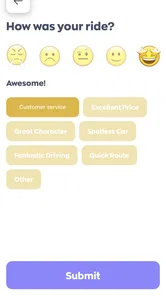
Passenger safety is a top priority for zTrip. The app incorporates features such as driver background checks, real-time ride tracking, and an in-app emergency button for immediate assistance. Drivers undergo rigorous screening processes, and vehicles are regularly inspected to ensure they meet safety standards. zTrip also offers a rating system for riders to provide feedback on their experiences.
Pros
- User-friendly interface
- easy navigation.
- Wide availability across many cities.
- Real-time vehicle tracking feature.
- Multiple payment options
- including cash.
- 24/7 customer support available.
Cons
- Limited availability in rural areas.
- Occasional delays during peak hours.
- Higher fares compared to competitors.
- App crashes reported by some users.
- Limited promotions or discounts.











