Zmodo
- 10.28K
- 3.1
- Installs
- 1.00M
- Price
- Free
Screenshots
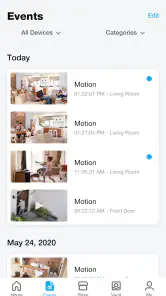
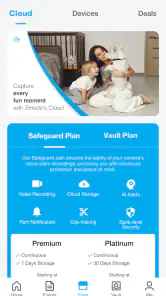
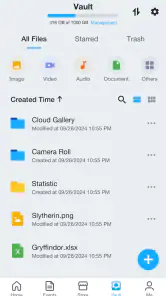
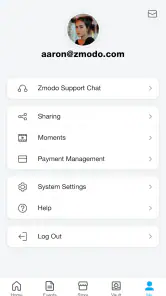

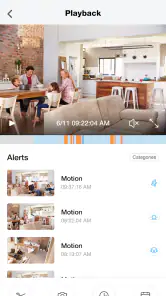
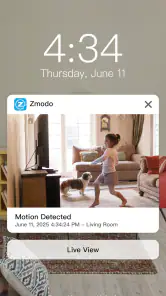
Analysis by Reviewed
I look at Zmodo as a practical companion for people who already use Zmodo connected-home products, rather than a general smart-home hub. Its job is to put those devices within reach from a phone, and that focused purpose is useful when you want to check in without juggling several controls. The app is free to install and is rated for Everyone, though some in-app purchases range from $4.99 to $399.99 per item, so I would check what a particular purchase covers before spending.
Who benefits most from a dedicated Zmodo app
I would start by asking what you already own. If your connected home is built around Zmodo products, one focused app can be easier than keeping separate controls for each device. That is especially true for someone who mainly wants to check a familiar room or entry point, rather than build complicated routines across brands. If you are still shopping for equipment, though, I would compare the devices and the app together; the app’s convenience is tied to having compatible Zmodo products in the first place.
For a mixed-brand home, a broader smart-home platform may be a better starting point. It can reduce app switching when your lights, sensors, and cameras come from different makers, though that convenience depends on which products the platform supports. Zmodo’s narrower focus is an advantage when you want a direct route to its own devices, but it is not a reason by itself to replace a system that already brings your other equipment together.
A useful everyday test is to imagine you have just left home and want to check the front entry before continuing your commute. The app is most helpful when you know which device you need and can get to it without searching through an unclear list. I would name devices by location and purpose before there is any urgency; “front entry” is easier to recognize than a generic label when you are checking quickly on a small screen.
Set expectations before relying on remote access
Before depending on a remote check, I would try the same action both at home and away from home. A view that works while your phone is on the home network gives you a useful baseline, but it does not prove that the connection will behave the same way when you are elsewhere. Testing in advance helps separate a setup problem from a temporary network issue, and it gives you time to learn the path back to the device list.
I would also decide what a successful check means for your household. If you only need reassurance that a room looks normal, a brief look may be enough. If you need a record of an event, make sure you understand the recording options available with your own setup rather than assuming that a live view has been saved. That distinction can prevent an unpleasant surprise later, particularly if you are choosing an app as part of a security plan.
Using Zmodo day to day
The app is listed in the Lifestyle category and is developed by Zmodo Support. It has reached over one million installs, with an average rating of 3.1 from around 20,000 ratings. That mixed rating is worth keeping in mind: the app may suit someone whose devices work well with it, but I would not assume every setup will feel equally smooth. Its current version is 7.0.0.8, and it requires Android 5.0 or later.
More From Our News Desk

Clash of Clans Is Won Between the Battles

Android Auto Makes the Case for Quieter Car Software

MobiOffice: Transforming Mobile Productivity with Seamless Integration

EA SPORTS FC™ Mobile Soccer: Redefining Mobile Sports Gaming

How Microsoft OneDrive Became a Mobile Productivity Giant

How Google Translate Breaks Language Barriers Effortlessly
Speed depends on more than the app
For a home-monitoring app, “fast” means getting to the right device and seeing useful information without a lot of friction. In practice, the experience depends on the phone, the network, and the connected Zmodo equipment, so I would avoid judging it from a single quick launch. If a feed takes time to appear, first check whether the phone has a stable connection and whether the device itself is online; repeatedly tapping the camera tile is unlikely to help.
A small habit makes checking more efficient: decide which device you need before opening the app, then return to the same view when you check again. That matters most when you are in a hurry, such as confirming that a room is quiet before leaving. If you have several connected products, a clear naming scheme is more useful than relying on memory. Names like “front entry” or “upstairs room” make it easier to pick the intended device and reduce the chance of checking the wrong one.
Busy moments and sensible workflows
One realistic use is checking on a pet during a lunch break. I would open the relevant device, look for the current situation, and close the app once I had the answer rather than leave a live view running in the background. That keeps the task simple and avoids treating a quick check as a substitute for being at home. If something looks unusual, the next step is to inspect the relevant device or recording option available in your setup, not to assume that every moment has been captured.
For a household with more than one person checking in, agree on what each person is looking for and avoid sending repeated checks of the same feed. This is a practical way to cut confusion when someone is responding to a notification while another person is already looking at the device. I would also test the basic viewing flow at home before depending on it while away: open the app, select the intended product, and make sure you can get back to the device list. That simple rehearsal can reveal setup or connection issues when there is still time to sort them out.
The usual alternative is to manage each product through its own manufacturer’s app, or to use a broader smart-home platform when devices from several brands are involved. Zmodo is the more straightforward choice if your connected products are already from Zmodo and you want a dedicated place to reach them. A multi-brand platform may be better if your main goal is coordinating equipment from different makers. I would not choose this app expecting it to replace every smart-home control in a mixed-brand household.
Reliability, recovery, and practical limits
With any remote device app, a blank or delayed view can come from several places: the phone’s connection, the home network, or the connected product. When something does not load, I would try a deliberate recovery sequence: confirm the phone can reach the internet, reopen the app, and check the device again before changing settings. If the problem continues, separate “the app will not open” from “one device is unavailable”; those are different symptoms and make troubleshooting more focused.
I also recommend checking the app while you are on the same home network during setup, then trying it away from home before relying on remote access. That gives you a chance to learn the normal path through the interface and notice whether the device is responding as expected. It is a useful distinction because a successful local check does not automatically prove that every remote check will work in the same way.
Resource use is hard to judge in isolation because live video and background activity can place different demands on a phone than simply opening a device list. If you only need occasional checks, close the app when finished and watch how your own phone behaves. If you plan to keep a feed open for a long time, expect that this may be more demanding than a brief status check; I would not leave video running unnecessarily.
The app is best suited to people who already own compatible Zmodo products and value a direct route to them. It is less appealing if you are still choosing a camera system, want one interface for several brands, or need remote monitoring to be dependable without testing your network and devices first. The free download lowers the barrier to trying it, but the available in-app purchases make it sensible to understand the cost of any optional service or feature before committing.
What to expect from performance
The release history begins on November 20, 2015, and the present version is 7.0.0.8. That tells me this is an established app, but age alone does not guarantee that it will feel quick on every phone. For a fair trial, I would use it with the actual Zmodo product I intend to keep, on the network where I will normally use it, and repeat the same task on more than one occasion. Consistency matters more than one unusually fast or slow attempt.
If your phone is older or running close to its limits, keep your expectations modest: a live camera view is a heavier task than browsing a list of devices. A newer phone cannot fix a weak home connection or an offline product, either. I would troubleshoot one part at a time instead of reinstalling immediately, since changing several things at once can make it harder to identify what actually helped.
Getting Started with Zmodo
First things first, getting Zmodo set up was a breeze. I downloaded the app from the Play Store (it’s also available on iOS, by the way), and within minutes, I was on my way to becoming the next Sherlock Holmes of my own home. The user interface is intuitive, which means you won’t need a tech degree to navigate through the settings. I appreciated how it walks you through the initial setup, ensuring everything is connected and ready to go.
After the basic setup, the app prompted me to add my Zmodo devices. I connected my camera with just a few taps, and voila, I was live streaming my living room. The process was seamless, and I was impressed with how everything synced up without a hitch.
The Features that Stand Out
Now, let’s talk about the features. The app is packed with functionalities that cater to both casual users and those who are a bit more security savvy.
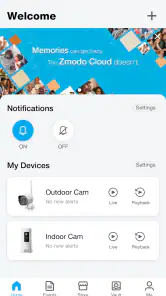
- Live Video Streaming: This is probably the star of the show. You can view real-time footage from your cameras, and the quality is top-notch. Whether it’s day or night, the clarity is impressive.
- Two-Way Audio: Ever wanted to talk to your pet while you’re at work? Or maybe shout at a suspicious character lurking around? This feature lets you do just that. The audio is clear, and there’s minimal lag.
- Motion Detection Alerts: The app sends notifications straight to your phone whenever it detects movement. It’s a lifesaver if you’re away and want to know what’s happening back home.
- Playback and Recording: You can easily access recorded events and save important clips. The timeline feature allows you to scroll through past events quickly.
Performance and Usability
So, how does Zmodo perform under pressure? Quite well, I must say. The app is responsive, and I didn’t experience any crashes or bugs during my time using it. The video feed loads quickly, and flipping between different cameras is a breeze.
I also loved how customizable the settings are. You can adjust the sensitivity of the motion detection, schedule recordings, and even set privacy masks on areas you don’t want to monitor. It’s these little things that make the app versatile for different users.
"Having peace of mind while away from home is priceless, and this app delivers just that."
Final Thoughts
In the end, Zmodo isn’t just another surveillance app — it’s a comprehensive tool that offers security and convenience. Whether you’re a tech novice or a seasoned pro, this app has something for everyone. It’s user-friendly, reliable, and packed with features that genuinely enhance your home security setup.
If you’re in the market for an app that offers excellent value and performance, give Zmodo a try. It’s definitely made my life a bit easier, and I’m sure it’ll do the same for you. So, go ahead, download it, and start enjoying the peace of mind it brings!
Zmodo Frequently Asked Questions
Can I use Zmodo on both Android and iOS?
Zmodo is designed to control Zmodo connected home products through a mobile app. On Android, it requires version 5.0 or later. Before installing, check that your phone’s operating system meets the requirements and that the Zmodo product you want to manage is compatible with the app. Once installed, its usefulness depends on having a connected product to set up and control.
Who makes Zmodo, and what is the app for?
Zmodo is a Lifestyle app developed by Zmodo Support. Its purpose is to control Zmodo connected home products from one app, bringing their management together on your mobile device. It is intended for people who own or plan to use compatible Zmodo products, rather than as a standalone home-control tool for unrelated devices.
Can I use Zmodo without owning a Zmodo connected home product?
Zmodo is intended to control Zmodo connected home products, so its main functions depend on having a compatible device to connect. You can download the app and explore its interface, but features such as viewing a camera feed or managing device settings require the relevant Zmodo product. If you are considering a purchase, check that the product you plan to use is designed to work with the app.
What should I know about Zmodo’s cost before downloading it?
The app is free to download, which makes it possible to try it without paying for the app itself. Some optional in-app purchases are available, with listed prices ranging from $4.99 to $399.99 per item. These purchases may relate to paid services or features, so review the purchase details in the app before confirming anything and decide whether the available options suit your needs.
What is Zmodo and how does it work?
Zmodo is a comprehensive home security app designed for use with Zmodo smart cameras and devices. The app allows users to monitor their home via live video streaming, receive motion alerts, and manage device settings. It connects to Zmodo cameras through Wi-Fi, enabling remote access, surveillance, and control from anywhere with an internet connection.
Pros
- User-friendly interface that's easy to navigate.
- High-quality video streaming with minimal lag.
- Customizable notifications for specific alerts.
- Compatible with multiple smart devices.
- Affordable pricing for premium features.
Cons
- Setup can be time-consuming for beginners.
- Occasional connectivity issues reported.
- Limited free storage options available.
- Some features locked behind a paywall.
- Customer support response can be slow.

- Category
- Lifestyle
- Version
- 7.0.0.8