

Zipcar
- 14.93K
- 4.0
- Installs
- 1.00M
- Price
- Free

Screenshots
Analysis by Reviewed
I judge a car-sharing service less by how quickly I can tap “book” than by whether I can understand the arrangement before I commit. Zipcar is aimed at people who want access to a car for a limited stretch without making ownership part of everyday life. That can be appealing in a city, but it also means planning around a specific vehicle, pickup point, and return. In my view, the app is most useful when those details fit the trip, not when I expect a car to appear wherever I happen to be.
Trust Before the Trip
Car sharing asks for more trust than checking a map: you are arranging access to a vehicle and sharing personal details during sign-up. I would treat the account setup as part of the decision, not just a hurdle before booking. Before entering information, I’d make sure I was using the official app and read the on-screen terms and privacy choices carefully. That’s a sensible habit for any service involving a driver’s license and a car.
I also wouldn’t assume every practical question is settled by a simple booking screen. Check the reservation details before committing, and make sure the pickup and return arrangements suit your plans. If a journey depends on arriving at a precise time, a little advance checking is more useful than relying on a last-minute search.
Getting Started with Zipcar
Signing up for Zipcar is a breeze. You just download the app, fill in some personal details, and upload your driver's license. The approval process was surprisingly quick, and in no time, I was ready to book my first ride. The user interface is clean and intuitive, making the entire process of finding and reserving a car super easy.
Booking Around a Real Schedule
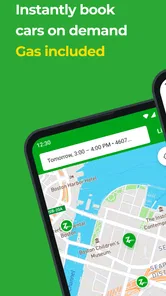
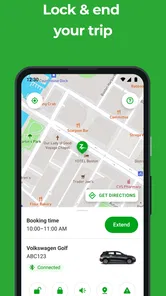
Once you're set up, booking a car is as simple as ordering a pizza. You can search for available cars near you, choose one that fits your needs, and reserve it right from the app. What I loved most is the flexibility - you can book a car for just a few hours or even several days. Plus, the app shows you exactly where the car is parked, so you’re not wandering around aimlessly.
A useful way to plan is to decide what the car needs to do before you browse. A short errand may call for a nearby option, while a day trip makes the pickup point and the time you need the vehicle more important. I’d compare the location and reservation window before choosing, rather than selecting the first car that appears. That small bit of planning can prevent a rushed walk to a less convenient parking spot.
For a realistic city-day example, imagine needing to collect a bulky purchase and then visit someone across town. Booking gives you control over when you travel, unlike waiting for a ride-hailing car at each stop, while avoiding the longer commitment of renting a vehicle for a trip that only needs a few hours. The trade-off is that you need to retrieve and return the shared car yourself, so it is less convenient when your route ends far from its designated spot.
More From Our News Desk

 Weather - By Xiaomi
Weather by Xiaomi Review: Clear at a Glance, Less Clear Up Close
Xiaomi’s weather app makes everyday forecasts quick to scan, but its calm surface can leave useful details and recovery paths harder to find than they should be.

 X
XX Under Pressure: Can It Recover When Posting Goes Wrong?
A resilience-focused review of X, examining setup, mistaken posts, interruptions, weak connections, and the gaps that matter when recovery needs to be dependable.

 Clash of Clans
Clash of Clans Is Won Between the Battles
Its raids are quick; its community is a long-term project of coordination, teaching, rivalry, and shared responsibility—with all the friction that entails.

 Android Auto
Android Auto Makes the Case for Quieter Car Software
The car interface is no longer judged by how much it can do, but by how quietly it helps. Android Auto shows what drivers now expect—and what still gets in the way.

 MobiOffice: Word, Sheets, PDF
MobiOffice: Transforming Mobile Productivity with Seamless Integration
MobiOffice: Word, Sheets, PDF is redefining mobile productivity with a surprising blend of functionality and innovation.

 EA SPORTS FC Soccer Mobile 26
EA SPORTS FC™ Mobile Soccer: Redefining Mobile Sports Gaming
Dive into EA SPORTS FC™ Mobile Soccer, where immersive gameplay and strategic depth transform mobile sports gaming.
Latest News



One practical trade-off is that “nearby” is not the same as “on the way.” A car a little closer to home may be awkward if the trip starts elsewhere, and a pickup that looks manageable on screen can cost time when you are carrying bags or travelling with someone who has limited mobility. I’d think through the walk to the vehicle as part of the journey, not as a separate chore after booking.
For a time-sensitive appointment, I would avoid planning the reservation so tightly that every delay becomes a problem. The car has to be collected and returned within the arrangements shown for that booking, so I’d leave room for getting to the pickup location, loading up, and reaching the return point. If I only need to cover a short one-way distance, transit or a ride service is usually the simpler choice.
At the Vehicle: A Moment to Check
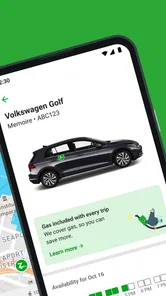
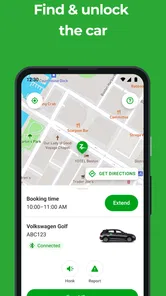
My first drive with Zipcar was smooth sailing. The car was clean, well-maintained, and ready to go. All I had to do was unlock it using the app. One thing that stood out was the variety of vehicles available – from compact cars to SUVs, there's something for every occasion. Whether you’re heading for a weekend getaway or just running errands, Zipcar has you covered.
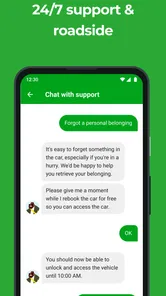
I’d still take a moment at pickup to check that the vehicle is the one I reserved and that it looks ready for the trip. If anything seems wrong, it is better to pause and use the app’s available support or reporting route than to set off and hope the issue sorts itself out. This is especially worthwhile when you have passengers, luggage, or a tight schedule; a quick check can help you make a calm decision before leaving.
Location access and account information are relevant moments to pay attention to in a car-sharing service. I prefer granting only the access needed for the task and reviewing the app’s permission prompts rather than tapping through automatically. I’d also keep login details private and use any account settings or choices presented in the app to manage the account. Those are practical precautions, not a substitute for checking the service’s own privacy information.
There is a useful distinction between trusting the app to help with the booking and assuming it answers every question about the vehicle or the journey. I would check the reservation details and the car itself before setting off, especially when the trip has a particular purpose such as carrying a large item. Choosing a vehicle based on the actual job, rather than simply the closest result, can matter more than browsing a long list of options.
People sometimes want to know whether a car-sharing app replaces a navigation app. I wouldn’t use this one as a substitute for route guidance: its central role is helping me find and reserve a shared vehicle and understand where to collect it. I’d use a dedicated map for directions if I needed them, while keeping the booking details handy for the pickup and return. That division of jobs makes the process clearer.
Returning Without a Last-Minute Rush
Returning the car is just as simple as picking it up. You just park it in its designated spot, lock it using the app, and you’re done. No need to refuel or clean the car - it’s all taken care of. It’s the ultimate convenience for city dwellers like me who want the perks of a car without the commitment of ownership.
The designated return point is an important part of the plan, not a minor detail. I’d leave enough time to get back there, particularly if the day includes several stops or traffic could make the schedule unpredictable. This is where car sharing differs from a taxi or ride-hailing trip: those options can drop you at your destination, whereas a shared car has to be returned according to its booking arrangements. For a one-way journey, public transport or a ride service may fit better.
A small but worthwhile planning habit is to set the return point in your mind before leaving the pickup area. That keeps the final leg from becoming an afterthought, especially if you have several stops or are unfamiliar with the neighborhood. I’d also avoid treating the stated reservation period as spare time for an unplanned extra errand; if the return has to happen at a particular place, a detour can make the end of the trip stressful.
That return requirement changes the comparison with ordinary car rental, too. A conventional rental may be easier for a longer journey or a trip that starts and ends in different places, while a shared car can suit a shorter local outing if its pickup and return locations work for me. Neither arrangement is universally better: I’d choose based on the route and how much control I need over the car, rather than assuming the app is automatically the cheaper or easier option.
Who Benefits Most, and Who May Prefer Another Option
This setup makes the most sense for people who need a car occasionally and can begin and end near an available vehicle. It can be handy for errands that are awkward on transit, carrying items, or a planned outing where having the car for several hours matters. Someone who drives every day, needs a vehicle close to home at all times, or cannot reliably return to the designated place may find ownership, a conventional rental, or another transport option more practical.
Before relying on a booking, I’d check the car’s location, the reservation period, and the return instructions in the app. I’d also confirm that the account is approved and ready before building an important day around a drive. These checks answer the questions that matter most in practice: whether I can use the service, where I need to go, how long I have the car, and where the trip has to end.
I’d particularly recommend trying the service first for a straightforward outing with a flexible schedule. That gives a new user room to learn the pickup and return routine without making a crucial appointment depend on a first attempt. Once the workflow feels familiar, it is easier to judge whether the vehicle locations and booking process suit regular errands. If the nearest car is consistently inconvenient, a different transport option may be a better fit even if the app itself feels simple.
It is less compelling for someone who wants door-to-door transport, makes frequent one-way trips, or needs to keep a car available throughout the day without planning. A taxi or ride-hailing service avoids parking and returning a vehicle; transit can be more direct for a predictable route; and a standard rental can make more sense for a longer trip. Zipcar’s appeal depends on the middle ground: I need a car for a defined period, and I can work with its pickup and return arrangements.
What the App Does—and What It Doesn’t
For an app in maps and navigation, the key value here is not replacing turn-by-turn navigation; it is helping connect a person with a nearby shared vehicle and its pickup point. If I only needed directions, a standard map app would be the more direct choice. If I needed a car for a brief, planned stretch, this booking approach could be more fitting than arranging separate rides for every leg.
That distinction also helps set expectations about availability. Finding a car nearby is useful only if its location, vehicle type, and timing suit the job. I would not build a plan around the general idea that a shared car must be available at any moment; I’d look for a specific option and make sure its details line up before making other arrangements. For an urgent trip, having a backup is sensible.
There are also two separate decisions that can be easy to blur: whether the service is convenient for a particular trip, and whether I’m comfortable with the account and permission choices involved. I’d consider both before signing up. Review the prompts as they appear, share only what feels necessary for using the app, and take time with the reservation details. That is a measured approach to a service where a phone and a vehicle are both part of the experience.
As an app, it is free to download, but I would not confuse that with the overall cost of using a car. Before committing to a plan, I’d check the booking terms and any charges presented for the trip, then compare the total with my realistic alternatives. A ride service may work out better for a short one-way ride, while using a shared car can make more sense when I need to make several stops. The right answer depends on the whole outing, not just the time spent driving.
A Cautious Recommendation
If you’re someone who occasionally needs a car but dreads the idea of owning one, Zipcar might just be your new best friend. It’s convenient, cost-effective, and environmentally friendly. The app is designed with the user in mind, making it accessible for anyone who can drive. Plus, with its extensive reach, finding a car near you is almost always guaranteed. So why not give it a shot? You might just find it’s the perfect solution for your urban transportation needs.
Zipcar is a free app from developer Zipcar, rated for Everyone, with an average rating of 4.0 from around 51,000 ratings and over 1 million installs. It has been available since March 22, 2011, and version 8.10.01 requires Android 6.0 or later. Those figures suggest a long-running service with a substantial audience, but availability still depends on finding a suitable vehicle where and when you need one. My cautious recommendation is to try it for a straightforward, non-urgent trip first, learn the pickup and return routine, and then decide whether that workflow suits your regular plans.
Zipcar Frequently Asked Questions
Can I use the Zipcar app to compare available cars before booking?
Zipcar is designed to help users find and reserve cars through a mobile app. You can use it to look for vehicles near you and review what is available for your plans before choosing a reservation. Availability can vary by location, so checking the app is a practical first step before deciding whether a nearby car suits your needs.
What should I check before installing Zipcar on my phone?
Zipcar is a Maps & Navigation app from Zipcar, intended for managing car sharing on a mobile device. It is free to download and is rated Everyone. The app requires Android 6.0 or later, so check your phone’s operating-system version before installing. Its current version is 8.10.01, and it has been available since March 22, 2011.
What phones and operating systems can run the Zipcar app?
Zipcar is a Maps & Navigation app for finding and reserving cars, so it is designed for people who want to manage car sharing from a mobile device. The app is free to download, and its listed minimum operating-system requirement is Android 6.0. Before installing, check that your device meets that requirement and has enough space for the app.
What is Zipcar and how does it work?
Zipcar is a car-sharing service that allows users to rent cars by the hour or day. To use Zipcar, you need to sign up for a membership, reserve a vehicle through the app, and then use your Zipcard or app to unlock and drive the car. It's especially convenient for those who need a car occasionally but don't want the hassle of ownership.
How much does it cost to use Zipcar?
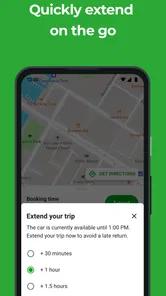
Zipcar charges a membership fee, and the cost of using a car varies depending on the type of vehicle and duration of rental. Typically, rates include gas, insurance, and maintenance. There may be additional fees for things like late returns or extending reservations, so it's important to check the pricing details before booking.
Pros
- Convenient car rentals by the hour or day
- Wide range of vehicles available
- Easy app-based booking process
- Fuel and insurance included in pricing
- Great for city dwellers without a car
Cons
- Limited availability in smaller towns
- Hourly rates can be expensive
- Membership fee required
- App can occasionally be glitchy
- Mileage limits may apply











