YNAB
- 4.59K
- 4.5
- Installs
- 1.00M
- Price
- Free

Screenshots





Analysis by Reviewed
If you’re anything like me, managing finances can sometimes feel like juggling flaming swords. Enter YNAB, or You Need A Budget, an app that promises to turn your financial chaos into a well-organized symphony. I took a dive into this budgeting app to see if it's the real deal or just another tool destined for my "unused apps" folder.
Reading the budget and finding your way around
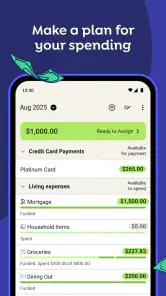
What makes this app different from a spending tracker is its emphasis on decisions, not just records. Rather than only showing where money went, it asks me to decide what the money I have should do next. That shift can make the main budget view feel more like a working plan than a report, though it takes some attention to learn what each category represents and keep those choices current.
For someone who prefers to understand a budget visually, category-by-category planning offers a useful structure: I can look at the purpose of a pot of money instead of mentally adding up a long transaction history. The trade-off is that a detailed budget can become crowded. I’d keep the categories meaningful and combine small, occasional expenses where that makes sense; an elaborate list is not automatically a more useful one.
Getting Started with YNAB
First things first, downloading YNAB was a breeze. Available on both Android and iOS, I found it easily on the app store and had it installed in no time. Once downloaded, the app greeted me with a clean, user-friendly interface. I’m talking minimalistic design with intuitive navigation – the kind that makes you feel like you’ve got everything under control, even if you’re living paycheck to paycheck.
The setup process is straightforward. You start by linking your bank accounts. The app supports a wide range of banks, which made it super convenient. After linking, YNAB automatically imports your transactions. It’s like having a personal assistant who does all the tedious work for you. I could immediately see where my money was going, and honestly, it was a bit of a wake-up call.
Budgeting Made Simple
The core principle of YNAB revolves around giving every dollar a job. It encourages you to allocate funds to specific categories, such as groceries, rent, or that ever-dangerous "miscellaneous" category. What I loved here is the app’s flexibility. If I overspend in one category, YNAB allows me to adjust my budget on the fly, ensuring that I’m always in control.
A practical way to use that flexibility is to treat an overspend as a choice to review, not a reason to abandon the plan. If a grocery run costs more than expected, I can decide which other category should give up some money to cover it. That small step keeps the budget honest. It also helps distinguish a genuine surprise from a recurring cost that deserves its own category next month.
More From Our News Desk

Clash of Clans Is Won Between the Battles

Android Auto Makes the Case for Quieter Car Software

MobiOffice: Transforming Mobile Productivity with Seamless Integration

EA SPORTS FC™ Mobile Soccer: Redefining Mobile Sports Gaming

How Microsoft OneDrive Became a Mobile Productivity Giant

How Google Translate Breaks Language Barriers Effortlessly
The app also offers a plethora of educational resources. I spent some time exploring their tutorials and webinars, which are filled with practical tips. The YNAB team clearly wants you to succeed, and it shows in how they’ve crafted their content. I found myself learning more about financial management than I ever did in school.
Using it in an ordinary week
Imagine checking the budget before meeting friends for dinner. Instead of guessing from your bank balance, you can check what is available in the relevant category and decide whether the outing fits. If it doesn’t, you can move money from a lower-priority category or choose a cheaper plan. That is a more useful habit than discovering the shortfall after the card payment has already happened.
This approach is especially helpful for people whose income arrives on different dates or who are trying to prepare for irregular bills. I’d set aside money gradually for costs that are predictable but not monthly, such as an annual renewal or a seasonal expense. The point is not to predict every surprise; it is to stop known, uneven expenses from feeling like emergencies when they come due.
For the smoothest routine, I’d pair imported transactions with a quick manual check rather than assuming the import has finished the job. A short review after spending helps keep category balances useful and gives me a chance to correct a purchase that landed in the wrong place. If account linking is unavailable or takes time, entering transactions manually can preserve the budgeting habit, though it adds work and requires consistency.
Tracking Progress
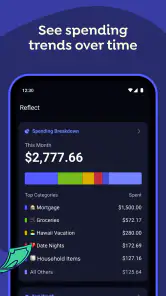
One of the standout features of YNAB is its ability to track your financial progress over time. The Reports feature is a powerful tool that offers insights into your spending habits. It’s like having a personal finance coach who’s brutally honest but in the best way possible. I could see trends, recognize problem areas, and make informed decisions.
Reports are most useful to me when I use them to ask a specific question, such as whether a flexible category is routinely taking more than I expect. Looking at a pattern can prompt a realistic budget change; it is less helpful if I treat every month as a scorecard. A budget should reflect actual priorities and circumstances, not encourage guilt over a necessary expense.
The app’s ability to sync across devices was also a big plus for me. Whether on my phone or tablet, I could check my budget status anytime, anywhere. This real-time synchronization ensures I’m never caught off guard, and I can make adjustments on the go.
Access, comfort, and everyday limits
Quick access on a phone is convenient, but the experience still depends on whether reading and interacting with a dense budget suits you. I’d avoid trying to make major category changes while rushed or distracted. A calmer review gives me time to check the amounts and understand what a change affects. If small on-screen details or frequent navigation are tiring, using a larger device for planning and the phone for brief checks may be a more comfortable split.
Budgeting also asks for regular attention, which can be a real barrier during a busy week, when someone is sharing financial decisions, or when money is already a source of stress. I’d start with the expenses that matter most rather than trying to organize every purchase perfectly on day one. A simpler working budget that I revisit is more useful than an ambitious one I stop maintaining.
Compared with a basic expense tracker, which often emphasizes categorizing past purchases, this method puts more weight on assigning available money before spending it. A spreadsheet can offer more freedom to build a custom system, but it also means maintaining the structure yourself. A bank’s built-in spending view may be quicker for a casual glance; I’d choose YNAB when I want to actively plan and adjust, not merely observe.
Overcoming Challenges
Now, while YNAB offers many positives, there were a few bumps along the road. The initial setup, especially linking bank accounts, required a bit of patience. Some accounts took longer to sync, and there were moments of frustration. However, the app’s customer support was responsive and helpful, smoothing out these hiccups.
The routine can also feel demanding if I expect automation to make every decision for me. Imported transactions can save entry work, but I still need to review the budget and decide how to handle overspending or a changed priority. People who only want a passive dashboard, or who dislike assigning money to categories, may find a simpler tracker less frustrating. The method works best when I’m willing to participate.
Another point to consider is the subscription model. Unlike some free apps, YNAB has a monthly fee. Initially, I was skeptical about paying for a budgeting app, but after using it for a while, I saw the value it brought. The investment in the app pays off when you start seeing savings and financial clarity.
It is listed as free to install, while in-app purchases range from about fifteen dollars to just over one hundred dollars per item. I’d check the current purchase options and decide whether the ongoing cost makes sense for my situation before building a long-term routine around it. The app is rated for Everyone, has an average rating of about four and a half from around twenty-four thousand ratings, and has been installed over a million times. It is made by ynab.com, with version 26.6.1 and a minimum operating-system requirement of 11.
Making a shared plan work
For a couple or household, the useful question is not simply whether everyone can see the same budget, but whether they agree on what the categories mean. I’d settle practical rules together—for example, which purchases need a conversation and which can be handled independently. That keeps category balances from becoming a source of friction and makes adjustments easier to understand later.
A small, specific routine can help: one person enters or checks transactions, while both review upcoming bills and decide what needs attention. This is more workable than expecting both people to inspect every purchase. If shared money decisions are sensitive, I’d begin with a limited set of common expenses and expand only when the process feels comfortable.
Who benefits most, and who may prefer another approach
I’d recommend this budgeting style to someone who wants to be deliberate about upcoming expenses, is willing to check transactions, and would rather make trade-offs ahead of time than wonder where the balance went. It can be particularly useful when a household needs a shared plan for essentials and flexible spending, provided everyone involved is comfortable following the same categories and reviewing changes together.
I would not push it on someone who needs only a quick record of purchases, wants budgeting to happen entirely in the background, or finds category-based planning stressful. A simpler bank overview or a personal spreadsheet may fit better in those cases. The best choice is the one a person can use steadily, not the one with the most detailed system.
What I would check before settling in
People often wonder whether they must connect a bank account to get value from this kind of budget. I would treat linking as a convenience rather than the whole method: manual entry can keep the plan moving, but it shifts more responsibility to me. If imports are delayed or a financial institution does not connect smoothly, I’d decide whether that extra work is acceptable before relying on automatic updates.
I’d also avoid building a complicated budget around hypothetical future precision. Start with bills, everyday essentials, and one or two priorities that matter now. After a few reviews, recurring gaps can show where a category needs changing. That sequence makes the system easier to maintain and reduces the chance of abandoning it because setup felt like a project in itself.
Final Thoughts
So, does YNAB live up to the hype? In my experience, it absolutely does. It’s more than just an app; it’s a comprehensive tool that helps you take control of your finances. With its user-friendly interface, insightful reports, and educational resources, YNAB empowers users to make informed financial decisions.
While there are challenges, like the subscription fee and initial setup hurdles, the benefits far outweigh them. If you’re serious about getting your finances in order, I’d say giving YNAB a try is a no-brainer. You just might find yourself finally mastering the art of budgeting.
My inclusive verdict
For me, the strongest case for this app is that it makes money decisions visible and revisable instead of leaving them buried in a statement. Its category approach can support thoughtful planning, but it asks the user to keep engaging with the plan. That is a meaningful distinction for anyone weighing convenience against control.
I’d try it with a modest set of categories and a regular, manageable check-in, then see whether that rhythm feels useful. If the interface, the ongoing attention, or the paid model becomes more work than the clarity it provides, choosing a simpler alternative is sensible. I like YNAB most for people who want an active budget they can adapt to real life, rather than a passive summary of spending.
YNAB Frequently Asked Questions
Can I use YNAB with someone else, such as a partner or family member?
YNAB’s budgeting approach can be useful when people want to plan their money together, since assigning funds to categories gives everyone a shared view of spending priorities. Before downloading, consider whether the app’s planning style suits the way you and the other person make financial decisions. Each user should be comfortable reviewing and updating the budget regularly.
Can I try YNAB before committing to a subscription?
YNAB is listed as a free app, with in-app purchases ranging from $14.99 to $109.00 per item. That gives you a way to download and explore it before deciding whether to purchase anything. Check the current options shown in your app store before making a purchase, since the available choices may depend on your platform and account.
What kind of app is YNAB, and who develops it?
YNAB is a finance app developed by ynab.com. Its store summary, “Never worry about money again,” reflects its focus on helping people plan and manage their money. If you are looking for a tool centered on budgeting rather than a general-purpose finance app, its budgeting approach may be a good fit.
What is YNAB and how does it work?
YNAB, or You Need a Budget, is a budgeting app designed to help users take control of their finances through proactive planning. By assigning every dollar a job, users can plan their spending, manage debts, and save effectively. The app encourages users to live on last month’s income, providing a clear view of financial health.
Is YNAB suitable for beginners in budgeting?
Yes, YNAB is well-suited for beginners. It offers a user-friendly interface and provides extensive tutorials and workshops to help new users understand budgeting principles. The app's methodology is straightforward, focusing on allocating funds to categories to avoid overspending, making it accessible even for those new to financial planning.
Pros
- User-friendly interface for easy budgeting.
- Syncs across devices seamlessly.
- Detailed spending reports available.
- Customizable budget categories.
- Strong customer support team.
Cons
- Subscription fee may be a deterrent.
- Learning curve for new users.
- Limited investment tracking features.
- No bill payment integration.
- Requires internet for full functionality.

- Category
- Finance
- Version
- 26.6.1











