Xtream IPTV Player
- 25.00
- 3.3
- Installs
- 1.00M
- Price
- Free

Screenshots
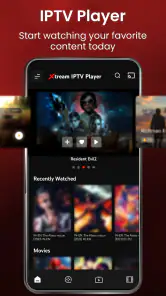
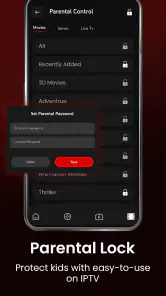
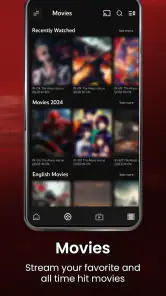

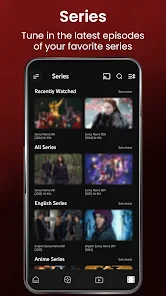
Analysis by Reviewed
I judge an IPTV player less by how impressive its channel list sounds and more by whether I can find and watch something without a struggle. That matters even more when someone is using a small screen, has difficulty reading dense menus, or is trying to watch in a noisy or distracting setting. Xtream IPTV Player is built around playlists from an IPTV provider, so the experience depends partly on the service and playlist you bring to it.
Readable navigation starts with a playlist
The first practical question is whether you already have access to an IPTV playlist. This app is a player, not a source of television channels by itself. I would sort out the provider’s playlist details before settling down to browse; that avoids mistaking an empty or incomplete library for an app problem. It also gives you a chance to check that the provider is legitimate and that you have permission to watch its content.
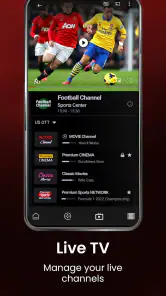
Once a playlist is loaded, the main job is choosing what to watch. The original appeal is straightforward: live television, on-demand video, and radio can sit within one viewing environment when those items are included in the playlist. That can be more convenient than jumping between separate apps, but it does not guarantee that every playlist contains all three kinds of content.
What the interface asks of you
In my experience, simple navigation is useful only if it remains comfortable on your particular device. Small text, long channel names, or a crowded list can make browsing tiring, especially for someone with low vision or who prefers fewer visual details. I would test the app with the actual playlist you plan to use, since the amount and organization of content can change how easy it is to scan.
A useful habit is to keep the playlist focused where possible. If your provider offers a way to organize channels, grouping the ones you watch most often can reduce repeated scrolling. Favoriting a channel, when that option is available in your setup, may also make regular viewing quicker. These small decisions can matter more than a long feature list when you want to get to one familiar program promptly.
Motor and sensory comfort
For viewers who find repeated tapping difficult, a long browse through channels can be a real drawback. I would prepare a short set of regular choices rather than expect to search from scratch every time. That approach can also help someone who gets overwhelmed by a large catalogue. The app’s role is to play the provider’s content; the provider’s playlist structure can still determine how much effort it takes to reach a particular item.
Sound and picture comfort are personal, and the stream itself is influenced by the connection and source. If you are sensitive to sudden volume changes or busy imagery, I would check a channel briefly before settling in, then adjust the device’s own sound and display settings to suit you. I would not assume that a player can compensate for every difference between channels or streams.
More From Our News Desk

Weather by Xiaomi Review: Clear at a Glance, Less Clear Up Close

X Under Pressure: Can It Recover When Posting Goes Wrong?

Clash of Clans Is Won Between the Battles

Android Auto Makes the Case for Quieter Car Software

MobiOffice: Transforming Mobile Productivity with Seamless Integration

EA SPORTS FC™ Mobile Soccer: Redefining Mobile Sports Gaming
Watching across everyday situations
Picture a quiet evening when you want to catch a live program but do not want to search through a television interface. With a working playlist already loaded, an IPTV player can put that viewing choice on your phone or tablet. On a commute or in a waiting room, the same flexibility may be appealing, but only if the connection and your viewing circumstances are suitable. I would avoid relying on a live stream for an important moment when the network is unstable.
Compared with a general video-on-demand app, an IPTV player is a better fit for people who already use a provider’s playlist and want that source in a dedicated player. A conventional streaming service is usually the simpler choice for someone who wants to browse a built-in catalogue without arranging a separate provider. And if your main need is watching a particular broadcaster’s programs, that broadcaster’s own app may be more direct.
Where the experience can fall short
The provider relationship is both the app’s purpose and its main limitation: without a usable playlist, there is little to explore. A confusing playlist can also make a player feel harder to use than it is. If a channel fails, I would first check whether the same stream works through the provider’s own instructions or another compatible player before assuming the app is at fault.
Search is another point to consider. When a playlist has many entries, weak or inconsistent naming can make finding a specific show frustrating. If you know what you want to watch, browsing a smaller group of familiar channels may be more reliable than searching the whole list. I would also keep expectations modest about features that depend on a provider or a particular stream rather than the player itself.
For accessibility, I would not treat the app as a guaranteed solution for every need. Anyone who relies on a specific screen reader workflow, large text, captions, or remote-control navigation should test those tasks directly on their device before making it the main way to watch. If those checks are essential and the experience is awkward, a television service with controls that better suit you is the more sensible option.
Planning a low-friction viewing routine
One practical way to judge whether this player fits your day is to try the exact sequence you expect to use, rather than just opening it and sampling a channel. For example, load the playlist, locate a familiar channel, leave playback, and then return to it later. That small rehearsal reveals whether you can repeat the task comfortably and whether the playlist’s labels make sense to you. It is especially useful if you share the device with someone who may need a simpler route to their usual programs.
I would also make a distinction between a setup problem and a viewing problem. If the playlist is not ready before you need it, the app cannot remove that last-minute work. If you are helping a family member, having the provider’s setup details and a few preferred channels organized beforehand can reduce the number of decisions they face. The trade-off is that someone else may need to maintain the playlist when it changes.
Setting the Stage
Imagine having a magic box that can stream live TV, on-demand videos, and radio stations from all over the world. That's what Xtream IPTV Player offers. It's an app that caters to all your entertainment needs in one place. Whether you're a fan of drama, sports, or reality TV, this app has got you covered. And the best part? It's available on both Android and iOS, making it accessible to almost everyone.
Getting Started
Now, setting up the app was a breeze. I downloaded it from the app store, and within minutes, I was ready to explore. The interface is slick and user-friendly, which means you won't need to spend hours trying to figure out how things work. Just load your IPTV playlist, and voila! You're ready to watch your favorite content.
For a more grounded expectation, I would treat setup as the point where the provider’s details matter most. The app cannot make an unavailable stream appear, and a playlist that needs correction can interrupt the otherwise simple start. Before a planned watch, I would test one live channel and one on-demand item, if available, so I know the playlist is functioning rather than discovering a problem when everyone is ready to watch.
Features Galore
This app is packed with features that make it stand out in the crowded market of IPTV players. First off, it supports a wide range of formats, so you won't have to worry about compatibility issues. Whether it's M3U or XSPF, Xtream IPTV Player has got you covered.
Another cool feature is the ability to add your favorite channels to a list for quick access. Plus, the app allows you to record live TV, which means you never have to miss an episode of your favorite series ever again. How cool is that?
Those options are most useful when the playlist is maintained well. I would save only the channels I actually use rather than turning favorites into another oversized list. Recording can be handy when a program’s timing is inconvenient, but I would test it with a nonessential broadcast first and check that the device has room; it is not wise to assume every stream will behave the same way.
Performance and Experience
Let's talk performance. The streaming quality is top-notch, provided your internet connection is up to the task. There were no lags or buffer issues when I tested it, which is a huge plus. The app runs smoothly and doesn't hog your device's resources, so you can multitask without any hiccups.
The navigation is intuitive, and finding your way around the app is straightforward. Whether you're a tech guru or someone who just wants to watch TV, you'll feel right at home with Xtream IPTV Player.
In everyday use, I would separate player performance from stream reliability. A smooth session on one connection does not promise the same result on a weaker network or with a different provider stream. If buffering appears, trying another channel and checking the connection is a sensible first step; it helps distinguish a single stream issue from a broader playback problem.
Costs and expectations
The app is free to try, which makes a brief test with your own playlist a sensible first step rather than a commitment. Optional in-app purchases are listed at prices from $16.99 to $24.99 per item. I would check the purchase screen carefully and decide whether an option addresses a need you actually have; paying does not solve a provider-side problem such as a broken stream or poorly organized playlist.
That distinction matters if you are comparing it with a typical subscription streaming service. Those services generally bring their own catalogue and viewing path, while an IPTV player depends on a provider arrangement you already use. Xtream IPTV Player may be a useful companion in that setup, but it is not a shortcut to a ready-made library just because it is free to install.
However, it's not all sunshine and rainbows. Like any app, it has its quirks. For instance, the search function could be a bit more robust, and sometimes, the app might crash unexpectedly. But, hey, no app is perfect, right?
Those quirks matter most to people who expect a player to behave like a polished, self-contained television service. If you want a curated catalogue, predictable search, and support for every accessibility preference without configuring a provider playlist, I would choose a more direct streaming option instead. The app makes more sense for someone comfortable managing that extra link in the chain.
Who will get the most from it
I see the clearest use for someone who already has a legitimate IPTV service and wants to watch its playlist on a mobile device. It can also suit a household that prefers one familiar viewing place for provider-supplied live channels and any other items the playlist includes. A person who watches only a handful of regular channels may find the routine manageable once those choices are easy to reach.
I would steer away from it if you are starting from zero and expect the app itself to supply programming, or if you want a polished catalogue that recommends something without any setup. It is also a poor first choice when a specific accessibility control is essential and you cannot test it comfortably on your device. In those cases, a broadcaster’s own app or a conventional streaming service is likely to involve fewer moving parts.
The Final Verdict
So, is Xtream IPTV Player worth downloading? I’d say absolutely! With its extensive range of features, ease of use, and excellent streaming quality, it's a fantastic choice for anyone looking to enhance their TV viewing experience. Just keep in mind the minor hiccups, and you'll have a blast using this app.
For context, it is a free video player from Max Soft Tech, rated for Everyone, with a 3.3 average from around 1.7 thousand ratings and more than one million installs. Its current version is 1.7.6, and it supports Android 8.0 and up. In-app purchases range from $16.99 to $24.99 per item, so I would check what an optional purchase covers before committing. Those details make it a low-cost way to try the player, but the rating also suggests that experiences are mixed rather than universally smooth.
In the end, if you're on the hunt for a reliable IPTV player that doesn't compromise on quality or features, give Xtream IPTV Player a shot. It's like having a world of entertainment right at your fingertips, and who wouldn't want that?
My inclusive verdict is more measured: I would recommend it to a viewer who already has a dependable playlist, can navigate it comfortably, and values having provider-supplied streams in one place. I would skip it if you need a built-in programme library, effortless discovery, or accessibility controls you can verify before relying on them. A short trial with your own playlist is the best way to decide whether its convenience outweighs the browsing and stream-related friction.
Xtream IPTV Player Frequently Asked Questions
Is Xtream IPTV Player suitable for someone who has never used an IPTV player before?
It may be approachable if you already have access to an IPTV service and know how to use its playlist or login details. The app is a player for accessing content from a provider, rather than a service that supplies TV channels itself. Before downloading, consider whether you are comfortable setting up a third-party service and navigating its content through a mobile app.
What should I have ready before opening Xtream IPTV Player for the first time?
Have your IPTV provider’s access details ready, since the app is intended to connect to a playlist from an IPTV service provider. You will also need an internet connection to stream content. The app does not provide a subscription or channels on its own, so arranging access through a provider is an important step before expecting to watch anything.
What is Xtream IPTV Player and how does it work?
Xtream IPTV Player is a versatile app designed to stream live TV, video on demand, and other multimedia content from IPTV services. Users can enter their IPTV service provider’s credentials to access a wide array of channels and content directly from their smartphones or tablets. It supports multiple formats and offers features like electronic program guides (EPG) and parental controls.
Is Xtream IPTV Player free to use?
Xtream IPTV Player itself is free to download and use, but it requires a subscription to an IPTV service to access content. While the app provides the platform to view IPTV channels, it does not come with any pre-loaded channels or content. Users need to obtain a subscription from a third-party IPTV provider to enjoy streaming. The app also offers in-app purchases priced between $16.99 and $24.99 per item.
Which devices are compatible with Xtream IPTV Player?
Xtream IPTV Player is compatible with a variety of Android and iOS devices, including smartphones and tablets. To ensure optimal performance, it is recommended to use a device with a stable internet connection and updated operating system. On Android, it is listed as requiring version 8.0 or later; availability on other devices can depend on platform compatibility.
Pros
- User-friendly interface
- Supports multiple formats
- High-quality streaming
- Parental control features
- Customizable playlists
Cons
- Ads in free version
- Limited customer support
- Requires stable internet
- No offline viewing
- Complex setup for beginners
- Category
- Video Players & Editors
- Version
- 1.7.6