WoAD
- 0.00
- 0.0
- Installs
- 1.00K
- Price
- $8.49

Screenshots
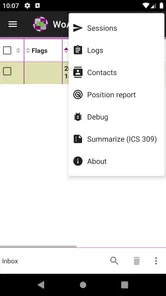
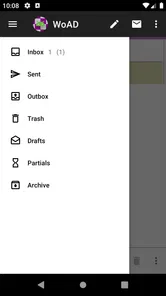
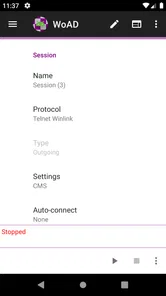
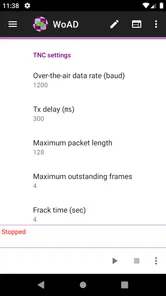
Analysis by Reviewed
I think WoAD makes sense only when you know why you want it: it is a communications app from Sumus Technology Ltd, not a general-purpose messenger. Its focus is bringing Winlink functionality to Android, which puts it in a very different lane from the chat and calling apps most people use every day. That distinction matters when deciding whether its specialist purpose justifies the $8.49 price.
Trust starts with knowing what kind of app this is
My first question with a communications tool is not whether it looks polished, but whether it fits the way I need to communicate. WoAD is aimed at people already interested in Winlink, so I would not install it expecting a familiar contact list, instant-message feed, or effortless setup for casual conversations. Its appeal depends on a more specific communications workflow, and that makes understanding the role it plays more useful than judging it by the standards of a mainstream messenger.
The app is rated for Everyone, and it has more than a thousand installs. Its average rating currently sits at zero, so there is little public rating signal to lean on when weighing the purchase. I would treat those details as context, not proof that the app is either dependable or unsuitable. For me, the sensible approach is to check that I have a real need for Winlink on Android before paying, rather than expecting popularity figures to answer that question.
What trust can—and cannot—tell you
With a communications app, I separate the developer’s identity from the questions I need to answer before use. Sumus Technology Ltd is the developer, but a company name alone does not tell me how information is handled or what controls are available. I look at the privacy information and permission prompts presented on my device, then judge whether they make sense for the way I intend to use the app. That is more useful than treating a specialist purpose as a guarantee of privacy.
I also avoid entering sensitive information just to see what happens. A low-stakes first run lets me understand the screens and setup path without turning a casual test into a real communications task. If something about a permission or requested information feels unclear, I pause and investigate before continuing. My standard is not that every request must be absent; it is that I should understand the choice I am making and be comfortable with it.
Where WoAD fits in a communications setup
I find it useful to treat WoAD as one part of a communications setup, rather than assuming an Android app alone defines the whole workflow. In this section, I’d look at how to decide whether its Winlink focus matches your needs and what to check on your own device before relying on it. That practical fit leads naturally to the next question: what you can verify about setup and controls.
Controls, setup, and practical expectations
WoAD is currently at version 1.5.22 and supports Android 4.4 or later, so it can suit some older devices as well as more recent ones. That broad minimum does not mean every phone will feel equally convenient: screen size, battery condition, and the way you use the device can matter when handling communications tasks away from a desk. I would check the app’s current setup requirements and make sure the phone I plan to use is comfortable to operate before relying on it.
More From Our News Desk

 Gmail
Gmail in a Busy Inbox: Who Benefits Most?
From first account to crowded workday, Gmail earns its place through dependable search and flexible sorting—but its best fit depends on how much inbox maintenance you can tolerate.

 Prime Video
Switching to Prime Video: What Changes in Your Viewing Routine
Prime Video can make a compelling second home for streaming, but switching means learning a different catalog, rental layer, and route from browsing to playback.

 Universal TV Remote Control
 Works Best as a Reliable Backup
A phone remote earns its place through quick setup and reliable habits. Here is how to get more from Universal TV Remote Control—and where its limits show.

 Weather - By Xiaomi
Weather by Xiaomi Review: Clear at a Glance, Less Clear Up Close
Xiaomi’s weather app makes everyday forecasts quick to scan, but its calm surface can leave useful details and recovery paths harder to find than they should be.

 X
X Under Pressure: Can It Recover When Posting Goes Wrong?
A resilience-focused review of X, examining setup, mistaken posts, interruptions, weak connections, and the gaps that matter when recovery needs to be dependable.

 Clash of Clans
 Is Won Between the Battles
Its raids are quick; its community is a long-term project of coordination, teaching, rivalry, and shared responsibility—with all the friction that entails.
Latest News



One practical tip is to separate setup from the moment you actually need to communicate. If you are evaluating a specialist tool, work through its configuration in a calm setting and confirm that your chosen Android device is ready for your intended Winlink workflow. That is a more useful test than simply opening the app once and assuming it will be ready later. I would also keep track of any settings I change, so I can retrace them if I move to another device or need to troubleshoot.
For a first test, I would write down the goal before changing anything: what I am trying to accomplish, what equipment or other parts of my setup are involved, and what result would count as success. That small checklist prevents a common specialist-app mistake: confusing “it installed” with “it is ready for the job.” It also makes troubleshooting less vague. If the workflow does not behave as expected, I can identify which step needs attention instead of starting over blindly.
Data-sensitive moments and user choice
Communications apps deserve a little extra attention because their value comes from handling information deliberately. Before using WoAD for anything important, I would review the permissions Android presents, consider whether each request makes sense for the task I am trying to perform, and look through any privacy and account options shown in the app. I would not assume that a particular permission, storage method, or account control exists without seeing it on my own device.
That caution is not a reason to avoid the app; it is a practical habit. Start with non-sensitive test use, learn how the workflow behaves, and only then decide what information you are comfortable handling through it. If you share a phone, pay attention to device access and notifications as well. The phone’s own lock and notification settings can be part of protecting communications, even when an app’s specific controls are not the only factor.
A useful distinction is between information needed to test a workflow and information that would matter if someone else saw it. I would begin with the former, avoid placing private details in test material, and check what the phone displays outside the app when a notification arrives. If the device is shared, I would also consider whether another person can unlock it or see its screen. Those choices are not substitutes for understanding the app’s own privacy options, but they can reduce avoidable exposure during an evaluation.
Making a fair comparison with everyday communication apps
Compared with familiar messengers, WoAD asks a different question of the user. Mainstream chat apps are built around contacts, quick exchanges, group conversations, and a low-friction start. WoAD’s reason to be on a phone is its relationship to Winlink, so the useful comparison is not which app has the better chat interface; it is whether a mobile Winlink workflow serves a need that a normal messenger does not. If all I need is to tell someone I am running late, the conventional option is plainly more direct.
There is also a trade-off between convenience and fit. A mainstream app may be simpler for ordinary social communication, but it is not automatically a substitute for a specialist system someone has deliberately chosen. Conversely, specialist software is not automatically the best choice merely because its purpose sounds more technical. I would compare the complete workflow I need—including setup and the other equipment or services involved—rather than comparing isolated app screens.
Who benefits, and who may prefer another option
I would consider this app if I already use or plan to use Winlink and want that kind of functionality on an Android device. A realistic use case is checking or preparing a communications workflow while away from a computer, then using the phone as one part of a broader setup. The useful trade-off is specialization: a dedicated tool can suit a particular job better than a generic chat app, but it is not a replacement for the simple messaging and calling most people expect from everyday communication software.
Imagine planning a trip and wanting to check your mobile setup before leaving. I would test the workflow at home, confirm the phone is comfortable to use, and make sure I understand which parts depend on the wider setup rather than on the app alone. That way, I am not trying to learn the controls at the same time as dealing with a time-sensitive situation. The value of having an Android option is strongest when it has been prepared in advance, not when it is treated as a magic fallback that needs no practice.
The app is most compelling for someone who knows why Winlink belongs in their toolkit and wants an Android device to play a defined role. It is a weaker match for someone who has only heard the name and expects the app itself to explain or provide every part of a communications system. If you are curious but inexperienced, I would first learn the workflow and identify what equipment or preparation it calls for, then decide whether the app fills a real gap. That sequence reduces the chance of paying for a tool before you know how you would use it.
If your goal is to message friends, make routine calls, or join group chats with minimal configuration, a conventional messenger is the easier choice. If you are new to Winlink, I would first learn what the system requires and whether your equipment and habits match that workflow; paying for an app before answering those questions risks buying something you cannot use comfortably. The price makes that decision worth taking seriously, especially when the average rating offers no meaningful crowd feedback yet.
Questions I would settle before relying on it
Before buying, I would ask myself whether I need Winlink functionality specifically, whether my Android device is part of a workable setup, and whether I am prepared to configure and test it before a real need arises. I would also check what the app asks permission to do and what privacy choices are visible on my phone. Those answers help with the practical question behind the purchase: not simply “Can I install it?” but “Can I use it as intended, and am I comfortable with the information and device access involved?”
Another worthwhile question is whether the phone I plan to use will remain available for this purpose. A device that is nearly out of battery, difficult to operate, or routinely shared may not be the right place to depend on a specialist workflow. I would test with the actual phone and usage conditions I expect, rather than assuming that a successful setup on one device transfers neatly to another. Keeping a brief record of what I configured can also make later checks more manageable.
A cautious verdict for the right user
What I find most important here is not a claim that the app will suit everyone, but the clear boundary around its purpose. Sumus Technology Ltd presents a focused Android option for people seeking Winlink functionality, and that focus is its strongest reason to consider it. I would not choose it as a casual, all-purpose communications app, and I would not rely on it for important use until I had personally checked the setup, permissions, and workflow on my device.
For someone who already understands the role of Winlink and wants an Android option, WoAD may be a sensible fit. For everyone else, I would compare the effort and cost with familiar communication apps and decide whether the specialized use is genuinely needed. My recommendation is therefore cautious but straightforward: start with your communication goal, verify the controls you see on your phone, and buy only if the app’s particular purpose matches it.
Ever stumbled upon a game that just pulls you in and won't let go? That's exactly what happened when I downloaded WoAD onto my phone. It's one of those gems that you think will be your casual time-killer, but it turns out to be a full-blown obsession. If you're wondering what makes this game a must-try, let me spill the beans!
The Enchanting World of WoAD
When you first launch WoAD, you're greeted with a visually stunning world that's nothing short of magical. The graphics are top-notch, with vibrant colors and intricate designs that immediately capture your attention. It's like stepping into a beautiful painting where every brushstroke is alive and breathing. The game developers have truly outdone themselves in creating a world that's both enchanting and immersive.
Gameplay that Keeps You Hooked
Now, let's talk about the gameplay. It's a perfect blend of strategy and adventure, keeping you on your toes as you navigate through various challenges and quests. The controls are intuitive and easy to grasp, even for those who might not consider themselves hardcore gamers. And trust me, once you start playing, it's tough to put your phone down. Each level presents a new challenge, requiring you to think on your feet and adapt to different scenarios.
One of the aspects I absolutely love is the character progression system. As you advance through the game, you have the opportunity to upgrade your skills and abilities, making your character stronger and more versatile. This adds a layer of depth to the gameplay, making you feel invested in your character's journey and growth.
A Soundtrack to Remember
Let's not forget the soundtrack, which deserves a special mention. The music in WoAD is nothing short of mesmerizing, perfectly complementing the game's aesthetic and enhancing the overall experience. It's the kind of soundtrack that makes you want to plug in your headphones and get lost in the game for hours on end. Kudos to the composers for crafting such an atmospheric audio experience!
Moreover, the sound effects are spot on, adding an extra layer of realism to the game. Whether it's the rustling of leaves or the clashing of swords, every sound is meticulously designed to draw you deeper into the game's world.
Final Thoughts
All in all, WoAD has quickly become one of my favorite mobile games. It's a delightful mix of stunning visuals, engaging gameplay, and a memorable soundtrack. If you're looking for a game that will captivate your senses and provide hours of entertainment, look no further. Just be prepared to lose track of time, because once you enter the world of WoAD, you won't want to leave!
WoAD Frequently Asked Questions
What is WoAD and what are its main features?
WoAD, short for World of Adventure and Discovery, is an immersive mobile game available on both Android and iOS platforms. It offers players a rich virtual environment to explore, teeming with adventures and challenges. Key features include an expansive open world, customizable characters, multiplayer options, and regular updates that introduce new quests and features. Whether you're a solo player or enjoy teaming up with friends, WoAD provides an engaging experience for all.
Is WoAD free to play or does it have in-app purchases?
WoAD is available as a free-to-play app, allowing users to download and start playing without any initial cost. However, it includes in-app purchases for players who want to enhance their gaming experience, such as buying exclusive items, unlocking new character abilities, or accessing special quests. While these purchases can enrich gameplay, they are entirely optional, and players can still enjoy the game without spending money.
What are the system requirements for installing WoAD on mobile devices?
To install WoAD on your mobile device, ensure that your device meets the minimum system requirements. For Android, this typically means having Android 7.0 (Nougat) or higher, with at least 2GB of RAM. For iOS devices, WoAD requires iOS 11.0 or later. Adequate storage space is also needed to accommodate game updates and additional content, ensuring smooth gameplay without any interruptions.
Does WoAD support multiplayer gameplay, and how does it work?
Yes, WoAD supports multiplayer gameplay, allowing players to team up with friends or other online players to tackle challenges and quests together. The game features an intuitive matchmaking system that pairs you with players of similar skill levels or allows you to join specific friends by entering a unique code. This cooperative mode enhances the social aspect of the game, making it more enjoyable and dynamic.
How frequently does WoAD receive updates and new content?
WoAD is committed to providing its players with fresh content and regular updates. The developers release new updates approximately every month, which may include bug fixes, new quests, additional characters, and improved features based on player feedback. This ensures that the gaming experience remains vibrant and engaging, keeping players invested in the evolving world of WoAD.
Pros
- Intuitive user interface for seamless navigation.
- Highly customizable settings for user preference.
- Regular updates with new features and improvements.
- Lightweight app
- consumes minimal device resources.
- Supports multiple languages for global users.
Cons
- Occasional bugs affecting app performance.
- Limited free features
- many are paid.
- Requires internet connection for full functionality.
- Some features are difficult to find initially.
- Subscription can be pricey for premium features.