Wishlist Maker - Listful
- 71.00
- 4.6
- Installs
- 100.00K
- Price
- Free

Screenshots
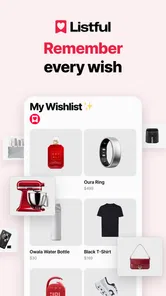
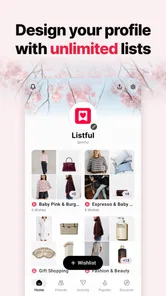
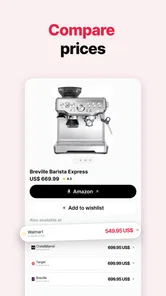

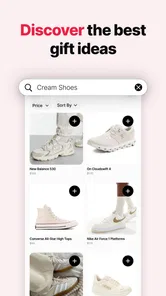
Analysis by Reviewed
I started using Wishlist Maker - Listful with a familiar problem: I wanted to save gift ideas from different shops without sending someone a messy collection of screenshots, messages, and browser tabs. Listful is a lifestyle app from Listful built around that simple handoff. I can collect things I like, turn them into a shareable wishlist, and give another person one place to browse when a birthday, holiday, or special occasion comes around.
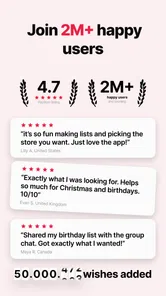
That sounds straightforward, and the app’s appeal is exactly that it focuses on the awkward middle step between discovering a product and telling someone else about it. It is free to install, has an Everyone content rating, and works on devices running Android 8.0 or later. Its current version is 1.17.0, and the app has built a 4.6 average from around 1.9 thousand ratings, with over 100 thousand installs. Those figures suggest that Listful has found a clear audience, but my experience is more useful than the numbers: it works best when I treat it as a shared planning tool rather than a personal shopping notebook.
From scattered ideas to one usable wishlist
I’ll look at the step that makes a wishlist useful beyond my own phone: shaping scattered finds into a clear set of choices. A little curation can spare the recipient guesswork, especially when items come from different shops. The next section turns to what happens when the list grows and several people need to use it.
The starting condition: a gift idea is rarely in one place
My first realistic use case was preparing a birthday wishlist. I had noticed a kitchen item in one shop, a book in another, and a pair of headphones while browsing on my phone. The normal alternative would have been to copy product names into a notes app, save several browser tabs, or send myself links through a messaging service. All three methods work, but none is especially pleasant for the person who eventually needs to choose a gift.
Listful changes the focus from private notes to a list that can be shared. Instead of asking a friend to search through a conversation, I can gather ideas as they occur and keep them together. That makes the app particularly useful for people who are often asked, “What would you like?” and never have a complete answer ready.
The important distinction is that this is not simply a reminder list with a gift-themed design. Its purpose is to make the transition from I might want this to someone else can easily act on this less awkward. I found that useful for several kinds of lists: birthday suggestions, household items, baby-shower ideas, travel equipment, and group gift planning. The same workflow also suits a couple who wants to keep a running list instead of rebuilding one before every occasion.
Adding an item without interrupting the browsing habit
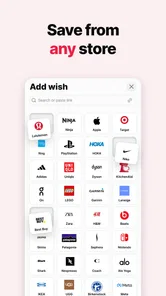
The most natural way to use the app is to add products while I am already browsing elsewhere. That matters because a wishlist tool becomes annoying if it requires me to stop, open a separate search, and manually recreate every detail. Listful is designed around saving items from any store, so the practical habit is simple: when I see something worth remembering, I send it into the list rather than relying on memory.
More From Our News Desk

Weather by Xiaomi Review: Clear at a Glance, Less Clear Up Close

X Under Pressure: Can It Recover When Posting Goes Wrong?

Clash of Clans Is Won Between the Battles

Android Auto Makes the Case for Quieter Car Software

MobiOffice: Transforming Mobile Productivity with Seamless Integration

EA SPORTS FC™ Mobile Soccer: Redefining Mobile Sports Gaming
I recommend adding items immediately, even when I am only mildly interested. A wishlist is more useful when it reflects several possibilities instead of only the one purchase I have already decided to make. Later, I can remove ideas that no longer fit, while recovering a forgotten product from a list is much harder if I never saved it.
There is also a small but meaningful trade-off here. Saving from different stores keeps discovery flexible, but it means the quality of the final list depends on the information attached to each item. A product saved from a clear listing is easier for a recipient to understand than one added from a vague page or a temporary promotion. I found it worth checking each saved entry before sharing, especially if the item has different sizes, colors, versions, or accessories.
Organizing before sharing: the step many people skip
My best results came when I treated the first saved version as a draft. I looked through the list again and asked whether another person could make a decision without messaging me for clarification. That meant removing duplicates, keeping alternatives separate, and making sure the most important details were visible in the item itself or obvious from its source.
This is one of the less obvious strengths of a dedicated wishlist app. A notes app lets me write anything, but it also encourages unfinished entries such as “blue jacket from that store” or “something like the speaker we saw.” Listful gives the collection a more deliberate purpose. I still have to provide the judgment, but the structure nudges me toward a list that another person can actually use.
I also avoid adding too many nearly identical choices. Five versions of the same item may feel helpful to me, yet they can make the recipient less confident about what would be welcome. A better approach is to save one preferred option and add a second only when the difference is meaningful, such as a lower-cost alternative or a different size. This keeps the handoff clear without taking away choice.
The handoff: one shared destination instead of a message chain
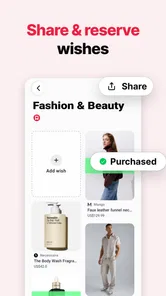
The central moment in the workflow is sharing the wishlist. Listful lets me share it in one link, which is a much cleaner handoff than sending individual product links across several messages. I can give the recipient one destination and let them browse the complete collection in their own time.
That arrangement works especially well when several people may be choosing gifts. A family group can receive the same list instead of asking me repeatedly for suggestions. A friend can forward the list to another person without rebuilding the information. For a group gift, the shared page also provides a common starting point, although the people involved still need to coordinate among themselves.
The link-based approach is convenient, but I would not treat it as a substitute for a short personal message. I usually explain who the list is for and whether the recipient should choose freely or check with others first. The app handles the product collection; it does not remove the social context around the gift. That distinction prevents an otherwise useful list from feeling like an impersonal shopping order.
Another practical tip is to share the list only after a quick review. If I send it too early, the recipient may see half-finished ideas, duplicates, or products I saved only as a temporary reference. A minute spent cleaning the list improves the entire handoff more than adding several extra items.
What the recipient gets from the workflow
From the recipient’s perspective, the value is reduced uncertainty. They do not need to ask which store I meant, search my old messages, or guess whether a product is still the right version. They can open the shared list and compare the options I intentionally collected.
This is where Listful feels more useful than a standard note-taking app. Notes are excellent for private thinking, but they often expose the writer’s unfinished process. A wishlist is a presentation layer for decisions that are not fully made yet. I can say, in effect, “These are the things I would genuinely enjoy,” while still leaving the final choice to the giver.
Compared with a retailer-specific wishlist, the cross-store approach is more flexible. I am not forced to keep every idea inside one shop, and the recipient is not limited to a single catalog. Compared with a social bookmarking service, Listful is more focused: it is not trying to turn product discovery into a public feed. That narrower purpose makes it easier to use for a specific occasion.
There is a limitation in that comparison. A retailer’s own wishlist may be better for stock tracking, price changes, or a store’s purchasing workflow, depending on what that retailer supports. Listful’s advantage is breadth and sharing, not replacing every store’s account system. If my main goal is monitoring one retailer’s inventory, I would probably stay with that retailer’s tool.
The outcome: a list that can survive real conversations
After cleaning and sharing a list, the outcome is not merely a collection of saved products. It is a compact answer to a recurring social problem: how to communicate preferences without making the other person do research on my behalf. I can keep the list available for later and update it as my interests change, rather than starting from an empty page every time someone asks for ideas.
For me, the biggest benefit is the reduction in repeated explanations. A shared list gives everyone the same starting point, and it lets me spend less time copying links into separate chats. The recipient still makes the final decision, but the work of describing what I like has already been done.
That result is strongest when the list has a clear purpose. A birthday list can be short and selective. A long-term personal wishlist can contain more experiments and possible purchases. A group list may need extra context in the accompanying message. Listful can support all three approaches, but the quality comes from how I curate the collection, not from simply saving as many items as possible.
Where the flow breaks: friction I would want you to know about
The app does not eliminate every point of friction. The first is the quality of the saved product information. Since items can come from different stores, product pages are not equally consistent. I need to review entries rather than assuming that every saved item will communicate its size, color, model, or preferred variation perfectly.
The second issue is list maintenance. A wishlist can become stale if I save ideas for months and never revisit them. Products change, links can become less useful, and my own preferences move on. Listful makes collecting easy, but that convenience can encourage accumulation. I get better results when I periodically remove items that no longer feel relevant and keep the list understandable for someone seeing it for the first time.
The third limitation is social rather than technical. A shared list can make gifting easier, but it cannot decide whether two people are buying the same thing or whether a group has agreed on a budget. For those situations, I still use a short conversation alongside the list. Anyone expecting a complete group-gifting coordinator may find the workflow too lightweight.
There is also a cost boundary to consider. The app is free, while in-app purchases range from $9.99 to $29.99 per item. I would begin with the free experience and decide only after understanding which parts of my routine genuinely need more. That is especially sensible for occasional users who create one list a year rather than maintaining several active collections.
Who should use it, and who should choose something else
I would recommend Listful to anyone who regularly shops across different stores and wants a simple way to communicate gift ideas. It is a strong fit for people who dislike repeating links, couples building shared ideas, families preparing for celebrations, and anyone whose preferred products are spread across several retailers.
It is also a good choice for the person who wants control over the tone of a wishlist. I can offer suggestions without making them sound like a rigid shopping order. The recipient gets options, while I avoid the uncertainty of saying, “Anything is fine,” when that is not really true.
I would be more cautious if I wanted a highly automated shopping assistant, detailed budgeting, or a retailer-specific purchasing dashboard. In those cases, a store’s own wishlist or a more specialized planning tool may be a better match. I would also skip Listful if I rarely share gift ideas and already have a reliable notes-and-messaging routine that causes no confusion.
My practical routine for getting better results
My preferred routine is simple. I save an item when I discover it, review the list before sharing, keep only meaningful alternatives, and add a brief message explaining the occasion. I also revisit older lists instead of assuming that saved ideas remain accurate forever. These steps take little time, but they address the main weaknesses of cross-store wishlists: clutter, ambiguity, and outdated choices.
For a shared occasion, I would create the list early enough to include different price levels and product types, then send the single link to the relevant people. I would avoid filling it with ten versions of one idea. A smaller list with clear choices is kinder to the recipient than a huge collection that transfers the decision-making burden back to them.
My final impression is that Wishlist Maker - Listful succeeds by making the handoff matter as much as the saving process. Listful, the developer, has created a focused lifestyle app rather than another general-purpose place to store links. It is free to start, rated for Everyone, and available for Android 8.0 and newer, with optional purchases for users who want more from the experience.
I would not call it a complete replacement for retailer wishlists, notes apps, or group chats. Each of those can be better in a specific situation. But when my real problem is turning scattered discoveries into a clean, shareable gift guide, Listful is the option I would choose. Its real strength is not collecting more products; it is making the next person’s decision easier.
Wishlist Maker - Listful Frequently Asked Questions
Is Wishlist Maker - Listful suitable for everyday gift planning?
Yes. Wishlist Maker - Listful is a lifestyle app for collecting gift ideas and keeping them together, so it can be useful for everyday planning as well as special occasions. Its store summary describes it as a wishlist maker and gift registry, with items saved from different stores and shared in one link. That makes it worth considering if you want a simple place to organize ideas before a gift-giving occasion.
What is Wishlist Maker - Listful used for?
Wishlist Maker - Listful is designed to help you create, organize, and manage wishlists in one convenient place. You can add products, gift ideas, experiences, or personal goals and keep them grouped for different occasions. It is useful for birthdays, holidays, weddings, shopping plans, or simply saving things you may want to purchase later.
Can I add items from online stores to my Listful wishlist?
The app is intended to make saving wishlist ideas easier, including items discovered while browsing or shopping online. Its store summary highlights saving items from any store, so it is designed to bring shopping finds together in a wishlist. Depending on the platform version and available sharing options, you may be able to save product links, titles, images, or notes from other apps. It is a good idea to check the current app permissions and supported sharing features before relying on it for a specific retailer.
Can I share my wishlist with friends and family?
Sharing is one of the most useful reasons to create a digital wishlist. Listful’s store summary describes sharing a wishlist in one link, making it easier for other people to see your preferences when choosing a gift. Before downloading, review whether the sharing options meet your needs and whether lists can be viewed without creating an account.
Does Wishlist Maker - Listful require an account or internet connection?
The exact requirements can vary according to the app version and device platform. Some wishlist features may work locally, while account-based functions such as synchronization, backup, or sharing can require an internet connection and user registration. Check the sign-up screen, privacy information, and store listing to understand what data is requested and which features remain available offline.
Pros
- Create and organize multiple wishlists for different occasions.
- Share lists easily with friends and family for gift planning.
- Simple interface makes adding and managing wishes quick.
- Useful for birthdays
- holidays
- weddings
- and everyday shopping.
- Helps prevent duplicate gifts when lists are shared.
Cons
- Some advanced features may require in-app purchases or a subscription.
- The app’s usefulness depends on friends and family using shared lists.
- Limited details may be available for products without added links.
- Wishlist organization can become cumbersome with many saved items.
- Privacy settings should be checked before sharing personal lists.











