WingAI: Your AI Wingman
- 450.00
- 4.8
- Installs
- 1.00M
- Price
- Free

Screenshots

Analysis by Reviewed
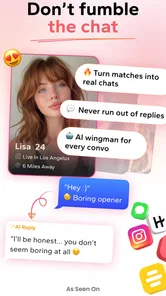
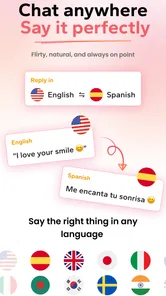
I tried WingAI: Your AI Wingman as a practical companion for the awkward parts of online dating, especially the moments when I knew what I wanted to say but could not find a natural way to say it. Its central idea is simple: use artificial intelligence to help with dating conversations, profiles, and replies rather than leaving you staring at a blank message box. That makes it interesting for people who want a little confidence without handing over the entire conversation.
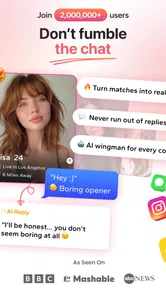
WingAI is a free lifestyle app from Ignition Dating LLC, aimed at helping users communicate with more personality and less hesitation. It is listed for Teen users, runs on Android 7.0 or later, and the current version is 2.1.11. The app has passed the early-experiment stage in terms of public attention, with over a million installs and an average rating of 4.8 from around 89 thousand ratings. Those figures suggest that the concept connects with many users, although popularity does not remove the need to judge whether an AI dating assistant fits your own style.
How WingAI feels in everyday dating
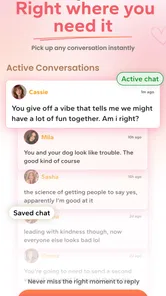
The most useful way to think about WingAI is not as a replacement for dating apps, but as a writing layer that sits beside them. I would open it when I had a match, a profile prompt, or a message that deserved more effort than “hey” but did not naturally lead to a clever response. The value is in reducing friction at that first step.
That distinction matters. WingAI does not create chemistry by itself. It can help me phrase an idea, adjust the tone, or move a stalled exchange forward, but the other person still reacts to the personality behind the message. If I send something that sounds polished but does not sound like me, the conversation can become harder rather than easier.
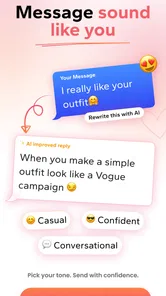
In my experience, the strongest use is editing rather than blind generation. I can start with a real observation from someone’s profile, explain what I am trying to communicate, and use the suggestion as a draft. That workflow keeps the message connected to the actual person instead of producing a generic compliment that could be sent to anyone.
A realistic use case after work
Imagine matching with someone whose profile mentions weekend cooking and a favorite local market. I might want to ask about the best thing they have made recently, but my first attempt could sound like an interview question. WingAI is useful here as a second opinion: I can ask for something more playful, more relaxed, or less formal, then choose the version that still feels like something I would say.
The important step is to add my own detail afterward. A generated line becomes more convincing when I connect it to a genuine experience, such as admitting that I can follow a recipe but regularly underestimate preparation time. That small personal addition does more for the conversation than an overly smooth sentence from an assistant.
More From Our News Desk

Weather by Xiaomi Review: Clear at a Glance, Less Clear Up Close

X Under Pressure: Can It Recover When Posting Goes Wrong?

Clash of Clans Is Won Between the Battles

Android Auto Makes the Case for Quieter Car Software

MobiOffice: Transforming Mobile Productivity with Seamless Integration

EA SPORTS FC™ Mobile Soccer: Redefining Mobile Sports Gaming
Where the “rizz” idea helps and where it does not
The app’s store summary presents it as an AI dating assistant with rizz, which points toward confidence, charm, and better timing. I found that framing useful when I was overthinking a reply, but “rizz” should not be treated as a magic setting that guarantees attraction. A witty line can still be inappropriate if the conversation has not reached that level of familiarity.
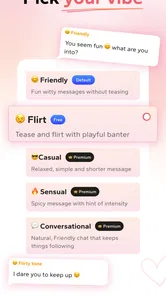
I would use the assistant to explore tone, not to force one. A warm question, a light joke, and a direct invitation can all be good choices depending on the exchange. The best result comes from selecting the option that matches the existing mood instead of choosing the most dramatic or flirtatious wording.
Advice for getting better suggestions
The quality of an AI dating suggestion depends heavily on the context I give it. A vague request such as “write something attractive” leaves too much room for a generic answer. A more useful instruction explains the situation, the desired tone, and the boundary I want to keep. For example, I might ask for a short reply that is curious but not intense, based on a specific detail from the other person’s profile.
I also found it helpful to ask for several different directions rather than accepting the first draft. One option may be playful, another sincere, and another more direct. Comparing them makes it easier to notice what sounds artificial. This is one of the app’s less obvious benefits: it can help me identify my own preferred communication style, not just supply words.
The best WingAI workflow is draft, edit, personalize, then send. Skipping the editing step is the fastest way to make a conversation feel automated. I would remove exaggerated compliments, add a concrete detail, and read the message aloud before using it. If I would never say it to a friend, I probably should not send it to a match.
What the current version means for users
Version 2.1.11 is the current release I reviewed, and the app’s public presence indicates that it has already attracted a substantial audience. For someone deciding whether to try it today, that is more relevant than the novelty of the idea. The product is positioned as an active dating utility rather than a one-time novelty, and the free entry point makes experimentation straightforward.
The app was released on September 12, 2023, so it has had time to move beyond a first concept and establish a recognizable purpose. I would still separate that product history from assumptions about future improvements. A version number can show ongoing iteration, but it does not automatically tell me which future tools will arrive or how the experience will change.
For existing users, the practical effect of using the current version is likely to be continuity in the core workflow: open the assistant when a dating message needs help, provide context, review the wording, and adapt it before sending. That routine is more important than chasing every possible feature. If the app already fits the way someone communicates, small refinements matter mainly when they save time or make suggestions feel more natural.
New users should expect to spend a little time learning how to prompt it well. The first suggestion is not necessarily the best one, and the app works better when I treat it as a collaborator that needs direction. People who want a completely automatic dating experience may find that disappointing, while users who appreciate control will probably see it as a strength.
Free access and optional spending
WingAI is free to download, but it includes in-app purchases ranging from $0.99 to $119.99 per item. That wide range is worth considering before I become dependent on a paid workflow. I would begin with the free experience, decide whether the suggestions genuinely improve my conversations, and only then consider spending money.
The pricing structure also changes how I would use the app. I would not pay simply because I felt nervous about one difficult message. Dating can already encourage impulsive decisions, and an assistant should reduce pressure rather than add another source of it. Anyone considering purchases should check what an item provides and whether it supports repeated use or only a particular need.
Privacy and authenticity in practice
Whenever I use an AI tool for dating, I have to think about the information I place into it. I would avoid copying sensitive personal details, private conversations that belong to someone else, or identifying information that is unnecessary for the wording task. Even when a message seems harmless, less context is often enough to get useful help.
Authenticity is the other major issue. Using WingAI to correct grammar or find a less awkward opening feels different from letting it conduct an entire relationship. If every reply is generated, the other person may be responding to a style I cannot maintain in a real conversation. I see the app as most valuable when it helps me express an existing thought, not when it invents a personality for me.
How it compares with ordinary alternatives
The usual alternative is simply to write messages inside a dating app, perhaps ask a friend for advice, or use a general writing assistant. WingAI has a clearer dating focus, which can make the suggestions more relevant to flirting, introductions, and conversation momentum than a general-purpose tool. I do not need to explain every dating context from scratch.
A friend, however, can understand my personality and the emotional history behind a conversation in a way an automated assistant cannot. Friends may also tell me when a message is too eager or when I should stop trying to revive an exchange. For sensitive situations, I would trust thoughtful human advice more than any generated line.
Writing directly is still better when I already know what I want to say. It is faster, more personal, and free of the risk that a polished suggestion will sound unlike me. WingAI earns its place when I am stuck, uncertain about tone, or trying to turn a flat opening into a question that gives the other person something easy to answer.
Who should use it and who should skip it
I think WingAI is a good fit for someone who freezes at the beginning of a conversation, wants help making profile-based questions, or often rewrites messages until the moment passes. It can also help people who are not naturally flirtatious but still want to sound warm and interested. The app is especially useful when the problem is confidence in wording rather than a lack of genuine interest.
I would skip it if I strongly dislike AI-generated language, if I want every message to be entirely spontaneous, or if I am looking for a complete dating platform with its own matching community. WingAI is an assistant, not a substitute for meeting people, deciding who is trustworthy, or maintaining a healthy conversation.
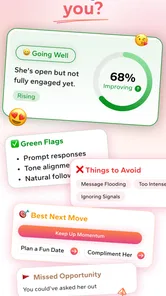
It is also not the right tool for trying to pressure someone into responding. If a match is giving short answers, has stopped engaging, or has made a boundary clear, a better assistant would be my own judgment: respect the signal and move on. No amount of clever wording makes persistence appropriate in every situation.
Remaining gaps I noticed
The central limitation is that AI can optimize wording without understanding the full emotional context. A message may be technically charming but wrong for the stage of a conversation. This is particularly noticeable when humor, sarcasm, cultural references, or personal boundaries matter. I have to remain the final editor because the assistant cannot take responsibility for the social outcome.
There is also a risk of sameness. Dating messages often rely on familiar formulas, and an assistant focused on appealing phrasing can encourage users toward similar patterns. The way around that is to feed it unusual but genuine details and reject lines that could have been written for any profile. Specificity is more valuable than maximum smoothness.
Another trade-off is attention. If I reach for WingAI after every incoming message, I may spend more time optimizing replies than actually getting to know someone. I would set a simple rule: use it for the first message, an important transition, or a conversation that needs a thoughtful reset, but answer naturally when the exchange is already flowing.
What I would watch as the app evolves
Future development should be judged by whether suggestions become more personal without becoming more intrusive. I would look for improvements that make it easier to preserve a user’s voice, control the level of flirtation, and distinguish between a first message and an established conversation. Those changes would matter more to me than a larger collection of flashy phrases.
I would also watch how the paid options affect the everyday experience. A free starting point is valuable, but users need to understand when spending becomes useful and whether the core assistant remains practical without it. Since individual purchases can reach $119.99, cost awareness should remain part of the decision rather than an afterthought.
The app’s Teen content rating is another reason I would encourage careful, age-appropriate use and sensible boundaries. Dating advice should never replace judgment about consent, safety, or personal information. A polished message is still only a message; it does not verify another person’s identity or make an online interaction risk-free.
After using WingAI, my opinion is positive but measured. It solves a real, narrow problem: the hesitation that appears when I want to start or improve a dating conversation but cannot find the right wording. Its free access makes it easy to test, its dating-specific focus gives it an advantage over a generic writing assistant, and the current version feels like a mature enough place to judge the idea rather than a bare experiment.
I would recommend it to a friend as a writing coach, not as a substitute for personality. Give it real context, ask for different tones, keep the parts that sound like you, and remove anything that feels too polished or too aggressive. Used that way, WingAI: Your AI Wingman can make online dating less intimidating while leaving the important human decisions in your hands.
My final advice is to try the free experience before considering any optional purchase. If it helps you say what you already mean, it is doing its job. If it makes every conversation sound like a performance, ordinary writing—or an honest message to a trusted friend—will probably serve you better. For the right user, WingAI: Your AI Wingman is a useful confidence boost, provided the human voice remains in charge.
WingAI: Your AI Wingman Frequently Asked Questions
How many people use or rate WingAI: Your AI Wingman?
WingAI: Your AI Wingman has passed one million installs and has an average rating of 4.8 from around 89,000 ratings. Those figures can offer a broad sense of how the app has been received, but they cannot tell you whether its writing style or suggestions will suit your needs. If you try it, judge the recommendations for yourself and review them before using them in a real conversation.
Who develops WingAI: Your AI Wingman, and what kind of app is it?
WingAI: Your AI Wingman is a lifestyle app developed by Ignition Dating LLC. Its focus is dating and social conversations, offering AI-assisted ideas for messages and replies. If you are considering it, think of it as a tool for preparing what you might say rather than a dating service or a substitute for deciding how you want to communicate.
What devices and operating systems can run WingAI: Your AI Wingman?
WingAI is available for Android and iOS, so you can check the relevant app store for the version suited to your device. The Android version requires Android 7.0 or later. Before downloading, confirm that your device meets the platform requirements and has enough available storage; compatibility can also depend on your device and the operating system version installed.
What is WingAI: Your AI Wingman used for?
WingAI: Your AI Wingman is designed to help users with dating and social conversations. It can suggest opening lines, replies, compliments, and conversation ideas based on the situation you describe. The app is especially useful when you are unsure how to respond or want to make a message sound more natural, confident, or engaging before sending it.
How does WingAI generate dating or conversation suggestions?
WingAI generally creates suggestions from the information you provide, such as a profile description, a received message, or the tone you want to use. Depending on the available features, you may need to type or paste text into the app, and some tools may analyze screenshots or images. The quality of its recommendations depends heavily on the context and instructions you provide.
Pros
- Provides quick AI-generated suggestions for chats and dating conversations.
- Can help users overcome writer’s block when starting a new conversation.
- Useful for adjusting messages to sound more confident
- playful
- or friendly.
- Saves time by offering multiple reply ideas in seconds.
- Simple concept that can support users who feel nervous about texting.
Cons
- AI suggestions may sound generic or unlike your natural personality.
- Advice quality depends heavily on the context and messages provided.
- Some features may require a subscription or in-app purchases.
- Sharing private conversations with an AI service may raise privacy concerns.
- Overusing generated replies can make conversations feel less authentic.











