Widgetable: Besties & Couples
- 10.63K
- 4.7
- Installs
- 10.00M
- Price
- Free

Screenshots
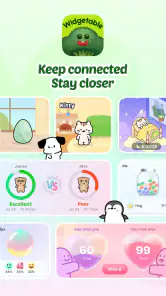


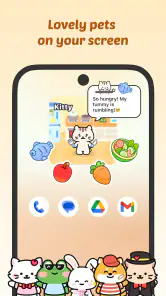
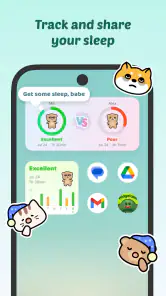
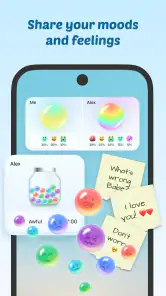


Analysis by Reviewed
I first noticed the appeal of Widgetable: Besties & Couples in the small moments: a shared update on a home screen can feel warmer than another message buried in a busy chat. This social app, made by Happeny Technology Pte. Ltd., is built around lightweight ways for friends and couples to share bits of daily life. Its playful approach is easy to understand, though whether it earns a permanent place on your phone depends on how much you enjoy keeping a shared digital ritual going.
The first-week appeal: little signals, quickly shared
During the first few days, the fun is in choosing a widget and seeing how it changes the feel of your screen. The app’s focus on pets and sharing sleep, moods, and other everyday details gives friends something specific to react to, rather than asking them to invent a conversation from scratch. That makes it especially appealing to couples in different routines, close friends who like small check-ins, or people who enjoy making their phones feel personal.
A realistic use is a couple with mismatched schedules: one person checks in before bed, while the other sees the update later and responds when free. It is a gentle prompt, not a substitute for talking through something important. I’d treat the widgets as little invitations to connect, rather than assuming that a changing screen means someone is available or wants a conversation right then.
Month-to-month value: a ritual, not a replacement for chat
The lasting value comes from whether both people actually enjoy the routine. A shared mood update can make a quiet day easier to acknowledge, while a virtual pet can give two people a recurring, playful subject. Unlike a standard messaging app, which is strongest when you need a direct conversation, Widgetable puts small shared signals in view. That distinction is useful, but it also means it works best alongside your usual chat rather than instead of it.
One practical tip is to agree on what a check-in means before relying on it. If a mood is simply a fun status, say so; if you want it to prompt a conversation, make that expectation clear between you. This keeps a playful feature from turning into a test of attentiveness. The app is most suitable for people who both like visible, low-pressure reminders of each other. If one person dislikes home-screen widgets or prefers private, uninterrupted communication, the shared habit may not stick.
Maintenance and friction: keep the routine lightweight
Any shared widget has a social maintenance cost: both people need to remember it, and the novelty can fade if updates start to feel like homework. I’d begin with one feature you genuinely want to use rather than filling the screen with several prompts. A small routine—such as checking in once during a natural pause in the day—is easier to sustain than trying to turn every mood or moment into content.
There is also a difference between a glanceable update and a full conversation. A widget can make a detail visible, but it cannot supply context, tone, or the reassurance that a direct message can. If you find yourself repeatedly checking for changes, or feeling obliged to post just to keep a streak of attention alive, it may be healthier to scale back. The app should make connection feel easier, not create another duty to manage.
More From Our News Desk

Clash of Clans Is Won Between the Battles

Android Auto Makes the Case for Quieter Car Software

MobiOffice: Transforming Mobile Productivity with Seamless Integration

EA SPORTS FC™ Mobile Soccer: Redefining Mobile Sports Gaming

How Microsoft OneDrive Became a Mobile Productivity Giant

How Google Translate Breaks Language Barriers Effortlessly
Who it suits, and who may prefer another option
Widgetable is a good fit for close friends and couples who already enjoy sharing small daily details and want those details to have a visible place on their phones. It may also suit someone who finds a simple prompt easier than opening a chat with no particular reason. By contrast, people looking for a full-featured messenger, a serious shared calendar, or a private journaling space should use tools designed specifically for those jobs. Widgetable’s strength is its playful, glanceable social layer, not replacing those alternatives.
It is free to start, with optional in-app purchases ranging from $0.99 to $99.99 per item, so I’d try the basic routine first and decide whether the extra spending makes sense for your use. The app is rated for Everyone, and its current version is 4.0.001, with Android support from version 9. For a social app, its 4.7 average across around 427,000 ratings suggests broad appeal, while its 10 million-plus installs show that the idea has reached a large audience. Those figures can help set expectations, but they do not guarantee that its particular style will suit every pair of friends.
What's the Buzz About?
So, what's the magic behind Widgetable: Besties & Couples? At its core, this app is all about fostering connections. By offering a wide range of widgets, it allows you and your favorite people to stay in sync and share fun moments. Whether it's a countdown to that epic trip, a shared calendar, or even just a daily mood update, this app has got you covered. It's like having a digital scrapbook, but way cooler!
Features to Look Out For
Now, let’s dive into the features that make this app a must-have:
- Customizable Widgets: Personalize how you connect with your besties and loved ones. Choose from a variety of themes, colors, and styles to match your vibe.
- Shared Experiences: Create shared albums and moments that you can both look back on and cherish. It's like a memory lane, but interactive!
- Real-Time Updates: Stay updated with what’s happening in your friends’ lives with live widgets that reflect real-time changes.
- Engagement Features: Send each other challenges, quizzes, and fun tasks to keep the interaction lively and engaging.
Why It's a Game-Changer
In today's fast-paced world, keeping up with our loved ones can sometimes feel like a chore. But with Widgetable, it becomes a delightful part of your day. The app cleverly integrates with your device's home screen, so you're always just a glance away from those who matter most.
What really sets this app apart is its ability to transform mundane interactions into meaningful connections. It's not just about staying in touch; it's about sharing a part of your life, no matter where you are. And let's face it, who doesn't want their phone to feel more like a portal to their favorite people?
Long-term verdict: keep it if the ritual stays welcome
My lasting test for an app like this is not whether its widgets look charming on day one, but whether I still want them visible after the novelty settles. The strongest reason to keep Widgetable is that it can give a relationship a small, recognizable rhythm without demanding a long conversation every time. If that little signal makes someone smile or starts a useful check-in, it has earned its space. If it becomes one more screen to maintain, removing the widget is a sensible choice, not a failure.
The app also asks both people to be comfortable with the same style of sharing. One friend may enjoy a playful pet or mood prompt, while the other sees home-screen space as something to reserve for practical tools. That mismatch matters more than the number of available designs. I’d agree on a simple trial together: choose one shared element, leave it in place through ordinary busy days, then decide whether it genuinely adds warmth. That avoids turning installation into an unspoken promise to keep up forever.
A more useful way to make the widgets work
For a low-pressure routine, connect an update to an existing moment rather than inventing a new daily obligation. A person might check the shared screen while waiting for coffee, or glance at it after finishing work, then send a message only if there is something worth discussing. This makes the widget a cue, not a notification demanding an immediate response. It also helps separate a casual status from urgent communication: if something needs attention, a direct message or call is clearer.
There is a small but important trade-off in putting personal details on a home screen. The point is that an update is easy to see, but that visibility may not suit everyone in every setting. Before sharing moods or other everyday information, I’d consider whether both people are comfortable with it appearing where they use their phone around others. If not, choose a less personal interaction or keep the shared feature off the main screen. That choice lets the app remain playful without making privacy feel like an afterthought.
For the virtual-pet side, I would treat it as a shared game-like ritual rather than proof of how attentive either person is. It can be a fun recurring topic, especially when there is little news to report, but it should not become a scorecard for who remembered to open the app. That distinction protects the friendship from a common trap of social tools: turning a cute prompt into a measure of affection. If either person starts feeling monitored or guilty, simplify the routine or step away.
How it compares with other ways to stay close
Compared with ordinary messaging, Widgetable is less useful for explanations and more useful for small things that are nice to notice without starting a full exchange. A chat is still the better choice for plans, sensitive conversations, or anything that needs a clear reply. A shared calendar is more dependable when the goal is coordinating dates and commitments; a private journal is a better fit for thoughts that are not meant to be seen by someone else. Widgetable sits between those tools as a visible, playful layer, and it works best when you let each tool do its own job.
It can also be more personal than relying on general social feeds, where updates compete with many other people and topics. Here, the appeal is the deliberate connection with a close person rather than broadcasting to a broad audience. That focus is a strength for pairs who want a small private ritual, but it can feel limiting if you want a lively group space or a large community. I would not choose it as my only social app; I would choose it when the home-screen presence itself is the point.
Practical expectations before you settle in
Widgetable is free to try, but the listed in-app purchases range from $0.99 to $99.99 per item. I’d avoid spending just to preserve initial excitement: first see which shared habit survives a normal week, then decide whether a purchase adds something you and your friend will actually use. Since the app is designed around shared participation, it is worth discussing spending together rather than assuming one person should pay to keep the other engaged.
It was released on December 14, 2022, and the app has a 4.7 average from around 427,000 ratings, with more than 10 million installs. Those figures suggest that its idea resonates with many people, but they cannot tell me whether a particular pair will enjoy maintaining it. The Everyone age rating makes it broadly suitable in that respect; the more relevant question is whether the people using it want this kind of visible, informal sharing. On Android, the current version is 4.0.001 and support starts at version 9.
Who should keep it—and who should move on
I’d recommend giving it a try if you and a close friend or partner already exchange small updates and would enjoy seeing one in a more playful place than a chat thread. It is particularly well suited to people who like customization, gentle prompts, and shared symbols that make a phone feel connected to someone else. For a long-distance relationship, a busy friendship, or two people with different daily schedules, that can be a pleasant extra without requiring both to be online at once.
I’d skip it if you want a straightforward messenger, dependable event planning, a private place to write, or a social app that does not ask you to keep a shared routine alive. It is also a poor fit if one person treats every update as a response obligation. In those cases, a direct chat, calendar, or solo note-taking tool will be clearer and less demanding. The best reason to keep Widgetable is not that it offers the most features, but that a particular shared detail continues to feel welcome.
Final Thoughts
If you're looking for a way to strengthen your bonds with those you hold dear, Widgetable: Besties & Couples is your go-to app. It's intuitive, engaging, and adds a personal touch to your digital communications. So why not give it a whirl? After all, the best moments are those we share with others. And with this app, you're in for a lot of them!
Widgetable: Besties & Couples Frequently Asked Questions
Can Widgetable help me keep in touch with someone who lives far away?
Widgetable is built around sharing small updates through home-screen widgets, so it can offer a casual way to feel connected when you and a friend or partner are apart. Its store summary highlights sharing pets, sleep, poop, and moods on screens. It is best approached as a playful companion to your usual conversations, rather than as a replacement for messaging.
Do both people need to use Widgetable to share updates?
The app is designed for sharing widgets and personal updates with besties or couples, so the experience is most relevant when the people involved can participate in Widgetable. You can use its widget features to make everyday moments visible on a home screen. If you are planning to share with someone, it makes sense to check that they are interested in using the app too.
Can I use Widgetable just for myself, without sharing with a partner or friend?
Widgetable’s identity is strongly social: it focuses on small updates and widgets intended for besties or couples. Its store summary highlights pets, sleep, poop, and moods on screens, which gives the app a playful, personal feel. Someone who prefers solo home-screen customization may still find the widget concept appealing, but the app’s central purpose is sharing with another person.
What does Widgetable share with friends or partners?
Widgetable focuses on sharing small updates through home-screen widgets, including pets, sleep, poop, and moods. Its social features are designed to make everyday moments visible to besties or couples, so the app may appeal to people who enjoy checking in with someone through playful, personal updates. The experience centers on widgets rather than a traditional social feed.
What is Widgetable: Besties & Couples, and how does it work?
Widgetable: Besties & Couples is a customization app designed to enhance your smartphone experience by allowing you to create personalized widgets. These widgets can display photos, countdowns, and other interactive elements, specifically tailored for sharing with your best friends or significant other. By installing the app, users can access a variety of widget templates and customization options, making it easy to personalize and share unique moments directly on their home screens.
Pros
- User-friendly interface
- Customizable widgets
- Seamless integration
- Regular updates
- Interactive features
Cons
- Requires in-app purchases
- Limited free features
- Occasional bugs
- Battery consumption
- Ads in free version

- Category
- Social
- Version
- 4.0.001