

what3words: Navigation & Maps
- 684.00
- 3.4
- Installs
- 10.00M
- Price
- Free

Screenshots
Analysis by Reviewed
When a familiar street address stops being precise enough, I find what3words: Navigation & Maps useful as a way to identify a very specific spot. It can help when a meeting point is inside a large park, a venue has several entrances, or a driver needs to know which side of a broad open area I mean. The key is to think of it as a precise location reference, not a complete replacement for the map and route tools most people already use.
Where the network becomes part of the experience
In practice, the most important connectivity question is whether I can load the map and look up or share a location when I need it. If I am already somewhere with a weak signal, I would not want to assume that a new search or map view will work as smoothly as it does at home. I try to find the three-word address before setting off, then keep it somewhere I can refer to while arranging the meeting. That simple bit of preparation matters more when I am travelling through a rural area, a crowded event, or a place where mobile reception is unreliable.
This also affects how I share directions. A three-word address can make the destination clearer, but the person receiving it still needs a practical way to open or use it. For an unfamiliar meetup, I send the words early and agree on a recognizable landmark as a backup. That way, neither of us has to solve a signal problem while standing on the wrong side of a venue.
Useful on foot, at events, and away from street numbers
The app is especially handy when a conventional address points to a whole building or block rather than the entrance I mean. I can imagine using it to guide a friend to a particular gate at a park, a meeting spot along a waterfront, or a pickup point in a large car park. In these situations, ordinary map apps are often better at showing the route, while what3words is valuable for making the final destination more exact. I see the two as complements: use a familiar navigation app for the journey, and a precise word address to remove ambiguity at the end.
One useful habit is to check the location on the map before sending its three words. A small difference in the chosen square can matter if the receiver is approaching from another side, so I would describe a nearby entrance or landmark too when the setting is confusing. This is not extra fuss for its own sake; it helps turn a precise digital point into directions another person can follow in the real world.
What to do when a lookup or handoff fails
If a search does not produce the place I expected, I would first check that the three words are spelled and ordered correctly, then inspect the result on the map rather than trusting a remembered phrase alone. Similar-looking word combinations can point somewhere entirely different, so confirmation is more sensible than guessing. If I cannot get a reliable connection, switching to a street address, a landmark, or a live conversation is the sensible recovery plan—not repeatedly trying the same lookup while the other person waits.
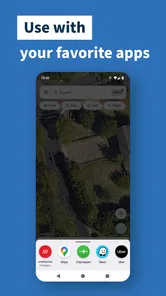
For a handoff to another navigation app, I would verify that the destination carried over before starting the trip. A shared location is only helpful if it opens at the intended point, and a separate app may be more familiar for turn-by-turn driving directions. This division of labor is one of the system’s real trade-offs: it can make a meeting point more exact, but it does not remove the need to check the route and the final approach.
More From Our News Desk

 Weather - By Xiaomi
Weather by Xiaomi Review: Clear at a Glance, Less Clear Up Close
Xiaomi’s weather app makes everyday forecasts quick to scan, but its calm surface can leave useful details and recovery paths harder to find than they should be.

 X
XX Under Pressure: Can It Recover When Posting Goes Wrong?
A resilience-focused review of X, examining setup, mistaken posts, interruptions, weak connections, and the gaps that matter when recovery needs to be dependable.

 Clash of Clans
Clash of Clans Is Won Between the Battles
Its raids are quick; its community is a long-term project of coordination, teaching, rivalry, and shared responsibility—with all the friction that entails.

 Android Auto
Android Auto Makes the Case for Quieter Car Software
The car interface is no longer judged by how much it can do, but by how quietly it helps. Android Auto shows what drivers now expect—and what still gets in the way.

 MobiOffice: Word, Sheets, PDF
MobiOffice: Transforming Mobile Productivity with Seamless Integration
MobiOffice: Word, Sheets, PDF is redefining mobile productivity with a surprising blend of functionality and innovation.

 EA SPORTS FC Soccer Mobile 26
EA SPORTS FC™ Mobile Soccer: Redefining Mobile Sports Gaming
Dive into EA SPORTS FC™ Mobile Soccer, where immersive gameplay and strategic depth transform mobile sports gaming.
Latest News



Making sensible use of mobile data
Because the experience involves a map and location lookups, I would avoid assuming it is data-free. If I am watching mobile usage or travelling with limited connectivity, I prepare while I have a dependable connection, save the address in a message or note, and avoid unnecessary map browsing. That workflow does not guarantee that every function will be available later; it simply gives me the location reference without relying on a last-minute search.
For everyday use, this is a modest effort rather than a reason to avoid the app. The extra step is worthwhile when a vague destination could cause a missed pickup or a long walk to the wrong entrance. For a routine trip to a clearly numbered building, though, a standard map search is usually quicker and easier.
As a Maps & Navigation app from what3words, it is free to download, rated for Everyone, and has an average rating of 3.9 from around 46,000 ratings, with more than 10 million installs. The app first appeared on June 11, 2013, and its minimum operating-system requirement is 7.1. Optional in-app purchases range from $4.69 to $39.99 per item. I would not treat popularity as proof that it suits every trip, but its long-running, focused approach makes sense for people who often need to describe places without clear street addresses.
The Magic of Precision
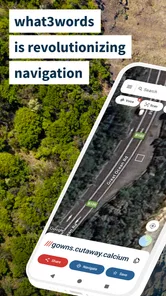
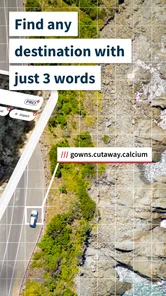
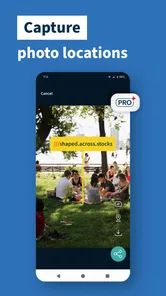
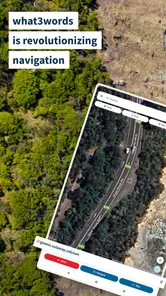
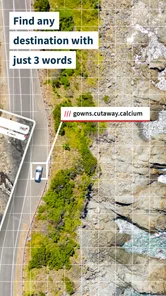
Imagine if every 3m x 3m square in the world had a unique name. Sounds crazy, right? But that's exactly what what3words does. It divides the entire globe into millions of squares, each identified by a unique combination of three words. Whether you're in the bustling streets of New York or the vast deserts of Namibia, pinpointing your exact location has never been easier. Trust me, this is a lifesaver when you're meeting friends in a crowded place or guiding emergency services to your exact spot.
A User-Friendly Experience
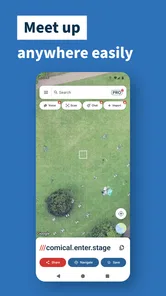
Now, I know what you might be thinking. "Doesn't this sound a bit complicated?" Fear not! The app's interface is as intuitive as it gets. Upon opening the app, you’re greeted with a simple search bar and a map. Type in any three words, and voila! Your location pops up. It’s as easy as pie, and you don't need to be a tech wizard to figure it out.
Navigating the World, 3 Words at a Time
Not only does what3words help you find your location, but it also integrates seamlessly with other navigation apps. So, if you’re planning a road trip or simply commuting, you can effortlessly transfer your location to Google Maps or Waze for turn-by-turn directions. It’s like having a personal guide at your fingertips, ensuring you never take a wrong turn again.
Security and Privacy
In today's digital age, privacy is a big deal, and what3words respects that. The app doesn't track your location unless you give it permission. You can share your three-word address with friends or family without worrying about your data being compromised. It’s like having a secret code that only you and your trusted circle know about.
In conclusion, what3words is more than just a navigation app; it's a revolutionary way to explore and connect with the world. Whether you're an adventurer at heart or someone who just wants to simplify their daily commutes, this app is a must-have. So, next time you’re in a pickle and need to pinpoint your location, remember, it’s as easy as saying three simple words.
When a precise point changes the handoff
A practical test is a rideshare pickup after a concert or sports event. The venue address may bring a driver to the correct complex but leave several gates, roads, and crowds between you. I would choose the intended pickup area in advance, share its three words with the driver, and include a visible landmark in the message. The words narrow down the destination; the landmark helps a person recognize it on arrival. That combination is more dependable than sending a pin without context, especially when people are moving through a busy space.
The same approach helps when meeting someone who is less comfortable with maps. Rather than asking them to understand a route across a sprawling park, I can give them a compact location reference and a familiar feature to look for. If they have trouble using the words, the landmark remains a useful fallback. I would not rely on the app alone for time-sensitive arrangements with someone who has not used it before; a short explanation and a second way to identify the spot reduce avoidable confusion.
Choose the right tool for the whole trip
Compared with conventional map apps, this one solves a narrower problem. A standard map is generally the better starting point for finding businesses, comparing routes, and following a journey. A street address is easier to recognize and communicate when a building has a clear numbered entrance. A map pin can be quick to share, but the recipient may still need to judge which side of a large site it marks. The three-word reference is most useful when that last distinction matters.
I would therefore use it alongside, not instead of, the navigation app I already trust. Before a drive, I can identify the destination precisely, then check that the receiving map app opens at the right place and choose the route there. On foot, I would compare the displayed point with paths and entrances rather than assuming the shortest line is a usable way in. A precisely named square tells people where the point is; it does not automatically explain access, parking, or the best approach.
Small checks that prevent avoidable mistakes
When someone sends me a three-word address, I would open it and confirm the area before setting off, especially if the message arrives amid other conversation. The words are not a substitute for reading the result: a typo, a missing word, or a mistaken copy can send someone to an entirely different place. Repeating the destination back to the sender is a simple safeguard for a pickup or appointment where being wrong would waste time.
For a group, I would share the same written address in one message rather than passing it along by voice. That reduces the chance that people remember different versions, and lets each person check the point themselves. If the group is splitting up or arriving at different times, add a plain-language description of the entrance and a visible landmark. It is a little more effort, but it makes the location useful to people who may not know how to interpret the map view.
Who benefits most, and who may not need it
I see the strongest fit for people who regularly arrange outdoor meetups, coordinate pickups across large sites, or need to communicate a point that lacks a clear postal address. Walkers, event visitors, and people who travel to unfamiliar places can all benefit when a broad place name leaves too much room for interpretation. The app is also worth considering for anyone who has repeatedly had to clarify “the other entrance” or “the far side of the car park.”
It is less compelling if nearly all your destinations are ordinary buildings with clear addresses, or if you want one app to handle every part of navigation. People who cannot reliably access a network at the moment they need a lookup should prepare ahead or use a familiar alternative. And for someone who prefers not to learn a new location format, a conventional address, landmark, or shared map pin may be simpler. Its value depends on whether exact placement solves a recurring problem for you.
As a free app, it is easy to try for an occasional tricky meeting point without changing your usual route-planning habits. Some optional purchases are available, but I would first see whether the core location-sharing workflow fits my needs before spending anything. The important decision is not whether three words are clever; it is whether the people you coordinate with can use them comfortably and whether the exact point saves them real effort.
A realistic routine for unreliable reception
Suppose I am meeting a friend at a trail entrance after travelling through an area where reception may vary. Before leaving, I would find the intended meeting point, check that it corresponds to the entrance rather than a nearby stretch of path, and send the address while I have a dependable connection. I would add the name of a nearby landmark and agree on what to do if either of us cannot load the location. That preparation does not make the app independent of connectivity; it simply avoids making the first lookup during the most inconvenient moment.
If the plan changes, I would send the replacement point as a fresh message and make clear that it supersedes the earlier one. This is a small but useful habit when several locations are being discussed in a chat. Keeping the final destination easy to find helps prevent someone from navigating to an obsolete spot, while the landmark gives both people a way to confirm they are talking about the same place.
My connectivity verdict
What I like most is that the app addresses a specific kind of ambiguity rather than trying to replace the familiar map for every job. Its usefulness rises when a destination is hard to describe and falls when a standard address already gets everyone to the right entrance. Network conditions matter because searches and map viewing are part of the experience, so I would prepare important locations before travelling and keep a plain-language fallback ready.
I would recommend giving it a place in your navigation toolkit if you often meet people in large outdoor areas or coordinate precise pickups. I would skip making it your only navigation option if you need a conventional route planner, expect to work without dependable access, or rarely encounter unclear destinations. Used with sensible checks and a backup description, it can make the final few metres of a journey much easier to explain; used without those checks, the neat three-word format can create misplaced confidence.
what3words: Navigation & Maps Frequently Asked Questions
Do I need an account to try what3words?
You can explore what3words as a location tool by entering or searching for a three-word address and seeing the place it identifies. Its central idea is making a precise location easier to communicate, rather than relying only on a street address or a long string of coordinates. If you plan to use it regularly, review the app’s available settings and sharing options after installing it.
What can I use what3words for in everyday life?
what3words can help when you need to identify a particular meeting point, give directions to a spot without a conventional address, or communicate a location for an outdoor activity. Its three-word addresses are designed to refer to precise places, so they can be more convenient to pass along than coordinates. The app is most useful when the other person can also access and understand a what3words address.
Can I use what3words to share my location with friends or family?
Yes. what3words lets you share a three-word address so someone else can identify the same precise spot, which can be useful when meeting outdoors or giving directions to a place without a conventional street address. The recipient can use the address for navigation, and sharing a word address can make a location easier to communicate than a long set of coordinates.
What is what3words and how does it work?
what3words is a unique location-based app that divides the world into 3x3 meter squares, assigning each square a unique combination of three words. This system allows users to pinpoint precise locations, aiding in navigation and mapping, especially in areas lacking traditional addresses. It's particularly useful for emergency services, deliveries, and outdoor adventures.
Is what3words free to use, and are there any in-app purchases?
Yes, the basic version of what3words is free to download and use on both Android and iOS platforms. However, there might be certain features or services that require in-app purchases or subscriptions. The app is free, with in-app purchases available for certain items, so check the purchase details before buying anything.
Pros
- Precise location pinpointing.
- Easy to share locations.
- Works offline efficiently.
- User-friendly interface.
- Supports multiple languages.
Cons
- Limited use in rural areas.
- Requires internet for updates.
- Not integrated with all maps.
- May confuse new users.
- Limited third-party app support.











