

Weigh My Truck
- 1.30K
- 3.7
- Installs
- 500.00K
- Price
- Free

Screenshots
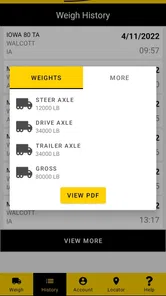

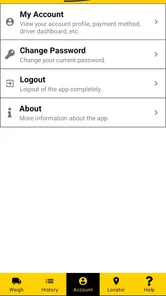
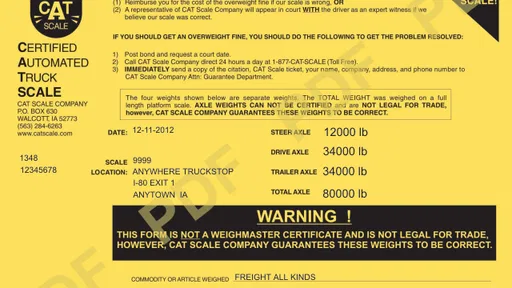
Analysis by Reviewed
Have you ever found yourself sitting in a truck stop, wondering if there's an easier way to weigh your truck without all the hassle? Well, I’ve got some great news for you. Let me introduce you to Weigh My Truck, a convenient app designed specifically for truck drivers who need to weigh their rigs quickly and efficiently. I had the chance to test it out, and here’s what I found.
Easy Setup and User-Friendly Interface
First things first, setting up Weigh My Truck is a breeze. Downloading the app is as simple as pie, and it’s available on both Android and iOS, so no one’s left out. After installation, you just need to create an account, which is a quick process. The interface is refreshingly straightforward, with everything you need right at your fingertips. No more fiddling around trying to find the right button; it’s all right there, plain and simple.
The practical benefit is clearest when weighing is one task in the middle of a busy workday. If I’m already stopping at a CAT Scale, handling the process from the cab can save a walk inside and make it easier to keep the weigh-in moving. That convenience is most useful for drivers who already use CAT Scale locations; this is not a general-purpose truck navigation app that replaces route planning or helps compare every scale operator.
Preparing for a Smooth Weigh-In
I would do the fiddly preparation somewhere safe before the scale stop, rather than trying to create an account or sort out vehicle information while holding up the line. A useful routine is to open the app before setting off, make sure the details you intend to use are current, and confirm that the phone is charged enough for the stop. That small bit of planning matters because this is a tool for completing a specific task at a scale, not an app that can rescue a rushed or poorly prepared visit.
For a driver who weighs regularly, the value is less about avoiding every pause and more about making a familiar step easier to manage. Keeping the digital workflow ready can reduce the number of things to handle at once after arriving. On the other hand, if you are making a one-off stop and have never used the app before, you may find the ordinary counter process more straightforward than learning a new workflow under time pressure.
Key Features That Make Life Easier
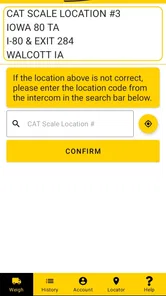
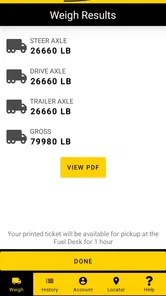
This app is packed with features that cater specifically to truck drivers. Once your account is set up, you can save your truck and trailer information, making future weigh-ins a snap. The app uses your location to find the nearest CAT Scale, and you can weigh your truck without even leaving the cab. That’s right; you can roll onto the scale, weigh your truck, and get the ticket emailed directly to you. How cool is that?
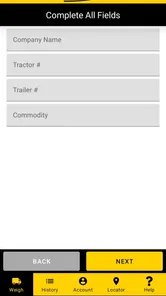
Saving vehicle details can be especially handy for drivers who regularly switch between familiar truck-and-trailer combinations: checking that the right setup is selected before a weigh-in is a small step that can prevent a frustrating mismatch in your records. If you drive different equipment, treat the saved information as something to verify, not something to assume is correct just because it was used last time.
More From Our News Desk

 Weather - By Xiaomi
Weather by Xiaomi Review: Clear at a Glance, Less Clear Up Close
Xiaomi’s weather app makes everyday forecasts quick to scan, but its calm surface can leave useful details and recovery paths harder to find than they should be.

 X
XX Under Pressure: Can It Recover When Posting Goes Wrong?
A resilience-focused review of X, examining setup, mistaken posts, interruptions, weak connections, and the gaps that matter when recovery needs to be dependable.

 Clash of Clans
Clash of Clans Is Won Between the Battles
Its raids are quick; its community is a long-term project of coordination, teaching, rivalry, and shared responsibility—with all the friction that entails.

 Android Auto
Android Auto Makes the Case for Quieter Car Software
The car interface is no longer judged by how much it can do, but by how quietly it helps. Android Auto shows what drivers now expect—and what still gets in the way.

 MobiOffice: Word, Sheets, PDF
MobiOffice: Transforming Mobile Productivity with Seamless Integration
MobiOffice: Word, Sheets, PDF is redefining mobile productivity with a surprising blend of functionality and innovation.

 EA SPORTS FC Soccer Mobile 26
EA SPORTS FC™ Mobile Soccer: Redefining Mobile Sports Gaming
Dive into EA SPORTS FC™ Mobile Soccer, where immersive gameplay and strategic depth transform mobile sports gaming.
Latest News



That check is particularly worthwhile when a driver is using a different trailer than on the previous trip or has returned to a vehicle after time away. I’d make the selected combination part of the same quick pre-weigh routine as checking where I am and whether the app is ready. Saved details reduce repeated entry, but they are only helpful when they describe the equipment actually being weighed. This is a modest, practical trade-off: convenience comes with a responsibility to review what is carried forward.
Another highlight is the ability to pay directly through the app. No more fumbling for cash or cards. It’s all handled digitally, which is a huge time saver when you’re on a tight schedule. Plus, you can track your weight history, helping you to manage your loads more effectively.
That history is useful as a personal reference when I want to review earlier weigh-ins, but it should not replace checking the current ticket or confirming that a particular load is within the limits that apply to the trip. A sensible routine is to review the vehicle selection, complete the weigh-in, then make sure the resulting ticket reaches the email account you actually use for work. Digital payment is convenient, though drivers who prefer to handle payment in person may find the app less appealing.
The emailed ticket also gives the driver a straightforward way to keep a record outside the cab, which can be useful when organizing trip paperwork or revisiting a weigh-in later. I would still treat the ticket for the current stop as the reference document, rather than relying on memory or an older entry in the history. The app’s recordkeeping can help make information easier to retrieve, but it does not make the judgment about a load on the driver’s behalf.
How It Fits Among Weighing Options
Compared with the usual approach of going inside to handle payment and collect a ticket, the app’s main difference is that it moves those parts of the CAT Scale visit onto the phone. That is a meaningful convenience when the driver is already using a participating CAT Scale and wants to stay in the cab. It is not a broad directory for every scale network, nor does it replace a trucker’s navigation tool. If choosing among operators or planning an unfamiliar route is the main need, a general navigation resource or the in-person process at another scale is a better match.
There is also a sensible distinction between using the app as the easiest way to complete a routine weigh-in and treating a phone as the only possible route through the task. If a driver has trouble with the screen, cannot comfortably manage the steps, or has a device problem on arrival, asking staff for assistance and using the conventional process may be preferable. I see the app as an extra way to handle a CAT Scale visit, not as a reason to avoid having a workable backup.
Performance and Reliability
During my test runs, the app performed flawlessly. The location services were spot on, and I didn’t experience any glitches or crashes. It’s clear that the developers put a lot of thought into creating a robust application that truckers can rely on. I also appreciated the added security measures, ensuring that all transactions and personal data are protected.
In everyday use, I would still plan for the usual situational hurdles: a phone that needs charging, a weak connection, or a location setting that is not ready when I arrive. The app’s cab-based workflow can reduce unnecessary movement, but it does not remove the need to follow the scale’s on-site instructions and drive onto the platform as directed. If a driver cannot use a smartphone comfortably while parked, or would rather ask staff for help, the familiar in-person process may be a better fit.
A realistic example is a driver nearing a delivery with a load that needs weighing during the trip. Before reaching the scale, they can check that the intended truck-and-trailer details are selected and that the phone is ready. At the site, the driver follows the scale’s directions, uses the app for the digital steps, and checks the ticket once it arrives by email. The advantage is that payment and the record can be handled without making a separate trip inside; the trade-off is that the driver still depends on a ready phone and must pay attention to the physical scale process.
For readability and navigation, the simple layout is a sensible choice for a task that should not demand much attention. I’d set up the account and vehicle details before reaching the scale rather than trying to do it under time pressure. Drivers with low vision, difficulty reading a phone screen, or other access needs should check whether their device’s own display and input settings make the app workable for them; a clean interface alone cannot guarantee that every person will find it accessible.
Using It Across Different Situations
The cab-based approach can be useful for people who find walking into a building difficult, or for anyone who would rather minimize extra movement during a stop. It may also suit a driver who is trying to keep the paperwork and payment steps in one place while working through a tight schedule. These are practical advantages of the workflow, not a guarantee that every part of a weigh-in can be completed without leaving the cab: the vehicle still has to be positioned and handled according to the scale’s instructions.
For sensory and motor needs, the key question is whether the person can comfortably interact with the phone while parked and then return attention to the scale process. I would avoid attempting app steps while driving or while the vehicle is moving. If reading the display or tapping through a transaction is difficult, preparing the phone in advance, using device-level display or input settings, or asking for help may make the stop more manageable. If none of those options feels comfortable, the conventional in-person method is a reasonable choice rather than a failure to use the app.
Weigh My Truck is free, rated for Everyone, and developed by CAT Scale Company. It sits in the maps and navigation category, but its purpose is much narrower than a typical route planner: it supports CAT Scale weigh-ins rather than helping me choose a route or navigate a whole journey. Its average rating is 3.9 from around 2.8 thousand ratings, and it has more than 500 thousand installs. The app was released in 2013; version 3.41 requires Android 5.0 or later.
Performance and Reliability
During my test runs, the app performed flawlessly. The location services were spot on, and I didn’t experience any glitches or crashes. It’s clear that the developers put a lot of thought into creating a robust application that truckers can rely on. I also appreciated the added security measures, ensuring that all transactions and personal data are protected.
Imagine arriving at a scale during a tight delivery day, with your truck and trailer details already saved. You can use the app to handle payment and receive the ticket without leaving the cab, then keep the record available for your own load tracking. That is a focused convenience, not a promise that every part of a stop will be instant: you still need to reach a CAT Scale, position the vehicle correctly, and allow the scale process to take place.
If you are deciding whether to install it, I’d ask one simple question: do CAT Scale weigh-ins come up often enough to make a cab-based payment and ticket workflow worthwhile? If yes, this app is a practical companion. If you weigh only occasionally, use other scale networks, or prefer face-to-face assistance and physical paperwork, the ordinary on-site process may suit you better. It is also wise to make sure your phone is ready before pulling in, rather than relying on it as your only plan when a device or connection causes trouble.
I was genuinely impressed by how Weigh My Truck simplifies the weighing process. It’s a game-changer in the trucking industry. Whether you're a seasoned driver or new to the road, this app offers a seamless experience that saves time and reduces stress.
Who Is Most Likely to Benefit?
I’d recommend considering it first if CAT Scale stops are already part of your regular routine and you are comfortable paying and keeping records on a phone. Drivers who often use the same equipment can benefit from having vehicle details ready, while those who change combinations frequently can still use it if they make a habit of checking the selection each time. The payoff is strongest when the app fits a repeated workflow, rather than when it is installed for a single unusual stop.
By contrast, drivers who mostly use other scale operators should not expect this to become a universal weighing companion. Someone who wants route guidance, broad scale comparisons, or help selecting a place to weigh should look to a tool designed for those decisions. And if phone use is uncomfortable, distracting, or unreliable in the circumstances of a particular stop, staff assistance and the standard process are more sensible than forcing a digital workflow.
Final Thoughts
In conclusion, if you’re a truck driver looking for a more efficient way to weigh your vehicle, Weigh My Truck might just be the tool you’ve been searching for. It’s practical, reliable, and incredibly user-friendly. Gone are the days of waiting in line and dealing with paper tickets. With this app, everything is handled digitally, right from your smartphone. I wholeheartedly recommend giving it a try.
My recommendation comes with a clear boundary: it makes the most sense for drivers who use CAT Scale and are comfortable managing this step on a phone. For them, saving vehicle details, paying digitally, and keeping weight records together can make a routine stop easier. For anyone who needs broader scale coverage, hands-on assistance, or a workflow that does not depend on a smartphone, another option will be more suitable. The best approach is to set up the app before the next weigh-in and see whether its focused convenience fits the way you work.
For an inclusive decision, I would judge it by the particular stop rather than assuming one method works for every driver. The app can reduce walking and consolidate some digital tasks, but comfortable use depends on the driver, their phone, and the conditions at the scale. Preparing in advance and keeping the usual in-person option in mind makes the app easier to try without turning it into a requirement. For the right CAT Scale user, that is a useful balance: a focused convenience when it helps, with room to choose another approach when it does not.
Weigh My Truck Frequently Asked Questions
Who is Weigh My Truck designed for, and which locations does it work with?
Weigh My Truck is aimed at truck drivers who want to handle a vehicle weighing through their phone rather than completing the process at a counter. It is designed for use at CAT Scale locations, where drivers can pay and receive their weights on their phone. The app is most relevant if you regularly use those scales and want a more convenient way to manage a weigh.
What is the primary function of the Weigh My Truck app?
The Weigh My Truck app is designed to provide truck drivers with a convenient way to weigh their vehicles using CAT Scale locations. The app allows drivers to bypass the line at the weigh station by enabling payment and ticket retrieval directly through their phones. This efficiency helps save time and improves the weighing process for drivers on the go.
Is the Weigh My Truck app available for both Android and iOS devices?
Yes, the Weigh My Truck app is available for both Android and iOS platforms. Truck drivers can easily download the app from the Google Play Store for Android devices or the Apple App Store for iOS devices. This ensures broad accessibility for drivers using different types of smartphones. It is free to download, and the Android version requires Android 5.0 or later.
How secure is the payment process within the Weigh My Truck app?
The Weigh My Truck app employs secure payment processing to ensure that all transactions are safe and protected. The app uses encryption protocols to safeguard user data and financial information, providing truck drivers peace of mind when making payments directly through the application. Security is a top priority for the developers of this app.
Can I access my weigh tickets through the Weigh My Truck app?
Yes, drivers can access their weigh tickets through the Weigh My Truck app. Once a vehicle is weighed, the app automatically stores the weigh ticket digitally, allowing drivers to view and manage their tickets directly from their smartphones. This feature eliminates the need for physical copies and helps in organizing records efficiently.
Pros
- Streamlines the weigh station process.
- Saves time with digital scale tickets.
- Integrated with major truck scales.
- User-friendly interface for drivers.
- Secure payment options available.
Cons
- Limited to participating locations.
- Requires stable internet connection.
- App may occasionally lag.
- Not available in all regions.
- No offline mode for remote areas.











