Wedding Planner by WeddingWire
- 2.65K
- 4.6
- Installs
- 1.00M
- Price
- Free

Screenshots




Analysis by Reviewed
Before I put wedding details into any planning app, I think about who will see them and how much personal information I actually need to share. Wedding Planner by WeddingWire brings planning tasks and venue discovery together, which can be useful, but that convenience does not mean I would automatically add every contact or private detail. I’d start with the information needed to organize the event and decide what to share as each task comes up.
Keep control of the details you enter
A practical way to use a wedding planner is to separate planning from disclosure. I’d use the checklist and budget to keep track of decisions, then review each item before adding information about guests or vendors. That small pause matters when a shared device, an imported contact list, or a message to a vendor could expose details beyond the couple’s immediate planning needs. I would also check the app’s current permission prompts and account settings on my own device rather than assume they work a particular way.
For example, if my partner and I were comparing venues after work, I’d first write down our budget range and must-haves, then use those as a shortlist guide. I wouldn’t put sensitive notes into a message simply because the app makes contacting a vendor convenient. Keeping a separate record of questions and only sharing what a venue needs can make the process clearer and leave me more comfortable about what I’ve disclosed.
Where this planner fits best
This is an events app from Wedding Planner by WeddingWire, aimed squarely at couples coordinating a wedding. It is free, rated for Everyone, and has a 4.6 average from around 9,400 ratings; more than a million installs suggest it has reached a broad audience. It first appeared in 2012, and version 8.29.2 lists Android 9 as the minimum system requirement. Those details give useful context, but I’d still judge the app by whether its tools suit the way I want to plan.
I see the strongest case for it when someone wants a wedding-focused starting point rather than a blank notes document. A checklist, spending overview, and venue search can keep related decisions in one place. The trade-off is that an all-in-one planner may feel like more structure than a small ceremony needs. If you already have a trusted spreadsheet and a simple calendar routine, moving everything into another app may create duplicate work instead of reducing it.
Easy Peasy Planning
First off, let’s talk about the interface. When I first opened Wedding Planner by WeddingWire, I was blown away by how user-friendly it is. The design is sleek and intuitive, which means you won’t need a degree in rocket science to navigate it. Everything is laid out in a way that makes sense, and it’s super easy to find what you’re looking for. Need to update your guest list? Boom, done in a few taps. Want to check out some vendors? Easy peasy, lemon squeezy.
All-in-One Organizer
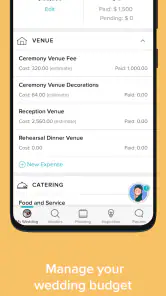
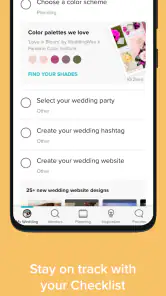
One of my favorite features of the app is its all-in-one organizer. It’s like a digital wedding bible with a checklist that keeps you on track from the moment you start planning until the big day. The app provides a personalized wedding checklist, which automatically updates as you go, so you never miss a beat. Plus, the budget tool is a godsend. It helps you keep track of your spending and ensures you don’t blow all your savings on a chocolate fountain, no matter how tempting it might be.
More From Our News Desk

Weather by Xiaomi Review: Clear at a Glance, Less Clear Up Close

X Under Pressure: Can It Recover When Posting Goes Wrong?

Clash of Clans Is Won Between the Battles

Android Auto Makes the Case for Quieter Car Software

MobiOffice: Transforming Mobile Productivity with Seamless Integration

EA SPORTS FC™ Mobile Soccer: Redefining Mobile Sports Gaming
Vendor Heaven
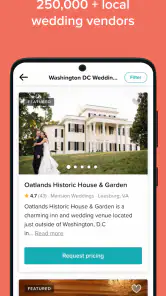
Now, let’s talk vendors. Finding the right vendors can be a nightmare, but this app makes it a breeze. It offers a vast database of vendors that you can filter by location, pricing, and reviews. You can even contact them directly through the app, which is a huge time-saver. I found this particularly useful when I was in a pinch to find a florist who could work magic with peonies.
Guest List Management
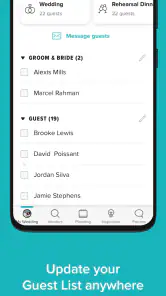
Managing your guest list has never been easier. The app allows you to import contacts from your phone, making it simple to add guests and keep everything organized. You can track RSVPs, meal preferences, and even seating arrangements. It’s like having a virtual maître d’ who ensures everyone is where they’re supposed to be.
A calmer way to use the tools
For the budget tool, I’d treat the first figures as a working plan, not a promise that the final bill will stay there. A useful habit is to enter estimates before booking, then update them when a decision becomes definite; that makes it easier to spot where expectations and actual spending diverge. I’d also keep a note of what each amount includes, since a simple total can hide differences in deposits, service charges, or extras.
The checklist is most helpful when I use it to agree on the next action, rather than treating every task as equally urgent. For instance, a couple with a venue visit coming up could focus on questions about capacity, timing, and what is included, then return to less immediate choices later. That turns a long planning list into a short agenda for the next conversation. If the suggested sequence doesn’t match your ceremony or timeline, I’d adapt it instead of forcing your plans to fit the app.
Use guest information deliberately
Contact importing can save repetitive typing, especially when the guest list is still changing, but I would add people selectively and check entries before relying on them. Couples often have duplicate names, different spellings, or relatives who share a phone number; reviewing the list early can prevent confusion when RSVPs and meal preferences become important. I’d keep a separate copy of key decisions if several people are coordinating, so one person’s edits do not become the only record everyone trusts.
For a couple planning across two households, a sensible routine is to agree who maintains the main guest list and when the other person reviews it. That is less glamorous than browsing venues, but it can avoid mismatched counts and awkward follow-ups. I’d also avoid assuming that a feature visible in a planning workflow replaces direct confirmation with a guest or vendor when a decision affects the event.
What to expect from vendor discovery
The vendor area is useful as a place to begin comparing options, not as a substitute for checking fit. I’d narrow by location and budget, then compare the details that matter to our plans: availability, style, what is included, and how the vendor responds to specific questions. Reviews can help identify points worth asking about, but I would not treat them as a guarantee that another couple’s experience will match mine. A short list and a clear set of questions make the search more manageable than contacting every promising result.
Compared with general-purpose planning tools, the appeal here is that venues, wedding tasks, spending, and guest organization sit within a wedding-specific context. A spreadsheet gives more freedom to design your own system, while a calendar is often better for reminders and appointments; neither necessarily offers the same focused discovery experience. I’d choose this app when I want a guided hub, and keep a spreadsheet or calendar alongside it if I need custom tracking or a dependable view of dates.
Practical limits and everyday fit
There is still some work the app cannot do for you: couples have to make the decisions, verify arrangements, and keep figures current. A vendor search can help create options, but it cannot tell you which choice feels right after a conversation or site visit. Likewise, a checklist can reduce the chance of forgetting a task without removing the need to coordinate with family, a partner, and the people providing services.
Imagine checking plans during a lunch break: you review the next checklist item, adjust a budget estimate after a call, and note two venues to compare that evening. That is a realistic, useful role for a phone planner—small updates while the details are fresh, followed by a more considered discussion later. If you prefer not to manage guest details on a phone, or you want a highly customized project board shared across many collaborators, a spreadsheet or dedicated team workspace may be a better fit.
Trust, permissions, and shared planning
My cautious approach is not a reason to avoid the app; it is a way to make its convenience work on my terms. On first use, I’d pay attention to what the phone asks permission to access and decide whether that access makes sense for the task I’m trying to do. If I’m only checking a checklist, I would not treat a request related to a different part of planning as automatically necessary. I’d also revisit device settings if my needs change, rather than assuming an earlier choice must remain in place.
When two people plan together, it helps to agree on a simple division of responsibility before entering lots of details. One person might maintain the budget while the other gathers venue questions, then they can compare notes before making a commitment. This reduces the chance that the same amount or guest entry is changed in separate places without discussion. For decisions that affect contracts, payments, or attendance, I’d keep the relevant confirmation somewhere both people can find it, rather than relying on memory or a single app screen.
Choosing the right amount of structure
A common question is whether this planner can replace a spreadsheet, calendar, or shared notes. I would not expect one tool to do every job equally well. The app’s advantage is its wedding-oriented context: it brings planning categories together instead of asking you to build a system from scratch. A spreadsheet remains useful for unusual budget breakdowns or custom comparisons, and a calendar is clearer when the main challenge is remembering appointments and deadlines. Using the app as the planning hub while retaining one complementary tool can be sensible, as long as you decide which record is authoritative.
It is also worth deciding what “organized” means for your own wedding. If you have a small event with a handful of decisions, a long checklist can feel like clutter. If your plans involve many vendors, guests, and moving parts, having a single place to revisit tasks may be more valuable. I’d start with only the sections that match the event, see whether they reduce mental load, and avoid adding information simply because a field is available. That keeps the app from becoming another inbox that needs tending.
How I would put it to work
For a practical weekly routine, I’d use one short planning session to review the next few tasks, update only budget items that have changed, and turn vendor browsing into a small shortlist with questions attached to each option. After a call or visit, I’d record the decision while it is fresh and keep the final confirmation in a place the couple can consult. The next time I open the app, I can focus on what remains unresolved instead of starting the search over or scrolling through every possibility again.
This method is especially helpful for couples who are planning around work, family commitments, or different households. A brief check-in can make it easier to divide the next actions without expecting both people to be available at the same time. It is less suitable if your planning group needs elaborate permissions, a detailed approval workflow, or a custom project board; in that situation, a general collaboration tool may be a better fit, with the wedding app reserved for the specialized planning material.
My cautious recommendation
For someone who wants wedding-specific organization and a starting point for venue and vendor research, I think WeddingWire’s planner is worth considering. I’d begin with the checklist and budget, then add guest information only when it is useful, reviewing the device permissions and account choices available at the time. That approach lets you benefit from the planning structure without treating convenience as a reason to share more than necessary.
In conclusion, Wedding Planner by WeddingWire takes the chaos out of wedding planning. With its comprehensive tools and user-friendly design, it’s a must-have for anyone looking to streamline their wedding preparations. Whether you’re planning a small intimate gathering or an extravagant affair, this app’s got your back. So, if you’re about to dive into the wedding planning whirlpool, grab this app and let it be your life raft. Trust me, your sanity will thank you.
Wedding Planner by WeddingWire Frequently Asked Questions
Who is Wedding Planner by WeddingWire intended for?
Wedding Planner by WeddingWire is aimed at couples who want to keep wedding plans and key tasks in one place. Its checklist, budget tools, venue information, and other planning features can be useful whether you are just starting to organize or already managing several decisions. It is a free events app with an Everyone age rating, so it is also accessible to a broad audience.
What is Wedding Planner by WeddingWire and what features does it offer?
Wedding Planner by WeddingWire is a comprehensive app designed to assist couples in organizing their wedding efficiently. The app offers a variety of features, including a customizable checklist, budget management tools, vendor search and reviews, guest list management, and inspiration galleries. With its user-friendly interface, it helps couples stay organized and on track with all aspects of wedding planning.
Is Wedding Planner by WeddingWire free to use, or are there any costs involved?
The Wedding Planner by WeddingWire app is free to download and use, providing access to many of its essential features at no cost. However, there might be premium features or additional services that require in-app purchases or subscriptions. It's advisable to check the app for any specific paid features if you're looking for advanced functionalities.
How can I manage my wedding budget using this app?
The app includes a comprehensive budget management tool that allows you to set your total budget and allocate funds to different categories like venue, catering, attire, and more. It tracks your spending and provides updates on how much you've spent against your budget, helping you to manage your finances effectively throughout the wedding planning process.
Can I use Wedding Planner by WeddingWire to find and contact vendors?
Yes, Wedding Planner by WeddingWire includes a vendor search feature that allows you to browse a wide range of vendors, including venues, photographers, florists, and more. Users can read reviews, compare prices, and directly contact vendors through the app. This feature simplifies the process of finding and booking reputable professionals for your wedding.
Pros
- User-friendly interface simplifies planning.
- Comprehensive vendor database available.
- Customizable checklist for tasks.
- Budget tracker helps manage expenses.
- Seamless synchronization across devices.
Cons
- Limited customization for certain features.
- Some features require a stable internet.
- Occasional ads can be intrusive.
- Vendor reviews may not be up-to-date.
- Offline functionality is limited.
- Category
- Events
- Version
- 8.29.2