

WDW Food&Wine
- 51.00
- 4.6
- Installs
- 50.00K
- Price
- Free

Screenshots
Analysis by Reviewed
Planning a day around Epcot’s food events sounds simple until you are standing between several tempting booths, trying to remember what you wanted to taste, what you already tried, and which items were worth the wait. WDW Food&Wine is built for that very specific kind of trip: it works as a personal Epcot Food Festival Passport rather than as a general restaurant guide. I found its value in turning a scattered food crawl into something I could follow, mark, and look back on.
This is a free Food & Drink app from Small World Code, LLC, with an Everyone age rating. It is currently at version 1.1.7 and requires iOS 11 or later. Its average rating is 4.6 from around 100 ratings, while its install count has passed 50K, which suggests that it has found a focused audience among Disney visitors rather than trying to serve every kind of food fan.
What the passport approach changes during an Epcot visit
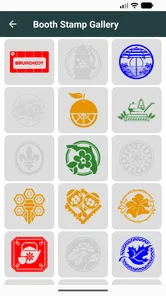
The central idea is more useful than it may first appear. Instead of treating the festival as a collection of menus to browse once, the app gives the visit a sense of progression. I could use it before arriving to think about the stops I cared about, then return to it while moving around the park and after the day was over.
That distinction matters because a normal web search is good at answering isolated questions, such as where a booth is or what a dish contains. A passport-style app is better at supporting a personal record. It encourages me to make decisions as I go: try this now, save that for later, and avoid buying the same type of item twice simply because I forgot what I had already sampled.
I would not describe it as a replacement for Disney’s full planning tools. It has a narrower purpose, and that is its strength. Someone looking for attraction wait times, transportation planning, reservations, park hours, or a complete vacation organizer will need another solution. For a visitor whose main goal is to enjoy an Epcot food festival methodically, the narrower focus feels much less distracting.
Using it before leaving for the park
The best time to open the app is not necessarily when hunger arrives. I found it more useful during the planning stage, when I could decide whether I wanted a broad tasting day or a shorter route built around a few high-priority stops. That preparation helps prevent a common festival problem: spending too much early in the day and then discovering several more appealing options later.
A practical approach is to divide the passport into three mental groups. The first is made up of items I would be disappointed to miss. The second includes interesting alternatives if I am nearby. The third is reserved for spontaneous choices. This keeps the app from becoming a rigid checklist. A festival is more enjoyable when the plan guides the day without controlling every minute.
More From Our News Desk

 Gmail
GmailGmail in a Busy Inbox: Who Benefits Most?
From first account to crowded workday, Gmail earns its place through dependable search and flexible sorting—but its best fit depends on how much inbox maintenance you can tolerate.

 Prime Video
Switching to Prime Video: What Changes in Your Viewing Routine
Prime Video can make a compelling second home for streaming, but switching means learning a different catalog, rental layer, and route from browsing to playback.

 Universal TV Remote Control
Universal TV Remote Control Works Best as a Reliable Backup
A phone remote earns its place through quick setup and reliable habits. Here is how to get more from Universal TV Remote Control—and where its limits show.

 Weather - By Xiaomi
Weather by Xiaomi Review: Clear at a Glance, Less Clear Up Close
Xiaomi’s weather app makes everyday forecasts quick to scan, but its calm surface can leave useful details and recovery paths harder to find than they should be.

 X
XX Under Pressure: Can It Recover When Posting Goes Wrong?
A resilience-focused review of X, examining setup, mistaken posts, interruptions, weak connections, and the gaps that matter when recovery needs to be dependable.

 Clash of Clans
Clash of Clans Is Won Between the Battles
Its raids are quick; its community is a long-term project of coordination, teaching, rivalry, and shared responsibility—with all the friction that entails.
Latest News



Another useful habit is to review the passport with the people you are visiting before arriving. Different guests may value desserts, drinks, savory dishes, or unusual ingredients in completely different ways. Agreeing on a few shared priorities reduces the amount of time spent debating at each stop, especially when the park is crowded and the group is already tired.
Why connectivity becomes part of the experience
Because this is a mobile companion used inside a busy theme park, the quality of the experience depends partly on when the phone can communicate smoothly. Opening an app in a quiet hotel room is very different from trying to use it while surrounded by crowds, structures, and thousands of other connected devices. I treated the passport as something to prepare before entering the busiest parts of the day, rather than assuming every interaction would feel equally quick.
This also changes how I would use it at a booth. I would rather check the relevant information before joining a long queue, then keep my phone away while ordering. That small adjustment makes the app less of a distraction and reduces the chance that a slow connection will hold up a decision when the line is moving.
The app’s focused design is helpful here. I am not jumping between a map, a reservation system, attraction alerts, and unrelated recommendations. The more limited purpose means I can use it in short bursts: prepare, check, mark progress, and put the phone away. For a food-centered day, that rhythm feels more natural than constantly managing a large park-planning application.
Realistic mobile scenarios where it helps
Imagine arriving around lunchtime with two friends. Everyone wants to try something different, but nobody wants to walk back and forth across the park. Before ordering, I can use the passport to see which planned stops fit the direction we are already traveling. If one person wants a sweet item and another wants something savory, the group can make a quick decision without reopening several browser tabs.
A second scenario is a return visit. On the first day, I might mark the items I tried and notice that my choices were concentrated in one part of the festival. If I visit again, that record becomes a simple reminder to explore differently rather than repeating the same route from memory. The app is especially useful for this kind of personal comparison because it turns a vague recollection into a visible history.
It can also help when the weather or energy level changes the plan. A carefully designed route may stop making sense after a long afternoon. Instead of abandoning the whole passport, I can treat it as a menu of remaining possibilities and select only the stops that fit the new situation. That flexibility is more valuable than completing every item.
What happens when the connection is unreliable
The most important practical lesson is to avoid making the network responsible for every part of the day. I would open the app before entering a crowded area, give the relevant screens time to load, and avoid waiting until I was standing at the counter to decide what to do. This is not a criticism unique to this app; it is a sensible habit for any park companion used in a demanding mobile environment.
If an interaction feels slow, I would not repeatedly tap the same control or assume that the app has lost my progress. I would pause, check whether the action completed, and then try again only when necessary. Repeated tapping can create confusion, particularly when the phone is in one hand and food, a drink, or a park bag is in the other.
Recovery is easier when the passport is treated as a guide rather than the sole record of the trip. If I am keeping a personal note about standout dishes or sharing decisions with friends, a temporary interruption does not erase the meaning of the visit. The app supports the experience, but it should not become the only place where I remember what happened.
That is also why I would avoid making last-minute, connection-dependent decisions at the busiest point in a queue. A few minutes of preparation earlier can make the difference between a smooth order and a frustrating pause. In practical terms, the strongest workflow is prepare in a calmer location, use the app briefly on the move, and confirm progress when the phone is responsive.
Managing battery, data, and attention
A food passport is less demanding than a navigation-heavy park app, but it still competes with the phone’s other jobs. Visitors may be using their devices for photos, messages, tickets, reservations, and payment. I would therefore keep the app use deliberate instead of leaving it open continuously. Check the next decision, record the result, and return attention to the people and food around me.
Data-conscious use follows the same principle. I would prepare the information I expect to need before the busiest part of the visit and avoid repeatedly refreshing screens simply out of habit. When a page is already available, there is little benefit in forcing it to reload. This approach is particularly sensible for travelers using a limited mobile plan or roaming service.
Battery planning matters even more than small data savings. A phone that reaches the end of the day with no power is inconvenient for photographs and communication, not just for this passport. I would start with a charged device, carry a suitable backup if I expect a long visit, and avoid unnecessary screen time. The app works best as a lightweight companion, not as a screen that remains active from entrance to exit.
There is a social benefit to this restraint. Constantly checking a device can make a shared tasting experience feel like an administrative task. I prefer assigning one person to make the next choice, then putting the phone away while everyone eats. The passport becomes a memory aid and planning tool instead of the center of attention.
Where it is stronger than ordinary alternatives
The usual alternative is a mixture of browser searches, screenshots, social media posts, and handwritten notes. That combination can work, but it tends to scatter the experience across several places. A screenshot may show information without helping me remember whether I actually tried the item. A search result may be current for one moment but awkward to consult repeatedly while walking.
WDW Food&Wine’s advantage is its single-purpose structure. It gives the food festival a dedicated space, and that makes it easier to think in terms of progress rather than isolated discoveries. The passport concept is especially appealing to repeat visitors, collectors of food experiences, and anyone who enjoys completing a themed list without needing a complicated planning system.
It is also less overwhelming than a full Disney vacation app when the immediate question is simply, “What should we try next?” A larger app may be better for coordinating an entire trip, but its wider scope can bury a small food decision under unrelated information. Here, the limited subject matter is the reason I would choose it.
On the other hand, a browser may be better for someone who wants broad context, extensive user commentary, or information beyond the festival’s passport experience. Likewise, a note-taking app may suit a visitor who wants to record detailed reactions, prices, dietary observations, or photographs in a completely custom format. This app is most convincing when I want guided structure rather than a blank page.
Small habits that make the passport more useful
My first tip is to use it as a budget-control aid even though it is not a financial planner. Before the day begins, decide how many tasting stops fit comfortably into the visit. Marking every appealing option without a limit can encourage impulse purchases, while choosing a rough target helps preserve room for discoveries and avoids turning the final hours into a rushed checklist.
My second tip is to separate “must try” from “nearby opportunity.” A favorite item may be worth crossing the park for, but an interesting alternative is often better when it is already along the route. This simple distinction prevents the passport from creating unnecessary walking and helps the app support the day’s flow instead of dictating it.
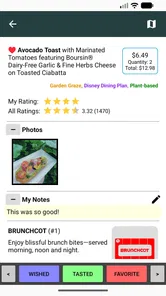
My third tip is to record progress immediately after eating, not at the end of the night. Memory becomes unreliable after several small tastings, and two similar dishes can easily blur together. A quick update while the experience is fresh makes the passport more meaningful when I return to it later.
A fourth useful habit is to keep dietary or personal restrictions in mind before building a route. The app can help organize choices, but I would still verify the details that matter to me at the point of purchase. Ingredients, preparation concerns, and individual sensitivities deserve direct attention rather than being left to a quick glance at a planning screen.
Who should use it, and who should skip it
I would recommend it to someone visiting Epcot primarily for the food festival, especially if that person enjoys sampling several items and wants a simple way to track the experience. It is also a good fit for friends who need a shared shortlist, repeat visitors who want to vary their route, and travelers who dislike carrying a paper checklist.
The free price makes it easy to try without turning the decision into another trip expense. Its Everyone rating also makes it suitable as a general family planning aid, although the usefulness will depend on whether the group actually wants to organize its food stops. Children may enjoy the idea of collecting passport progress, while adults may value the reduced mental load.
I would skip it if I want one app to manage every part of a Disney vacation. It is not the right choice for someone whose priority is attraction strategy, reservations, transportation, or detailed navigation. I would also skip it if I prefer completely spontaneous eating and would find a checklist restrictive. The passport format is helpful only when structure adds enjoyment rather than pressure.
Another exception is the visitor who wants a detailed personal food journal. If my goal were to write long tasting notes, attach photos, compare costs, and build a custom archive, a notes app would offer more freedom. This app’s appeal comes from its ready-made festival focus, not from unlimited customization.
My overall view after using it as a trip companion
WDW Food&Wine succeeds because it understands a narrow but real problem: a festival visit can offer more choices than I can comfortably remember or organize. By presenting the experience as a passport, it gives me a practical way to prepare, make choices, and keep track of what I have done without demanding the complexity of a full vacation planner.
Its main limitation is equally clear. The app cannot remove the realities of a crowded park, a busy mobile network, a low battery, or a group that cannot agree on what to eat. I get the best results when I load what I need early, use it in brief moments, and keep a backup plan for decisions that cannot wait.
With a 4.6 average and more than 50K installs, it has enough adoption to feel like a well-established niche companion rather than an obscure experiment. The release date of Mar 3, 2018 also places it among the longer-running options in this focused space, while version 1.1.7 indicates the app has continued in a maintained form.
My connectivity verdict is simple: prepare ahead, use the passport lightly, and do not let the phone run the day. For an Epcot visitor who wants a focused food checklist and a record of festival progress, I would gladly keep it on my device. For broader trip management or highly customized food journaling, I would pair it with another tool or choose a different option altogether.
In the end, the app is most valuable when it fades into the background. I can use it to make the next stop easier, then put the phone away and enjoy the meal. That balance—organized enough to reduce confusion, but limited enough not to dominate the visit—is what makes this particular food companion worth recommending.
WDW Food&Wine Frequently Asked Questions
Who is WDW Food&Wine designed for?
WDW Food&Wine is most useful for visitors who enjoy planning food stops before or during a Walt Disney World visit, particularly guests interested in EPCOT’s Food & Wine Festival. It can help you browse festival offerings and think through what to try, whether you prefer to make a loose tasting plan or simply explore choices as you go. The app is listed as a Food & Drink app and is free to download.
What is WDW Food&Wine?
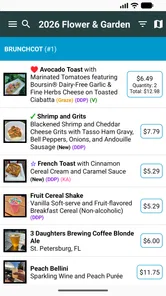
WDW Food&Wine is a helpful companion for guests planning to eat and drink around Walt Disney World, especially during the EPCOT International Food & Wine Festival. After exploring its features, I found it useful for browsing festival marketplaces, checking menu items, comparing food and beverage choices, and organizing a tasting plan. It is designed for visitors who want more information than the standard park map provides.
Does WDW Food&Wine include current menus and prices?
The app is intended to provide festival food and drink information, including marketplace offerings and, where available, prices. However, users should treat these details as a planning reference rather than a guarantee. Disney can change menus, item availability, portion sizes, and prices without notice, and some offerings may sell out during the day. Always confirm important details at the location.
Can WDW Food&Wine help with dietary restrictions and allergies?
WDW Food&Wine can make it easier to identify dishes that may suit common dietary preferences by displaying descriptions and relevant menu information. Nevertheless, it should not replace speaking directly with Disney cast members about food allergies or cross-contact concerns. Ingredients and preparation procedures can change, so guests with serious allergies should verify every item before ordering.
Does the app require an internet connection or location access?
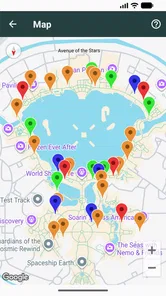
Some information in WDW Food&Wine may be available after the app has loaded, but an internet connection is generally recommended for obtaining the latest menus, updates, and availability details. Location access may also improve convenience when navigating between festival marketplaces or viewing nearby options. Battery usage and performance can vary, so carrying a charger is sensible during a full park day.
Pros
- Menus and prices are easy to check before visiting a restaurant.
- Useful for comparing dishes across Disney World dining locations.
- Helps plan festival food stops around your park itinerary.
- Photos make unfamiliar snacks and drinks easier to identify.
- A convenient reference for seasonal Food & Wine offerings.
Cons
- Coverage may be less useful outside the annual festival period.
- Menu details can change without notice at the parks.
- Some listings may not reflect sold-out or temporarily unavailable items.
- It is not a replacement for official Disney dining reservations.
- Frequent updates may be needed to keep festival information accurate.











