

Waymo
- 4.16K
- 4.9
- Installs
- 1.00M
- Price
- Free

Screenshots
Analysis by Reviewed
For a first-time rider, the most useful thing to know about Waymo One is that the app is only part of the experience: it connects you with an autonomous ride where the vehicle, rather than a human driver, handles the trip. I’d approach it as a practical way to get somewhere, with the novelty of watching a self-driving car at work as a bonus. It is a free Maps & Navigation app from Waymo LLC, rated for Everyone, and the current version is 25111008-834082502. Its 4.9 average from around 37,000 ratings and more than a million installs suggest strong interest, though your own experience will depend on whether rides are available where you need one.
Before you request a ride
After installing, take a moment to set up your account and check whether the service can serve the places you plan to travel between. That small check can save a frustrating attempt when you are already in a hurry. The app is not a general-purpose map that can replace every ride-hailing or transit option; its main purpose is arranging a Waymo One journey. If you routinely compare several transport modes or need directions for a route outside the service area, a regular maps app or another ride service may be more useful for that part of the trip.
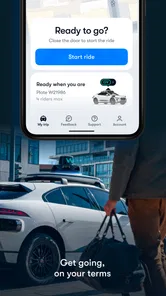
For a low-pressure first ride, I’d choose a familiar destination and leave enough time to learn the pickup process. Before confirming, make sure the pickup point is somewhere you can reach comfortably and recognize. A busy curb, a large venue, or a complicated entrance can make any pickup harder to follow, and the fact that the vehicle is autonomous does not remove the need to meet it at the right place. Once the ride is arranged, use the arrival updates to keep track of the vehicle rather than repeatedly guessing where it is.
Making the first trip count
A useful first outing might be a straightforward daytime errand: request a ride from a clear pickup spot, watch the car approach, and travel to a destination you already know. That lets you concentrate on the practical questions—how the pickup feels, how the app communicates, and whether the ride suits your routine—without also trying to navigate an unfamiliar neighborhood. I’d also avoid building a tight appointment around a first-ever booking. Getting comfortable with the handoff matters more than proving that the technology can fit an exact schedule.
Once inside, the sensor view can make the trip more engaging, but I would treat it as an explanation of what the vehicle is detecting, not as a reason to stop paying attention to your own comfort or surroundings. If something about the ride or pickup feels unclear, use the in-app support option rather than assuming you have to work it out alone. For someone curious about autonomous driving, seeing the car’s view while it responds to traffic is one of the app’s distinctive advantages over a conventional ride-hailing experience.
Making the service fit a real routine
After the first ride, I’d judge Waymo One by the trips you repeat, not by the novelty of one unusual outing. Think about a regular journey you would otherwise take by car, taxi, or another ride service, then check whether both ends work for you. A ride can be appealing on paper but inconvenient if the pickup leaves you with a long walk or the drop-off is awkward for your destination. This practical check is more useful than treating the service as a general replacement for every way of getting around.
For example, imagine finishing an errand and heading home with bags. Before requesting, consider whether you can wait comfortably at the pickup point and whether the destination is easy to reach from the likely drop-off. An autonomous vehicle removes the need to coordinate with a driver, but it does not remove the ordinary details of getting yourself and your belongings to the curb. If those details are manageable, the ride may make a routine trip feel straightforward; if they are not, a taxi or another option with a driver may be the better fit.
More From Our News Desk

 Weather - By Xiaomi
Weather by Xiaomi Review: Clear at a Glance, Less Clear Up Close
Xiaomi’s weather app makes everyday forecasts quick to scan, but its calm surface can leave useful details and recovery paths harder to find than they should be.

 X
XX Under Pressure: Can It Recover When Posting Goes Wrong?
A resilience-focused review of X, examining setup, mistaken posts, interruptions, weak connections, and the gaps that matter when recovery needs to be dependable.

 Clash of Clans
Clash of Clans Is Won Between the Battles
Its raids are quick; its community is a long-term project of coordination, teaching, rivalry, and shared responsibility—with all the friction that entails.

 Android Auto
Android Auto Makes the Case for Quieter Car Software
The car interface is no longer judged by how much it can do, but by how quietly it helps. Android Auto shows what drivers now expect—and what still gets in the way.

 MobiOffice: Word, Sheets, PDF
MobiOffice: Transforming Mobile Productivity with Seamless Integration
MobiOffice: Word, Sheets, PDF is redefining mobile productivity with a surprising blend of functionality and innovation.

 EA SPORTS FC Soccer Mobile 26
EA SPORTS FC™ Mobile Soccer: Redefining Mobile Sports Gaming
Dive into EA SPORTS FC™ Mobile Soccer, where immersive gameplay and strategic depth transform mobile sports gaming.
Latest News



How it compares with familiar options
Compared with conventional ride-hailing, the defining difference is not simply the booking screen: the vehicle handles the driving without a human driver. That changes the feel of the journey and makes the sensor view an unusual point of interest, but it also means you cannot rely on a driver for conversation, informal directions, or help negotiating a confusing pickup. I’d choose between the two based on what matters for that particular trip rather than assuming driverless automatically means more convenient.
A standard maps app is still better when the question is how to get somewhere by walking, transit, or several possible modes. Waymo One is focused on arranging its own rides, so it is not a substitute for broad route research. Likewise, if the service does not cover your route, the sensible plan is to switch to another transport option instead of trying to force the trip into this app. Keeping a familiar maps app available can help you understand the surrounding area while using Waymo One for the ride itself.
Small choices that make the pickup easier
One detail I would pay attention to is the exact pickup point, especially around large buildings, busy streets, and places with several entrances. Choose a spot you can identify from the street and reach without crossing an inconvenient area. When a location offers several plausible meeting points, a little thought before requesting can prevent the uncertainty of looking for the vehicle from the wrong side of a block. The app can guide the ride, but you still need a clear plan for joining it.
I’d also avoid making the first trip a test of how much you can multitask. Keep your phone accessible enough to follow arrival updates, then put your attention on getting to the pickup and settling into the ride. Once you know how the process works, you can decide how much you want to watch the vehicle’s sensor view. For a first journey, a simple destination and an unhurried schedule are better ways to learn than adding a complicated stop or unfamiliar route to the experiment.
How it feels once the car arrives
Jumping into the world of self-driving technology, Waymo One is a ride-hailing service that's making waves in the transportation industry. Imagine a future where you simply tap on your phone and a car arrives without a driver—Waymo One is making this a reality today. Having tested this app myself, I've got to say, it's like stepping into a sci-fi movie, but it's all happening in the real world!
What Exactly is Waymo One?
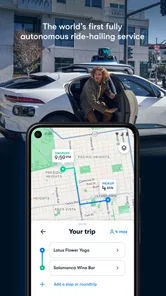
So, what’s the deal with Waymo One? In a nutshell, it’s a ride-hailing service just like Lyft or Uber, but with a twist—no drivers are involved. Instead, you’re picked up by a fully autonomous vehicle. The app itself is super intuitive. Once you download it and set up your account, you’re just a few taps away from summoning your ride. The interface is clean and user-friendly, ensuring that even the least tech-savvy among us can navigate it with ease.
The Experience
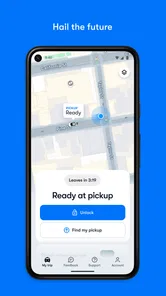
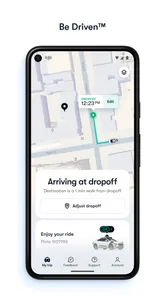
From the moment you book a ride, the app keeps you updated with real-time notifications. As I waited for my ride, the app provided constant updates on the vehicle’s location and estimated time of arrival. When the car pulled up, it felt like I was part of something groundbreaking. The vehicle itself was spotless, equipped with the latest tech gadgets to ensure safety and comfort.
During the ride, I was amazed at how smoothly the car navigated through traffic. The app offers a feature where you can see what the vehicle's sensors detect, providing an inside look at how these autonomous cars operate. It’s fascinating to watch it all happen, knowing that the car is making all the decisions on its own.
When a different choice makes more sense
I would not make this my only transport plan if a missed connection or late arrival would create a serious problem. For an important appointment, compare the available ride details with your timing and keep a fallback in mind until you know how the service behaves on your route. A human-driven taxi or ride-hailing trip may be preferable when you want someone to help with luggage, answer a question, or resolve an unusual pickup face to face. If you are traveling with someone who feels uneasy about autonomous driving, a conventional option may also make the trip more comfortable for everyone.
It is also worth separating curiosity from practical value. If you enjoy technology, seeing the vehicle’s perception during a ride can make an ordinary journey unusually interesting. But if you simply need the cheapest, fastest, or most flexible option, compare the trip itself rather than assuming Waymo One will win on those measures. I’d use it where the route and pickup suit me, and choose transit, a regular map-guided journey, or another ride service when those better match the day’s needs.
What to keep in mind
The biggest trade-off is that this is not the right single app for every journey. If you need a ride where you live or are heading, Waymo One may be a compelling alternative to booking a car with a human driver; if it cannot cover your route, a taxi, transit planner, or another ride-hailing app is the sensible fallback. I also wouldn’t choose it solely because the technology sounds exciting when punctuality is critical and you have no backup. As with any pickup, clear meeting points and a little spare time make the experience easier.
It suits people who value a driverless ride, want to see how autonomous navigation works, or simply prefer to make a trip without a human driver behind the wheel. It may be less appealing if you want a driver to answer questions, help with a handoff, or adapt through direct conversation. The app is free to install, but that does not mean each ride is free; check the trip details in the app before committing. The app first appeared on April 20, 2021, and its broad appeal is reflected in about 3,200 written reviews, but those figures cannot tell you whether it fits your local routine.
Safety First
Safety is a big concern for many when it comes to self-driving cars. Waymo has addressed this by equipping their vehicles with state-of-the-art technology that ensures the highest safety standards. Throughout my ride, I felt completely at ease, thanks to the app’s transparency and the vehicle’s reliable performance. Plus, there’s an option to contact support directly through the app if needed, which adds an extra layer of reassurance.
Taking the next step
If you are curious but cautious, I’d make the first booking a short, familiar trip with an easy-to-find pickup and destination. That gives you a realistic feel for the app’s notifications and the vehicle’s behavior without making the ride a high-stakes experiment. Keep another transport option in mind until you know how well the service fits your usual routes. The most helpful question to ask yourself afterward is not whether the car feels futuristic, but whether the pickup, ride, and destination worked smoothly for the kind of trip you actually take.
One practical follow-on is to make a short note after that ride: was the pickup point comfortable, did the updates help you time your walk, and did the destination leave you where you needed to be? These are personal route questions, so a single ride on a different day may not settle them. If the answers are positive, try another ordinary journey before depending on the service for a time-sensitive routine. If one part felt inconvenient, adjust the pickup or choose another mode rather than assuming every trip will feel the same.
Final Thoughts
Overall, my experience with Waymo One was nothing short of impressive. The convenience of hailing a ride without a driver is something I never thought I’d see in my lifetime, and yet, here we are. While the service is currently available in select areas, I’m excited to see how it expands and evolves. If you’re curious about the future of transportation, I’d highly recommend giving Waymo One a try. It’s not just a ride; it’s a glimpse into the future of how we’ll get around. Trust me, once you try it, you’ll be hooked on the idea of self-driving cars.
My recommendation for a first ride
My recommendation is to treat the first booking as a small, useful trial rather than a technology demo you have to be wowed by. Pick a familiar destination, check that the service can cover the whole journey, select a pickup you can recognize, and allow room to learn the arrival process. That sequence answers the questions a new rider is most likely to have: whether it serves their route, how they meet the vehicle, what the trip feels like, and whether the experience suits their own comfort level.
Waymo One is a strong option for someone who can use it locally and is genuinely comfortable taking a ride without a human driver. It is less suitable as a universal map, as a guarantee for a tightly timed appointment, or as a replacement for the human help some passengers value. For me, its appeal lies in combining a practical ride with a rare chance to observe autonomous driving up close. Try it on an uncomplicated journey first, then decide from the actual pickup and ride—not just the idea of a driverless car—whether it deserves a place in your routine.
Waymo Frequently Asked Questions
What does Waymo One need from my phone to get started?
Waymo One is a Maps & Navigation app for accessing Waymo’s ride-hailing service, so it is intended for people who want to arrange a ride rather than use a general-purpose navigation tool. Before downloading, check that your device runs Android 8.0 or later. The app is free to download, and its age rating is Everyone.
Can I use Waymo One just for directions, without booking a ride?
Waymo One is designed around accessing Waymo’s ride-hailing service, not as a general-purpose map for planning routes or getting turn-by-turn directions. Its store summary invites riders to get there with the Waymo Driver. If you are looking for a conventional navigation app, Waymo One may not fit that need; its main purpose is arranging a ride through the service.
What kind of app is Waymo One, and what is it used for?
Waymo One is a Maps & Navigation app for accessing Waymo’s ride-hailing service. Its store summary describes the experience as getting there with the Waymo Driver, which Waymo calls the world’s most experienced driver. If you are considering a download, the app is intended for people who want to use Waymo One to arrange a ride rather than for general-purpose navigation.
Is Waymo One free to download, and what does the age rating mean?
Waymo One is free to download and is rated Everyone. The app has had over one million installs and an average rating of 4.9 from around 37,000 ratings. Those details can help you understand its general availability and audience, but downloading the app is separate from taking a ride: ride costs are a separate consideration, and the app is for arranging the service.
What is Waymo One and how does it work?
Waymo One is a ride-hailing service that uses self-driving technology to transport passengers. It operates similarly to traditional ride-sharing apps, but with the unique feature of autonomous vehicles. Users can book a ride through the Waymo app, which then deploys a self-driving car to their location, ensuring a safe, efficient, and futuristic travel experience.
Pros
- User-friendly interface
- Reliable ride scheduling
- Competitive pricing
- Environmentally friendly
- 24/7 customer support
Cons
- Limited service areas
- High demand during peak times
- Requires stable internet
- Limited vehicle types
- No cash payments accepted











