Wave VPN
- 237.00
- 4.5
- Installs
- 100.00K
- Price
- Free

Screenshots
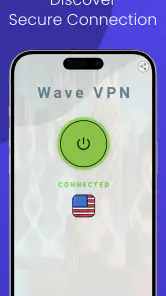
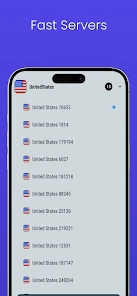


Analysis by Reviewed
A VPN is easy to appreciate on the first day: one tap, a different apparent location, and a little more comfort when using public Wi-Fi. The harder question is whether it remains useful once that novelty wears off. Wave VPN is a free tools app from Galaxy Applications, and its appeal is straightforward: it aims to make connecting to a global VPN service feel simple rather than technical. I’d consider it for occasional everyday protection, but I would not treat a quick connection as proof that every privacy concern is solved.
What to expect after the first week
Wave VPN has a 4.5 average from around 5,200 ratings, and it has passed 100,000 installs. Those figures suggest that many people have tried it, but they can’t tell you whether a particular server suits your connection or whether its approach matches your privacy needs. The app is rated for Everyone, is free to install, and requires Android 6.0 or later. Its current version is 41.453wav.
For a new VPN user, the main practical benefit is having a tool ready for moments when you want to route a connection through a VPN without comparing technical settings first. A useful habit is to decide when you actually want it on—such as when joining an unfamiliar public network—instead of leaving it running automatically out of routine. That keeps the app’s role clear: it changes how your internet traffic is routed, but it doesn’t make suspicious links, weak passwords, or unsafe downloads harmless.
Setting Sail with Wave VPN
First things first, downloading Wave VPN was a breeze. It's available on both Android and iOS, so whether you're team Apple or Android, you're in luck. The installation was straightforward, and I was up and running in no time. The app's interface is simple and intuitive, which I totally appreciate. Nothing's worse than needing a degree in rocket science just to figure out how to connect to a server.
Features Worth Noting
What caught my eye about Wave VPN is its promise of unlimited bandwidth and high-speed connections. I mean, who wouldn't want that, right? Streaming videos, downloading files, or just browsing social media, it handled everything smoothly. There's no cap on how much data you can use, which means no more worrying about hitting a limit in the middle of a Netflix binge.
The app boasts a wide array of servers scattered across the globe. This means you can virtually hop from one country to another in seconds. Whether you want to access geo-restricted content or just mask your location, Wave VPN has got you covered. I tested it out with a couple of shows only available in the UK, and it worked like a charm.
Security-wise, Wave VPN uses top-notch encryption to ensure your data stays private. It also doesn't keep logs of your online activities, which is a huge plus for anyone concerned about privacy. The peace of mind knowing that your data isn't being tracked or stored is priceless.
More From Our News Desk

Clash of Clans Is Won Between the Battles

Android Auto Makes the Case for Quieter Car Software

MobiOffice: Transforming Mobile Productivity with Seamless Integration

EA SPORTS FC™ Mobile Soccer: Redefining Mobile Sports Gaming

How Microsoft OneDrive Became a Mobile Productivity Giant

How Google Translate Breaks Language Barriers Effortlessly
Making it useful month to month
For occasional tasks, I’d judge this VPN by whether it solves a real problem without becoming another app to manage. Imagine checking email while waiting at a café, then opening a banking app before heading out. A VPN can add a layer of protection for the connection, but I’d still avoid handling sensitive tasks on a network I don’t trust when I can use mobile data instead. That distinction matters: a VPN is a routing tool, not a substitute for careful choices.
Wave VPN may suit someone who wants a simple starting point, especially if switching locations is part of their normal browsing. It is less compelling for a person who needs detailed control over how a VPN connection behaves, or who wants to compare documented privacy practices before trusting a service with routine traffic. In those cases, I’d look at VPN providers that clearly explain their policies and offer the specific controls I need, rather than choosing on convenience alone.
Choosing a use that genuinely repeats
To decide whether it belongs on your phone after the first week, I’d pick one recurring situation rather than test it randomly. For instance, if you often work in different cafés, connect before opening work messages, note whether the sites you need still behave normally, and see whether the extra step feels worthwhile. That’s a better test than simply opening the app once and assuming it will be useful everywhere.
Travel is another practical case, but it comes with a different trade-off. A VPN can change the apparent route of your traffic, yet it does not guarantee that a local service will accept the connection or that every page will load as it does at home. I’d test the sites I rely on before a trip, while I still have a familiar network available, rather than discovering a compatibility issue when I need a ticket or confirmation.
The User Experience
Using Wave VPN day-to-day was pretty smooth sailing. I didn't experience any significant drops in speed, and connecting to different servers was a snap. The app runs quietly in the background, so you almost forget it's there, doing its thing.
One of the highlights for me was the customer support. Anytime I had a question, their team was quick to respond and super helpful. It's always nice to know that there's someone ready to assist if you hit a snag.
On the flip side, while Wave VPN offers a free version, it does have its limitations. The premium version unlocks more features and faster servers, which might be worth considering if you find yourself using it often.
Small habits that reduce hassle
I’d make a quick check part of the routine: when a task matters, look at the app before starting and make sure you have deliberately connected. If you move from Wi-Fi to mobile data, or reconnect after a break, take a moment to check again rather than assuming the earlier state still applies. That simple pause is useful with any VPN, especially when your reason for opening it is protection rather than location switching.
For location-dependent browsing, keep a note of which location worked for the particular service you care about. That saves you from cycling through choices every time. It also helps separate a VPN issue from a website issue: if the same page fails with your usual connection, changing the VPN location is unlikely to be the useful next step.
Keeping the routine manageable
My practical tip is to check the connection before relying on it for a task: confirm that the VPN is active, then revisit the app if a page or service behaves unexpectedly. If a site refuses to load, switching locations may help, but repeatedly hopping between servers can waste time and may not solve a service’s restrictions. For a one-off need, I’d try one sensible alternative and then decide whether the VPN is worth keeping on for that session.
There’s also a trade-off between convenience and consistency. A VPN can make some services behave differently because they see a routed connection rather than the one you normally use. If a work login, payment page, or streaming service has trouble, temporarily disconnecting may be more practical than troubleshooting every setting. I wouldn’t keep a VPN enabled by reflex if it regularly interrupts the things I use most.
Where a simple VPN fits—and where it doesn’t
The easiest comparison is with your normal connection. Without a VPN, you avoid another connection step and may have fewer compatibility surprises, but you also miss the routing change a VPN provides. A simple VPN app is a middle ground for people who want to try that change without learning much network terminology. More involved services can be a better match if you need specific controls, detailed policy information, or a setup that fits a managed work device.
Wave VPN is most appealing to someone who values quick access over fine-grained configuration: a casual browser, a student using shared networks, or a traveler who wants to try another connection route for ordinary browsing. I’d be more cautious if I were choosing a VPN for confidential work, sensitive research, or a household where every device needs consistent protection. Those jobs call for a closer review of the provider’s policies and controls, not just an easy connection screen.
One useful way to evaluate it is to separate privacy from access. If you want a different apparent location, first check whether the service you need works with that route. If your goal is to feel safer on public Wi-Fi, remember that a VPN doesn’t validate a website or protect an account after you hand over a password. Keeping software updated and using strong, unique passwords still matter; the VPN is only one part of a sensible routine.
When another option makes more sense
Compared with using no VPN, Wave VPN gives a straightforward way to route traffic through a VPN connection. Compared with a paid service chosen for advanced controls or extensive privacy documentation, its simple, free approach may not answer every concern. The right choice depends on the job: casual browsing and trying out a VPN are different from protecting a work device, handling sensitive information, or meeting a specific security requirement.
If you’re wondering whether you need a paid plan, I’d first notice how often the free experience gets in your way and whether the added features solve a problem you actually have. Don’t upgrade merely because you use the app a lot; compare the plan details and privacy terms first. Likewise, if a VPN is only useful once in a while, you may prefer to install it when needed rather than build a daily habit around it.
Who should pass, and what to check first
I wouldn’t recommend choosing any VPN solely because it is free or has a convenient interface. If your decision depends on independently assessable privacy practices, particular connection controls, or support for a work requirement, compare providers against those needs before routing routine traffic through one. A familiar brand name or a large number of users is not a replacement for understanding what you need the service to do.
Before relying on it, I’d also check the current plan terms and privacy information directly, especially if you are considering an upgrade. A free starting point can be a sensible way to see whether a VPN fits your habits, but plans and features can change. The practical question is not whether a premium tier sounds more capable; it is whether its specific terms and features solve a problem that has shown up in your own use.
Final Thoughts
All in all, Wave VPN delivers on its promises. It's a reliable, user-friendly app that keeps your online activities private without breaking a sweat. It's perfect for anyone looking to enhance their online security or bypass geo-restrictions. While the free version is decent, the premium option might be the way to go for the full experience. So, if you're in the market for a VPN, give Wave VPN a whirl. You might just find it's the perfect fit for your digital needs.
Does it earn a lasting place?
For me, a VPN earns space on a phone when it solves a recurring problem without demanding constant attention. Wave VPN’s appeal is its approachable setup and the ease of changing locations; its friction appears when you need stronger assurance, more control, or a connection that never disrupts everyday services. Galaxy Applications has built a tool that may fit casual use, but I’d make the keep-or-delete decision after trying it with the networks and sites I actually use.
My long-term verdict is cautiously positive for someone who wants a simple VPN to test or use now and then. It is not the option I’d choose automatically for high-stakes privacy or a work environment with strict requirements. If it helps with a regular, low-risk task and stays out of the way, keeping it installed makes sense. If you find yourself troubleshooting often or needing clearer guarantees, choose a provider whose policies and controls you can evaluate with confidence.
Wave VPN Frequently Asked Questions
What is Wave VPN and how does it work?
Wave VPN is a virtual private network application designed to enhance your online privacy and security. It encrypts your internet connection, making it difficult for third parties to track your online activities. By masking your IP address, Wave VPN allows you to browse the internet anonymously and access content that might be restricted in your region.
Is Wave VPN free to use or does it require a subscription?
Wave VPN offers a free version with limited features and bandwidth, suitable for casual users who need basic privacy protection. For more advanced features and unlimited bandwidth, Wave VPN provides several subscription plans. These paid plans offer faster connection speeds, access to more server locations, and enhanced security features.
On which devices can I use Wave VPN?
Wave VPN is available for both Android and iOS devices, ensuring you can protect your online privacy across multiple mobile platforms. Additionally, it may offer support for other devices, such as Windows or macOS, allowing for broader protection. Always check the official website or app store listings for the latest compatibility information.
How secure is Wave VPN in protecting my data?
Wave VPN employs robust encryption protocols to safeguard your data from hackers and other malicious entities. With military-grade encryption and a no-logs policy, it ensures that your browsing activity remains private. However, as with any VPN, it’s essential to keep the app updated to benefit from the latest security enhancements.
What should I do if I encounter issues while using Wave VPN?
If you experience any problems with Wave VPN, begin by checking your internet connection, as disruptions often stem from unstable networks. Ensure the app is updated to the latest version. If issues persist, consult the app’s help section, FAQs, or contact customer support for further assistance. Most common problems can be resolved with these steps.
Pros
- Fast connection speeds for seamless browsing
- Easy-to-use interface for quick setup
- Supports multiple devices simultaneously
- Strong encryption ensures data security
- No logs policy protects user privacy
Cons
- Limited server locations for free users
- Occasional disconnections may occur
- No dedicated IP option available
- Ads present in the free version
- Customer support is email-based only
- Category
- Tools
- Version
- 41.453wav








