

Watchgram for Telegram
- 4.00
- 1.8
- Installs
- 1.00K
- Price
- $2.49
Screenshots
Analysis by Reviewed
I’d treat a watch-based Telegram client as a convenience layer, not a replacement for the phone app. That distinction matters with Watchgram for Telegram: the appeal is handling small communication tasks without reaching for your phone, while the value depends on how well the watch, phone, and Telegram fit together in your daily routine.
Where setup and everyday use can snag
The first question I’d settle before paying is whether your particular smartwatch and phone can run the app comfortably. Watchgram is a paid communication app from clapps, currently priced at $2.49, and its current version is 1.0.1. It was released on November 7, 2024, and lists a minimum OS version of 7.1. Compatibility is more than a line in a store: check that the app is available for your watch and that your phone can keep Telegram working as expected.
Because this is a watch companion, the practical setup involves two parts: Telegram on the phone and Watchgram on the watch. I’d install or update Telegram first, then follow the pairing prompts and allow the devices to communicate as intended. If messages do not appear immediately, I would check that both devices are connected, notifications for Telegram are enabled in the phone’s settings, and the watch is not in a mode that silences alerts. Those checks are more useful than repeatedly reinstalling the watch app.
Keep the wrist workflow small
A watch screen is best for a quick glance, a short reply, or deciding whether a message needs a longer answer. It is not where I’d want to read a long thread, search through a busy conversation, or compose a detailed message. The strongest use case is reducing interruptions: check who contacted you, handle a brief response, and save anything complicated for the phone.
For example, while carrying groceries or walking to a meeting, I can see whether a Telegram message needs attention without taking my phone out. A short voice reply or quick response can close the loop; if the conversation turns into several follow-up questions, switching to the phone is the sensible move. That boundary makes the watch useful rather than frustrating.
When messages or replies seem stuck
If a chat looks out of date, I’d first open Telegram on the phone and confirm the conversation is current there. Then I’d check the connection on both devices and whether the watch is receiving other notifications. If Telegram notifications are missing everywhere, the issue may be with the phone’s notification settings or its connection, rather than Watchgram itself. If only the watch view is affected, closing and reopening the app or checking the pairing is a reasonable next step.
There is also a privacy trade-off with wrist notifications. A glance is convenient, but message previews can be visible to people nearby. I’d review the phone and watch notification settings before relying on the app in a shared office, classroom, or public transit. For sensitive conversations, keeping previews hidden or leaving the phone as the place to read them is the safer habit.
More From Our News Desk

 Gmail
GmailGmail in a Busy Inbox: Who Benefits Most?
From first account to crowded workday, Gmail earns its place through dependable search and flexible sorting—but its best fit depends on how much inbox maintenance you can tolerate.

 Prime Video
Switching to Prime Video: What Changes in Your Viewing Routine
Prime Video can make a compelling second home for streaming, but switching means learning a different catalog, rental layer, and route from browsing to playback.

 Universal TV Remote Control
Universal TV Remote Control Works Best as a Reliable Backup
A phone remote earns its place through quick setup and reliable habits. Here is how to get more from Universal TV Remote Control—and where its limits show.

 Weather - By Xiaomi
Weather by Xiaomi Review: Clear at a Glance, Less Clear Up Close
Xiaomi’s weather app makes everyday forecasts quick to scan, but its calm surface can leave useful details and recovery paths harder to find than they should be.

 X
XX Under Pressure: Can It Recover When Posting Goes Wrong?
A resilience-focused review of X, examining setup, mistaken posts, interruptions, weak connections, and the gaps that matter when recovery needs to be dependable.

 Clash of Clans
Clash of Clans Is Won Between the Battles
Its raids are quick; its community is a long-term project of coordination, teaching, rivalry, and shared responsibility—with all the friction that entails.
Latest News



Who gets the most from it
Watchgram makes the most sense for someone who already uses Telegram throughout the day, owns a compatible smartwatch, and mainly wants brief, low-friction interactions. It is less compelling if you rarely receive time-sensitive messages, prefer to keep notifications off, or need a full messaging workspace on your wrist. In those cases, Telegram on the phone is the more practical choice; a watch’s built-in notification tools may also be enough if all you need is to see an alert rather than open chats and respond.
The app’s audience is still modest: it has 1K+ installs and an average rating of 1.8 from 83 ratings, alongside 4 written reviews. I would take that low average seriously rather than assume the experience will be flawless. The age rating is Everyone, but that does not change the basic question of whether the watch workflow suits you. At $2.49, I’d check compatibility and be clear about what I expect to do on the watch before buying.
Getting Started with Watchgram
First things first, you’ll need to have Telegram installed on your smartphone because Watchgram is essentially an extension of this app. Once you’ve got that sorted, setting up Watchgram is a breeze. Just download it onto your smartwatch, and follow the simple pairing instructions. Within minutes, you'll be up and running, receiving messages without even needing to pick up your phone. It’s like having a slice of the future strapped to your wrist.
Functionalities and Features
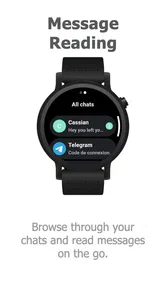
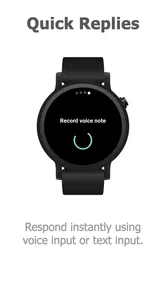
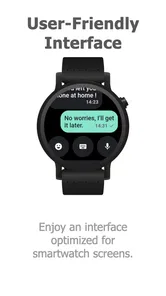
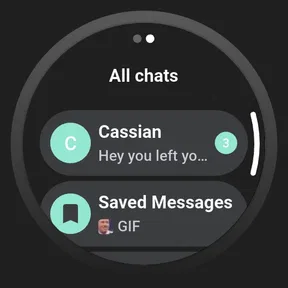
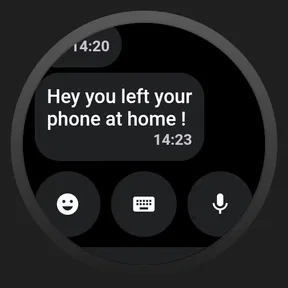
Let’s talk about what makes this app a must-have. The interface is sleek and intuitive, showing you a list of your latest conversations as soon as you open it. You can quickly scroll through messages or tap to open a specific chat. Replying is a breeze too, with options for voice-to-text, quick replies, and even a nifty little keyboard for those quick yes-or-no answers. It’s like having a tiny, efficient assistant that fits on your wrist.
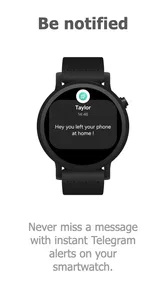
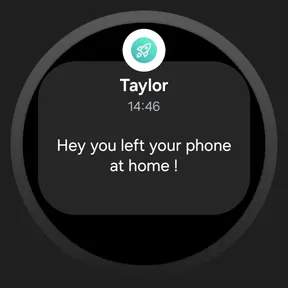
One of my favorite features is the notification system. Your watch will buzz you whenever a new message comes in, and you can sneakily glance at it during those boring meetings without anyone noticing. Plus, for the privacy-conscious, Watchgram ensures that your data is kept secure, syncing only the necessary information and nothing more.
Performance and Usability
Performance-wise, Watchgram for Telegram is a champ. It runs smoothly without any noticeable lag, and the battery consumption is surprisingly minimal. Even with constant notifications throughout the day, I noticed only a slight dip in my smartwatch’s battery life. It’s perfect for those who are always on the go and can’t afford to be tethered to a charging cable.
Usability is where Watchgram really shines. The developers have clearly put a lot of thought into making the app as user-friendly as possible. You don’t need to be tech-savvy to navigate through its features, which is a huge win in my book.
The Final Verdict
So, is Watchgram for Telegram worth the download? Absolutely. It’s a game-changer for anyone who uses Telegram regularly and wants the convenience of accessing messages from their wrist. Whether you’re at the gym, in a meeting, or just lounging at home, Watchgram keeps you connected without the hassle of constantly reaching for your phone.
In a world where staying connected is crucial, Watchgram offers a seamless way to integrate your communications into your daily routine, all while keeping things simple and efficient. Give it a try, and you might find yourself wondering how you ever managed without it.
My practical recommendation
I’d decide based on one ordinary day, not on the promise of having Telegram everywhere. If you often need to acknowledge a message while your hands are occupied, the watch can save a few small interruptions. If you usually want to read context, send a careful reply, or manage several chats at once, the phone remains the better tool. A useful habit is to treat watch replies as acknowledgements and move anything nuanced to the phone, where the larger screen makes it easier to check the thread before sending.
That also answers whether this replaces Telegram’s usual phone experience: it does not need to. The phone app is the natural choice for full conversations, while the watch is valuable only for quick access. Compared with relying on standard watch notifications alone, Watchgram is aimed at opening conversations and replying from the wrist; if a simple glance at alerts already solves your problem, paying for a separate app may add little. If you need more than a glance, it may be worth considering, provided your devices cooperate.
I would not judge reliability from one missed alert. First check whether Telegram itself received the message, then whether the phone showed its notification, and finally whether the watch was connected and allowed to alert you. This sequence helps identify where the interruption occurred without assuming the watch app is responsible. When only one chat is affected, check that conversation on the phone before changing general settings.
Watchgram is listed for Everyone, but I would still think about who can see your wrist. A quick preview can be handy in a quiet moment and awkward when private messages appear in a crowded room. Turning off previews or using the phone for sensitive exchanges is a straightforward way to keep the convenience without making every notification public.
If you are comfortable testing a paid utility and your main goal is short Telegram interactions on a watch, this is a focused option to consider. If your watch compatibility is uncertain, you depend on dependable message delivery for important conversations, or you expect a full chat experience, I’d stick with the phone until you know the watch setup meets your needs. That is the fairest way to weigh the convenience against the app’s low average rating and the extra step of adding another device to your messaging routine.
A sensible way to test the fit
Before making the watch part of your routine, I’d try it with low-stakes conversations rather than relying on it for an urgent exchange. Send a brief message to someone you know, check whether it appears on the watch, and try a short reply. Then repeat the check when the phone is locked and the watch is being worn normally. This gives you a practical feel for the handoff without making assumptions based on one successful notification.
I’d also test a few different message types in ordinary conditions: a short text, a busy conversation, and a notification received while you are away from the phone. The point is not to stress-test the app, but to learn where the watch saves effort and where the phone is still needed. If reading a thread requires too much scrolling or replying feels awkward, that is useful information before you start depending on the wrist workflow.
Choosing the right communication tool
Compared with messaging apps designed around a phone, a watch client has a narrower job: make a small interaction possible when the phone is inconvenient. Telegram on the phone is better for composing, reviewing context, and moving between conversations. Built-in watch notifications are a simpler alternative if you only need to know that a message arrived. Watchgram is most appealing in the middle ground, when you want to open a Telegram conversation and handle a short reply from the watch rather than merely dismiss an alert.
That middle ground will not suit everyone. If most of your Telegram use involves group discussions, long messages, or sharing details that need careful checking, a wrist-sized interface adds friction instead of removing it. If your messages are mostly quick coordination—confirming a time, acknowledging a change, or saying you will respond later—the compact workflow can be genuinely useful. I’d think about the messages you actually receive, not an idealized version of how you might use the app.
Small habits that prevent avoidable frustration
One helpful habit is to separate delivery problems from reply problems. If you do not see a message, trace it from Telegram on the phone to the phone’s notification and then to the watch. If you can read it but cannot comfortably answer, that may simply be the limit of the watch format, not a setup failure. Keeping those two questions distinct stops a clumsy typing experience from sending you into unnecessary connection troubleshooting.
For a shared or public setting, I’d decide in advance whether a wrist preview is appropriate. You can glance at the watch without pulling out a phone, but that convenience changes when someone nearby can read the screen. For private conversations, I would use the watch to notice that a message arrived and switch to the phone when I have a more discreet moment. This makes the app a useful prompt rather than an invitation to expose every conversation.
Who should pass
I would skip it if your smartwatch is mainly a fitness device, if you keep messaging notifications muted, or if you need a dependable channel for time-critical communication. A watch adds another point in the chain between sender and reader, so I would not make it the only way I monitor important messages. I’d also pass if the cost matters more than the occasional convenience or if your built-in alerts already let you respond in the way you need.
For someone who already wears a compatible watch and checks Telegram often, the decision is more about tolerance for a focused companion than about replacing a familiar app. The low average rating is a reason to approach it cautiously and test the everyday basics early, not proof that every setup will behave the same way. If the first few ordinary checks feel unreliable or awkward, returning to phone notifications is a perfectly reasonable choice.
Final call for a wrist-sized Telegram companion
My recommendation is conditional rather than universal: consider Watchgram if you want short Telegram interactions on your watch and have confirmed that your devices work together. Treat the watch as a shortcut for small tasks, keep the phone ready for longer or more sensitive conversations, and judge the app by whether it removes interruptions in your own routine. That is a more realistic standard than expecting a tiny screen to become a complete messaging workspace.
For a Telegram-heavy day, the useful moment may be modest: checking a delivery update while carrying bags, confirming a meeting change while walking, or replying that you will answer properly later. If those moments happen often, paying for wrist access may feel worthwhile. If they are rare, or if a notification glance is enough, the phone and its usual alerts are the simpler choice.
Watchgram for Telegram Frequently Asked Questions
What should I know about Watchgram for Telegram before downloading it?
Watchgram for Telegram is a communication app from clapps, with a store summary focused on Telegram messaging on your watch. It is rated for Everyone and costs $2.49. Its average rating is 1.8 from around 80 ratings, so it is worth weighing the available user feedback against your own needs before making a purchase.
What is Watchgram for Telegram?
Watchgram for Telegram is an innovative app designed for smartwatch users who want seamless access to their Telegram messages. The app allows you to receive, read, and reply to Telegram messages directly from your smartwatch, ensuring you stay connected without needing to pick up your phone. It's perfect for those who are always on the go and rely on their smartwatch for quick updates.
How do I install Watchgram for Telegram on my smartwatch?
To install Watchgram for Telegram, first ensure that your smartwatch is compatible with third-party apps, then visit the app store on your smartwatch or connected smartphone. Search for Watchgram for Telegram and follow the installation instructions. Once installed, you'll need to sync it with your Telegram account to start receiving messages. The app is currently version 1.0.1 and requires OS 7.1 or later, so check that your device meets that requirement before proceeding.
Is Watchgram for Telegram free to use?
Watchgram for Telegram costs $2.49, so it is not a free download. The purchase is best considered in light of the app’s stated purpose: bringing Telegram messaging to your watch. If that convenience suits your routine, the price may be worthwhile; if you only need occasional access, consider whether you would use watch-based messaging often enough before purchasing.
What privacy measures does Watchgram for Telegram have in place?
Watchgram for Telegram prioritizes user privacy by implementing strong encryption protocols to protect your messages as they are transmitted to your smartwatch. Additionally, the app does not store any of your personal data or messages on its servers, ensuring that your conversations remain private and secure at all times. As with any messaging companion, review the permissions requested during setup and choose notification settings that feel comfortable for you.
Pros
- Seamless integration with Telegram.
- User-friendly interface.
- High-quality video streaming.
- Supports multiple languages.
- Frequent updates with new features.
Cons
- Requires Telegram account to use.
- Limited offline capabilities.
- Consumes significant data.
- Some features are premium only.
- Occasional connectivity issues.











