Wasatch Backcountry Skiing Map
- 24.00
- 4.0
- Installs
- 1.00K
- Price
- $12.99
Screenshots
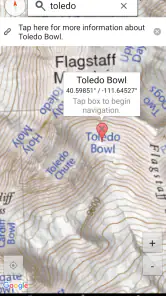
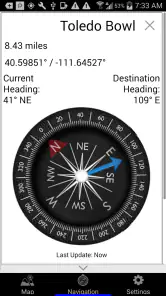
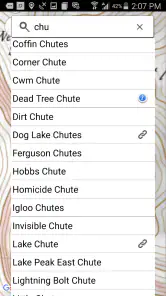
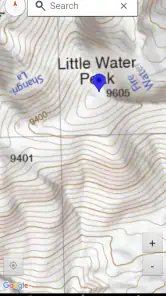
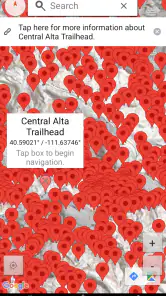
Analysis by Reviewed
When I plan a day in Utah’s Wasatch backcountry, I want a map that helps me think through the terrain before I leave, not just a screen to glance at once I’m already moving. That is the appeal of Wasatch Backcountry Skiing Map: it focuses on a specific mountain region and the needs of skiers and hikers there. I see it as a specialized planning aid, rather than a replacement for sound judgment, current local guidance, or the skills needed to travel in mountain terrain.
A regional map, not a universal navigator
Because the app is built around the Wasatch, its value is greatest when that range is actually your destination. If I were planning a familiar outing elsewhere, a general mapping app might be more convenient; for a Wasatch trip, a region-focused map can make it easier to keep attention on the landscape and route choices relevant to that day. The developer is Iterum, LLC, and the app sits in the maps and navigation category. It is listed at $12.99, so I would treat the purchase as a deliberate choice for people who expect to use it, rather than an automatic download for occasional visitors.
A practical way to use a backcountry map is to consult it before committing to a plan: identify the general area, consider how the route fits your group’s ability, and agree on a turnaround point while everyone is together. That habit matters more than trying to make decisions quickly on a small phone screen in cold weather. I would also keep a separate navigation and safety plan; a map app should support preparation, not carry the full responsibility for it.
Using it where the signal can change
Connectivity is worth thinking about before heading into the mountains. Mobile coverage can vary with terrain and location, so I would not assume that a map, report, or other online information will load at the moment I need it. Before leaving, I’d open the app, review the area I expect to visit, and make sure my group knows the plan without relying on everyone being able to check a phone later. The app’s regional focus is useful for that preparation, but it does not remove the need to plan for gaps in service.
On the move, keep the phone in its proper role
A phone is useful for a quick reference, but it can be awkward to operate with gloves, in cold weather, or while paying attention to changing conditions. I’d check route decisions at a safe stopping point instead of trying to navigate while skiing. For a group, agreeing on recognizable meeting points and a clear fallback plan is also sensible: a shared screen is no substitute for making sure everyone understands where to regroup if people become separated.
For a realistic day, imagine meeting friends at a trailhead and finding that the group has different ideas about where to go. Looking at the map together before setting off can turn a vague suggestion into a route discussion, including where to pause and when to reassess. If a connection is unavailable later, that earlier conversation still helps everyone stay oriented around the same plan. That is a useful role for a digital map, even when it cannot answer every question in the field.
What I would verify before relying on a screen
Backcountry decisions depend on conditions that can change, and a map alone cannot tell me whether a slope is appropriate today. I would check current weather and avalanche information from suitable, up-to-date sources and make decisions based on training and conditions on site. I also would not treat any app alert—or the absence of one—as a guarantee of safety. The sensible trade-off is to use mapping for orientation and planning while keeping risk assessment independent and active.
More From Our News Desk

Weather by Xiaomi Review: Clear at a Glance, Less Clear Up Close

X Under Pressure: Can It Recover When Posting Goes Wrong?

Clash of Clans Is Won Between the Battles

Android Auto Makes the Case for Quieter Car Software

MobiOffice: Transforming Mobile Productivity with Seamless Integration

EA SPORTS FC™ Mobile Soccer: Redefining Mobile Sports Gaming
Battery and data use deserve a little thought too. If I expect a long day, I’d begin with a charged phone, reduce unnecessary screen use, and avoid repeatedly refreshing information when I already have what I need. That is especially useful in cold conditions, where keeping a phone available matters. Anyone comparing this with a general-purpose navigation app should ask whether the Wasatch-specific focus justifies a separate paid tool; someone who mainly wants broad city directions may be better served by the map app they already use.
Who will get the most from it
I’d consider it for a skier or hiker who regularly plans outings in the Wasatch and wants a dedicated digital reference for that region. A visitor making one casual trip, someone who needs turn-by-turn directions for everyday driving, or a person expecting a phone to replace backcountry training should look elsewhere or adjust expectations. It is rated for Everyone, has an average rating of 4.0 from around 45 ratings, and has been installed over a thousand times. Those figures offer a little context, but they do not tell me whether it fits a particular route or experience level.
Getting Started with the Wasatch Backcountry Skiing Map
First things first, let's talk about getting the app up and running. The Wasatch Backcountry Skiing Map is available for both Android and iOS, making it accessible for most smartphone users. Installation is a breeze, and once you open it, you're greeted with a user-friendly interface that's designed with skiers in mind.
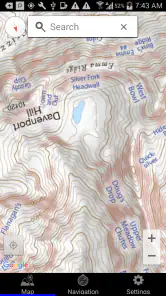
The primary feature of the app is, of course, the detailed map of the Wasatch Range. This isn't just any map; it's a comprehensive guide to the best skiing spots, complete with topographical details that help you plan your routes. The app shows you everything from trailheads to avalanche-prone areas, giving you the information you need to stay safe while chasing that perfect run.
Features That Make a Difference
One of the aspects I love most about this app is its real-time updates. The map is constantly refreshed with the latest snow conditions, weather forecasts, and even recent avalanche reports. This is crucial for planning your day out on the slopes. Trust me, there's nothing more reassuring than knowing the path you’re taking is safe and sound.
Another standout feature is the ability to track your progress. As you ski through the backcountry, the app logs your route, helping you to review your adventures and share them with friends. It’s like having a personal ski diary right on your phone!
Why It's a Must-Have
Now, you might be wondering why you need this app if you’re an experienced skier. Well, the Wasatch Backcountry Skiing Map isn't just about finding your way; it's about enhancing your entire skiing experience. The app helps you discover new trails you might not have found on your own and alerts you to potential hazards.
Moreover, the community aspect of the app is a fantastic bonus. You can connect with other backcountry skiers, share tips, and even plan group outings. Skiing is always more fun with friends, right?
Choosing it over a general map
The decision I would make is less about whether a specialist map is automatically better and more about what I need from a map on a particular trip. A broad navigation app is usually the practical choice for getting to a trailhead, handling errands, or finding my way around an unfamiliar town. A Wasatch-focused tool makes more sense once the planning question shifts from ordinary directions to understanding a particular mountain region. I would use the general app for the journey to the area and this one as a dedicated reference for the backcountry, rather than expecting one screen to do both jobs equally well.
That distinction also helps explain who should skip the purchase. If I were visiting once, still deciding whether backcountry travel is for me, or mostly interested in resort skiing and everyday driving, I would first consider whether a paid regional map has enough ongoing value. At $12.99, the cost is easier to justify for someone who returns to the Wasatch and wants a specific digital reference. The app has an average rating of 4.0, based on around 24 reviews, but I would treat that as a broad impression rather than proof that it suits my preferred routes or planning style.
A more deliberate planning routine
One useful habit is to separate the map check into two moments. Before the outing, I would use it to frame the route discussion with the group and choose a plan that matches the day’s aims. At the trailhead, I would revisit the decision with current conditions and the people actually present, rather than treating yesterday’s plan as fixed. This keeps a map from becoming a shortcut around judgment: it can help make the conversation concrete, but the group still has to decide whether to continue, change course, or turn back.
I would also make sure each person can explain the plan in their own words instead of assuming that everyone has absorbed the same screen. That is particularly helpful when several people are sharing one phone or when a group becomes spread out. A simple agreement about where to regroup and what to do if plans change is more useful than expecting a single device to coordinate everyone. The strongest value of a digital map may be the shared preparation it supports before the group is moving.
When a phone becomes a weak link
There is a trade-off in putting a mountain reference on a phone: it is convenient to carry, but the same device may also be needed for communication and other practical tasks. I would avoid leaving the display on simply because it is easy to glance at, and I would not make repeated checks out of habit. Instead, I’d decide when a map check is genuinely useful, stop somewhere safe, and put the phone away again. That approach makes the app a deliberate tool rather than a constant distraction.
If the map or another online source does not load, my recovery plan would not be to keep trying indefinitely in exposed or inconvenient conditions. I would fall back to the route and meeting plan the group discussed beforehand, reassess whether continuing is sensible, and use appropriate navigation resources and training. This is why I would want to understand the app’s behavior before a consequential outing and avoid assuming that previously viewed content will remain available. It is a practical limitation of phone-based planning in variable coverage, not a reason to treat a screen as the sole source of direction.
Who benefits from the regional focus
The best fit, in my view, is someone who already has a reason to spend time in the Wasatch and wants a focused digital map to support planning. It may also suit a hiker who shares the same regional interest, since the app is described for both skiing and hiking. A newcomer can still find a regional reference useful, but should not mistake it for instruction in route-finding, avalanche awareness, or mountain decision-making. Those are separate skills and responsibilities.
For a visitor with limited experience, I would put current local guidance, qualified instruction, suitable equipment, and an appropriate plan ahead of buying any map app. For someone who already has those foundations, a region-specific map may be a handy companion. The distinction matters: a useful map can make planning more organized, but it cannot make an unsuitable objective safe or replace the judgment of the people traveling.
A sensible fit for the right trip
My bottom line is that this is most compelling as a Wasatch-specific companion, not as an all-purpose answer to navigation. The $12.99 price makes more sense if I expect to return to the range and value having a focused map at hand. Before a first outing, I’d learn how the map presents the area while comfortably at home, then use it alongside a written plan, appropriate equipment, and current safety information. If that preparation suits the way you travel, the app can be a useful addition; if you need reliable online access everywhere or expect a map to make route choices for you, it is not the right tool on its own.
Connectivity is the key practical question I’d settle before relying on any phone-based map in the backcountry: what can I check ahead of time, and what is my plan if the signal disappears? I’d avoid making a trip depend on an online refresh at a remote point, and I would not infer that the app works offline without confirming that directly. Used with those limits in mind, it has a clear purpose for people who ski or hike in this Utah range. For me, the strongest reason to choose it is that regional focus; the strongest reason to pass is needing a broader or more dependable navigation setup.
In conclusion, the Wasatch Backcountry Skiing Map is more than just a navigation tool; it's an essential companion for any backcountry explorer. With its easy-to-use interface, detailed maps, and real-time updates, it's no wonder it's quickly becoming a favorite among skiing enthusiasts. So, if you're planning a trip to the Wasatch Range, make sure you have this app in your pocket. You won't regret it!
Wasatch Backcountry Skiing Map Frequently Asked Questions
Who develops Wasatch Backcountry Skiing Map, and what is it designed for?
Wasatch Backcountry Skiing Map is a Maps & Navigation app developed by Iterum, LLC. Its store summary describes it as the digital map for skiers and hikers in Utah, while its short description is “Wasatch Skiing.” It is intended for people looking for a map focused on exploring the Wasatch backcountry.
What is the Wasatch Backcountry Skiing Map app?
The Wasatch Backcountry Skiing Map app is a specialized mapping tool designed for backcountry enthusiasts who wish to explore the Wasatch Range. It provides detailed topographic maps, helps users plan routes, and offers essential information about avalanche-prone areas, ensuring a safer skiing experience by understanding the terrain better.
Is the Wasatch Backcountry Skiing Map app available for both Android and iOS devices?
Yes, the Wasatch Backcountry Skiing Map app is available for download on both Android and iOS platforms. It can be found on the Google Play Store for Android users and the Apple App Store for iOS users, making it accessible to a wider audience of skiing enthusiasts.
How does the Wasatch Backcountry Skiing Map app help with avalanche safety?
The app includes critical data on avalanche-prone zones, slope angles, and historical avalanche paths, which are crucial for assessing risk. By providing real-time updates and detailed terrain information, users can make informed decisions to avoid dangerous areas, thereby enhancing their safety while skiing in the backcountry.
Can I use the Wasatch Backcountry Skiing Map app offline?
Yes, the Wasatch Backcountry Skiing Map app offers offline functionality. Users can download maps and essential data to use when they are out of mobile service range. This feature is particularly useful for backcountry skiers who often find themselves in remote areas with limited connectivity.
Pros
- Comprehensive trail coverage for accurate navigation
- Offline maps for areas with no cell service
- Regular updates with new trails and features
- User-friendly interface enhances usability
- Detailed topographic information available
Cons
- Only covers Wasatch region
- limiting use
- Requires storage space for offline maps
- Subscription needed for full feature access
- Interface may be cluttered for beginners
- No real-time weather updates included
- Category
- Maps & Navigation
- Version
- Varies with device












