Wansview Cloud
- 3.90K
- 4.4
- Installs
- 1.00M
- Price
- Free

Screenshots
Analysis by Reviewed
For me, a home-camera app earns its place on my phone when it helps me make a clear decision while I’m away, not just when it displays a picture. That is the job I would give Wansview Cloud: check a compatible camera, see what is happening, and decide whether anything needs attention. It is a lifestyle app from AJCLOUD INTERNATIONAL INC., and its practical appeal is easy to understand. A quick look can help me work out whether a delivery has arrived or whether a room looks as expected. It is free, rated for Everyone, and has an average rating of 4.4 from around 35,000 ratings, making it an approachable option for everyday remote viewing.
From camera setup to a useful check-in
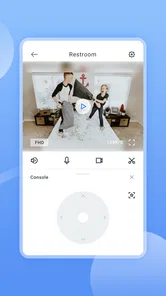
The first thing that caught my eye was how effortlessly Wansview Cloud linked up with my existing security cameras. No fuss, no muss! I simply downloaded the app, followed a few straightforward instructions, and voila, I could see my home’s live feed right on my smartphone. It’s like having your personal security detail in your pocket!
Making the first check count
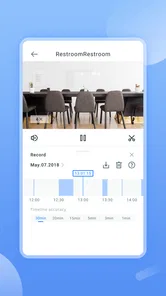
Now, I’m no tech wizard, but navigating through this app was a breeze. The interface is clean and intuitive, making it easy for even the least tech-savvy among us to monitor their home’s security. With just a few taps, I was able to switch between camera views, adjust settings, and even review past footage. It’s those little touches that make a big difference.
A useful habit is to label your own mental map of the camera views before you need them: know which view covers the entry and which one shows a shared living area. When you have several feeds, that small bit of preparation can make a check faster than opening each view at random. I’d also take a moment after setup to confirm that the live picture is clear enough for the purpose you have in mind; a camera view is only reassuring if it actually shows the area you care about.
Alerts as a handoff, not a verdict
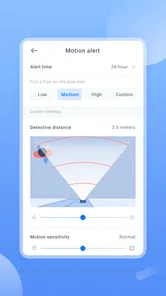
One of the standout features has to be the real-time alerts. Imagine this: you’re at work, and you get a notification because someone’s at your door. You can instantly check the live feed and even communicate through the app. It’s like having a virtual doorman. These alerts give peace of mind, knowing you’re always in the loop.
I’d treat an alert as a prompt to look, not proof that something is wrong. For example, if I’m expecting a parcel, I can check the view and decide whether to contact someone at home or handle it later. That is a useful handoff from the app to my own judgement, but it still depends on being able to open the feed and interpret what I see. If a household needs several people to coordinate around alerts, it’s worth agreeing who will respond so that notifications don’t simply become background noise.
Recorded footage and the storage trade-off
Let’s talk about storage. With Wansview Cloud, all your footage is securely stored in the cloud. No more worrying about losing important recordings if something happens to your device. Plus, it’s accessible anytime, anywhere. Whether you’re on vacation or just out for groceries, your home’s security is literally at your fingertips.
More From Our News Desk

Weather by Xiaomi Review: Clear at a Glance, Less Clear Up Close

X Under Pressure: Can It Recover When Posting Goes Wrong?

Clash of Clans Is Won Between the Battles

Android Auto Makes the Case for Quieter Car Software

MobiOffice: Transforming Mobile Productivity with Seamless Integration

EA SPORTS FC™ Mobile Soccer: Redefining Mobile Sports Gaming
For a useful routine, I’d review a relevant clip soon after an alert instead of assuming I’ll remember to search for it later. That turns remote viewing into a clear sequence: notification, live check, then footage review if I need more context. Cloud-based access is convenient when I’m away from the phone I normally use, but it also means this approach may not suit someone who wants every part of a camera system to work locally or prefers not to rely on cloud storage. I’d compare those priorities before choosing an app-led setup.
Who benefits from this kind of access
This app makes the most sense for someone who already uses compatible Wansview cameras and wants a straightforward way to check home from elsewhere. A realistic use is leaving for work, receiving a door alert, checking the camera, and then deciding whether a family member needs to follow up. It can also be handy for a quick look in on a room while travelling. The key benefit is not replacing a person on site; it is helping me decide whether a situation needs attention.
Compared with checking a camera only through a home monitor, a phone-based service is more useful when I’m out, while a local monitor can be preferable if I want a dedicated screen and fewer steps. Compared with a broader smart-home app, a camera-focused tool can feel more direct for viewing and reviewing feeds, but it may be less suitable if my main goal is to manage many unrelated devices in one place. I’d skip it if I don’t own compatible cameras, need a system that keeps viewing independent of cloud access, or expect an app alone to provide complete security.
What to expect before settling in
Wansview Cloud has been available since August 22, 2018, and its current version is 2.0.25102706, with Android 7.0 as the minimum operating system requirement. It has more than a million installs and around 3,300 written reviews. Those figures suggest a widely used app, but they don’t guarantee that every camera setup will feel equally smooth. I’d check compatibility for my particular camera and phone before relying on it for an important routine, then test live viewing and alerts while I’m still at home.
A routine that works when the day gets busy
The most useful way I’d fit a camera app into an ordinary day is to give each check a purpose. If I’m expecting a delivery, I’d glance at the entry view when the notification arrives, then decide whether the parcel is safe or someone at home should take it in. If nothing needs doing, I can close the app rather than repeatedly checking the same feed. That simple stop point matters: remote access is helpful when it supports a decision, but constant watching can turn a convenient tool into another source of distraction.
For a household, I’d agree in advance who is likely to handle a door alert during work hours and who is the backup. The app can pass along information, but people still need a clear handoff. If two people both assume the other has checked, an alert may not lead to action; if both respond to every notification, it can create needless messages. A short shared routine—who checks, who follows up, and when to leave it alone—can make camera access more useful without asking everyone to monitor it all day.
Choosing the right camera workflow
One question worth settling before installing any companion app is what the camera is supposed to help you do. For a quick visual check while away, a phone is more convenient than relying on a screen that stays at home. For continuous viewing in one room, a dedicated monitor may be simpler because it does not require picking up a phone and opening an app. If your household already organizes lights, locks, and other devices through a broader smart-home service, keeping everything together may matter more than having a camera-focused viewing path.
That comparison is less about declaring one approach best and more about matching it to the handoff you need. A phone-based camera check is useful when the person who sees an alert is also able to decide what to do next. A local screen can be a better fit when someone is already at home and wants an immediate glance without reaching for a device. A general smart-home app may be preferable when camera viewing is only one small part of a larger routine. I’d choose the route that makes the next action clearest, rather than installing another app just because it offers remote access.
Small checks that prevent avoidable frustration
I would not wait until the first urgent notification to find out whether the setup works for my routine. While at home, I’d open the live view on the phone I expect to use, check that I can identify the area in frame, and try moving between the views I care about. Then I’d make sure I understand where to look for a recording after an event. These are modest checks, but they help expose confusing camera labels or a view that is poorly placed before I’m relying on it from somewhere else.
It is also worth distinguishing a useful alert from a noisy one. A notification has value only if I can understand why it arrived and make a reasonable next move. If every alert becomes something I ignore, the app has stopped helping with the handoff. I’d review how the camera is positioned and how the household handles notifications before assuming that more alerts mean better monitoring. The goal is not to react to every phone buzz; it is to notice the events that matter and use the live view or footage to add context.
Privacy, access, and practical boundaries
Because the workflow involves viewing a home remotely and using cloud-based footage, I’d think about who should have access and which spaces are appropriate to monitor. A shared household benefits from agreeing where cameras are placed and who is expected to check them. That is not an app trick so much as a sensible boundary around the technology. The convenience of checking from anywhere should not replace a conversation about the people who live in or visit the space.
I’d also keep the purpose narrow. A camera can help answer a practical question about an entryway or a room, but it cannot explain every situation from an image alone. A person at the door might be a courier, a visitor, or someone the household already expects; the picture needs human judgement. For a serious safety concern, I would treat the app as one source of information, not as a substitute for contacting someone who can help in person. That modest expectation makes the tool more useful and avoids asking it to do a job it cannot do by itself.
Where this choice may not fit
The strongest reason to pass is not a dislike of phone apps; it is a mismatch with the camera system or with the way you want footage handled. If you don’t have a compatible Wansview camera, this app is not a standalone answer to home monitoring. If you specifically want a setup that works locally without depending on cloud access, a different system may align better with that preference. And if your priority is a single control center for many kinds of smart-home devices, a broader platform may reduce app switching.
I’d also be cautious about treating remote viewing as a guarantee of protection. It can help me notice a situation and choose a response, but it does not put someone at the door, make a delivery secure, or ensure that a connection will always be available at the moment I want to check. For someone who needs a dependable on-site monitoring arrangement, a phone app alone is the wrong tool. Its strongest role is narrower: giving a camera owner a convenient way to look, gather context, and decide whether a person needs to take the next step.
The practical question is whether it can fit the way I already handle home monitoring. If I want a simple phone-based route from camera to live check to a decision, it’s a sensible place to start. If I need local-only recording, a dedicated monitoring screen, or a single app for a much wider smart-home setup, another approach may suit me better.
In conclusion, if you’re in the market for a reliable home security app, Wansview Cloud should be at the top of your list. Its seamless integration, user-friendly interface, and robust features make it a standout choice for anyone looking to boost their home security. So, give it a whirl and see for yourself how it can transform your peace of mind.
Wansview Cloud Frequently Asked Questions
Can I view my home remotely with Wansview Cloud?
Yes. Wansview Cloud is intended for checking in on your home remotely, with the store summary describing its purpose as viewing your home anytime, anywhere. It is a mobile app, so you can use it to access your home-monitoring setup from a compatible phone. Before downloading, consider whether you have a camera that works with the app and whether remote viewing is what you need.
What should I check before setting up Wansview Cloud?
Before installing Wansview Cloud, check that your phone’s operating system meets the app’s requirements and that your camera is compatible. You will also need to follow the app’s setup prompts to connect your monitoring equipment. These checks can help avoid frustration during setup and ensure the app is a practical fit for the way you want to view your home.
What devices and operating systems can I use Wansview Cloud on?
Wansview Cloud is a mobile app for checking in on your home remotely, and it is available for Android and iOS users. On Android, it requires version 7.0 or later. Before downloading, make sure your device meets that requirement and that you are getting the app developed by AJCLOUD INTERNATIONAL INC. The app is free to download and is rated for Everyone.
What features does Wansview Cloud offer for home security?
Wansview Cloud provides a comprehensive set of features for home security, including real-time video streaming, two-way audio, motion detection, and night vision. The app allows you to monitor your home remotely and receive alerts whenever unusual activity is detected. Additionally, it offers cloud storage for recorded videos, ensuring you never miss any important events.
Is Wansview Cloud compatible with all types of security cameras?
Wansview Cloud is primarily designed to work with Wansview’s range of security cameras. While it may support some third-party cameras, optimal performance and features are guaranteed when used with Wansview products. Before purchasing, check the compatibility of your existing cameras with the app to ensure seamless integration and functionality.
Pros
- Easy to set up and use
- High-quality video streaming
- Reliable motion detection
- Affordable pricing
- Supports multiple cameras
Cons
- Limited cloud storage options
- App occasionally crashes
- No desktop app support
- Notification delays
- Limited integration with smart home devices











