Voice GPS Navigation: GPS Map
- 67.00
- 4.7
- Installs
- 1.00M
- Price
- Free

Screenshots
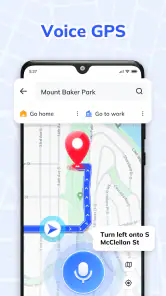
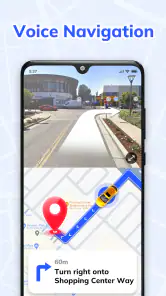
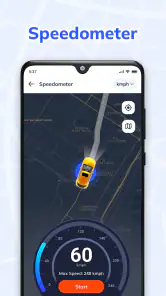
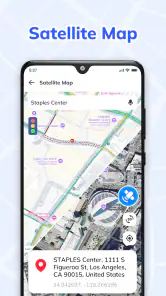
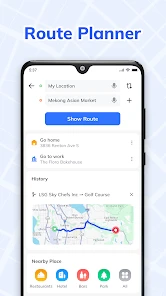
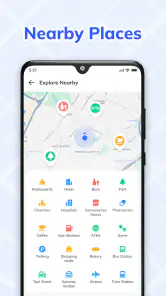
Analysis by Reviewed
I usually judge a navigation app by what happens when I’m in a hurry, not by how many options it promises. Voice GPS Navigation: GPS Map is aimed at drivers who want spoken directions and a map-based route without a complicated setup. Handy Tools Studio makes it a free Maps & Navigation app, and its simple starting point suits someone who wants to enter a destination and get moving.
Getting Started with Ease
Once you download Voice GPS Navigation: GPS Map, you’re greeted with a user-friendly interface that’s as straightforward as it gets. No endless sign-up processes or confusing settings—just open the app and you're ready to hit the road. I was pleasantly surprised by how intuitive everything felt right from the get-go.
A Practical Driving Routine
My most useful habit with a voice navigator is to set the destination before pulling away, then check the route on the map while parked. Spoken prompts are helpful when I’m watching traffic, but they work best as a supplement to a quick visual check—not as a reason to interact with the screen while driving. For a regular commute, I’d also compare the suggested route with the roads I already know before leaving, especially if a small detour would make the trip more predictable.
Picture a familiar weekday trip that suddenly includes a pickup across town. I’d enter the new destination before starting the car, listen for the next turn, and use the map to confirm that the route is taking me toward the right neighborhood. That simple routine is where voice guidance earns its place: it can reduce the need to keep looking down, while leaving the driver responsible for safe decisions and road signs.
Features That Stand Out
Let’s talk features, because this app is packed with them. One of the first things I noticed was the voice-guided navigation. It’s not just clear and precise, but also available in multiple languages. For someone like me who occasionally likes to switch things up or when traveling abroad, this is a game-changer.
Real-time traffic updates are another highlight. I can’t count the number of times this feature has saved me from getting stuck in gridlock. It’s like having a personal traffic assistant that whispers, "take the next exit," just when you need it most. Plus, the offline maps function ensures that even when you’re in a dead zone, you’re never truly lost. Just download the maps in advance and you’re good to go.
Settings and Small Habits That Help
Before relying on a new navigator for an important drive, I’d check that the spoken guidance is audible over the car’s usual background noise and confirm the selected language. These are quick checks, but they prevent a common frustration: reaching a complicated junction and realizing the voice prompts are too quiet or unfamiliar. I’d also start with a short route I know, so I can get used to how the app presents turns without the pressure of being late.
More From Our News Desk

Clash of Clans Is Won Between the Battles

Android Auto Makes the Case for Quieter Car Software

MobiOffice: Transforming Mobile Productivity with Seamless Integration

EA SPORTS FC™ Mobile Soccer: Redefining Mobile Sports Gaming

How Microsoft OneDrive Became a Mobile Productivity Giant

How Google Translate Breaks Language Barriers Effortlessly
Offline navigation is most useful when treated as preparation rather than a last-minute rescue. If I expect poor reception, I’d make sure the relevant map area is downloaded while I still have a dependable connection, then verify that the destination is within it. That matters on a rural drive or in a large building where service drops; offline access can help with the map, but it shouldn’t be mistaken for live traffic information.
The Everyday Companion
Whether I’m commuting to work or exploring new places on a weekend getaway, this app has become an essential part of my daily routine. I love how it integrates with my calendar, reminding me of upcoming appointments and suggesting the best time to leave based on current traffic conditions. It’s like having a digital co-pilot who’s always got my back.
Oh, and did I mention the point of interest suggestions? If you’re ever in a new city and unsure where to eat or what to see, the app’s got you covered. It highlights local attractions, restaurants, and even gas stations, ensuring you’re never left wondering what’s around the corner.
Building a Repeatable Route Habit
For a recurring drive, I’d use the same simple pre-trip routine instead of changing settings every time: enter the destination, inspect the route while parked, make sure the voice is audible, and then leave the phone alone. This is especially useful when a familiar journey gains one new stop, because it keeps the extra decision-making on the driveway rather than at a junction. The map gives me a chance to catch an obviously inconvenient route before moving, while the spoken guidance handles the small reminders once I’m underway.
I’d also treat a first trip to a new neighborhood as a practice run for the app’s presentation, not as a test of whether I can follow every instruction perfectly. If a prompt arrives at a busy intersection, I can prioritize signs and traffic over the phone and safely continue when possible. That’s a practical trade-off with any voice navigator: it reduces the need to watch the display, but it cannot make complicated roads simple or replace a driver’s judgement.
Choosing It for the Right Kind of Drive
This app makes the most sense for someone who wants a dedicated voice-led route to a known address, a regular destination, or a place they are visiting for the first time. It may also suit a driver who wants to try a different navigation routine without paying to install the app. The free download lowers the barrier to testing it, while optional in-app purchases range from $4.99 to $24.99 per item, so I’d check what an optional purchase covers before spending anything.
I would be more cautious if I depended on one established map app for a large collection of saved places or a carefully learned workflow. A familiar alternative can be better simply because I already know where its controls are and how it behaves on my regular roads. I’d compare the two on the same short journey, while parked before setting off, rather than switching systems for the first time on a long drive. That side-by-side test reveals whether the voice prompts and route view actually feel easier for me.
Where It Fits Among Navigation Choices
Compared with the familiar map apps many drivers already use, Voice GPS Navigation: GPS Map makes its appeal through a voice-led driving experience and straightforward route guidance. If your priority is a clean, low-effort way to follow a route, that focus is useful. If you depend on a particular mapping service’s established routines, saved places, or other familiar tools, switching may not be worthwhile unless this app’s approach suits you better. I’d test it on ordinary trips first rather than making it my only option on an unfamiliar, time-sensitive journey.
It is free to install, with optional in-app purchases priced from $4.99 to $24.99 per item. Its 4.7 average from around 2.4 thousand ratings and over a million installs suggest that many people have tried it, but those figures don’t replace a personal road test. The app is rated for Everyone, runs on Android 5.0 and later, and is currently at version 1.2.2. I’d consider those details alongside the practical question of whether its guidance and map workflow fit my own driving habits.
Questions I’d Settle Before a Longer Trip
A common practical question is whether this can be relied on when mobile reception fades. I’d prepare by downloading the map area in advance and checking that the planned destination sits within it, then keep in mind that offline map access is not the same as live traffic information. If changing traffic is central to the trip, I’d plan with a connection available and keep a backup sense of the route rather than assuming the offline map will do everything.
Another question is whether voice navigation means I can stop checking the road layout. I wouldn’t use it that way. Spoken directions can help me keep my eyes up, but road signs, lane markings, and safe driving remain more important than any prompt. I’d also try a familiar route first to judge whether the volume and language work for me in my own car. For someone who mainly wants a reliable route without learning a complex interface, that small test is more useful than judging the app from its feature list.
Limits Worth Keeping in Mind
Voice prompts can make driving less screen-dependent, but they don’t remove the need to pay attention to road signs, lane markings, and changing conditions. Traffic guidance can also be less useful when a route depends on an area with weak connectivity, so I wouldn’t assume an offline map will provide every connected feature. For a trip where exact arrival timing is critical, I’d leave a margin rather than treating any navigation estimate as a guarantee.
This app is a sensible choice for drivers who want spoken directions, use maps for everyday journeys, or sometimes travel where reception is unreliable and can prepare in advance. I’d skip it if I need a navigation tool to replace careful planning, or if I already have a map app whose established features I rely on heavily. A short trial on a familiar route is the easiest way to decide without risking a stressful first outing.
Final Thoughts
In a world where getting from point A to point B can sometimes feel like a Herculean task, Voice GPS Navigation: GPS Map makes it all seem effortless. It’s reliable, easy to use, and packed with features that cater to both the everyday commuter and the adventurous traveler. So, if you’re looking to add a little more ease and a lot more fun to your journeys, this app is definitely worth a download.
Voice GPS Navigation: GPS Map Frequently Asked Questions
Who developed Voice GPS Navigation: GPS Map, and what kind of app is it?
Voice GPS Navigation: GPS Map is a Maps & Navigation app developed by Handy Tools Studio. Its focus is voice-guided driving with GPS maps and route guidance, so it is aimed at people who want navigation instructions while traveling. It is rated for Everyone, making it suitable for a general audience.
What features does Voice GPS Navigation: GPS Map offer?
Voice GPS Navigation: GPS Map provides real-time GPS navigation with voice guidance, ensuring hands-free operation while driving. It offers detailed maps, live traffic updates, and alternative route suggestions to avoid congestion. The app also includes points of interest, such as gas stations and restaurants, making it a comprehensive tool for travelers.
Is Voice GPS Navigation: GPS Map free to use?
Voice GPS Navigation: GPS Map is free to download, with in-app purchases priced from $4.99 to $24.99 per item. The earlier description of a free version with basic features, possible ads, and paid extras such as offline maps and advanced route planning may help set expectations, but check the app’s current purchase options before deciding what to use.
How accurate is the navigation provided by Voice GPS Navigation: GPS Map?
The app uses advanced GPS technology to provide accurate navigation and real-time updates. However, the accuracy can be influenced by factors such as the quality of the user's GPS signal, network connectivity, and map updates. Users generally find the app reliable for both urban and rural navigation.
Can Voice GPS Navigation: GPS Map be used offline?
Yes, Voice GPS Navigation: GPS Map offers offline map capabilities for premium users. This feature allows users to download maps in advance and navigate without an internet connection, which is especially useful in areas with poor network coverage or when traveling abroad without data access.
Pros
- Accurate real-time navigation guidance.
- Easy-to-use interface for all users.
- Voice commands minimize driver distraction.
- Detailed maps with offline access.
- Frequent updates improve app reliability.
Cons
- Can drain battery quickly during use.
- Requires stable internet for best performance.
- Occasional map lag in heavy traffic.
- Limited customization options.
- Ads in free version can be intrusive.
- Category
- Maps & Navigation
- Version
- 1.2.2











