

Voice GPS Navigation Direction
- 16.00
- 4.0
- Installs
- 100.00K
- Price
- Free

Screenshots
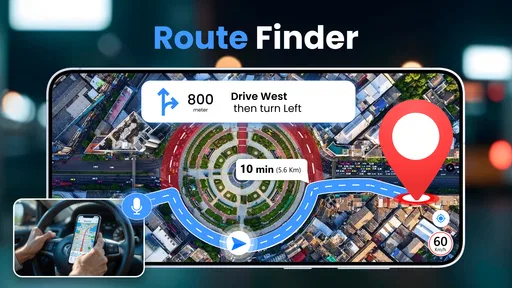
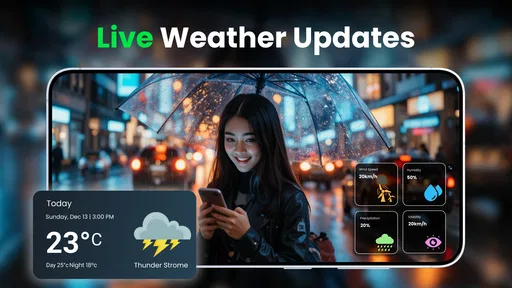

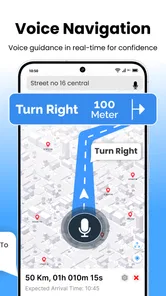
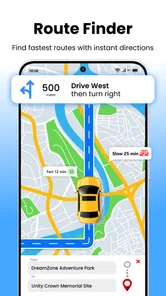


Analysis by Reviewed
Voice GPS Navigation Direction is the kind of Android navigation app I would try when I want a straightforward route planner without paying an upfront price. I used it with a simple question in mind: can it make everyday driving less stressful, especially when I need spoken guidance rather than constantly checking a map? My overall impression is positive, but with an important qualification. Its usefulness depends heavily on how reliably your phone can reach the mapping service during the journey, so it is best treated as a connected navigation companion rather than a guaranteed replacement for every navigation tool.
Developed by Appsiun Technology, this free app sits in the Maps & Navigation category and focuses on turn-by-turn driving directions with voice guidance. That focus makes it easy to understand. You enter a destination, review the suggested route, start navigation, and let the phone provide instructions while you drive. It is available to Everyone, runs on Android 9 and newer, and the current version is 1.6.2. The app has passed the early discovery stage too, with over one hundred thousand installs and a 4.0 average from around one thousand three hundred ratings.
What I like most is that the concept is immediately practical. I do not need a complicated planning system for a trip to a supermarket, a new office, a medical appointment, or a friend’s house. I need a readable route and timely voice prompts. That is where this app makes sense. At the same time, I would not choose it automatically for long journeys through areas where mobile connectivity is uncertain, or for users who need the mature traffic, transit, cycling, and offline tools found in larger navigation platforms.
How Voice GPS Navigation Direction behaves when connectivity matters
I find connectivity is the key practical question to settle before trusting Voice GPS Navigation Direction on an unfamiliar trip. I would check that a route loads while parked, then think about what I would do if coverage dropped before the next turn; that small bit of preparation helps distinguish a convenient city companion from the right choice for a signal-poor journey.
The first route depends on a healthy connection
The most important practical point is how much the experience is shaped by network access. Route planning normally requires the app to communicate with mapping services, and the store summary presents it as a travel map for turn-by-turn navigation rather than as a confirmed offline navigator. I therefore approach every trip by planning before I pull away. If the destination is important, I check that the route has appeared properly and that guidance has started while I still have a stable connection.
This small habit prevents a common mistake: assuming that a navigation app will behave like a downloaded map once the route is visible. A route displayed on screen does not automatically mean every map detail or recalculation capability is stored locally. In a city with reliable mobile service, this may never bother you. On a rural road, in an underground parking area, or near a weak-signal stretch, it becomes much more relevant.
For a short urban drive, the connection requirement is usually a manageable trade-off. I can enter the address at home or before leaving, wait for the directions to load, and keep the phone mounted where I can hear and glance at it safely. The app’s voice-navigation approach is especially useful here because it reduces the temptation to handle the phone at every intersection.
More From Our News Desk

 Weather - By Xiaomi
Weather by Xiaomi Review: Clear at a Glance, Less Clear Up Close
Xiaomi’s weather app makes everyday forecasts quick to scan, but its calm surface can leave useful details and recovery paths harder to find than they should be.

 X
XX Under Pressure: Can It Recover When Posting Goes Wrong?
A resilience-focused review of X, examining setup, mistaken posts, interruptions, weak connections, and the gaps that matter when recovery needs to be dependable.

 Clash of Clans
Clash of Clans Is Won Between the Battles
Its raids are quick; its community is a long-term project of coordination, teaching, rivalry, and shared responsibility—with all the friction that entails.

 Android Auto
Android Auto Makes the Case for Quieter Car Software
The car interface is no longer judged by how much it can do, but by how quietly it helps. Android Auto shows what drivers now expect—and what still gets in the way.

 MobiOffice: Word, Sheets, PDF
MobiOffice: Transforming Mobile Productivity with Seamless Integration
MobiOffice: Word, Sheets, PDF is redefining mobile productivity with a surprising blend of functionality and innovation.

 EA SPORTS FC Soccer Mobile 26
EA SPORTS FC™ Mobile Soccer: Redefining Mobile Sports Gaming
Dive into EA SPORTS FC™ Mobile Soccer, where immersive gameplay and strategic depth transform mobile sports gaming.
Latest News



Recalculation is where connectivity becomes visible
Following a prepared route is one thing; changing it is another. If I miss a turn, deliberately avoid a busy-looking road, or discover that a street is closed, I expect a navigation app to reconsider the journey. That kind of recovery can require fresh map communication. With Voice GPS Navigation Direction, I would not deliberately test this in a location where the phone is already struggling for signal. I would slow down safely, follow the current instruction if possible, and give the app time to respond rather than repeatedly tapping the screen.
This is also why I see it as a better fit for ordinary connected driving than for demanding expedition-style travel. A larger navigation service may offer more sophisticated traffic awareness, alternate-route handling, and map storage. This app keeps the experience simpler, which can be an advantage when you want less clutter, but simplicity also means you should take more responsibility for checking the route before departure.
Voice guidance is most valuable when the phone is left alone
The spoken direction feature changes how I use the app. Instead of treating the display as the main source of information, I can listen for the next instruction and glance at the map only when the road layout is complicated. That is a meaningful safety improvement compared with repeatedly reading a written route list. It is not a reason to ignore road signs or local conditions, but it does make the app feel more natural during normal driving.
I recommend setting up the journey while parked. Choose the destination, confirm that the route is loaded, check the phone’s audio level, and place the device securely before moving. If the phone is connected to the car’s audio system, the spoken prompts may be easier to hear, but I would still test the volume on a quiet street first. Voice instructions that are technically present but too quiet to understand are not useful in heavy traffic.
Using it in different mobile situations
My most realistic use case is a weekday appointment in an unfamiliar part of town. I would search for the destination before leaving, review the opening portion of the route, and start the voice guidance while connected to a dependable mobile network. During the drive, I would let the app handle the basic sequence of turns and keep my attention on traffic. If I needed to stop for fuel or parking, I would pause and make any destination changes while stationary.
It also suits occasional drivers who do not want to learn a large navigation platform. Someone borrowing a family car, renting a vehicle, or visiting a nearby city can use a familiar Android phone and receive spoken directions without an upfront purchase. The free entry point makes it easy to try for a few regular journeys before deciding whether it fits a person’s habits.
There are less comfortable situations, though. A phone with a weak data connection, an unreliable battery, or a poor dashboard position can make any navigation app frustrating. Voice GPS Navigation Direction cannot remove those physical limitations. I would not depend on it as my only preparation for a long drive through remote areas. For that, I prefer a service with clearly established offline map downloads and a broader set of route-planning safeguards.
Walking, passengers, and everyday errands
Although the main emphasis is driving directions, I can imagine using the route-planning idea for a passenger who is helping with an unfamiliar trip. A passenger can enter a destination, check the route, and monitor the screen while the driver concentrates on the road. This works better than asking the driver to make destination changes in motion.
For walking or cycling, I would be more cautious about assuming the same experience is ideal. The store positioning is centered on driving directions, and drivers benefit most from spoken prompts. If I were choosing an app specifically for pedestrian paths, cycling lanes, public transport connections, or detailed outdoor navigation, I would look for a specialist tool instead.
What happens when the route goes wrong
Everyday navigation rarely follows a perfect script. A delivery van may block a lane, a road may be closed, or I may simply make a wrong turn. My recovery routine with this app would be deliberately simple: keep driving safely, avoid abrupt maneuvers, listen for the next instruction, and only interact with the phone after stopping if the route does not update as expected.
This is one of the less obvious trade-offs of a focused navigation app. A clean interface can help me find the essential controls quickly, but it may not provide the same depth of incident reporting or route customization that I associate with larger alternatives. If I need to compare several routes before leaving, avoid toll roads, plan multiple stops, or coordinate a complicated journey, I would spend more time preparing or use a more feature-rich navigator.
Another useful habit is to remember the general direction of the trip before starting. I do not mean memorizing every street. I simply note the first major road, the approximate destination area, and one recognizable landmark. If the connection becomes unstable, that basic awareness gives me context instead of leaving me completely dependent on a silent screen.
Managing mobile data without making navigation awkward
People often ask whether a free navigation app is automatically cheap to use. The answer is more nuanced. The app itself costs nothing to download and use at the basic entry point, but route requests and map activity can still use mobile data. The amount will vary with how long I navigate, how often the route changes, and how the phone loads map information. I would not assume that free means data-free.
My practical approach is to plan while connected to trusted Wi-Fi when possible, then begin the trip only after confirming that the route is ready. I avoid repeatedly opening and closing the map just to watch the route move, and I do not enter new destinations while driving. Those habits are helpful for both data use and safety. They also reduce unnecessary battery consumption, which matters because navigation can keep the screen and location services active for a long period.
For a regular commuter, the best test is personal rather than theoretical. I would use the app on a few normal journeys and check how the phone behaves with my own mobile plan, signal quality, and screen settings. Someone with a generous data allowance may never notice the connection cost. Someone on a limited plan should be more deliberate, especially before a long trip.
Free access and optional spending
The app is free, but it includes in-app purchases ranging from around nine dollars to around thirty-nine dollars per item. That matters when deciding whether it is a simple no-cost utility or a product that may invite optional spending during use. I would first explore the basic navigation workflow and understand what is available without purchasing anything. There is no reason to pay merely because an app belongs on the phone; the decision should depend on whether any optional addition genuinely improves the way you travel.
This pricing structure also makes comparison important. A user who only needs occasional voice directions may be satisfied with the free experience. A frequent driver who expects a complete navigation ecosystem should compare the total value with established alternatives, including their route coverage, traffic tools, offline options, and any subscription requirements. The right choice depends less on the headline price than on how many journeys the app can handle comfortably.
How it compares with familiar navigation alternatives
Compared with a general-purpose map service, Voice GPS Navigation Direction feels more focused on the act of receiving driving instructions. That can be refreshing if I do not want to sort through business listings, reviews, transit layers, or a large collection of map tools before starting a route. The trade-off is that a broader platform may be more useful when the trip involves several stops, live traffic decisions, public transport, walking connections, or detailed place information.
Compared with a dedicated offline navigator, this app is less reassuring for weak-signal travel because I cannot treat offline operation as a confirmed part of its experience. An offline-first option is the better choice for remote routes, international travel where data costs are a concern, or anyone who wants a map that remains dependable after leaving coverage. Voice GPS Navigation Direction is more appealing when convenience and a quick connected route matter more than complete independence from the network.
Compared with manually checking directions in a browser, the app has a clear advantage: the voice-led journey is easier to follow while driving. I do not have to keep switching between a written list and the road. Still, I would not replace basic preparation with blind trust. Checking the destination spelling, confirming the starting point, and recognizing the first major turn can prevent avoidable mistakes.
Who should install it, and who should look elsewhere
I would recommend trying it if you want a free Android tool for ordinary car trips, prefer spoken prompts, and usually drive where mobile coverage is dependable. It is also a sensible option for people who find large mapping apps distracting and want a more direct route-planning experience. The Everyone age rating and support for Android 9 and newer make it accessible to a broad range of phone users.
I would be less enthusiastic for professional drivers who spend all day on the road and need advanced route controls, dependable traffic intelligence, multi-stop scheduling, or specialized vehicle settings. I would also point travelers toward another solution if they regularly cross areas with poor connectivity or need confirmed offline maps. The same applies to pedestrians, cyclists, and public-transport users looking for modes beyond the app’s driving-centered identity.
Before relying on it for an important appointment, I would perform a short local test. Enter a familiar destination, listen to the timing of the prompts, see whether the map remains usable on your phone, and try the route with your usual vehicle audio setup. Then test one unfamiliar but nearby destination while you still have time to recover. This reveals more than simply installing the app and reading its description.
My connectivity verdict
After considering the way network access affects route loading and recovery, I see Voice GPS Navigation Direction as a practical, approachable navigation app for connected everyday driving. Its strongest quality is not an enormous feature set; it is the simple combination of route planning and spoken instructions. When the phone has a stable connection and the destination is straightforward, that focus can be exactly what I need.
Its limitations are equally clear. I would prepare more carefully for signal gaps, avoid treating a displayed route as proof of offline availability, and keep a backup plan for remote or high-stakes journeys. I would also compare the optional in-app purchases with my actual needs instead of assuming that the free download tells the whole cost story.
My final recommendation is therefore conditional but favorable: install it if you want an uncomplicated voice-guided route planner for normal Android trips and are comfortable with a connection-dependent workflow. For reliable everyday navigation, preparation matters as much as the app itself. With that expectation, Voice GPS Navigation Direction is worth trying; without it, a navigation service built around confirmed offline maps or richer traffic tools may be the safer match.
Voice GPS Navigation Direction Frequently Asked Questions
Can Voice GPS Navigation Direction help plan a route before I start driving?
Yes. Voice GPS Navigation Direction is intended to help users plan travel routes and get driving directions, with turn-by-turn guidance once a destination has been entered. You can review your trip plan before setting off, which is useful for getting familiar with the general route. Keep the phone positioned safely and make any route changes while parked rather than handling it on the road.
Who develops Voice GPS Navigation Direction, and what devices can run it?
Voice GPS Navigation Direction is developed by Appsiun Technology and is listed for devices running Android 9 or later. Its content rating is Everyone, so it is intended for a broad audience. Before downloading, check that your device meets the minimum operating-system requirement and that the app is available for your device through its app store.
What is Voice GPS Navigation Direction, and how does it work?
Voice GPS Navigation Direction is a navigation app designed to provide turn-by-turn driving guidance using spoken instructions. After entering a destination, the app calculates a route and announces upcoming turns, streets, exits, and other driving details. Its usefulness depends on accurate GPS reception, current map data, and the permissions granted on your Android or iOS device.
Does Voice GPS Navigation Direction work without an internet connection?
The app may require an internet connection for searching destinations, loading maps, receiving traffic information, and calculating certain routes. Some navigation features can work with previously downloaded or cached map data, but offline availability may vary by version and region. Before relying on it during a trip, test the route in advance and check whether offline maps are supported on your device.
Does the app provide real-time traffic information and alternative routes?
Voice GPS Navigation Direction can offer route guidance and may display traffic conditions or suggest alternatives when supported by its map and navigation services. However, traffic accuracy depends on location, data coverage, and the freshness of information received from online servers. Drivers should treat suggested arrival times as estimates and remain attentive to road signs, closures, and changing conditions.
Pros
- Clear turn-by-turn voice guidance while driving.
- Useful route planning with multiple destination options.
- Helps reduce the need to look at the phone screen.
- Provides navigation support in unfamiliar areas.
- Simple interface that is easy to use while on the move.
Cons
- Voice instructions may be unclear in noisy vehicles.
- Accurate navigation depends on GPS and location permissions.
- Some routes may be affected by outdated map information.
- Continuous GPS use can drain the phone battery quickly.
- Certain features may require an internet connection or paid access.











