

Villages GPS
- 448.00
- 4.2
- Installs
- 10.00K
- Price
- Free

Screenshots
Analysis by Reviewed
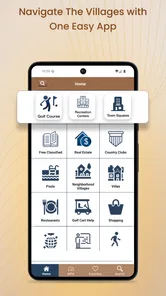
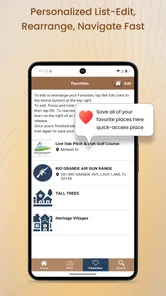
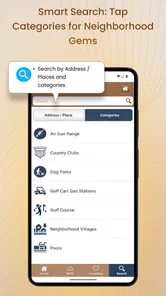
Villages GPS is the kind of navigation app that makes sense only after you understand the place it serves. It is built for golf carts and vehicles in The Villages, Florida, rather than for broad travel planning, city exploration, or ordinary turn-by-turn driving everywhere. I found that narrow focus refreshing: instead of trying to be another general-purpose map, it aims to make local movement easier for people who regularly travel through this community.
My first impression was that its appeal comes from convenience rather than spectacle. The app is free to download, is rated for Everyone, and comes from BK Partnerships, LLC. Its store summary describes voice navigation for golf carts and vehicles in The Villages, which tells you immediately who should pay attention. If your daily trips involve cart paths, local roads, familiar destinations, and the small decisions that make a route comfortable, this is much more relevant than a standard driving app.
After using it, I would describe it as a practical local tool with a clear audience. It is not the app I would keep open for every journey, and I would not recommend it as a replacement for a general map service outside The Villages. But for the right resident or visitor, it can become part of a useful routine. The important question is whether that routine survives the first-week novelty.
Why the first week feels useful
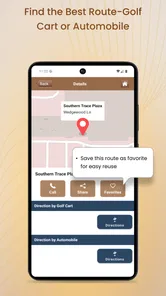
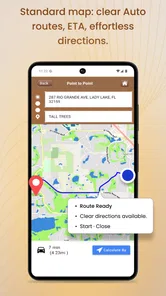
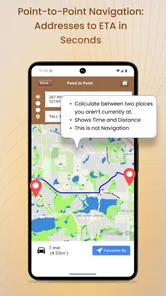
The first week is when Villages GPS makes its strongest case. A new user can approach it with a simple goal: get from one local point to another without constantly checking a phone. Voice guidance is especially valuable when driving a golf cart, because repeatedly looking down at a screen is awkward and distracting. I prefer to set up the route before moving, place the phone where it can be heard and seen safely, and then let the spoken directions handle the small corrections.
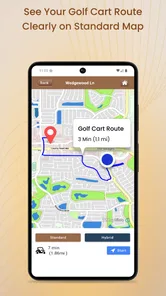
That workflow is more important than it sounds. In a community where a trip may combine cart travel with ordinary vehicle roads, the useful route is not always the one a conventional car-navigation app would choose. A general app may prioritize speed or major roads, while a golf-cart user may care more about whether the route fits the vehicle and the local path network. Villages GPS earns its place by focusing on that local distinction.
A realistic everyday example would be a resident heading from home to a shopping area, appointment, recreation spot, or another familiar destination. The destination itself may not be difficult to find, but the route can become less comfortable when the journey includes turns, crossings, or a choice between a direct road and a more suitable cart route. Having voice guidance reduces the need to memorize every turn. It also helps visitors who understand the general layout but do not yet have the local rhythm in their heads.
The app’s short description, “Villages GPS,” is brief, but the more useful interpretation is local navigation with a golf-cart perspective. That distinction should shape expectations. I would not install it because I want restaurant discovery, broad travel planning, or a complete replacement for a familiar mapping ecosystem. I would install it because I want a focused guide for getting around The Villages in the way I actually travel there.
More From Our News Desk

 Weather - By Xiaomi
Weather by Xiaomi Review: Clear at a Glance, Less Clear Up Close
Xiaomi’s weather app makes everyday forecasts quick to scan, but its calm surface can leave useful details and recovery paths harder to find than they should be.

 X
XX Under Pressure: Can It Recover When Posting Goes Wrong?
A resilience-focused review of X, examining setup, mistaken posts, interruptions, weak connections, and the gaps that matter when recovery needs to be dependable.

 Clash of Clans
Clash of Clans Is Won Between the Battles
Its raids are quick; its community is a long-term project of coordination, teaching, rivalry, and shared responsibility—with all the friction that entails.

 Android Auto
Android Auto Makes the Case for Quieter Car Software
The car interface is no longer judged by how much it can do, but by how quietly it helps. Android Auto shows what drivers now expect—and what still gets in the way.

 MobiOffice: Word, Sheets, PDF
MobiOffice: Transforming Mobile Productivity with Seamless Integration
MobiOffice: Word, Sheets, PDF is redefining mobile productivity with a surprising blend of functionality and innovation.

 EA SPORTS FC Soccer Mobile 26
EA SPORTS FC™ Mobile Soccer: Redefining Mobile Sports Gaming
Dive into EA SPORTS FC™ Mobile Soccer, where immersive gameplay and strategic depth transform mobile sports gaming.
Latest News



One tip I found worthwhile is to treat the first few trips as a learning period rather than blindly following every instruction. Compare the suggested path with what you know about your vehicle, comfort level, and destination. If a route feels less intuitive than expected, note the reason before the next trip. Local navigation becomes more useful when the app supports your judgment instead of replacing it. This is particularly important for anyone switching between a golf cart and a conventional vehicle.
The app has also had time to mature. It was released in late 2013 and is now at version 9.4, so it is not presenting itself as a brand-new experiment. Its average rating is 4.2 from roughly 500 ratings, with more than 400 written reviews, and it has passed 10,000 installs. Those figures suggest a real, if specialized, user base. I would not treat them as proof that every route will suit every person, but they do make the app feel more established than a barely used local utility.
Who benefits immediately
I think the strongest early users are residents who regularly drive golf carts, people who have recently moved to The Villages, and visitors who want more confidence than a paper map or memory can provide. It is also a sensible option for someone who finds a general navigation app too focused on ordinary cars. The voice element matters for users who would rather listen for the next instruction than keep touching a screen.
There is a second group that may appreciate it: experienced locals who already know most destinations but occasionally need help with an unfamiliar section. They may not need navigation every day, yet a focused local tool can be more convenient than opening a large mapping app and adjusting settings for a short trip. That occasional usefulness is easy to overlook, but it can be what keeps a specialized app installed.
I would be more cautious about recommending it to someone who rarely travels in The Villages, someone who needs worldwide navigation, or someone who expects detailed travel features beyond routing. The app’s strength is its setting. Outside that setting, the reason to choose it becomes much weaker.
What remains valuable after the first month
The real test is not whether the app helps during the first few unfamiliar trips. It is whether it becomes a dependable habit once the roads start feeling familiar. In my view, Villages GPS can pass that test when navigation is part of a recurring routine rather than a one-time curiosity. A person who makes regular cart trips may keep returning because the value is tied to movement, not discovery.
Month-to-month value comes from reducing small amounts of friction. You may already know how to reach a regular destination, but conditions change in practical ways: you leave from a different location, combine errands, travel in a vehicle you do not use every day, or need a route that suits a golf cart rather than a car. A specialized navigator is useful when it saves thought at the moment you are ready to leave.
I would use it as a preparation tool as much as an active guide. Before setting out, decide whether the trip is best handled by cart or vehicle, check the destination, and think about where the phone will sit. This simple routine prevents the common mistake of starting navigation while already moving. It also gives you a chance to notice whether the route matches your actual plan, especially when the destination has several possible entrances or nearby points of interest.
A less obvious benefit is consistency. When several people in a household use the same local navigation approach, it can reduce the need for one person to explain every route to another. That does not mean the app replaces local knowledge. Instead, it gives a shared starting point for trips that are familiar to one person but new to another. For families, guests, or occasional drivers, that can be more valuable than a long list of advanced functions.
There is a trade-off, however. A broad app such as Google Maps or Apple Maps is usually the better companion when the journey begins outside The Villages, involves a long-distance drive, or requires information about businesses, traffic, transit, and multiple stops. Those services are built for a much wider range of situations. Villages GPS makes more sense as a local specialist used alongside them, not as a total replacement.
The app is free, which lowers the barrier to trying it as a secondary tool. It also lists in-app purchases of $12.99 per item. I would think carefully before paying for anything: first establish whether the basic experience fits your trips, then decide whether an optional purchase solves a problem you actually have. A paid addition is easier to justify when it supports frequent use, but occasional visitors should avoid assuming that every extra is necessary.
Another practical question is whether the app is suitable for older users or people who are not comfortable with phone settings. The Everyone content rating is reassuring from an age standpoint, but age suitability is not the same as ease of use for every individual. I would help a less confident user with the initial setup, audio level, phone placement, and route-starting routine. Once those habits are in place, voice guidance can be less demanding than a map that requires constant visual attention.
How to keep it useful rather than forgettable
My best advice is to give the app a defined job. Use it for local golf-cart and vehicle navigation, and keep a general map app for everything else. That division avoids disappointment and prevents the specialized tool from being judged against features it was never meant to provide. It also makes the app easier to remember: when the trip involves The Villages and a route decision, open Villages GPS; when it involves broader travel, use the broader service.
I would also review the route before each unfamiliar trip, even if the app has worked well before. Familiarity can create overconfidence. A quick glance at the destination and the first few turns is a useful safety habit, while voice prompts handle the journey after you begin. If the route conflicts with your local knowledge or current conditions, pause and reassess rather than treating the instruction as unquestionable.
For regular users, the most sustainable pattern is occasional reliance rather than constant dependence. You do not need to navigate every trip just to justify keeping the app installed. Use it when the route is new, when a guest is driving, when you change vehicles, or when you want confirmation before leaving. That makes the app a quiet utility instead of another screen demanding attention every day.
Maintenance, friction, and the reasons it may wear out its welcome
Every navigation app carries a maintenance burden, even when the user does not think of it that way. You need to keep the phone charged, make sure the audio can be heard, position the device safely, and remember to start the route before moving. With a specialized app, there is an additional mental burden: remembering when it is the right tool and when a general alternative is more appropriate.
That burden is manageable for a regular resident, but it can feel excessive for a visitor making only one or two trips. A general map app may already be installed and familiar, so downloading another navigator can seem like unnecessary preparation. The case for Villages GPS becomes stronger as local travel becomes a repeated activity. If you are only passing through, convenience may favor the app you already know.
Voice navigation itself can create fatigue. Spoken directions are helpful, but they can become distracting when the route is simple or when instructions arrive at moments that feel obvious. I would keep the volume comfortable rather than loud, and I would avoid trying to adjust settings while driving. If you already know the route, using the app only for the unfamiliar portion may be a better compromise than listening to every instruction on every outing.
Another source of fatigue is the difference between what a map suggests and what feels natural on the ground. A route can be technically sensible yet still require more attention than expected because of a turn, crossing, or change in travel context. This is where local judgment matters. A navigation app is an aid, not permission to ignore signs, road conditions, or the needs of other people using the area.
I would also avoid assuming that a version number guarantees a perfect experience. Version 9.4 indicates ongoing product development, but software updates do not remove the need for sensible use. Before an important trip, I would test the app on a low-pressure journey, confirm that voice output works, and learn how to stop or restart navigation. That small rehearsal is one of the most useful precautions for any navigation tool.
The in-app purchase structure may be another point of hesitation. Since items are listed at $12.99 each, I would not make a purchase simply because the app is specialized. First decide whether the free experience already covers your normal trips. If you are a frequent user and an optional feature clearly improves your routine, the cost may be reasonable; if your use is occasional, the purchase may not earn its place.
Privacy-conscious users may also prefer to keep their navigation habits simple and limited to necessary trips. I would not install any navigation app casually across several devices without understanding how I intend to use it. For this product, the sensible approach is to keep it on the phone used for local travel, configure it once, and avoid turning a focused utility into a source of unnecessary digital clutter.
When another option is the better choice
Choose a general navigation service when you need long-distance directions, complex multi-stop planning, broad business information, or travel beyond The Villages. Those apps are more versatile and are likely to be better for a mixed journey that begins locally but quickly becomes a standard road trip. A dedicated local navigator cannot win every comparison, and it should not try.
Choose Villages GPS when the central problem is local movement by golf cart or vehicle and you want voice guidance shaped around that environment. Its value is not the number of places it covers; it is the relevance of the route context. That makes the comparison less about which app is universally best and more about which one matches the trip in front of you.
I would skip it if you never use a golf cart, rarely travel in The Villages, or already have a local navigation routine that causes no friction. Installing another app only makes sense when it solves a real problem. The specialized focus is an advantage for the right user, but a limitation for everyone else.
My long-term verdict
After the novelty fades, Villages GPS still has a credible reason to remain installed, but only for a specific kind of user. I see it as a local navigation companion rather than a complete mapping platform. Its lasting value comes from repeated golf-cart and vehicle trips in The Villages, voice guidance that can reduce screen checking, and a focused alternative to car-first navigation.
The app’s free entry point makes trying it easy, while the Everyone rating keeps it broadly approachable. BK Partnerships, LLC has maintained a product that has been available since 2013, and the current version is 9.4. Its rating of 4.2 and install base of more than 10,000 show that it has found an audience, though the specialized nature of that audience matters more to me than the totals.
My recommendation is to test it on several ordinary trips, not just one exciting first outing. Try a familiar destination, an unfamiliar destination, and a journey where you must decide between using a golf cart and a conventional vehicle. Pay attention to whether the voice directions genuinely reduce effort, whether the route fits your expectations, and whether you still reach for the app after you know the area better.
Its lasting value depends on matching a recurring local habit, not on replacing every map app you own. For residents and regular visitors of The Villages, that is a fair and useful proposition. For everyone else, a general navigation service will probably be more flexible. I would keep Villages GPS on my phone if local cart travel were part of my normal week; otherwise, I would treat it as a situational tool rather than permanent digital luggage.
Villages GPS Frequently Asked Questions
Is Villages GPS designed specifically for The Villages, Florida?
Yes. Villages GPS is a Maps & Navigation app focused on voice navigation for golf carts and vehicles in The Villages, Florida. That local focus makes it different from a general-purpose app for exploring villages worldwide: its intended use is getting around this Florida community. It is free to download, and its content rating is Everyone.
What is Villages GPS and what can I use it for?
Villages GPS is a navigation and location-based app designed to help users find, identify, and explore villages and nearby places of interest. It can be useful for planning rural trips, checking locations while traveling, discovering lesser-known destinations, and keeping track of places you have visited. The exact information available may depend on the selected region, map coverage, and the data provided by the app.
Does Villages GPS require an internet connection to work?
Villages GPS may need an internet connection to download maps, search for locations, update place information, and calculate routes. Some functions could continue working with limited connectivity if map data has already been loaded, but users should not assume that every feature is available offline. If you plan to travel through areas with weak coverage, check the app’s offline options and prepare the necessary information before leaving.
Does Villages GPS use my phone’s location, and is my privacy protected?
To show your position, calculate distances, or provide navigation-related information, Villages GPS may request access to your device’s location services. You can usually allow access only while using the app or deny permission, although some features may then be limited. Before downloading, review the app-store privacy details and its permission requests so you understand what location or personal data may be collected and how it may be used.
Is Villages GPS accurate enough for driving, hiking, or rural travel?
The usefulness and accuracy of Villages GPS can vary according to GPS signal quality, map updates, regional coverage, and the reliability of the location database. It may be helpful for orientation and discovering villages, but it should not be treated as the only source of guidance in unfamiliar or remote areas. For driving, hiking, or outdoor activities, keep an updated map, follow road and trail signs, and use additional navigation tools when necessary.
Pros
- Works offline
- so saved village maps remain useful without mobile coverage.
- GPS coordinates make it easier to locate remote villages and rural areas.
- Simple interface is suitable for quick searches and basic navigation.
- Helpful for planning trips through less-documented countryside locations.
- Can support outdoor exploration away from major tourist destinations.
Cons
- Coverage and village data may vary significantly by country or region.
- GPS accuracy can drop in valleys
- forests
- or areas with weak signals.
- It may lack detailed roads
- trails
- landmarks
- or public transport information.
- Some features may depend on downloading map data before traveling.
- The app may feel too basic for users wanting full turn-by-turn navigation.











