

Video Meeting
- 67.00
- 4.1
- Installs
- 100.00K
- Price
- Free

Screenshots

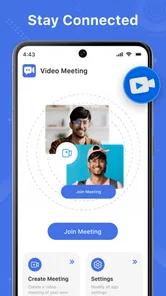


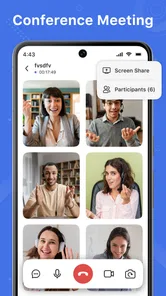
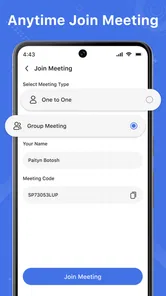
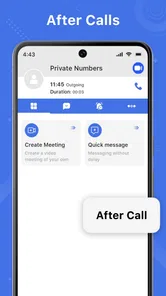
Analysis by Reviewed
I approached Video Meeting as a practical communication app rather than another tool I would install once and forget. Its promise is straightforward: join HD video meetings, webinars, and chats without creating an account first. That combination makes a strong first impression, especially when I need to enter a conversation quickly from an Android phone or tablet. After spending time with it, though, the more important question is not whether it can make a meeting feel convenient once. It is whether the convenience remains useful when meetings become a routine part of the week.
Video Meeting belongs to the communication category and is developed by Video Meeting and Conference App. It is free to use, aimed at Everyone, and runs on devices using Android 7.0 or later. The current release is version 14.0, and the app has passed the early-discovery stage with over one hundred thousand installs. I also noticed a 4.2 average from roughly four hundred eighty ratings, which suggests a generally positive reception without implying that every user will have the same experience.
From quick first impression to a repeatable meeting habit
I find the move from a promising first call to a dependable routine depends less on adding more meetings and more on making each one easier to enter. I’d pick a familiar time and a clear purpose, then notice whether guests can join without extra coaching. That practical test leads into the next section: how readability and navigation affect the confidence to return.
Why the first week feels appealing
The most attractive part of Video Meeting is the low barrier between deciding to join a call and actually getting into it. The no-signup approach matters when someone sends an invitation at short notice, when I am helping a less technical relative, or when I am using a spare device that I do not want to configure with another account. That small reduction in friction can be more valuable than a long list of advanced options.
During a first week, I would use it for the situations where speed matters more than building a permanent workspace. A short family call, a remote appointment, a study discussion, or a small team check-in all fit the basic idea well. The HD video emphasis also makes sense for conversations where seeing faces clearly is important, although the actual experience will still depend on the phone camera, microphone, lighting, and network connection.
The app’s broad purpose is easy to understand. It combines video meetings with webinars and chat, so I do not have to think of it only as a one-to-one calling tool. That wider scope makes it more useful for a group that alternates between live discussion and written messages. Still, I would not assume that the presence of these categories automatically makes it a complete replacement for a mature workplace platform. The value is in accessible communication, not in promising an entire office system.
A realistic everyday example is a volunteer group arranging an evening event. One person can share a meeting invitation with several participants, and a late arrival can try to join without first working through a registration process. After the call, the group can continue the conversation through chat instead of immediately moving to a separate messaging app. For this kind of occasional coordination, that simple flow is more important than elaborate administration.
More From Our News Desk

 Gmail
GmailGmail in a Busy Inbox: Who Benefits Most?
From first account to crowded workday, Gmail earns its place through dependable search and flexible sorting—but its best fit depends on how much inbox maintenance you can tolerate.

 Prime Video
Switching to Prime Video: What Changes in Your Viewing Routine
Prime Video can make a compelling second home for streaming, but switching means learning a different catalog, rental layer, and route from browsing to playback.

 Universal TV Remote Control
Universal TV Remote Control Works Best as a Reliable Backup
A phone remote earns its place through quick setup and reliable habits. Here is how to get more from Universal TV Remote Control—and where its limits show.

 Weather - By Xiaomi
Weather by Xiaomi Review: Clear at a Glance, Less Clear Up Close
Xiaomi’s weather app makes everyday forecasts quick to scan, but its calm surface can leave useful details and recovery paths harder to find than they should be.

 X
XX Under Pressure: Can It Recover When Posting Goes Wrong?
A resilience-focused review of X, examining setup, mistaken posts, interruptions, weak connections, and the gaps that matter when recovery needs to be dependable.

 Clash of Clans
Clash of Clans Is Won Between the Battles
Its raids are quick; its community is a long-term project of coordination, teaching, rivalry, and shared responsibility—with all the friction that entails.
Latest News



The trade-off behind no signup
Skipping registration is convenient, but it also changes how I think about continuity. An account-based service usually gives people a stable identity, personal settings, and a familiar history across devices. A no-signup entry point is better for guests and spontaneous calls, but it may be less comfortable for someone who wants a carefully organized long-term meeting routine.
This is the first important trade-off: less setup can mean less personal continuity. I would recommend Video Meeting to people who regularly receive invitations or need to host simple conversations without imposing account creation on everyone. I would be more cautious for a company that needs tightly managed identities, formal records, or a highly structured collaboration environment. Those users may prefer a conventional business meeting service whose administration and account model are central to the product.
Another point I would settle during the first week is whether the people I actually need to contact are willing to use it. A communication app is only useful when the other participants can join comfortably. If a group already has an established service and nobody wants to switch, the technical appeal of Video Meeting may not be enough to create a new habit. In practice, adoption by the whole group matters more than the app’s installation on my own phone.
Who gets the most from the early experience
I see the strongest fit in casual groups, independent organizers, families, students, and small teams that need video without a lengthy onboarding process. It can also be useful as a backup option when a primary meeting service is inconvenient or when a guest objects to creating another account.
I would not choose it first for users who mainly need a polished, permanent work hub. People who depend on extensive scheduling, deep document collaboration, complex moderation, or organization-wide controls should compare it with established alternatives before moving their regular meetings. Video Meeting’s appeal is its directness; that same directness may feel limited once a group’s process becomes complicated.
What creates value after the novelty fades
After the first month, the app has to earn its place through repeated small advantages. The most convincing one is the ability to keep a communication path open without making every participant complete a large setup process. If my group holds occasional meetings, that can remain genuinely useful. I can return to the app whenever a video conversation is needed instead of treating it as a daily destination.
The combination of meetings, webinars, and chat gives it more staying power than a narrowly focused video dialer. A community organizer might use a meeting for discussion, a webinar-style session for a larger presentation, and chat for follow-up questions. That workflow is not automatically sophisticated, but it is practical because it reflects how communication usually continues after the camera is turned off.
One non-obvious advantage is that the no-signup design can lower the social cost of inviting someone new. In a recurring group, the person who joins for one session does not necessarily need to become a permanent member of the platform. That is especially helpful for guest speakers, temporary collaborators, and relatives who are uncomfortable managing multiple accounts.
There is a corresponding weakness: a tool that is excellent for occasional access may be less satisfying as a personal archive of conversations. If I need to remember exactly where a discussion happened, which account owns the meeting history, or how a team’s settings carry from one session to the next, I would want to test that workflow carefully rather than assume the convenience of joining also means strong long-term organization.
A month-to-month workflow I would actually use
For a recurring group, I would keep the process deliberately simple. I would choose one consistent meeting routine, send the invitation early, and use chat for short reminders rather than scattering updates across several channels. Before the first important session, I would test the phone’s microphone, camera framing, and connection in the same room where the meeting will happen. This is not glamorous advice, but it prevents the common mistake of blaming the app for a weak signal or poor lighting.
I would also avoid making the app responsible for every part of a project. Video Meeting can serve as the conversation layer, while documents, task lists, and formal records remain in tools designed for those jobs. That division keeps the app useful without forcing it into a role it may not be intended to fill. The more disciplined the workflow, the less likely the chat and meetings will become a confusing substitute for actual organization.
Maintenance: light at first, but not invisible
The maintenance burden is relatively easy to underestimate with a communication app. Installation is simple, and the free price removes a financial decision, but recurring usefulness still depends on human maintenance. Someone has to keep invitations clear, remind participants how to join, and decide whether chat is for quick coordination or for storing important information.
Because the app supports people who may enter without signing up, I would make the joining instructions part of every invitation. A short note explaining which device to use, when to join, and how to check the microphone can save more time than any feature discovery. This is a concrete workflow advantage for hosts: the app reduces account-related support, but the host still needs to provide practical guidance.
Device age is another maintenance consideration. Android 7.0 compatibility makes the app accessible to older supported devices, but video calls can still be demanding for a phone with a weak battery, limited processing power, or an unreliable connection. I would keep the device charged, close unnecessary background activity, and use a stable network before an important call. These steps are particularly worthwhile for webinars, where leaving and rejoining can be disruptive.
Updates should be treated as part of the routine rather than something to ignore. The current version is 14.0, and keeping an app current is sensible for compatibility and reliability. I would not update immediately before a critical meeting without checking that the app still opens and that the joining process is familiar. That small precaution is useful for anyone who depends on the app for scheduled communication.
Where long-term fatigue can appear
The first source of fatigue is repetition. A no-signup experience feels fresh when I use it occasionally, but a regular team may eventually prefer a stable account-based environment where members, schedules, files, and permissions feel connected. If every meeting begins with uncertainty about who can join or which invitation is current, the original simplicity starts to work against the group.
The second is feature expectation. Calling something a meeting, webinar, and chat app sets a broad expectation. Users may naturally look for the same depth they associate with large conferencing platforms. If my work depends on advanced presentation controls, detailed participant management, or a formal organizational structure, I would compare those needs directly instead of assuming that a clean interface will cover them.
The third is social fragmentation. If some participants use Video Meeting, others insist on a different service, and chat continues somewhere else, the group can end up with more places to check. The app is most sustainable when the people involved agree on its role. It works well as a shared meeting point; it is less convincing when it becomes one of several overlapping channels with no clear owner.
There is also the ordinary fatigue of video itself. Not every conversation benefits from cameras, and not every participant has a quiet room or a strong connection. I would use chat for simple updates and reserve video for discussions where seeing and hearing one another adds something. That selective approach makes the app feel more valuable month after month than using it automatically for every minor message.
How it compares with familiar alternatives
Compared with a typical account-based video meeting service, Video Meeting is more welcoming to guests and spontaneous participants. The usual alternative may be better for people who want a persistent identity, a carefully managed team space, and predictable settings across many meetings. The choice depends less on image quality as a headline and more on whether the group values fast entry or long-term administration.
Compared with a basic messaging app that happens to offer video calls, Video Meeting is more clearly centered on meetings, webinars, and communication around them. A messaging-first alternative may feel more natural for friends who already live in a chat thread, while Video Meeting makes more sense when the event itself is the main thing and participants need a dedicated way to join.
Compared with a full collaboration suite, it is easier to keep focused but likely less suitable as the central home for documents, project planning, and formal records. I would choose the broader suite for a company that wants one controlled environment. I would choose Video Meeting for a lighter arrangement where the priority is connecting people without turning every guest into a registered platform member.
Questions I would resolve before relying on it
Can someone join without signing up? That is one of the clearest reasons to consider the app, and it is especially useful for guests or occasional participants. I would still send a test invitation before a high-stakes event, because a simple entry concept does not eliminate device, browser, camera, or network problems.
Is it suitable for webinars? It is designed to cover webinars as well as meetings, so it deserves consideration for presentations and larger communication sessions. My recommendation would depend on how much control the host needs. For a straightforward presentation, it may be a sensible fit; for a heavily managed event with complex roles and production requirements, I would compare it with a dedicated webinar platform.
Will it replace my existing chat app? Sometimes, but not automatically. Its chat capability can keep follow-up close to the meeting, which is useful for a small group. If everyone already has an active messaging habit elsewhere, moving the conversation will require a clear reason. I would use Video Meeting as the shared communication space only when the group agrees that reducing scattered channels is worth the change.
Is it appropriate for children or mixed-age families? The Everyone content rating makes it broadly accessible, but I would still apply normal family judgment around invitations, privacy, and who is present in a call. An age label does not replace sensible supervision or clear group rules.
Does free mean it is the best long-term choice? Not necessarily. Free access makes experimentation easy, and that is a real advantage for small groups. Long-term suitability depends on whether the app’s simple joining model and communication focus match the group’s needs. If administration, records, or deep collaboration become central, paying for a more specialized service may be better value than forcing a lightweight tool to do everything.
My long-term verdict
I think Video Meeting earns lasting space when I treat it as a low-friction meeting doorway, not as a complete replacement for every communication and productivity tool. Its strongest recurring value comes from bringing people into HD video meetings, webinars, and chat without making signup the first obstacle. That remains useful after the initial novelty fades, particularly for families, communities, guest-heavy groups, and small organizers.
Its limitations become clearer with regular professional use. A group that needs deep administration, a permanent workspace, extensive collaboration, or highly controlled events may outgrow the app or prefer a more established alternative. I would also avoid using it for every tiny update, because unnecessary video meetings create fatigue and make any meeting app feel burdensome.
For me, the deciding test is simple: after a few weeks, are people joining more easily, and is the conversation staying organized enough for the group’s real needs? If the answer is yes, the free cost and low entry friction make Video Meeting an easy app to keep installed. If the answer is no, its convenience is only solving the first five minutes of a larger communication problem. I recommend it as a practical, approachable meeting option, with the clear understanding that simplicity is its lasting strength and its main boundary.
Overall, Video Meeting is worth trying for anyone who wants accessible video communication without an account-first experience. I would keep it for recurring but uncomplicated calls, occasional webinars, and groups that value easy invitations. I would skip making it the backbone of a complex organization unless testing proves that its workflow can handle the group’s growing expectations.
Video Meeting Frequently Asked Questions
What devices and operating systems can I use with Video Meeting?
Video Meeting is a communication app for mobile devices, and its minimum operating system requirement is version 7.0. Before installing, check that your device meets this requirement and has a working camera and microphone if you plan to make video calls. Keeping your operating system up to date can also help with compatibility and security.
Who is Video Meeting designed for, and is it suitable for children?
The app is intended for people who want to connect through online meetings, webinars, and chat, whether for work, learning, or personal conversations. Its content rating is Everyone, so it is classified for a broad audience. As with any communication app, parents may still want to guide younger users on meeting invitations, privacy, and sharing personal information.
What is Video Meeting, and what can I use it for?
Video Meeting is a communication app designed for online meetings, virtual classes, remote work, interviews, group discussions, and casual video calls. After installing it, users can generally join meetings through an invitation link or meeting code, while hosts can create sessions and invite participants. Its usefulness depends on the available features, supported devices, and the quality of your internet connection.
Do I need to create an account to join a Video Meeting call?
The app’s summary highlights connecting without signup, making it appealing if you want to join a conversation without first creating an account. In many cases, participants can join a meeting through a direct invitation link. Registration may still be required for hosting, managing schedules, saving preferences, or using additional tools, so check the sign-in process when you open the app.
Does Video Meeting require a strong internet connection?
Yes, a stable internet connection is important for a smooth experience. Video calls use considerably more data and bandwidth than text messaging, so weak Wi-Fi or an unstable mobile network may cause frozen video, delayed audio, dropped calls, or reduced image quality. If your connection is limited, turning off your camera or using audio-only mode can often improve call stability and reduce data consumption.
Pros
- Clear video and audio make conversations feel natural.
- Simple controls let new users join meetings quickly.
- Supports remote teamwork
- classes
- and social conversations.
- Screen sharing is useful for presentations and demonstrations.
- Works across Android and iOS devices for flexible access.
Cons
- Video quality can drop noticeably on weak connections.
- Long meetings may drain the phone battery quickly.
- Some advanced features may require a paid plan.
- Background noise can affect conversations without a quiet space.
- Large meetings may feel less personal and harder to manage.











