

Ventra
- 3.71K
- 3.1
- Installs
- 1.00M
- Price
- Free

Screenshots
Analysis by Reviewed
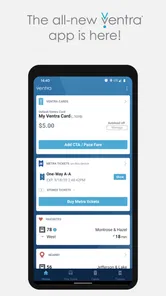
Ventra is the kind of app I would install when public transportation is part of my normal week rather than something I use once in a while. Developed by the Chicago Transit Authority, it brings fare management, Metra ticket purchases, and arrival information together for Chicago-area travel. In my experience, that combination makes it more useful than a simple route planner because it focuses on the practical moments surrounding a trip: checking when a vehicle is coming, handling payment, and keeping a rail ticket available when needed.
It is a free Maps & Navigation app for Everyone, and its presence on more than a million devices suggests that it has become a familiar tool for many riders. The average rating sits at 3.1 from roughly 6,600 ratings, with about 3,700 written reviews, so the overall picture is mixed rather than universally enthusiastic. I think that is a fair starting point: Ventra can simplify a daily commute, but it is not the sort of app I would trust blindly without preparing for the occasional moment of friction.
How Ventra feels during an ordinary trip
I find the best way to use Ventra is to decide what I need before opening it: an arrival check, fare management, or a Metra ticket. That small pause helps me avoid rushing through a payment task while watching for a vehicle. It also sets up the next section’s closer look at how a focused transit app earns trust through the choices riders can actually see.
Quick access matters more than visual polish
The most important speed question here is not whether the app feels flashy. It is whether I can open it, find the information I need, and get moving before a bus or train arrives. Ventra is built around a narrow set of transit tasks, which is a strength when I already know what I want to do. I am not searching through a broad travel service for a fare option or a Metra ticket; I am opening a transit-specific tool intended for those actions.
That focused purpose makes the app easier to understand than using separate services for payment, rail tickets, and arrival checks. A commuter who repeatedly follows the same pattern can develop a simple routine: check the next arrival, confirm the fare situation, and deal with a Metra purchase when the journey requires it. The fewer places I need to switch between, the less likely I am to overlook something while standing on a platform or approaching a bus stop.
There is an important distinction between perceived speed and dependable speed. An app may feel fast when I have a strong connection and only need to view a familiar screen, but a transit app is often used in less comfortable conditions. I might be underground, walking quickly, carrying a bag, or trying to act before the next vehicle appears. For that reason, I would judge Ventra by how calmly it supports a prepared routine, not by expecting every task to be instant in every location.
A realistic weekday scenario
Imagine leaving work for a Metra trip while also needing a local connection. I would open Ventra before reaching the station, check the relevant arrival information, and purchase the rail ticket while I still had time to review the details. That timing is better than waiting until boarding is imminent. If the app takes longer than expected or I need to repeat a step, I have created room to recover instead of turning a small delay into a missed train.
More From Our News Desk

 Weather - By Xiaomi
Weather by Xiaomi Review: Clear at a Glance, Less Clear Up Close
Xiaomi’s weather app makes everyday forecasts quick to scan, but its calm surface can leave useful details and recovery paths harder to find than they should be.

 X
XX Under Pressure: Can It Recover When Posting Goes Wrong?
A resilience-focused review of X, examining setup, mistaken posts, interruptions, weak connections, and the gaps that matter when recovery needs to be dependable.

 Clash of Clans
Clash of Clans Is Won Between the Battles
Its raids are quick; its community is a long-term project of coordination, teaching, rivalry, and shared responsibility—with all the friction that entails.

 Android Auto
Android Auto Makes the Case for Quieter Car Software
The car interface is no longer judged by how much it can do, but by how quietly it helps. Android Auto shows what drivers now expect—and what still gets in the way.

 MobiOffice: Word, Sheets, PDF
MobiOffice: Transforming Mobile Productivity with Seamless Integration
MobiOffice: Word, Sheets, PDF is redefining mobile productivity with a surprising blend of functionality and innovation.

 EA SPORTS FC Soccer Mobile 26
EA SPORTS FC™ Mobile Soccer: Redefining Mobile Sports Gaming
Dive into EA SPORTS FC™ Mobile Soccer, where immersive gameplay and strategic depth transform mobile sports gaming.
Latest News



For a bus ride, I would use the same principle. I would check arrivals before walking to the stop rather than treating the app as a live stopwatch. Arrival information can help me decide whether to leave immediately or wait a few minutes, but I would still allow a buffer. Transit movement changes quickly, and an app should support my judgment rather than replace it.
This is one of the less obvious ways to get more value from Ventra: use it as a pre-departure preparation tool, not only as an emergency screen opened at the last possible second. That habit reduces pressure on the phone, the connection, and the user. It also makes the app feel more responsive because I am not demanding that every part of a transaction happen during the most stressful moment of the journey.
Where heavy use can expose friction
Ventra becomes more demanding when several tasks happen together. Checking arrivals is one action; checking them while arranging payment or buying a Metra ticket is another. A rider making multiple trips in a day may also open the app repeatedly, especially when changing between CTA, Metra, and Pace services. That repeated switching is where small delays, extra confirmation steps, or an unclear return path can become noticeable.
I would not describe this as a reason to avoid the app. It is a reason to separate tasks whenever possible. If I know I will take Metra later, I would handle the ticket before I am standing in a crowded boarding area. If I expect to make several local trips, I would review my fare situation at a calm moment rather than immediately before boarding. This workflow is particularly helpful for visitors, who may be learning the relationship between the different services while also navigating Chicago.
Another practical trade-off is that a single app can reduce app switching while also concentrating more responsibility in one place. If Ventra is the tool I use for arrival checks and ticket handling, a temporary problem affects more than one part of my trip. I therefore prefer to keep basic route knowledge, station details, or a backup payment plan in mind. That is not a criticism unique to Ventra; it is simply the cost of relying on one central transit companion.
Stability and recovery in the moments that matter
The mixed rating tells me that riders have not had one consistent experience. I would approach Ventra as a useful official transit utility, but I would avoid assuming that a successful first use guarantees a perfect future one. The app’s value is highest when it helps me complete a task before the trip becomes urgent. Its weakness becomes more visible when I need recovery: reopening after an interruption, returning to a ticket flow, or trying again while a vehicle is approaching.
My advice is simple: do not begin an important purchase with only seconds to spare. Give the app enough time for a mistaken tap, a slow response, or a need to review what is on screen. If something does not appear to complete, I would pause and check the current state before repeating the action. That avoids creating confusion through unnecessary retries.
For arrival checks, recovery can be easier because I can try again or use the information as one part of a wider decision. For a ticket purchase, recovery deserves more care. I would confirm what the app shows before attempting another purchase, especially if I am unsure whether the first attempt went through. This is the kind of small operational habit that a store summary cannot teach, yet it matters more than visual design during a real commute.
I also recommend opening Ventra before entering a low-connectivity setting whenever I can. I would not treat that as proof that every screen or ticket will work without a connection; it is simply sensible preparation. Transit apps are most frustrating when the user waits until the platform or vehicle to discover that a required step needs more time than expected.
Resource demands and older devices
Ventra is not a game or a media-heavy service, so I would expect its main demands to come from repeated network activity and the practical work of handling transit information rather than from elaborate graphics. That makes it a reasonable fit for a phone used primarily for calls, maps, messages, and commuting. Still, a modest app category does not remove the need for a functioning device, available storage, and enough battery for the entire journey.
The current version is 2.2.16 and requires Android 7.0 or later. That broad compatibility is helpful for people who keep an older Android phone, although age alone does not guarantee a smooth experience. A device with limited remaining storage, an overloaded system, or an unreliable connection can make any transit workflow feel slower. I would update the app when an update is available and avoid beginning a time-sensitive purchase after the phone has already started behaving sluggishly.
Battery planning is also more important than it first appears. Checking arrivals occasionally is unlikely to be the same as keeping the screen active throughout a long day of transfers. If Ventra is part of my commute, I would treat my phone as travel equipment: start with a reasonable charge, keep a charger or power bank available for long outings, and avoid unnecessary repeated refreshes. The app does not need to be blamed for a phone that is already close to shutting down.
On an older phone, I would pay attention to whether switching away from Ventra causes the current task to restart. If that happens, I would complete one action at a time and avoid jumping between several apps during a purchase. This is a useful device-specific adjustment: the best workflow on a newer phone may not be the safest one on an older model.
Who will benefit most from the combination
Ventra makes the most sense for regular CTA riders who also need access to Metra or Pace. Its advantage is not that it replaces every travel tool; it is that it gathers several Chicago transit responsibilities into one place. A daily commuter can build a repeatable habit around it, while an occasional rider can use it to avoid learning several unrelated payment and arrival systems.
It is also useful for people who dislike carrying a separate process for every part of a journey. A trip that combines local transit with Metra is exactly where the app’s scope becomes meaningful. Instead of treating the rail ticket, fare management, and arrival information as unrelated chores, I can approach them from the same transit-focused app.
Visitors may appreciate that focus, but I would not rely on Ventra alone for broader sightseeing decisions. A general map app is usually better for comparing walking routes, finding restaurants, or understanding a complete door-to-door itinerary. Ventra is strongest once the transit portion is clear and I need to manage the ride itself.
Who should choose another tool or use a backup
I would skip Ventra if I rarely use Chicago public transportation and only need a one-time walking route. In that situation, installing a dedicated transit account app may feel like unnecessary setup. A general mapping service can be more convenient for occasional navigation, particularly when the main question is how to get from an address to an attraction rather than how to manage a fare or Metra ticket.
I would also be cautious if my travel depends on last-second digital transactions and I have no tolerance for delays. Ventra can still be worthwhile, but I would prepare earlier and keep an alternative plan. Someone who frequently travels through areas with weak connectivity should be especially deliberate about completing important steps before reaching those areas.
Compared with using separate official or general-purpose tools, Ventra’s benefit is consolidation. Compared with a broad navigation app, its benefit is transit-specific fare and ticket handling. The trade-off is that it may not offer the same all-purpose route-planning convenience I expect from a map service. I would use Ventra for the transit account and ticket side of a journey, then use a broader map when I need walking directions, location discovery, or a wider comparison of routes.
Small habits that make the app more dependable
My first habit would be to check the next arrival before leaving, then check again when I am close to the stop or station. That gives me useful timing without forcing constant refreshing. It also helps me notice whether my original plan still makes sense before I commit to the final part of the walk.
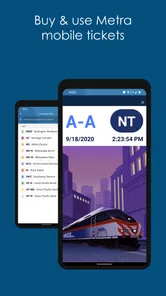
My second habit would be to purchase a Metra ticket ahead of the boarding rush. Doing so turns a pressured transaction into a normal preparation step. I would review the selected ticket carefully and avoid tapping repeatedly if the screen seems slow. The goal is not to rush the app; it is to give myself enough time to understand what happened.
My third habit would be to keep the app updated and maintain a little battery reserve on travel days. The current Android requirement means that very old software may not be compatible, so I would check the phone before depending on it for an important trip. I would also avoid testing a new workflow for the first time when I am already late.
Finally, I would remember that arrival information is guidance, not a personal guarantee. I would leave a buffer for walking, boarding, and unexpected changes. Ventra can help me make a better decision, but no arrival screen can remove the need for practical judgment in a busy transit system.
My performance verdict
After looking at how Ventra fits into real travel, I see it as a focused and worthwhile utility rather than a universal navigation replacement. Its strongest point is the combination of CTA, Metra, and Pace-related tasks in a free app from the Chicago Transit Authority. That focus can save time and reduce app switching, especially for commuters whose trips cross more than one service.
Its performance depends heavily on timing and preparation. I am comfortable recommending it for checking arrivals and organizing transit tasks before a journey. I am less comfortable recommending a last-second, no-backup approach to an important ticket purchase. The mixed average rating reinforces my view that users should expect practical value with some possible friction, not flawless behavior in every situation.
For a Chicago rider on Android 7.0 or later, Ventra is worth trying because it addresses needs that a general map app does not handle as directly. I would keep broader navigation tools available for walking and route discovery, and I would build a few minutes of recovery time into important trips. Used that way, Ventra is a sensible everyday companion for Chicago transit: not perfect, but focused enough to earn a place on the phone of anyone who regularly manages CTA, Metra, or Pace travel.
My final recommendation is therefore practical. Install it if you want one transit-centered place to check arrivals, manage fares, and buy Metra tickets. Prepare transactions before boarding, protect your battery, and avoid treating the app as the only thing standing between you and a departure. With those expectations, I think the free price and focused coverage make it a useful choice for regular riders, while occasional visitors may prefer to combine it with a general navigation app.
Ventra Frequently Asked Questions
Is Ventra free to download, and which devices can run it?
Ventra is free to download and is intended for everyone. It runs on devices using Android 7.0 or later, so check your phone’s operating system before installing. Some services inside the app involve transit fares or ticket purchases, which are separate from the cost of downloading the app. Keeping your device and app current can also help you access available features.
Who makes Ventra, and is it intended for Chicago-area transit?
Ventra is developed by the Chicago Transit Authority and is focused on transit services in the Chicago area. Its store summary highlights CTA, Metra, and Pace, making it relevant to riders using those networks. If you are visiting or commuting around the region, it can be a practical place to handle transit-related tasks, though your journey and payment options depend on the services you use.
What is Ventra, and what can I use it for?
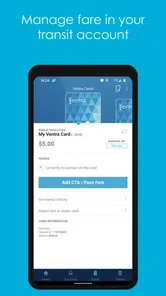
Ventra is the official mobile app for managing transit services in the Chicago area. After installing it, users can check train and bus information, plan journeys, view service updates, manage Ventra cards, and purchase or load eligible passes and value. It is designed to bring many everyday transit tasks into one place, although available features can depend on the card type and current transit services.
Can I use the Ventra app to pay for public transportation?
Yes, the Ventra app can be used for several payment-related transit tasks. Depending on your device and the supported service, you may be able to add value, buy passes, manage a Ventra card, or use a compatible contactless payment method. Before relying on the app for an important trip, check that your payment method is supported, your account is active, and any purchased product has been properly loaded or activated.
Do I need a Ventra account to use the app?
Some basic information, such as browsing transit details or checking certain schedules, may be available without completing every account setup step. However, an account is generally useful for managing a Ventra card, reviewing transactions, adding payment methods, protecting your balance, and accessing purchases across devices. Registration may require personal and payment information, so users should make sure their details are accurate.
Pros
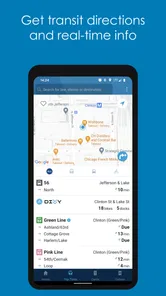
- Real-time bus and train tracking helps reduce uncertainty while waiting.
- Mobile ticketing offers a convenient alternative to buying tickets at stations.
- Service alerts keep riders informed about delays
- disruptions
- and schedule changes.
- Trip planning combines Ventra services with nearby transit options for easier journeys.
- Digital passes and account access make managing fares more convenient on the go.
Cons
- Location and tracking data may be inaccurate during service interruptions.
- Some features require an internet connection and may not work well underground.
- Ticket activation errors can be frustrating when the app or network is slow.
- Account or payment issues may require contacting customer support for resolution.
- The interface can feel overwhelming for first-time users navigating multiple options.











